Mobx.dart: [Question] Best way to handle navigation when observable is updated
Example: We have 3 screens: Login, Home, Login Error
- User enters the credentials (username and password), tap Login
- There are 2 cases:
- Login successfully: go to Home
- Login error: go to Login Error
Questions:
- How to handle navigation?
- Where should the navigation code be implemented? (in Store? or in Widget (Login screen in this case))?
 thphuc
All 20 comments
Hi @thphuc there are potentially two ways of doing the navigation:
Put the navigation logic in the store, so that you can do pre/post steps if needed. Also route paths can be kept in the store so all the _"reactions"_, such as navigation are self-contained in the store. The Widget tree simply becomes a render surface and a way to accept user events. All business logic will be in your store. Do note that you will have to pass the
contextto theStorein this case, as all navigation needs that value.Keep the navigation logic in the
Widgetitself, by making it aStatefulWidget. You could setup areaction()in theinitState()of the widget. When the tracked observable inside the Widget changes, it will trigger the reaction and do the navigation.
Hope that give you some ideas to handle your use case. I would suggest try both approaches and see what feels "better" to you. I personally prefer 1. as it keeps all reaction and business logic self contained in the Store.
 pavanpodila
on 5 May 2019
pavanpodila
on 5 May 2019
Thanks @pavanpodila for you answer
If we need to pass the _context_ to the store, I'm afraid it doesn't fit my need. I plan to use MobX to create apps on multiple platforms (mobile, web and even PC). Then the store with Flutter context will not work for other platforms, right?
I assume that MobX store and business logic can be shared among platforms. Is this possible?I will try with this solution first when waiting for you next answer.
Thanks again.
thphuc
on 5 May 2019
Yes you can certainly share the MobX logic across platforms. Note that when I say you need to pass the context, it is not being stored in Store. It is purely a function argument for making the Navigation call. That said, Option 2. would be safer and will have the least platform dependency.
pavanpodila
on 5 May 2019
Good to know that we can share MobX logic across platforms. I will try option 1 (passing the function to store).
I'm just confusing about your last sentence "That said, Option 2. would be safer and will have the least platform dependency".
Can you clarify it?
thphuc
on 5 May 2019
Sure, if you are going to pass the BuildContext, it will add a dependency on flutter, which I am not sure if you want. Hence my comment on option 2., which keeps the BuildContext in the Widget side and no dependency exists on Flutter. This way you can even move the MobX stores to its own package if needed.
pavanpodila
on 5 May 2019
But if I understand correctly, with option 1, when we pass a function to store, the store will not contain any context. That way the store is independent already, right?
I also tried option 2 (using reaction), but the reaction was not working for some reasons.
I created an observable in the store, under initState, I tried both autorun and when, but both didn't work.
thphuc
on 5 May 2019
For option 1. You will be referencing the type BuildContext, which will require the dependency on flutter. Can you share the coffee for option 2?
pavanpodila
on 5 May 2019
Let me share you code for option 1 first, I don't see any reference to the BuildContext in store. Please correct me if I'm wrong. I think in my example, the BuildContext is used in the widget internally.
import 'dart:math';

import 'package:mobx/mobx.dart';

part 'user.g.dart';

class User = _User with _$User;

abstract class _User implements Store {
  final firstNames = ['Phuc', 'Dang', 'Son', 'Huy'];
  final lastNames = ['Tran', 'Nguyen', 'Le', 'Pham'];

  @observable
  String firstName = '';

  @observable
  String lastName = '';

  @computed
  String get fullName => '$firstName $lastName';

  Function onFullNameUpdated;

  @action
  generateName() {
    final random = Random();
    final firstNameIndex = random.nextInt(firstNames.length - 1);
    final lastNameIndex = random.nextInt(lastNames.length - 1);

    firstName = firstNames[firstNameIndex];
    lastName = lastNames[lastNameIndex];

    if (onFullNameUpdated != null) {
      onFullNameUpdated();
    }
  }
}
class _HomePageState extends State<HomePage> {
  final User _user = User();

  @override
  void initState() {
    super.initState();
    _user.onFullNameUpdated = navigateToNewScreen;
  }
...
   navigateToNewScreen() {
      // Code to navigate to new screen, using BuildContext
   }
}
Yup looks like you are doing it all inside the Widget, so no need to pass the context into the Store.
pavanpodila
on 6 May 2019
Great.
So I think the first option is better. I don't want to put reaction into the widget.
If you don't have any further comment. We can close this issue.
Thanks again for your answers @pavanpodila
thphuc
on 6 May 2019
Also take a look at this example code, where I setup reactions in the initState of the Widget: https://github.com/mobxjs/mobx.dart/blob/master/mobx_examples/lib/form/form_widgets.dart
pavanpodila
on 6 May 2019
@pavanpodila whats the difference when you initialize the reaction inside the initState over initializing it inside the store's constructor?
 campanagerald
on 6 May 2019
campanagerald
on 6 May 2019
Its mostly about lifetimes of the Store. Doing inside the Widget suggests that a Store is only for the lifetime of the Widget, so you will most likely override initState and dispose for the Widget. Technically there is no other difference.
pavanpodila
on 6 May 2019
After playing around with it for a while, I feel option 1 is not natural. If I pass a function to store, it's a kind of callback actually. Then this option is a mixing between reaction and callback, is this correct @pavanpodila ?
thphuc
on 7 May 2019
@thphuc I don't think its about passing functions into the Store but calling the Store methods directly. You would call the Store methods inside the initState() and dispose(). Here is an example.
pavanpodila
on 7 May 2019
I think what @pavanpodila trying to say is to pass the context to the store's function.
abstract class _LoginStore implements Store {
  ....
  ....
 @action
  Future<void> submit(BuildContext context) async {
     // logic here
     // if success navigate to the next page

    Navigator.push(
        context, // here you got the context and now you can decouple your business logic to the view
        MaterialPageRoute(
          builder: (_) => HomePage(),
        );
  }
}
Correct me if I'm wrong. :)
campanagerald
on 8 May 2019
@campanagerald That is the problem, if we pass the BuildContext (of Flutter) to the Store, when using this Store for other platforms (not Flutter), the context is not valid. Right?
thphuc
on 8 May 2019
@campanagerald that is exactly what I had in mind 👍. @thphuc the context should still work across all platforms. Its implementation internally would be different but you should have it available across desktop, mobile and web. So I think you can use it reliably.
pavanpodila
on 8 May 2019
I think what @pavanpodila trying to say is to pass the context to the store's function.
abstract class _LoginStore implements Store {
  ....
  ....
 @action
  Future<void> submit(BuildContext context) async {
     // logic here
     // if success navigate to the next page

    Navigator.push(
        context, // here you got the context and now you can decouple your business logic to the view
        MaterialPageRoute(
          builder: (_) => HomePage(),
        );
  }
}
Correct me if I'm wrong. :)
It's seems the best approach for now! thank you.
 pedromassango
on 21 Nov 2019
pedromassango
on 21 Nov 2019
Create Navigations as a service and register it as a singleton using getit and locator.
Access this service from any store as part of your action.
Ensure that you initialize the navigator key in your main app using
navigatorKey: locator
This should do the trick. And now you should be able to access the navigation service from anywhere you want using your navigation service.
Have a generateroute setup
Route
switch (settings.name) {
case GENERATE_OTP_SCREEN_ROUTEPAGE:
return _getPageRoute(
routeName: settings.name,
viewToShow: GenerateOtpScreen(),
);
case VERIFY_OTP_SCREEN_ROUTEPAGE:
String? args = settings.arguments.toString();
return _getPageRoute(
routeName: settings.name,
viewToShow: VerifyOtpScreen(mobileNumber: args),
);
case DASHBOARD_SCREEN_ROUTEPAGE:
return _getPageRoute(
routeName: settings.name,
viewToShow: DashBoardScreen(),
);
And you can define future methods to call the navigation services and use the generateroute settings.
Future
return navigationServices.navigatePushReplacement(
VERIFY_OTP_SCREEN_ROUTEPAGE,
arguments: mobileNumber);
}
Future
return navigationServices.pushAndRemoveUntil(GENERATE_OTP_SCREEN_ROUTEPAGE);
}
Future
return navigationServices
.navigatePushReplacement(DASHBOARD_SCREEN_ROUTEPAGE);
}

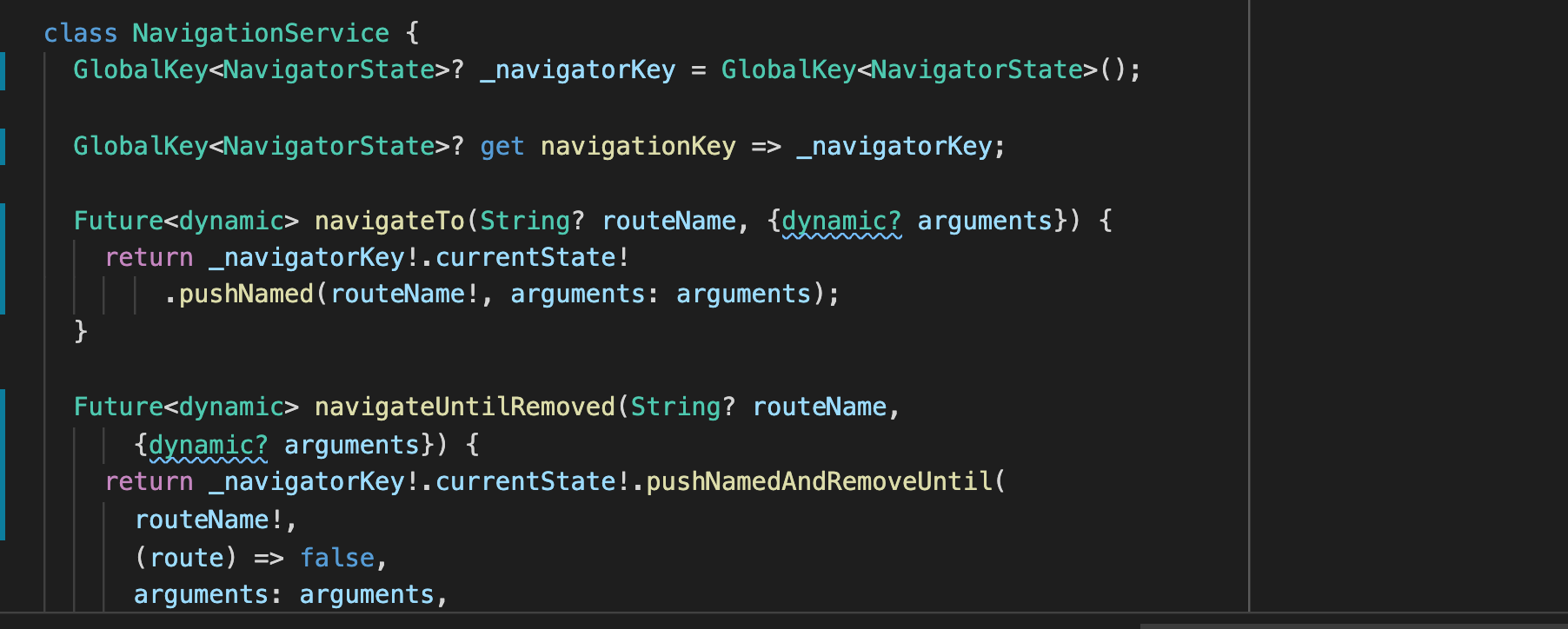
My Navigation Service which I have registered as a singleton in GetIt.
class NavigationService {
GlobalKey
GlobalKey
Future
return _navigatorKey!.currentState!
.pushNamed(routeName!, arguments: arguments);
}
Future
{dynamic? arguments}) {
return _navigatorKey!.currentState!.pushNamedAndRemoveUntil(
routeName!,
(route) => false,
arguments: arguments,
);
}
void navigatePopUntilRemoved(String routeName, {dynamic arguments}) {
return _navigatorKey!.currentState!
.popUntil(ModalRoute.withName(routeName));
}
Future
{dynamic arguments}) {
return _navigatorKey!.currentState!
.pushReplacementNamed(routeName, arguments: arguments);
}
Future
return _navigatorKey!.currentState!.pushAndRemoveUntil(
PageRouteBuilder(pageBuilder: (BuildContext context,
Animation animation, Animation secondaryAnimation) {
return GenerateOtpScreen();
}, transitionsBuilder: (BuildContext context,
Animation
Animation
Widget child) {
return new SlideTransition(
position: new Tween
begin: const Offset(1.0, 0.0),
end: Offset.zero,
).animate(animation),
child: child,
);
}),
(Route route) => false);
}
void pop() {
_navigatorKey!.currentState!.pop();
}
void popToExit() {
SystemChannels.platform.invokeMethod('SystemNavigator.pop');
}
void popWithData(dynamic data) {
_navigatorKey!.currentState!.pop(data);
}
}
 technicious-tech
on 23 May 2021
technicious-tech
on 23 May 2021
Related issues
 vadimtsushko
·
5Comments
vadimtsushko
·
5Comments
 jascodes
·
5Comments
pavanpodila
·
5Comments
jascodes
·
5Comments
pavanpodila
·
5Comments
 dukaric1991
·
5Comments
dukaric1991
·
5Comments
 thedejifab
·
5Comments
thedejifab
·
5Comments
Most helpful comment
Let me share you code for option 1 first, I don't see any reference to the BuildContext in store. Please correct me if I'm wrong. I think in my example, the BuildContext is used in the widget internally.