Mobile: The iOS keyboard for the autofill password popup doesn’t appear in some apps when the password button on the keyboard is pressed
Describe the Bug
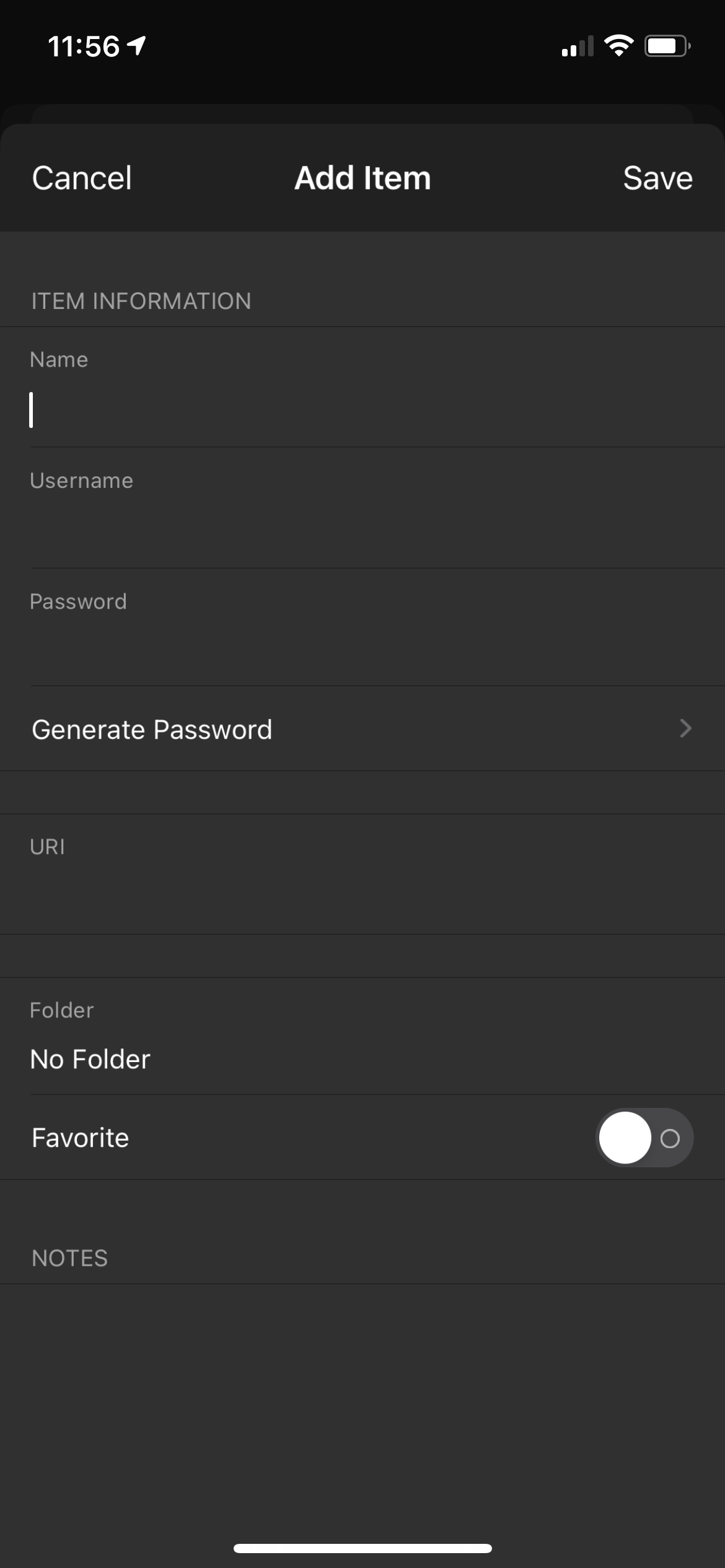
When trying to select a password using the keyboard password button on iOS they keyboard does not show up once authenticated. So once authenticated you cannot search for a specific account or even create a new account since the keyboard doesn’t appear. I noticed it only occurs on apps that don’t automatically suggest a password (like the ProtonVPN app).
Steps To Reproduce
- Go to an app that doesn’t automatically suggest one of your accounts (in my cause the ProtonVPN app)
- Click on login
- Click on the password button on the keyboard (where typing suggestions are)
- And observe as the keyboard doesn’t appear when searching or when your trying to create an account
Expected Result
I’d expect the keyboard would appear so I could search for an account or be able to create an account.
Actual Result
The keyboard never appears and so it’s not possible to search or create an account with some apps and sites.
Screenshots or Videos
The keyboard password button I’m referring to:

A screenshot of me trying to create an account but the keyboard won’t appear even after waiting:
Environment
- Device: iPhone 12
- Operating system: iOS 14.2
- Build Version (go to "Settings" → "About" in the app): Version: 2.7.0 (358)
- Is this a Beta release? No
Additional Context
The main cause of this issue seems to be when apps don’t suggest an account to sign into so it seems to be related to the keyboard not appearing. This happens I think when ever a site is not suggest as seen in the above screenshot no URL was included automatically like in most apps.
 Jarboer
All 7 comments
Wow. This is amazing site for me. Good work on this webpage. Here is a detailed article on change google chrome themes. Thankyou.
 mahnoorzubair
on 8 Dec 2020
mahnoorzubair
on 8 Dec 2020
I have this problem too on iPhone 12 mini (iOS 14.2.1) with Bitwarden version 2.7.0 (358).
When I try to use "Auto-fill" Feature and tap "Passwords" at the top of the keyboard, after FACE ID verification, no item is automatically matched and the password list appears directly. At this time, I tap "Search Vault" field, but no keyboard pops up anyway. And after I tap the “+” icon to try to add a new item, no keyboard pops up when I tap any field on the page anyway. During my use of Bitwarden iOS APP, this problem only appeared in the "Auto-fill" Feature and no item was automatically matched.
Hope this problem can be fixed as soon as possible!
 herderich
on 20 Dec 2020
herderich
on 20 Dec 2020
I have this issue too. Noticed it almost immediately upon upgrading from an iPhone SE (2016) to iPhone 12 mini. Never once had this problem before that.
 Twiglet1022
on 23 Dec 2020
Twiglet1022
on 23 Dec 2020
Same issue.
iPhone 12 Pro Max
iOS 14.3
Bitwarden 2.7.2
Apps I have this issue in (will update as I encounter this issue)
Honda Link AppStore
 lilchancep
on 24 Dec 2020
lilchancep
on 24 Dec 2020
Same problem here.
Iphone 11
IOS 14.2
version 2.7.2
My issue happens exactly as described in the additional context of the original post
 psstarwarsisgood
on 3 Jan 2021
psstarwarsisgood
on 3 Jan 2021
Thank you all very much for bringing this to our attention. I will be marking this as a duplicate to consolidate this matter into a single issue, and we would be looking into this issue soon.
 SergeantConfused
on 5 Jan 2021
SergeantConfused
on 5 Jan 2021
Duplicate of #1114
SergeantConfused
on 5 Jan 2021
Related issues
 kauron
·
7Comments
kauron
·
7Comments
 w0ken
·
10Comments
w0ken
·
10Comments
 jerryn70
·
6Comments
jerryn70
·
6Comments
 luckman212
·
6Comments
luckman212
·
6Comments
 fabianski7
·
3Comments
fabianski7
·
3Comments
Most helpful comment
I have this problem too on iPhone 12 mini (iOS 14.2.1) with Bitwarden version 2.7.0 (358).
When I try to use "Auto-fill" Feature and tap "Passwords" at the top of the keyboard, after FACE ID verification, no item is automatically matched and the password list appears directly. At this time, I tap "Search Vault" field, but no keyboard pops up anyway. And after I tap the “+” icon to try to add a new item, no keyboard pops up when I tap any field on the page anyway. During my use of Bitwarden iOS APP, this problem only appeared in the "Auto-fill" Feature and no item was automatically matched.
Hope this problem can be fixed as soon as possible!