mobile-ffmpeg LTS build failed
Description
I cloned the repository and tried to run ./android.sh -l . It failed at building cpu-features and stopped afterwards so I ran normal ./android.sh and it built cpu-features and ffmpeg for all Android platforms. Then I reran./android.sh -l because I need the downward compatibility. It builds all ffmpeg but mobile-ffmpeg fails. As I understood this step builds the .aar file that I need to integrate in my project so I'm kind of stuck here.
If this works, I want to change unused settings in the android-ffmpeg.sh ./configure to decrease binary size but I first want to get it to build with no changes that I added that may lead to a crash.
Expected behavior
ffmpeg-mobile build should work
Current behavior
ffmpeg-mobile build fails with android.sh -l
Screenshots
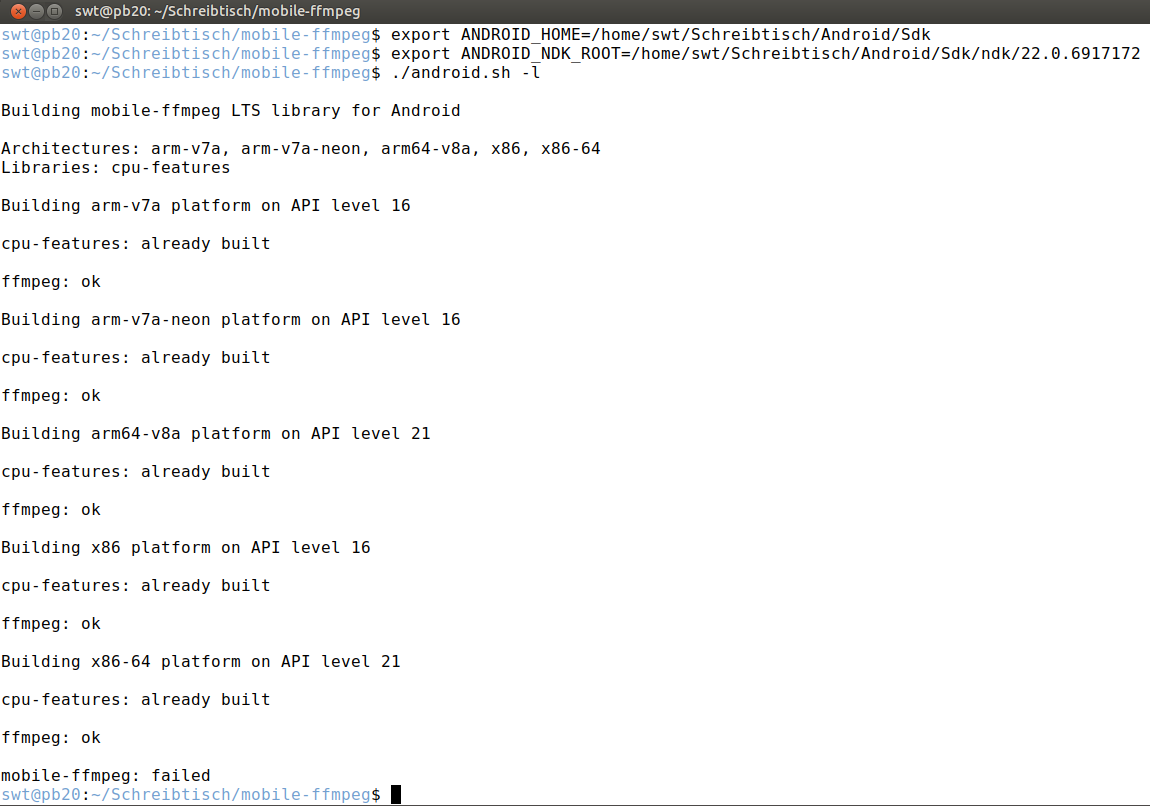
Logs (I included logs after the completed Build for x86-64)
INFO: Completed build for x86-64 on API level 21 at Di 17. Nov 13:09:58 CET 2020
[armeabi-v7a] Compile arm : mobileffmpeg <= mobileffmpeg.c
[armeabi-v7a] Compile arm : mobileffmpeg <= mobileffprobe.c
[armeabi-v7a] Compile arm : mobileffmpeg <= android_lts_support.c
[armeabi-v7a] Compile arm : mobileffmpeg <= mobileffmpeg_exception.c
[armeabi-v7a] Compile arm : mobileffmpeg <= fftools_cmdutils.c
jni/../app/src/main/cpp/fftools_cmdutils.c:361:79: error: implicit conversion from 'long long' to 'double' changes value from 9223372036854775807 to 9223372036854775808 [-Werror,-Wimplicit-const-int-float-conversion]
*(int64_t *)dst = parse_number_or_die(opt, arg, OPT_INT64, INT64_MIN, INT64_MAX);
~~~~~ ^~~
/home/swt/Schreibtisch/Android/Sdk/ndk/22.0.6917172/toolchains/llvm/prebuilt/linux-x86_64/sysroot/usr/include/stdint.h:188:27: note: expanded from macro 'INT64_MAX'
define INT64_MAX (INT64_C(9223372036854775807))
^~~~~~~~~~~~~~~~~~~~~~~~~~~~
/home/swt/Schreibtisch/Android/Sdk/ndk/22.0.6917172/toolchains/llvm/prebuilt/linux-x86_64/sysroot/usr/include/stdint.h:147:27: note: expanded from macro 'INT64_C'
define INT64_C(c) c ## LL
^~~~~~~
9223372036854775807LL
^~~~~
1 error generated.
make: * [/home/swt/Schreibtisch/Android/Sdk/ndk/22.0.6917172/build/core/build-binary.mk:476: obj/local/armeabi-v7a/objs/mobileffmpeg/fftools_cmdutils.o] Error 1
Environment
- Platform: Android (building on Linux)
- Architecture: arm-v7a, arm-v7a-neon, arm64-v8a, x86, x86_64
- Version (if applicable) 4.4-LTS
- Source branch (if applicable) master
- Android Studio version (if applicable) 4.1.1
- Android NDK version (if applicable) 22.0.6917172
 tim162
All 5 comments
You're using the NDK 22, which is still in beta. I suggest using NDK 21, which is the latest tested version.
Furthermore, if you're building LTS and Main builds in the same directory, do not forget to delete prebuilt directory before starting a new build. Build scripts can not detect the build type for already compiled libraries. In your case, if you build cpu-features using LTS and switch to Main, build scripts will not compile cpu-features again and try to link it with Main build options. And since cpu-features was built against LTS, it will fail.
 tanersener
on 17 Nov 2020
tanersener
on 17 Nov 2020
@tanersener Thanks for your quick help! I used NDK 21 now and it worked. I guess the problem was that with NDK 22 cpu-features build failed in LTS so I used Main to build cpu-features and then switched back to LTS. Now everything works with NDK 21.
I appreciate your help!
tim162
on 17 Nov 2020
Hi @tanersener sorry to bother you again but I thought maybe you can help and I already asked the mobile-ffmpeg email list but didn't get an answer.
As said what I want to do is convert .wav files to .mp3 and build a minimal binary size to achieve this. I added to android-ffmpeh.sh
./configure
${DEBUG_OPTIONS} \

    --disable-everything \
    --disable-autodetect \
    --disable-network \
    --enable-pthreads \
    --enable-avcodec \
    --enable-avformat \
    --enable-swresample \
    --enable-avfilter \
    --enable-libmp3lame \
    --enable-parser=mpegaudio \
    --enable-demuxer=mp3,wav,pcm_s16le \
    --enable-muxer=mp3,wav,pcm_s16le \
    --enable-decoder=pcm*,mp3*,pcm_s16le \
    --enable-encoder=pcm*,pcm_s16le,mp3,libmp3lame \
    --enable-filter=aresample \
    --enable-protocol=file \
and then run ./android.sh -l --enable-lame
(The pcm_s16le is activated because I'm recording the wav files from the mic and the "underlying" format seems to be pcm_s16le)
So when I run the following command in my Android app I get the following error:
-i input.wav -vn -c:a libmp3lame -ar 44100 -ac 1 -b:a 96k -y output.mp3
I/mobile-ffmpeg: Loading mobile-ffmpeg.
E/AndroidRuntime: FATAL EXCEPTION: Thread-18
java.lang.UnsatisfiedLinkError: dlopen failed: cannot locate symbol "libiconv" referenced by ".../lib/arm64/libavcodec.so"...
at java.lang.Runtime.loadLibrary0(Runtime.java:994)
at java.lang.System.loadLibrary(System.java:1533)
at com.arthenica.mobileffmpeg.Config.
at com.arthenica.mobileffmpeg.Config.ffmpegExecute(Config.java:637)
at com.arthenica.mobileffmpeg.FFmpeg.execute(FFmpeg.java:68)
at com.arthenica.mobileffmpeg.FFmpeg.execute(FFmpeg.java:129)
Do you have any idea what could be missing? I thought lame autoimports libiconv while building so it should be included.
Again, any help is highly appreciated!
tim162
on 20 Nov 2020
Have you tried enabling libiconv too? lame depends on libiconv as far as I remember.
./android.sh -l --enable-lame --enable-libiconv
@tanersener just tried it, went one step further but now gives me this error:
E/mobile-ffmpeg: [AVFilterGraph @ 0x7209dfec40] No such filter: 'anull'
E/mobile-ffmpeg: Error reinitializing filters!
E/mobile-ffmpeg: Failed to inject frame into filter network: Invalid argument
E/mobile-ffmpeg: Error while processing the decoded data for stream #0:0
I/mobile-ffmpeg: Conversion failed!
E/mobile-ffmpeg: Command execution failed with rc=1 and the output below.
I/mobile-ffmpeg: ffmpeg version v4.4-dev-416 Copyright (c) 2000-2020 the FFmpeg developers
built with Android (6454773 based on r365631c2) clang version 9.0.8 (https://android.googlesource.com/toolchain/llvm-project 98c855489587874b2a325e7a516b99d838599c6f) (based on LLVM 9.0.8svn)
configuration: --cross-prefix=aarch64-linux-android- --sysroot=/home/swt/Schreibtisch/Android/Sdk/ndk/21.3.6528147/toolchains/llvm/prebuilt/linux-x86_64/sysroot --prefix=/home/swt/Schreibtisch/mobile-ffmpeg/prebuilt/android-arm64/ffmpeg --pkg-config=/usr/bin/pkg-config --enable-version3 --arch=aarch64 --cpu=armv8-a --cc=aarch64-linux-android21-clang --cxx=aarch64-linux-android21-clang++ --extra-libs='-L/home/swt/Schreibtisch/mobile-ffmpeg/prebuilt/android-arm64/cpu-features/lib -lndk_compat' --target-os=android --enable-neon --enable-asm --enable-inline-asm --enable-cross-compile --enable-pic --enable-jni --enable-optimizations --enable-swscale --enable-shared --enable-v4l2-m2m --disable-outdev=fbdev --disable-indev=fbdev --enable-small --disable-openssl --disable-xmm-clobber-test --disable-debug --enable-lto --disable-neon-clobber-test --disable-programs --disable-postproc --disable-doc --disable-htmlpages --disable-manpages --disable-podpages --disable-txtpages --disable-static --disable-sndio --disable-schannel --disable-securetransport --disable-xlib --disable-cuda --disable-cuvid --disable-nvenc --disable-vaapi --disable-vdpau --disable-videotoolbox --disable-audiotoolbox --disable-appkit --disable-alsa --disable-cuda --disable-cuvid --disable-nvenc --disable-vaapi --disable-vdpau --disable-everything --disable-network --enable-pthreads --enable-avcodec --enable-avformat --enable-swresample --enable-avfilter --enable-libmp3lame --enable-parser=mpegaudio --enable-demuxer='mp3,wav,pcm_s16le' --enable-muxer='mp3,wav,pcm_s16le' --enable-decoder='pcm,mp3,pcm_s16le' --enable-encoder='pcm*,pcm_s16le,mp3,libmp3lame' --enable-filter=aresample --enable-protocol=file --enable-libmp3lame --enable-iconv --disable-sdl2 --disable-zlib
libavutil 56. 55.100 / 56. 55.100
libavcodec 58. 96.100 / 58. 96.100
libavformat 58. 48.100 / 58. 48.100
libavdevice 58. 11.101 / 58. 11.101
libavfilter 7. 87.100 / 7. 87.100
libswscale 5. 8.100 / 5. 8.100
libswresample 3. 8.100 / 3. 8.100
Guessed Channel Layout for Input Stream #0.0 : mono
Input #0, wav, from '.../Rec_0.wav':
Duration: 00:00:09.91, bitrate: 705 kb/s
Stream #0:0: Audio: pcm_s16le ([1][0][0][0] / 0x0001), 44100 Hz, mono, s16, 705 kb/s
Stream mapping:
Stream #0:0 -> #0:0 (pcm_s16le (native) -> mp3 (libmp3lame))
Press [q] to stop, [?] for help
[AVFilterGraph @ 0x7209dfec40] No such filter: 'anull'
Error reinitializing filters!
Failed to inject frame into filter network: Invalid argument
Error while processing the decoded data for stream #0:0
Conversion failed!
Any idea? Seems like I'm missing some kind of filters
tim162
on 20 Nov 2020
Related issues
 khacchungory
·
7Comments
khacchungory
·
7Comments
 abokhalel2
·
4Comments
abokhalel2
·
4Comments
 hantrungkien
·
6Comments
hantrungkien
·
6Comments
 shaheercs
·
6Comments
shaheercs
·
6Comments
 chitrang200889
·
5Comments
chitrang200889
·
5Comments
Most helpful comment
@tanersener Thanks for your quick help! I used NDK 21 now and it worked. I guess the problem was that with NDK 22
cpu-featuresbuild failed in LTS so I used Main to buildcpu-featuresand then switched back to LTS. Now everything works with NDK 21.I appreciate your help!