Mmdetection: Compile successfully on Windows.
Install community version of pycocotools for windows (official repository does not support windows)
such as https://github.com/philferriere/cocoapi#egg=pycocotools&subdirectory=PythonAPIedit mmdetection/ops/masked_conv/src/masked_conv2d_kernel.cu
find and replace: long -> int64_tedit mmdetection/ops/sigmoid_focal_loss/src/sigmoid_focal_loss_cuda.cu
find and replace: long -> int64_tin line 112, add type casting to values
dim3 grid(std::min(THCCeilDiv((long)losses_size, 512L), 4096L))
to
dim3 grid(std::min(THCCeilDiv((int64_t)losses_size, (int64_t)512L), (int64_t)4096L));in line 150, add type casting to values
dim3 grid(std::min(THCCeilDiv((long)d_logits_size, 512L), 4096L));
to
dim3 grid(std::min(THCCeilDiv((int64_t)d_logits_size, (int64_t)512L), (int64_t)4096L));
done.
I didn't test on linux and didn't run tools/train.py or tools/test.py on windows.
I just compiled.
 hjinlee88
All 33 comments
Nice work! It may also be related to #547.
 hellock
on 31 Jul 2019
hellock
on 31 Jul 2019
Thank you for your help @hellock @hjinlee88, i did compile ops successfully but when trying to test HTC model, I got an error:
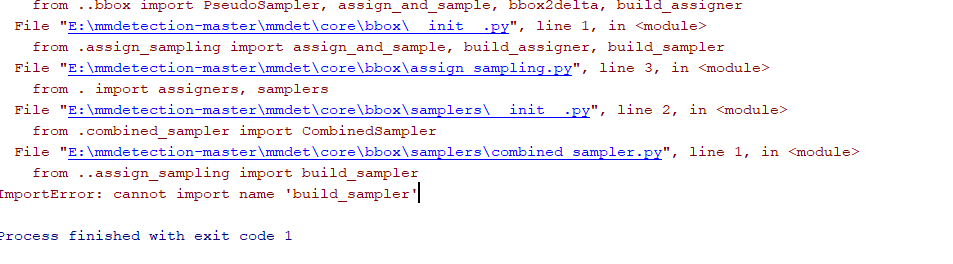
 trungpham2606
on 1 Aug 2019
trungpham2606
on 1 Aug 2019
谢谢你的帮助@hellock @hjinlee88,我确实成功编译了ops但是在尝试测试HTC模型时,我收到了一个错误:
HI,Have you solved this problem?
 Lamaric
on 1 Aug 2019
Lamaric
on 1 Aug 2019
谢谢你的帮助@hellock @hjinlee88,我确实成功编译了ops但是在尝试测试HTC模型时,我收到了一个错误:
HI,Have you solved this problem?
I solved this problem
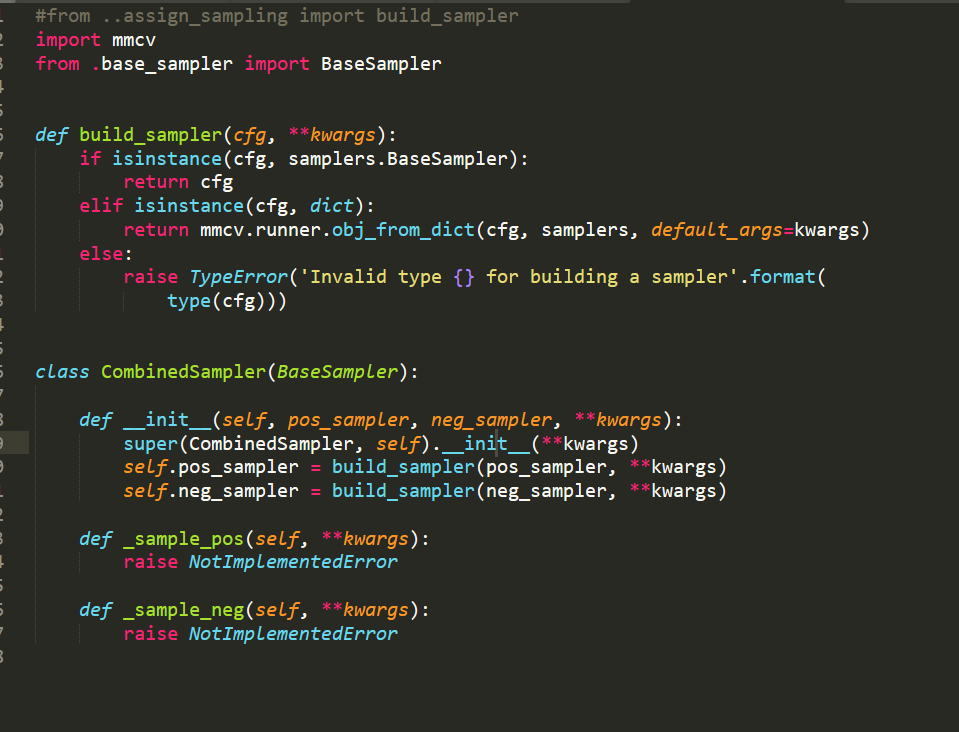
@hjinlee88 @ @hellock @trungpham2606
Lamaric
on 1 Aug 2019
@Lamaric oh, I will tried your solution bro ^^
trungpham2606
on 1 Aug 2019
@trungpham2606 @Lamaric hmm. it may be not windows problem. see #1098
hjinlee88
on 1 Aug 2019
@hjinlee88 the solution form @Lamaric works fine for me. but you have to import samplers first @Lamaric. Now I can compile the source and run detection successfully.
trungpham2606
on 1 Aug 2019
Mark!
 Linchunhui
on 6 Aug 2019
Linchunhui
on 6 Aug 2019
@hjinlee88 @hellock I also compiled successfully following your instructions. However, when I execute from mmdet.models import build_detector, an ImportError has been thrown. The error happens at the line of from . import deform_conv_cuda in ops/dcn/deform_conv.py. The message is DLL load failed: the specified module could not be found. But I checked that directory and found deform_conv_cuda.cp37-win_amd64.pyd exists. So what may be the reason? The compilation has no error.
 ywwynm
on 7 Aug 2019
ywwynm
on 7 Aug 2019
@hjinlee88 @hellock 我也按照你的指示编译成功。但是,当我执行时
from mmdet.models import build_detector,抛出了一个ImportError。错误发生from . import deform_conv_cuda在ops / dcn / deform_conv.py的行中。信息是DLL load failed: the specified module could not be found。但我检查了该目录,发现deform_conv_cuda.cp37-win_amd64.pyd存在。那可能是什么原因呢?编译没有错误。
I have also encountered the same problem, and finally I used VS2015 to compile cuda instead of VS2017.VS2017 will also not report an error,so I think it has something to do with the version of the instruction set, which causes cuda to not compile successfully.
Lamaric
on 7 Aug 2019
@Lamaric I just tried VS2015 while it doesn't make any difference. I have to stress that there is no error during compiling cpp and cuda extensions. The pyds are generated successfully.
ywwynm
on 7 Aug 2019
@Lamaric我刚尝试了VS2015,但没有任何区别。我必须强调在编译cpp和cuda扩展时没有错误。该
pyds的成功生成。
Sorry!I thought it was a problem with the cuda version, because I compiled it successfully on cuda10, but it failed in cuda9, which made me very hard. But in the end, I solved this problem. The principle of this I did not understand for the time being.
Lamaric
on 7 Aug 2019
@Lamaric Thanks for your reply~ I'm also using CUDA10. And I think I've found the problem, which is not related to compilation. Because I just run the inference script from cmd and it works. While if I run the same script from PyCharm, it stops and throws that error... This is a stupid problem, I'll go check myself.
ywwynm
on 7 Aug 2019
My setup for a successful compilation and inference:
- latest mmdetection (after PR 1131)
- Win10 (10.0.17134.0) + PyTorch 1.1.0 + CUDA 10.1 + Cudnn 7.1
- VS 2017, cl.exe version: 19.14.26433
No need to modify any code, just follow official installing instruction and it should work. Though, there should be some setups for environment variables including Path, LIB and INCLUDE. Details can be found through Google (just try to compile for the first time, and search the error, it will guide you to the correct path). Two key locations are:
- C:\Program Files (x86)\Microsoft Visual Studio\2017\Professional\VC\Tools\MSVC\version code\
- C:\Program Files (x86)\Windows Kits\10\Lib (or Include or Bin)\version code\
Environment variables are important during not only compilation but also usage. So be aware of it.
ywwynm
on 7 Aug 2019
My setup for a successful compilation and inference:
- latest mmdetection (after PR 1131)
- Win10 (10.0.17134.0) + PyTorch 1.1.0 + CUDA 10.1 + Cudnn 7.1
- VS 2017, cl.exe version: 19.14.26433
And there should be some setups for environment variables including
Path,LIBandINCLUDE. Details can be found through Google (just try to compile for the first time, and search the error, it will guide you to the correct path). Two key locations are:
- C:\Program Files (x86)\Microsoft Visual Studio\2017\Professional\VC\Tools\MSVC\version code\
- C:\Program Files (x86)\Windows Kits\10\Lib (or Include or Bin)\version code\
Environment variables are important during not only compilation but also usage. So be aware of it.
Environment variables should be set in advance, I am the first step after installation is to check the environment variables
Lamaric
on 7 Aug 2019
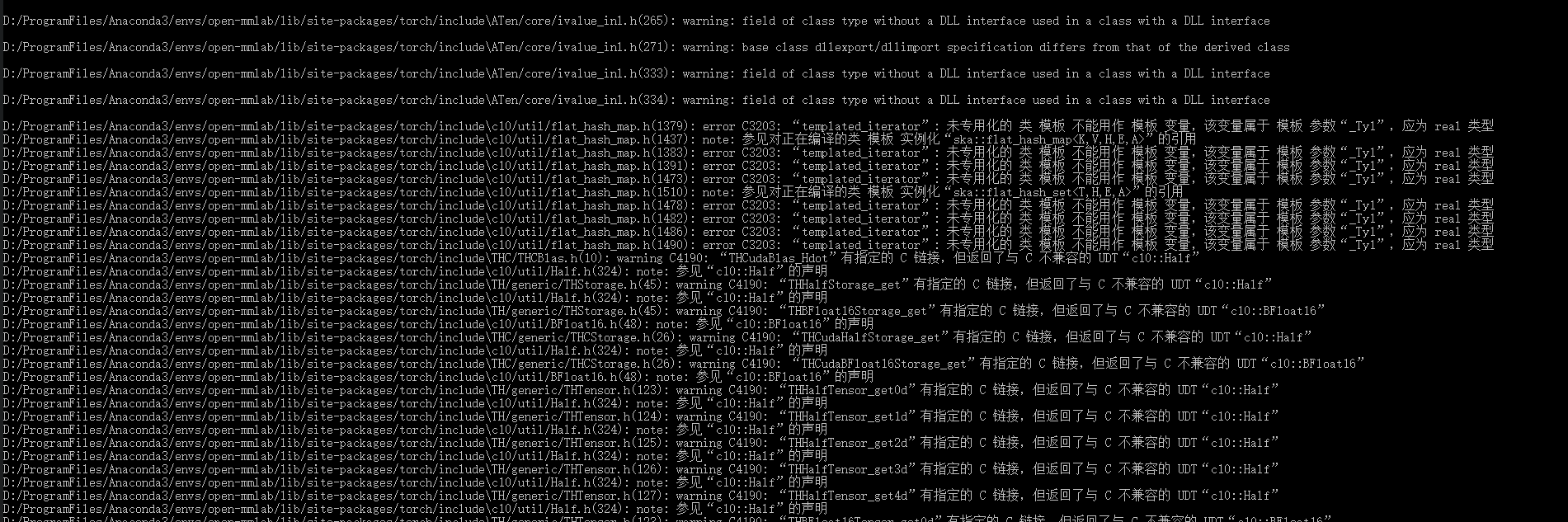
error C3202 is the first occured error, other is all warning
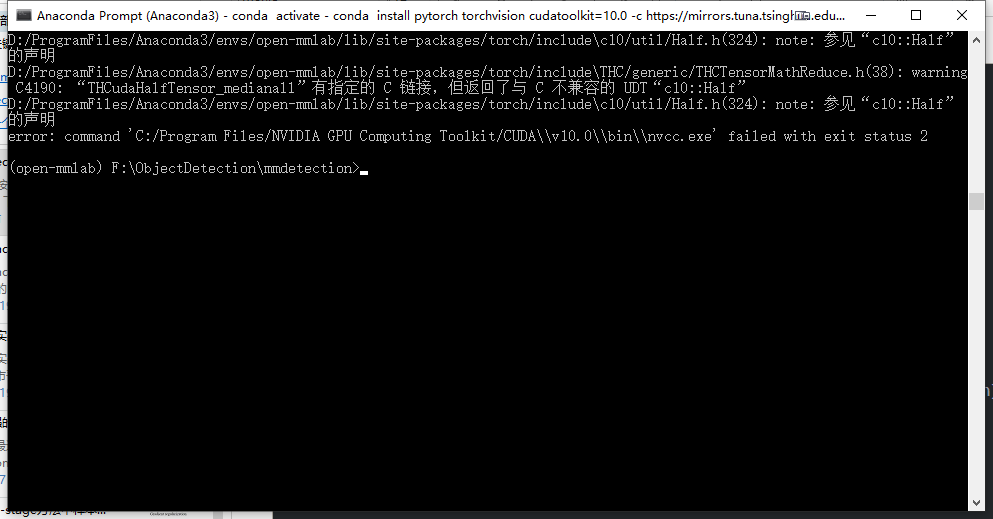
my environment is win10 + PyTorch 1.2 + CUDA 10.0 + Cudnn 7.6.2.24,
could someone help !!
 ghost
on 25 Aug 2019
ghost
on 25 Aug 2019
@hjinlee88 @hellock I also compiled successfully following your instructions. However, when I execute
from mmdet.models import build_detector, an ImportError has been thrown. The error happens at the line offrom . import deform_conv_cudain ops/dcn/deform_conv.py. The message isDLL load failed: the specified module could not be found. But I checked that directory and found deform_conv_cuda.cp37-win_amd64.pyd exists. So what may be the reason? The compilation has no error.
@hjinlee88 @hellock I also compiled successfully following your instructions. However, when I execute
from mmdet.models import build_detector, an ImportError has been thrown. The error happens at the line offrom . import deform_conv_cudain ops/dcn/deform_conv.py. The message isDLL load failed: the specified module could not be found. But I checked that directory and found deform_conv_cuda.cp37-win_amd64.pyd exists. So what may be the reason? The compilation has no error.
I have also encountered the same problem, could you tell me how to solve it
我也遇到了同样的问题,请问你是怎么解决的呢
ghost
on 25 Aug 2019
@CappuccinoMocha
see https://github.com/pytorch/pytorch/issues/19156 for your error
(please update your VS 2017 to the latest version)
your second problem already solved by #1099
use latest mmdetection
hjinlee88
on 26 Aug 2019
@CappuccinoMocha
see pytorch/pytorch#19156 for your error
(please update your VS 2017 to the latest version)your second problem already solved by #1099
use latest mmdetection
@hjinlee88
for the first problem, I plan to install VS2019, should I reinstall the cuda10.1 after installing VS2019 ?
ghost
on 27 Aug 2019
@CappuccinoMocha
in my experience (vs2017 and cuda9), there is no need to reinstall cuda.
I don't know vs2019 fully supports python and cuda10.1, but it may work.
hjinlee88
on 27 Aug 2019
close due to #1131
hjinlee88
on 3 Sep 2019
My setup for a successful compilation and inference:
* latest mmdetection (after PR [1131](https://github.com/open-mmlab/mmdetection/pull/1131))

* Win10 (10.0.17134.0) + PyTorch 1.1.0 + CUDA 10.1 + Cudnn 7.1

* VS 2017, cl.exe version: 19.14.26433
No need to modify any code, just follow official installing instruction and it should work. Though, there should be some setups for environment variables including
Path,LIBandINCLUDE. Details can be found through Google (just try to compile for the first time, and search the error, it will guide you to the correct path). Two key locations are:* C:\Program Files (x86)\Microsoft Visual Studio\2017\Professional\VC\Tools\MSVC\version code\ * C:\Program Files (x86)\Windows Kits\10\Lib (or Include or Bin)\version code\Environment variables are important during not only compilation but also usage. So be aware of it.
Can you explain where and which environment variables should be set exactly? The Conda environment comes with a Cuda toolkit. Do I still have to install my own CUDA version?
 Kaeseknacker
on 16 Oct 2019
Kaeseknacker
on 16 Oct 2019
@Kaeseknacker
Conda's cudatoolkit has no nvcc (compiler), so cuda and cudnn must be installed on your system. If you installed vs2017 and cuda correctly, don't worry about the environment variables as they will be set correctly.
hjinlee88
on 17 Oct 2019
@hjinlee88 Thanks for your response.
After installing CUDA v10.1 and VS2017 I run into the following error:
[...]
Installed c:\dlminion\mmdetection
Processing dependencies for mmdet==1.0rc0+3dc9ddb
Searching for pycocotools
Reading https://pypi.org/simple/pycocotools/
Downloading https://files.pythonhosted.org/packages/96/84/9a07b1095fd8555ba3f3d519517c8743c2554a245f9476e5e39869f948d2/pycocotools-2.0.0.tar.gz#sha256=cbb8c2fbab80450a67ee9879c63b0bc8a69e58dd9a0153d55de404c0d383a94b
Best match: pycocotools 2.0.0
Processing pycocotools-2.0.0.tar.gz
Writing C:\Users\spraul\AppData\Local\Temp\easy_install-ykumvt7a\pycocotools-2.0.0\setup.cfg
Running pycocotools-2.0.0\setup.py -q bdist_egg --dist-dir C:\Users\spraul\AppData\Local\Temp\easy_install-ykumvt7a\pycocotools-2.0.0\egg-dist-tmp-ee9gag_p
Compiling pycocotools/_mask.pyx because it depends on c:\dlminion\mmdetection\.eggs\cython-0.29.13-py3.7-win-amd64.egg\Cython\Includes\numpy\__init__.pxd.
[1/1] Cythonizing pycocotools/_mask.pyx
c:\dlminion\mmdetection\.eggs\cython-0.29.13-py3.7-win-amd64.egg\Cython\Compiler\Main.py:369: FutureWarning: Cython directive 'language_level' not set, using 2 for now (Py2). This will change in a later release! File: C:\Users\spraul\AppData\Local\Temp\easy_install-ykumvt7a\pycocotools-2.0.0\pycocotools\_mask.pyx
  tree = Parsing.p_module(s, pxd, full_module_name)
cl : Befehlszeile error D8021 : Ungültiges numerisches Argument /Wno-cpp.
error: Setup script exited with error: command 'C:\\Program Files (x86)\\Microsoft Visual Studio\\2017\\Enterprise\\VC\\Tools\\MSVC\\14.16.27023\\bin\\HostX86\\x64\\cl.exe' failed with exit status 2
@Kaeseknacker
Install community version of pycocotools for windows (official repository does not support windows)
such as https://github.com/philferriere/cocoapi#egg=pycocotools&subdirectory=PythonAPI
hjinlee88
on 17 Oct 2019
I installed mmdetection on two different Windows notebooks, that's why I want to share my experiences with you:
- Install Visual Studio 2017
- I installed Visual Studio Enterprise 2017. I have no idea if and how to just install the compiler. That's why I installed complete Visual Studio and it worked without further adjustments.
- Install CUDA
- I installed cuda_10.1.243_426.00_win10.exe. I did not have to adjust system environment variables. CUDA_PATH was set automatically.
- CUDNN
- Download cudnn-10.1-windows10-x64-v7.6.3.30 and copy the files from bin/include/lib folders in the appropriate folders in your CUDA folder.
- Install Conda/Miniconda
- realy straight forward
- Install mmdetection
- followed the instructions in INSTALL.md:
conda create -n open-mmlab python=3.7 -yconda install pytorch torchvision cudatoolkit=10.1 -c pytorchconda install cythonneeded for CocoAPIpip install git+https://github.com/philferriere/cocoapi.git#subdirectory=PythonAPI- Pray and execute:
python setup.py develop
I had to do it twice. The first time it broke with an error. The second time it went through.
Kaeseknacker
on 23 Oct 2019
@Kaeseknacker I meet the same problem with you.
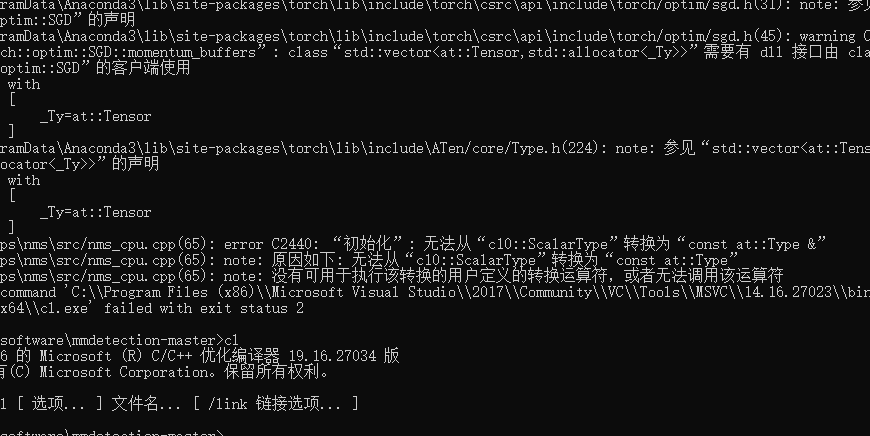
@hjinlee88 Thanks for your response.
After installing CUDA v10.1 and VS2017 I run into the following error:[...] Installed c:\dlminion\mmdetection Processing dependencies for mmdet==1.0rc0+3dc9ddb Searching for pycocotools Reading https://pypi.org/simple/pycocotools/ Downloading https://files.pythonhosted.org/packages/96/84/9a07b1095fd8555ba3f3d519517c8743c2554a245f9476e5e39869f948d2/pycocotools-2.0.0.tar.gz#sha256=cbb8c2fbab80450a67ee9879c63b0bc8a69e58dd9a0153d55de404c0d383a94b Best match: pycocotools 2.0.0 Processing pycocotools-2.0.0.tar.gz Writing C:\Users\spraul\AppData\Local\Temp\easy_install-ykumvt7a\pycocotools-2.0.0\setup.cfg Running pycocotools-2.0.0\setup.py -q bdist_egg --dist-dir C:\Users\spraul\AppData\Local\Temp\easy_install-ykumvt7a\pycocotools-2.0.0\egg-dist-tmp-ee9gag_p Compiling pycocotools/_mask.pyx because it depends on c:\dlminion\mmdetection\.eggs\cython-0.29.13-py3.7-win-amd64.egg\Cython\Includes\numpy\__init__.pxd. [1/1] Cythonizing pycocotools/_mask.pyx c:\dlminion\mmdetection\.eggs\cython-0.29.13-py3.7-win-amd64.egg\Cython\Compiler\Main.py:369: FutureWarning: Cython directive 'language_level' not set, using 2 for now (Py2). This will change in a later release! File: C:\Users\spraul\AppData\Local\Temp\easy_install-ykumvt7a\pycocotools-2.0.0\pycocotools\_mask.pyx tree = Parsing.p_module(s, pxd, full_module_name) cl : Befehlszeile error D8021 : Ungültiges numerisches Argument /Wno-cpp. error: Setup script exited with error: command 'C:\\Program Files (x86)\\Microsoft Visual Studio\\2017\\Enterprise\\VC\\Tools\\MSVC\\14.16.27023\\bin\\HostX86\\x64\\cl.exe' failed with exit status 2
how to deal with this problem…… \14.16.27023\bin\HostX86\x64\cl.exe' failed with exit status 2. I'm sure I set the vs2017 environment variables.
 rtingo
on 24 Oct 2019
rtingo
on 24 Oct 2019
@hjinlee88
Can I compile the roi_align of cuda version in Linux and copy the result of compilation to the windows, so that the mmdetecion could work in the windows platform?
ghost
on 28 Oct 2019
@CappuccinoMocha
nope
hjinlee88
on 28 Oct 2019
WINDOWS安装有问题的加QQ群:669412407(注明mmdetection)
 QQ2737499951
on 2 Dec 2019
QQ2737499951
on 2 Dec 2019
I installed mmdetection on two different Windows notebooks, that's why I want to share my experiences with you:
Install Visual Studio 2017
- I installed Visual Studio Enterprise 2017. I have no idea if and how to just install the compiler. That's why I installed complete Visual Studio and it worked without further adjustments.
Install CUDA
- I installed cuda_10.1.243_426.00_win10.exe. I did not have to adjust system environment variables. CUDA_PATH was set automatically.
CUDNN
- Download cudnn-10.1-windows10-x64-v7.6.3.30 and copy the files from bin/include/lib folders in the appropriate folders in your CUDA folder.
Install Conda/Miniconda
- realy straight forward
Install mmdetection
- followed the instructions in INSTALL.md:
conda create -n open-mmlab python=3.7 -yconda install pytorch torchvision cudatoolkit=10.1 -c pytorchconda install cythonneeded for CocoAPIpip install git+https://github.com/philferriere/cocoapi.git#subdirectory=PythonAPI- Pray and execute:
python setup.py develop
I had to do it twice. The first time it broke with an error. The second time it went through.

In the order you said, when I went to the last step, I got the error shown above.
There are two error messages
我按照您说的顺序,执行到最后一步时,出现了上图的错误。
有两个错误信息
- C:\Users\SR\Anaconda3envs\open-mmlab\libsite-packages\torch\utils\cpp_extension.py:189: UserWarning: Error checking co
mpiler version for cl: [WinError 2] 系统找不到指定的文件。 - compiling_info.cpp
c1xx: fatal error C1083: 无法打开源文件: “mmdet\ops\utilssrc/compiling_info.cpp”: No such file or directory
error: command 'C:\Program Files (x86)\Microsoft Visual Studio\2017\Community\VC\Tools\MSVC\14.16.27023\bin\Ho
stX86\x64\cl.exe' failed with exit status 2
Is my version of MSCV too high or is it a problem with the file path?
请问是我的MSCV版本过高了还是文件路径的问题?
Here is some additional information:
下面是一些补充信息:
Visual Studio 2017+CUDA10.0+cudnn+pytorch1.2
Python 3.7.5 (default, Oct 31 2019, 15:18:51) [MSC v.1916 64 bit (AMD64)] :: Anaconda, Inc. on win32
Type "help", "copyright", "credits" or "license" for more information.
 xds95
on 16 Dec 2019
xds95
on 16 Dec 2019
I installed mmdetection on two different Windows notebooks, that's why I want to share my experiences with you:
Install Visual Studio 2017
- I installed Visual Studio Enterprise 2017. I have no idea if and how to just install the compiler. That's why I installed complete Visual Studio and it worked without further adjustments.
Install CUDA
- I installed cuda_10.1.243_426.00_win10.exe. I did not have to adjust system environment variables. CUDA_PATH was set automatically.
CUDNN
- Download cudnn-10.1-windows10-x64-v7.6.3.30 and copy the files from bin/include/lib folders in the appropriate folders in your CUDA folder.
Install Conda/Miniconda
- realy straight forward
Install mmdetection
- followed the instructions in INSTALL.md:
conda create -n open-mmlab python=3.7 -yconda install pytorch torchvision cudatoolkit=10.1 -c pytorchconda install cythonneeded for CocoAPIpip install git+https://github.com/philferriere/cocoapi.git#subdirectory=PythonAPI- Pray and execute:
python setup.py develop
I had to do it twice. The first time it broke with an error. The second time it went through.
In the order you said, when I went to the last step, I got the error shown above.
There are two error messages
我按照您说的顺序,执行到最后一步时,出现了上图的错误。
有两个错误信息
- C:\Users\SR\Anaconda3envs\open-mmlab\libsite-packages\torch\utils\cpp_extension.py:189: UserWarning: Error checking co
mpiler version for cl: [WinError 2] 系统找不到指定的文件。- compiling_info.cpp
c1xx: fatal error C1083: 无法打开源文件: “mmdet\ops\utilssrc/compiling_info.cpp”: No such file or directory
error: command 'C:\Program Files (x86)\Microsoft Visual Studio\2017\Community\VC\Tools\MSVC\14.16.27023bin\Ho
stX86x64\cl.exe' failed with exit status 2Is my version of MSCV too high or is it a problem with the file path?
请问是我的MSCV版本过高了还是文件路径的问题?
Here is some additional information:
下面是一些补充信息:Visual Studio 2017+CUDA10.0+cudnn+pytorch1.2
Python 3.7.5 (default, Oct 31 2019, 15:18:51) [MSC v.1916 64 bit (AMD64)] :: Anaconda, Inc. on win32
Type "help", "copyright", "credits" or "license" for more information.
I have the exact same issus with you, so have you already figured out this problem?
我跟你一模一样的问题,也是找不到那个compiling_info.cpp,请问你解决了吗
 lvzongyao
on 17 Apr 2020
lvzongyao
on 17 Apr 2020
win10 vs2017 cuda10.1 pytorch1.4 python3.75 运行正常


WINDOWS安装有问题的加QQ群:669412407(注明mmdetection)
QQ2737499951
on 17 Apr 2020
Related issues
 fengxiuyaun
·
3Comments
fengxiuyaun
·
3Comments
 dereyly
·
3Comments
dereyly
·
3Comments
 happog
·
3Comments
happog
·
3Comments
 namheegordonkim
·
3Comments
namheegordonkim
·
3Comments
 FrankXinqi
·
3Comments
FrankXinqi
·
3Comments
Most helpful comment
I solved this problem

@hjinlee88 @ @hellock @trungpham2606