Mmdetection: Out of memory when training on custom dataset
I was trying to train a retinanet model on some custom dataset (e.g. WIDER face) and I've encountered consistent out of memory issue after several hundred (or thousand) iteration. The error messages are like the followings:
  File "/root/mmdetection/mmdet/core/bbox/assigners/max_iou_assigner.py", line 72, in assign
    overlaps = bbox_overlaps(bboxes, gt_bboxes)
  File "/root/mmdetection/mmdet/core/bbox/geometry.py", line 59, in bbox_overlaps
    ious = overlap / (area1[:, None] + area2 - overlap)
RuntimeError: CUDA error: out of memory
or
  File "/root/mmdetection/mmdet/core/bbox/assigners/max_iou_assigner.py", line 72, in assign
    overlaps = bbox_overlaps(bboxes, gt_bboxes)
  File "/root/mmdetection/mmdet/core/bbox/geometry.py", line 51, in bbox_overlaps
    wh = (rb - lt + 1).clamp(min=0)  # [rows, cols, 2]
RuntimeError: CUDA error: out of memory
The training machine has 2 x 1080 Ti and the OOM happens no matter imgs_per_gpu is 2 or 1. In fact, even if the initial memory consumption reduces to around 3~4G when imgs_per_gpu=1, it quickly grows to around 8G and fluctuate for a while until finally OOM. I've tried both distributed and non-distributed training and both suffer OOM.
BTW, the machine has the following software configurations:
- Pytorch = 0.4.1
- CUDA = 9
- Cudnn = 7
Is this normal?
 pkdogcom
All 38 comments
This issue doesn't seem to happen to Coco, which makes me guess that it is possibly caused by inconsistent image size in the custom dataset as Pytorch seems to be suffering growing memory consumption issue if input size keeps changing. Any thoughts?
pkdogcom
on 16 Dec 2018
What is the image size you specified? In coco we use img_scale=(1333, 800). For the ResNet-50 backbone, 1080Ti is enough to hold 2 images per gpu.
 hellock
on 16 Dec 2018
hellock
on 16 Dec 2018
Same configs as in coco. I was also using ResNet-50. Any idea why memory consumption keeps fluctuating in the first place? In Coco training memory consumption is stable.
pkdogcom
on 17 Dec 2018
I use the same config for coco-dataset training, with no OOM error.
When I use the same config for resnet18 for dota-dataset training(each image is 1024*1024), with memory fluctuation, but no OOM error.
When I use (1333, 1024) instead of (1333, 800), with memory fluctucation at firstly, after 4 epochs, OOM error happend.
 hedes1992
on 17 Dec 2018
hedes1992
on 17 Dec 2018
And I find that,
If using 4 gpus, there exist one gpu occupying 3GB or more than other ones...
hedes1992
on 17 Dec 2018
I met the same problem, I have to set img_scale=(800, 800) to solve this problem.
 jwwangchn
on 17 Dec 2018
jwwangchn
on 17 Dec 2018
And I also use 8 gpus (each with 12GB, one image) on cluster to train resnet18, the cluster give a gpu ultilization statistics.
It is

, seemly not OOM on gpu, but the error is RuntimeError: CUDA error: out of memory
hedes1992
on 17 Dec 2018
And I find that,
If using 4 gpus, there exist one gpu occupying 3GB or more than other ones...
Are you using distributed training or not? It is strange that the memory in different GPUs have a huge difference.
hellock
on 17 Dec 2018
@pkdogcom How many gt bboxes are there in an image at most?
hellock
on 17 Dec 2018
And I find that,
If using 4 gpus, there exist one gpu occupying 3GB or more than other ones...Are you using distributed training or not? It is strange that the memory in different GPUs have a huge difference.
I use the same configuration, and not open distributed training. I run program using 4 or 8 gpu on the same worker
For the same dataset, use (1333,800), it can train to the end. And the gpu occupation curve is
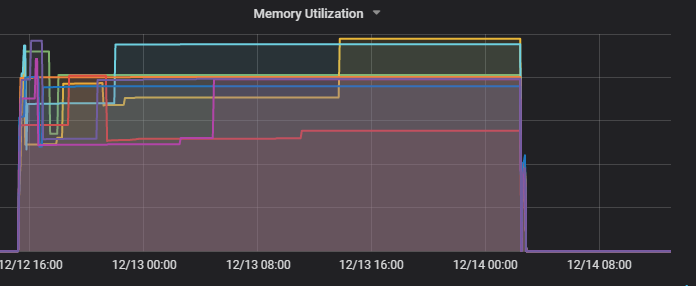 , very strange
hedes1992
on 17 Dec 2018
As stated in the README, distributed training is preferred at any time. If you switch to distributed training, the memory consumption on different GPUs should be similar and smaller.
hellock
on 17 Dec 2018
As stated in the README, distributed training is preferred at any time. If you switch to distributed training, the memory consumption on different GPUs should be similar and smaller.
Thank you! And is the output like this in distributed training:

?
hedes1992
on 17 Dec 2018
@hellock There can be samples, though very rare, which have as many as around 1000 bounding boxes per image.
pkdogcom
on 17 Dec 2018
I've tried to remove samples which contains no gt bboxes (due to filtering say super small bboxes) similar to COCO and it helps somewhat by postponing OOM to the 2nd epoch (previously it OOM in just a few hundred iterations).
I'm currently trying to also filter out samples with too many gt bboxes (say >200) and will let you know if I have any progress.
pkdogcom
on 17 Dec 2018
Well, in fact I can train the same dataset in Tensorflow and Detectron without any problems, even not filtering out those samples. So I guess there are memory leak issues in Pytorch and perhaps there are some part of implementations in this project which worsens the case.
pkdogcom
on 17 Dec 2018
@hedes1992 mmdetection does not print such communication logs, maybe related to the environment?
hellock
on 18 Dec 2018
@pkdogcom We conduct all box operations on GPU, so the memory will increase if the number of gt bboxes is large, though there may exist some hidden bugs. A walk around is to move some operations (IoU computation, etc) to CPU, and then copy the results to GPU.
hellock
on 18 Dec 2018
@hellock You're right. After filtering out samples with very large number of gt bboxes, it can be successully trained (20 epoch in total). I've limited the number of sample to 1 per GPU as using 2 samples will increase memory consumption to near 10G in the first few hundred of iterations. Not sure if it is the case for other custom dataset that other people have mentioned. I would like to keep this issue open for a few more days so that people in the loop can still post their results with the fixes we've talked about.
pkdogcom
on 18 Dec 2018
Just for reference, the max gt number in COCO dataset is 90, and 12G memory is enough for 4 images per GPU.
hellock
on 18 Dec 2018
I was limiting the max gt number to 200 and it is likely that it can be trained for 2 images per GPU in 11G memory but there seems to be no way to hold 4 images. So perhaps the gt bboxes number is indeed the key factor in maximum memory consumption.
pkdogcom
on 18 Dec 2018
I am encountering the same question, dataset works for Detectron but does not work for mmdetection, even though I set image scale lower than that in Detectron, still get "out of memory" error
 greathope
on 19 Dec 2018
greathope
on 19 Dec 2018
@greathope Could you provide some information about your custom dataset, such as the maximum gt number? Normally mmdet requires significantly less memory than Detectron, according to our experiments on COCO and PASCAL VOC.
hellock
on 19 Dec 2018
@hellock You are right~ I have four datasets, one of them has much more gt boxes, up to 3k, while the others only have less than 250 gt boxes, so I remove this different dataset, training becomes normal, so why detectron can deal with that dataset but mmdetection can't?
greathope
on 19 Dec 2018
@greathope In Detectron, box operations are conducted on CPU, so it will not suffer OOM. We implement all operations on GPU, which leads to faster speed. The memory will get increased when the gt number is extremely large.
hellock
on 19 Dec 2018
@hellock So do you think it is necessary to make box operations configurable so that for those who want to train their models on custom datasets with large gt bbox number, they can switch to CPU? It is likely that there are datasets where most samples have many gt bboxes and thus simply removing those data samples won't work.
pkdogcom
on 19 Dec 2018
@pkdogcom Yes I think that would be a useful feature. Popular object detection datasets usually annotates less than 100 gts, so I was not aware of this requirement. Contributions are welcome!
hellock
on 19 Dec 2018
I'm still looking into details of the project and I'll take a look and see if I have an easy way to implement this feature when I get a chance. I'm thinking about something like automatic switch between GPU and CPU depending on the maximum number of gt bounding boxes in the batch, where the threshold can be configured in config file. I'll keep you posted on my findings.
pkdogcom
on 19 Dec 2018
@hedes1992 mmdetection does not print such communication logs, maybe related to the environment?
I don't know, it's output of one worker on aliyun cluster.
After that, I change worker_num to 1 and 0, but it is also OOM when use cluster worker, but can finish on local dev computer.
It is worth noting that if I change scale from (1333,1024) to (1333, 800), there exists no OOM on cluster or local dev computer.
I will do more attempt...
hedes1992
on 21 Dec 2018
Is there any solution to load gt bbox use cpu, I can not train my nwn dataset which include more than 200 gt boxes in one image. How to operation with the code? @hellock
 chenxu93
on 12 Jan 2019
chenxu93
on 12 Jan 2019
@hellock I got the same problem when I train wider_face who has many gts per pic. I find you calculate anchor_taegets by purely gpu. When the gts goes larger, the bi-match operator will get a heavy burden on gpus. Here is the code...
        lt = torch.max(bboxes1[:, None, :2], bboxes2[:, :2])  # [rows, cols, 2]
        rb = torch.min(bboxes1[:, None, 2:], bboxes2[:, 2:])  # [rows, cols, 2]

        wh = (rb - lt + 1).clamp(min=0)  # [rows, cols, 2]
        overlap = wh[:, :, 0] * wh[:, :, 1]
        area1 = (bboxes1[:, 2] - bboxes1[:, 0] + 1) * (
            bboxes1[:, 3] - bboxes1[:, 1] + 1)

        if mode == 'iou':
            area2 = (bboxes2[:, 2] - bboxes2[:, 0] + 1) * (
                bboxes2[:, 3] - bboxes2[:, 1] + 1)
            ious = overlap / (area1[:, None] + area2 - overlap)
        else:
            ious = overlap / (area1[:, None])
Then I change the implemention by loop the gts. It works well on no_dist training, in my test it stablely occupy 8G memory while with no more training time while your code will get CUDA_OUT_OF _MEMORY. However, when I use the dist training, I got a unbalance distribution problem of the memory as mentioned by @hedes1992 . And at last it comes up with CUDA_OUT_OF _MEMORY.......
So.....what's the problem.... ??
When will you fix this.....??
 ZhihuaGao
on 3 Feb 2019
ZhihuaGao
on 3 Feb 2019
I am training my own datasets which has so many gt boxes(the most is 500~600) per image. I have set the max_num_gts when loading the gt boxes, and also i modify the BboxTransform in transforms.py.
Like this:
self.bbox_transform = BboxTransform(max_num_gts = 100)
Although i set the max number limit, the memory of gpu will increase gradually when i use the dist train, and crash to RuntimeError: CUDA out of memory at last. But strangely, if i dont use the dist train, it will be OK, but…… very slow……
Just like what mentioned by @AresGao ……
How can i fix this?
 destinyzs
on 11 Mar 2019
destinyzs
on 11 Mar 2019
In my case, single image could have hundreds of gt(even 500~600), so i set the max_num_gts 100, and set the remaining boxes to ignore(not add loss in rpn and fastrcnn). However, the gpu memory will increase gradually and to RuntimeError: CUDA out of memory, even i set batch size=1.
I find that although the training gt is less, but the ignore gt is still so many, and according to what @AresGao said, the ignore boxes will be taken into gpu memory to calculate iou, so the gpu memory will still increase and then crash.
I set the rpn.ignore_iof_thr to -1, so the calculate iou process of ignore gt will be passed, finally the training process will be stable(No RuntimeError: CUDA out of memory). The rcnn.ignore_iof_thr is still 1, i think if set it to -1, the gpu memory will be much less.
Maybe set it to -1, the testing result could be a little worse……, but i can only do this.....otherwise crash and crash again...... endless... hope this will be helpful....
destinyzs
on 11 Mar 2019
gt_bbox_ignore does not mean just ignoring them, these bboxes will be used to compute IoU and invalidate some proposals. If you just want to treat some bboxes as pure background, then you can just remove them from gt_bboxes and leave gt_bbox_ignore as empty, but the performance will be affected.
To save as much memory, it is better to compute the IoU on cpu, at the cost of the training speed.
hellock
on 11 Mar 2019
agree this, in common case, it should be computed by cpu, just for better performance.
destinyzs
on 12 Mar 2019
In my custom dataset, single image could have hundreds of gt(even 500~600) gt boxes, I encounter the out of memory problem,
I change the computation from gpu to cpu as
bboxes1 = bboxes1.cpu().detach().numpy()
bboxes2 = bboxes2.cpu().detach().numpy()
tl = np.maximum(bboxes1[:, None, :2], bboxes2[:, :2])
br = np.minimum(bboxes1[:, None, 2:], bboxes2[:, 2:])
    iw = (br - tl + 1)[:, :, 0]
    ih = (br - tl + 1)[:, :, 1]
    iw[iw < 0] = 0
    ih[ih < 0] = 0
    overlaps = iw * ih

    area1 = (bboxes1[:, 2] - bboxes1[:, 0] + 1) * (
        bboxes1[:, 3] - bboxes1[:, 1] + 1)

    if mode == 'iou':
        area2 = (bboxes2[:, 2] - bboxes2[:, 0] + 1) * (
            bboxes2[:, 3] - bboxes2[:, 1] + 1)
        ious = overlaps / (area1[:, None] + area2 - overlaps)
    else:
        ious = overlaps / (area1[:, None])
    ious = torch.from_numpy(ious).cuda()
the out of memory is solved, and the memory of gpu reduce to 1/4 of that changed before, and now the image per gpu = 4 is ok for single gpu.
The training time increases a little bit which can ignore.
 fl82hope
on 4 Oct 2019
fl82hope
on 4 Oct 2019
1575
hellock
on 28 Nov 2019
@fl82hope
Thanks for sharing your code, but i have a question.
If you use detach() function, bboxes1 & bboxes2 have no grad_fn, right?
Then how do you update the parameters of the model?
Thanks!
 a060146251
on 27 Mar 2020
a060146251
on 27 Mar 2020
I was trying to train a retinanet model on some custom dataset (e.g. WIDER face) and I've encountered consistent out of memory issue after several hundred (or thousand) iteration. The error messages are like the followings:
File "/root/mmdetection/mmdet/core/bbox/assigners/max_iou_assigner.py", line 72, in assign
overlaps = bbox_overlaps(bboxes, gt_bboxes)
File "/root/mmdetection/mmdet/core/bbox/geometry.py", line 59, in bbox_overlaps
ious = overlap / (area1[:, None] + area2 - overlap)
RuntimeError: CUDA error: out of memoryor
File "/root/mmdetection/mmdet/core/bbox/assigners/max_iou_assigner.py", line 72, in assign
overlaps = bbox_overlaps(bboxes, gt_bboxes)
File "/root/mmdetection/mmdet/core/bbox/geometry.py", line 51, in bbox_overlaps
wh = (rb - lt + 1).clamp(min=0) # [rows, cols, 2]
RuntimeError: CUDA error: out of memoryThe training machine has 2 x 1080 Ti and the OOM happens no matter imgs_per_gpu is 2 or 1. In fact, even if the initial memory consumption reduces to around 3~4G when imgs_per_gpu=1, it quickly grows to around 8G and fluctuate for a while until finally OOM. I've tried both distributed and non-distributed training and both suffer OOM.
BTW, the machine has the following software configurations:Pytorch = 0.4.1
CUDA = 9
Cudnn = 7Is this normal?
Hello, all I can think of at the moment is time for space.I've been told to switch from BBOXES to Cpus, but I've been slow.I changed to batch to calculate overlap. Before there is no batch, one figure is 1024x1024, and the training time is 0.39s.Change to batch 0.49s think it is ok.The details are controlled by the batch size.You can refer to it. If you have any questions, we can communicate again
import torch
def bbox_overlaps(bboxes1, bboxes2, mode='iou', is_aligned=False):
"""Calculate overlap between two set of bboxes.
If ``is_aligned`` is ``False``, then calculate the ious between each bbox
of bboxes1 and bboxes2, otherwise the ious between each aligned pair of
bboxes1 and bboxes2.

Args:
    bboxes1 (Tensor): shape (m, 4) in <x1, y1, x2, y2> format.
    bboxes2 (Tensor): shape (n, 4) in <x1, y1, x2, y2> format.
        If is_aligned is ``True``, then m and n must be equal.
    mode (str): "iou" (intersection over union) or iof (intersection over
        foreground).

Returns:
    ious(Tensor): shape (m, n) if is_aligned == False else shape (m, 1)

Example:
    >>> bboxes1 = torch.FloatTensor([
    >>>     [0, 0, 10, 10],
    >>>     [10, 10, 20, 20],
    >>>     [32, 32, 38, 42],
    >>> ])
    >>> bboxes2 = torch.FloatTensor([
    >>>     [0, 0, 10, 20],
    >>>     [0, 10, 10, 19],
    >>>     [10, 10, 20, 20],
    >>> ])
    >>> bbox_overlaps(bboxes1, bboxes2)
    tensor([[0.5238, 0.0500, 0.0041],
            [0.0323, 0.0452, 1.0000],
            [0.0000, 0.0000, 0.0000]])

Example:
    >>> empty = torch.FloatTensor([])
    >>> nonempty = torch.FloatTensor([
    >>>     [0, 0, 10, 9],
    >>> ])
    >>> assert tuple(bbox_overlaps(empty, nonempty).shape) == (0, 1)
    >>> assert tuple(bbox_overlaps(nonempty, empty).shape) == (1, 0)
    >>> assert tuple(bbox_overlaps(empty, empty).shape) == (0, 0)
"""

assert mode in ['iou', 'iof']
batch = 600
rows = bboxes1.size(0)
cols = bboxes2.size(0)
if is_aligned:
    assert rows == cols

if rows * cols == 0:
    return bboxes1.new(rows, 1) if is_aligned else bboxes1.new(rows, cols)

if is_aligned:
    lt = torch.max(bboxes1[:, :2], bboxes2[:, :2])  # [rows, 2]
    rb = torch.min(bboxes1[:, 2:], bboxes2[:, 2:])  # [rows, 2]

    # wh = (rb - lt + 1).clamp(min=0)  # [rows, 2]
    # overlap = wh[:, 0] * wh[:, 1]
    # area1 = (bboxes1[:, 2] - bboxes1[:, 0] + 1) * (
    #     bboxes1[:, 3] - bboxes1[:, 1] + 1)
    #
    # if mode == 'iou':
    #     area2 = (bboxes2[:, 2] - bboxes2[:, 0] + 1) * (
    #         bboxes2[:, 3] - bboxes2[:, 1] + 1)
    #     ious = overlap / (area1 + area2 - overlap)
    # else:
    #     ious = overlap / area1
    area1 = (bboxes1[:, 2] - bboxes1[:, 0] + 1) * (bboxes1[:, 3] - bboxes1[:, 1] + 1)
    if mode == 'iou':
        wh = (rb[ :batch, :] - lt[:batch, :] + 1).clamp(min=0)  # [rows, cols, 2]
        overlap = wh[:, 0] * wh[:, 1]

        area2 = (bboxes2[:batch, 2] - bboxes2[:batch, 0] + 1) * (bboxes2[:batch, 3] - bboxes2[:batch, 1] + 1)
        ious = overlap / (area1[:, None] + area2 - overlap)
    else:
        ious = overlap / (area1[:, None])

    for idx in range(batch, cols, batch):
        if mode == 'iou':
            wh = (rb[idx:idx + batch, :] - lt[idx:idx + batch, :] + 1).clamp(min=0)  # [rows, cols, 2]
            overlap = wh[:, :, 0] * wh[:, :, 1]
            area2 = (bboxes2[idx:idx + batch, 2] - bboxes2[idx:idx + batch, 0] + 1) * (
                    bboxes2[idx:idx + batch, 3] - bboxes2[idx:idx + batch, 1] + 1)
            ious_tmp = overlap / (area1[:, None] + area2 - overlap)
        else:
            ious = overlap / (area1[:, None])
        ious = torch.cat((ious, ious_tmp), 1)
else:
    lt = torch.max(bboxes1[:, None, :2], bboxes2[:, :2])  # [rows, cols, 2]
    rb = torch.min(bboxes1[:, None, 2:], bboxes2[:, 2:])  # [rows, cols, 2]

    area1 = (bboxes1[:, 2] - bboxes1[:, 0] + 1) * (bboxes1[:, 3] - bboxes1[:, 1] + 1)
    if mode == 'iou':
        wh = (rb[:, :batch, :] - lt[:, :batch, :] + 1).clamp(min=0)  # [rows, cols, 2]
        overlap = wh[:, :, 0] * wh[:, :, 1]

        area2 = (bboxes2[:batch, 2] - bboxes2[:batch, 0] + 1) * (bboxes2[:batch, 3] - bboxes2[:batch, 1] + 1)
        ious = overlap / (area1[:, None] + area2 - overlap)
    else:
        ious = overlap / (area1[:, None])

    for idx in range(batch, cols, batch):
        if mode == 'iou':
            wh = (rb[:, idx:idx+batch, :] - lt[:, idx:idx+batch, :] + 1).clamp(min=0)  # [rows, cols, 2]
            overlap = wh[:, :, 0] * wh[:, :, 1]
            area2 = (bboxes2[idx:idx + batch, 2] - bboxes2[idx:idx + batch, 0] + 1) * (
                        bboxes2[idx:idx + batch, 3] - bboxes2[idx:idx + batch, 1] + 1)
            ious_tmp = overlap / (area1[:, None] + area2 - overlap)
        else:
            ious = overlap / (area1[:, None])
        ious = torch.cat((ious, ious_tmp), 1)
# print("####ious_all:",ious_all, ious_all.shape, type(ious_all))
# print("####ious:",ious, ious.shape, type(ious))
# os._Exit()

return ious
 lijain
on 14 Sep 2020
lijain
on 14 Sep 2020
Related issues
 liugaolian
·
3Comments
liugaolian
·
3Comments
 namheegordonkim
·
3Comments
namheegordonkim
·
3Comments
 fatLime
·
3Comments
fatLime
·
3Comments
 songyuc
·
3Comments
songyuc
·
3Comments
songyuc
·
3Comments
songyuc
·
3Comments
Most helpful comment
@hellock I got the same problem when I train wider_face who has many gts per pic. I find you calculate anchor_taegets by purely gpu. When the gts goes larger, the bi-match operator will get a heavy burden on gpus. Here is the code...
Then I change the implemention by loop the gts. It works well on no_dist training, in my test it stablely occupy 8G memory while with no more training time while your code will get CUDA_OUT_OF _MEMORY. However, when I use the dist training, I got a unbalance distribution problem of the memory as mentioned by @hedes1992 . And at last it comes up with CUDA_OUT_OF _MEMORY.......
So.....what's the problem.... ??
When will you fix this.....??