Mlflow: [BUG] Tracker metrics don't log when Ray Tune is enabled
System information
- Have I written custom code (as opposed to using a stock example script provided in MLflow): Yes
- OS Platform and Distribution (e.g., Linux Ubuntu 16.04): Ubuntu 18.04.5 LTS
- MLflow installed from (source or binary): source
- MLflow version (run
mlflow --version): 1.12.1 - Python version: 3.7
- Exact command to reproduce:
Describe the problem
I am successfully running experiments and reporting metrics to my remote tracking server on my custom Ray model. However, metrics fail to report when I run this same model with Ray Tune.
I'm attempting to log my results dictionary at the end of each epoch through the following function call:
def mlflow_log(data,  epoch=None):
    for k in data.keys():
        mlflow.log_metric(k, float(data[k]), epoch)
The above method call works when my model runs without Tune, but not with Tune.
Code for calling model without Tune:
```python
config, client = setup_mlflow(project='3dreconstruction', config=config, experiment_name=args.experiment_name, run_name=args.run_name)

trainer = CustomRayTrainable(config)
trainer._setup(config)

for _ in range(config["train_epochs"]):
    trainer._train() # mlflow_log() is called at the end of this function
    trainer._save(DESTINATION)
Calling model **with** Tune:
 ```python
    config, client = setup_mlflow(project='3dreconstruction', config=config, experiment_name=args.experiment_name, run_name=args.run_name)
    analysis = tune.run(
        CustomRayTrainable,
        name=args.experiment_name,
        upload_dir='s3://[url]/'+args.user+'/' if args.use_s3 else None,
        checkpoint_at_end=True,
        num_samples = args.num_samples,
        stop={"training_iteration": config["train_epochs"]},
        scheduler = ASHAScheduler(metric="mean_accuracy", mode="max", grace_period=1),
        config = config,
        loggers=DEFAULT_LOGGERS,
        resources_per_trial = {"gpu": args.ngpus, "cpu": args.ncpus},
        checkpoint_freq=args.ckpt_freq,
        max_failures=-1,
    )
When I look to my remote server, I see that metrics are not logged in the case where Tune is enabled. I tried making sure that every value logged is a float, but that didn't solve it. This is failing silently, so there's no way for me to determine whether this is an issue with MLFlow or with my own system. I'm happy to share more code if necessary.
Tracking server view
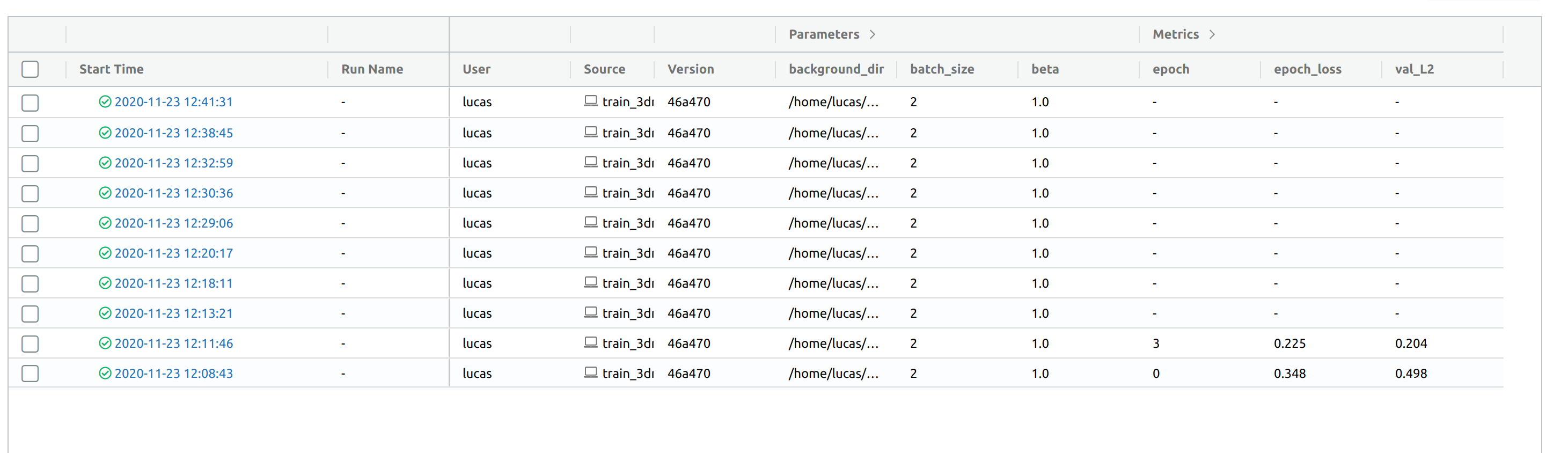
The most recent runs are called with Tune, resulting in no logged metrics. Previous runs are without Tune.
What component(s), interfaces, languages, and integrations does this bug affect?
Components
- [x]
area/tracking: Tracking Service, tracking client APIs, autologging
 dukeeagle
All 4 comments
Hu @dukeeagle thanks for raising this issue.
We (Tune team) are in the process of updating our MLFlow integration, so hopefully these problems won't come up in the future.
However for a quick fix, I think the problem here is that you'll have to setup_mlflow within the trainable. Basically each trainable is started as a separate process, sometimes on remote machines, and it doesn't have access to environment variables. We only pickle code directly related to training.
Thus, if you setup_mlflow in the constructor of your trainable, it might work out of the box.
 krfricke
on 25 Nov 2020
krfricke
on 25 Nov 2020
@dukeeagle As you know that this effort and integration is underway between the Ray and MLflow engineering team.
 dmatrix
on 25 Nov 2020
dmatrix
on 25 Nov 2020
Hu @dukeeagle thanks for raising this issue.
We (Tune team) are in the process of updating our MLFlow integration, so hopefully these problems won't come up in the future.
However for a quick fix, I think the problem here is that you'll have to
setup_mlflow_within_ the trainable. Basically each trainable is started as a separate process, sometimes on remote machines, and it doesn't have access to environment variables. We only pickle code directly related to training.Thus, if you
setup_mlflowin the constructor of your trainable, it might work out of the box.
That solved it! Thank you so much for the help!
dukeeagle
on 25 Nov 2020
@dukeeagle @krfricke Can we close this issue?
dmatrix
on 29 Nov 2020
Related issues
 masa26hiro
·
4Comments
masa26hiro
·
4Comments
 budmitr
·
4Comments
budmitr
·
4Comments
 nkarpovdb
·
5Comments
nkarpovdb
·
5Comments
 gsganden
·
5Comments
gsganden
·
5Comments
 Astonzzh
·
4Comments
Astonzzh
·
4Comments
Most helpful comment
@dukeeagle @krfricke Can we close this issue?