Ml-agents: vectorAction doesn't return right amount of actions
Hi all,
I'm working on an environment by following this tutorial , but the vectorAction in this function
public override void AgentAction(float[] vectorAction, string textAction)
in my Agent script only returns one float when I press play or debug.
When I do
var action = Mathf.FloorToInt(vectorAction[0]);        // movement
        var action_brush = Mathf.FloorToInt(vectorAction[1]);
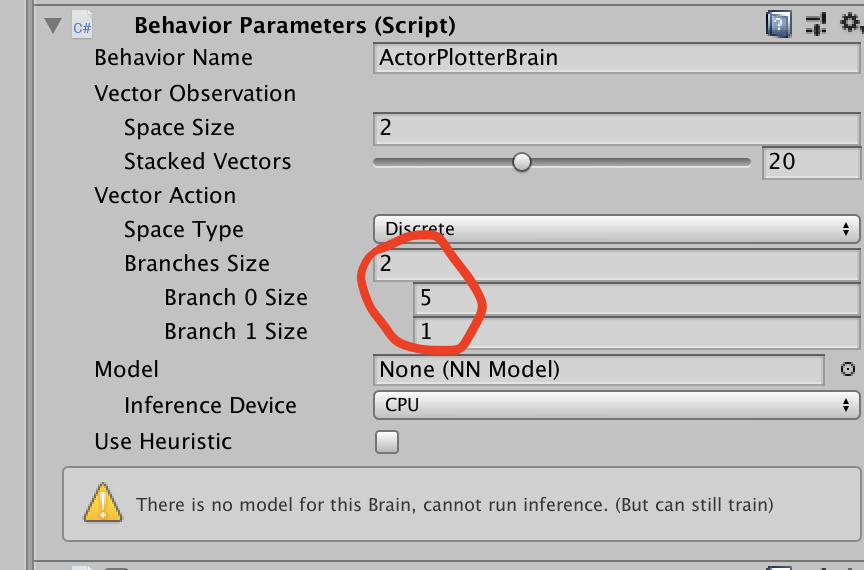
I get the error that my index exceeds array size in the second line (action_brush)
This is strange, because I've set my branches size of VectorAction to 2. Even when setting it to 5 I get only one single float in vectorAction. Or am I doing something wrong here?
Screenshots
- OS + version: OS Mac Mojave 10.14.4
- _ML-Agents version_: ML-Agents Beta 0.11.0
- _TensorFlow version_: 1.14.0
Unity version 2019.2.9f1
 MarkTension
All 8 comments
After further research, it seems that the agent only uses the heuristic method, and never without heuristic, because when I change the
public override float[] Heuristic()
function from returning an array of one to three actions, I do see the length of vectorAction increase in the agentAction function. Strange, since Use Heuristic has not been selected in the Agent's Behavior paramaters
MarkTension
on 25 Nov 2019
Maybe could have something to do with this:


It's an error message that I get when opening the UnitySDK in Unity, and after it asks to change the code so as to be more compatible with my version of unity (because the ml-agents SDK has been built in an older version of Unity)
MarkTension
on 25 Nov 2019
The reason you only get one float is that you use Space Type: Discrete, meaning your agent chooses between two actions. Then you get only one float and its value is an integer corresponding to the action index. So just do a Mathf.RoundToInt or similar, and do different actions based on that.
In case you need two floats you can change space type to continuous
Note that the agent will start with heuristic if you run it without training, since you haven't linked a model into its behavior.
 robinerd
on 25 Nov 2019
robinerd
on 25 Nov 2019
The warning you see is something strange that unity started to do recently which I'm not sure of why. I get that message in ml agents and also several other places in my own code. That variabel is actually assigned from the unity editor, via a custom inspector, but for some reason the compiler doesn't realize that it works in that way so it still complain. It's not affecting the actual running game though.
robinerd
on 25 Nov 2019
Ah I see the tutorial now. They use continuous in their guide (see the final part where they set agent parameters) so that's probably what you need.
robinerd
on 25 Nov 2019
Alright, thanks for the clarification! The part about heuristics explains a lot. I think you're wrong though with the discrete vs continuous. Here's instructions from the documentation:
When you specify that the vector action space is Continuous, the action parameter passed to the Agent is an array of control signals with length equal to the Vector Action Space Size property. When you specify a Discrete vector action space type, the action parameter is an array containing integers. Each integer is an index into a list or table of commands. In the Discrete vector action space type, the action parameter is an array of indices. The number of indices in the array is determined by the number of branches defined in the Branches Size property.
MarkTension
on 26 Nov 2019
You are right, I forgot that they introduced support for multiple branches some time ago. Having a second look at your first screenshot I agree that you should indeed be getting to values. Do you get the same error while training?
robinerd
on 26 Nov 2019
It works in train mode:). So I guess the problem is solved now.
Didn't try train mode at first because I thought something was wrong, while actually it was just a problem with heuristic-mode. Makes sense
MarkTension
on 26 Nov 2019
Related issues
 jlanis
·
4Comments
jlanis
·
4Comments
 Sohojoe
·
3Comments
Sohojoe
·
3Comments
 Porigon45
·
3Comments
Porigon45
·
3Comments
 scotthovestadt
·
4Comments
scotthovestadt
·
4Comments
 mattinjersey
·
3Comments
mattinjersey
·
3Comments