Ml-agents: `System.Text.StringBuilder' could be found.
Drag the ML-Agents folder from unity-environments/Assets to the Unity Editor Project window.And then print this error message.My queastion is why I missing this assembly reference while I Drag the same folder into the Unity Editor Project window and where is it?
_Assets/ML-Agents/Scripts/ExternalCommunicator.cs(259,24): error CS1061: Type System.Text.StringBuilder' does not contain a definition forClear' and no extension method Clear' of typeSystem.Text.StringBuilder' could be found. Are you missing an assembly reference?_
Thank you so much!
 Kevinlinpr
All 12 comments
I assume you created a new project and tried to import all the ml-agents assets, right?
If so, make sure that you are running on .NET 4.6:
Edit -> Project Settings -> Player
Then in the inspector under "Other Settings" select the .NET 4.6 equivalent Scripting Runtime Version.
 MarcoMeter
on 31 Mar 2018
MarcoMeter
on 31 Mar 2018
@MarcoMeter Yeah,you got it,but I found a way that open my new project with double clicking one of the scene from the example folder to avoid this error,it will be fixed automatically by Unity Editor loading the .meta files. I will check my Runtime Version when I import all the ml-agents assets again,and I will reply to you as quickly as possible.
Kevinlinpr
on 2 Apr 2018
Is your editor version 2018.1.0b6?
I assume that's important.
 gw1108
on 3 Apr 2018
gw1108
on 3 Apr 2018
I had a project that had this error, but I was using Unity 2017.3.1f1. Using Unity 2018.1.0b13 and no errors.
Then I reopened the project with Unity 2017.3.1f1 and no errors.
gw1108
on 3 Apr 2018
@gw1108 2017.3.1f1 is my version.
Kevinlinpr
on 3 Apr 2018
I had exactly the same problem and thanks to MarcoMeter it was solved. Thanks! I had selected the .net 3.5 instead of 4.6.
 entropia666
on 8 Apr 2018
entropia666
on 8 Apr 2018
Hi @WindRunnerCackerChen - did the feedback on this thread resolve the issue? Let us know if you need any additional support.
 mmattar
on 12 Apr 2018
mmattar
on 12 Apr 2018
had same problem but resolution from MarcoMeter seems to have fixed it , thanx.
 FortyFortyLabs
on 19 Apr 2018
FortyFortyLabs
on 19 Apr 2018
had the same problem and was able to fix it now thanks to MarcoMeter. (I used 2017.4.1f1 Personal just installed yesterday on OSX.) It might be nicer to mention this in this tutorial.
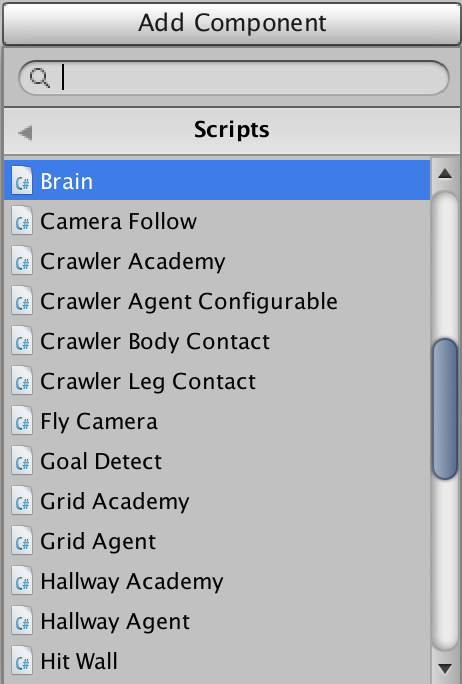
Also before noticing this issue, I originally stuck in Select the Scripts/Brain since I could not find Scripts/Brain component. But this is also fixed and I can see Scripts/Brain component. Thank you!
 h1ros
on 22 Apr 2018
h1ros
on 22 Apr 2018
@mmattar definitely done.thanks
Kevinlinpr
on 24 May 2018
Great, thanks @WindRunnerCackerChen.
mmattar
on 24 May 2018
This thread has been automatically locked since there has not been any recent activity after it was closed. Please open a new issue for related bugs.
![lock[bot] picture](https://avatars1.githubusercontent.com/in/6672?v=4&s=40) lock[bot]
on 3 Jan 2020
lock[bot]
on 3 Jan 2020
Related issues
 bjg2
·
22Comments
bjg2
·
22Comments
 lukemadera
·
25Comments
lukemadera
·
25Comments
 phoenixSK
·
17Comments
phoenixSK
·
17Comments
 mikecann
·
27Comments
mikecann
·
27Comments
 beardordie
·
58Comments
beardordie
·
58Comments
Most helpful comment
I assume you created a new project and tried to import all the ml-agents assets, right?
If so, make sure that you are running on .NET 4.6:
Edit -> Project Settings -> Player
Then in the inspector under "Other Settings" select the .NET 4.6 equivalent Scripting Runtime Version.