Ml-agents: Training RollerBall example doesnt work
I did all the tutorial from: https://github.com/Unity-Technologies/ml-agents/blob/master/docs/Learning-Environment-Create-New.md
But when I do the training with 100.000 steps, it doesnt seems to really train the agent beacuse when I try to see with the Internal Brain the results the ball never reach the target, what could it be?
It dont throw errors so I dont know what happens.
I need to increase the steps or thats not the problem?
 KilianSillero
All 29 comments
I have been struggling with the same problem all evening.
 peterparnes
on 28 Mar 2018
peterparnes
on 28 Mar 2018
We will look into it.
 xiaomaogy
on 28 Mar 2018
xiaomaogy
on 28 Mar 2018
I changed the example a bit and the logic around what to learn.
It works quite good if I change what it observes to these 6 parameters instead:
    // Calculate relative position
    Vector3 relativePosition = Target.position - this.transform.position;

    // Relative position
    AddVectorObs(relativePosition.x);
    AddVectorObs(relativePosition.z);

    // Distance to center of platform
    AddVectorObs(this.transform.position.x - floor.position.x);
    AddVectorObs(this.transform.position.z - floor.position.z);

    // Agent velocity
    AddVectorObs(rBody.velocity.x);
    AddVectorObs(rBody.velocity.z);
It was a very good exercise trying to get this to work!
peterparnes
on 29 Mar 2018
With that 6 parameters works better, but I dont know why, is better for the Agent to know the center of the platform instead of the edges? Why?
KilianSillero
on 29 Mar 2018
@KilianSillero,
It is likely easier for the network to represent distance from the center than keeping track of multiple edges and the distances between all of them.
@peterparnes
Great to hear that this works better. Would you be willing to put these changes to the document into a PR? We'd love to change things so that the intro tutorial works better for new users.
 awjuliani
on 29 Mar 2018
awjuliani
on 29 Mar 2018
Interesting. I used the edges of the platform to support different platform sizes (though for simplicity, I didn't have the Academy adjust the size for different training episodes in this example). I also don't see any real difference in the results from training with either the original or your modified reward setup.
On the other hand, this setup does work better when removing the reward for getting closer to the target, which is something we wanted to do (though keeping that reward still works better in both cases).
Since making this change requires changes throughout the article, and perhaps changes to screenshots, maybe I should make the change -- unless @peterparnes is up for an exciting foray into technical writing!
 jo3w4rd
on 29 Mar 2018
jo3w4rd
on 29 Mar 2018
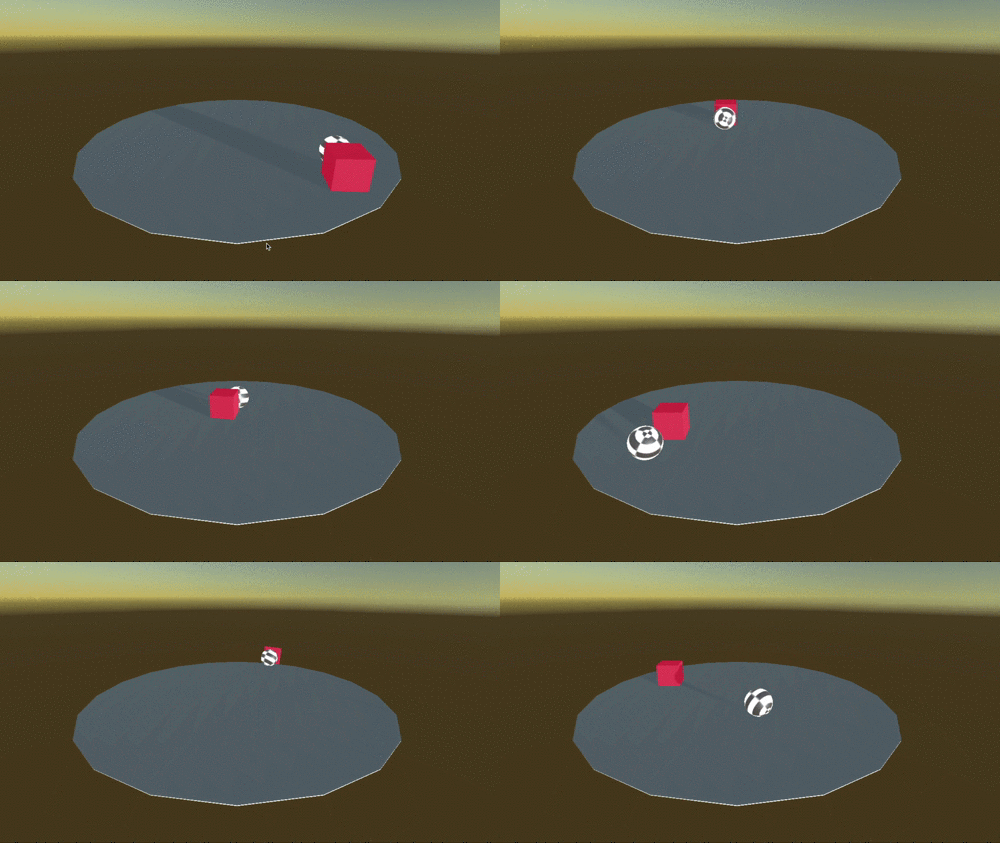
I went a step further and decided to make the problem a little more challenging: have the ball move the block over the edge of the platform, without falling over. Took me quite a while to get this right (tweaking reward values, etc) but works pretty well after about 500k steps. It was definitely a fun problem to solve!
 jlanis
on 31 Mar 2018
jlanis
on 31 Mar 2018
Wow! Impressive. @jlanis, Care to share your files?
peterparnes
on 31 Mar 2018
Here is the modified RollerAgent script:
RollerAgent.cs.zip
I simply added a RigidBody component to the cube with a mass of .001 and make sure that your vector observation is set to 6. The most difficult thing was tweaking the reward values through trial and error, as well as figuring out which values to observe.
Note that after 500k steps, the agent still has a tendency to fall about 20% of the time. I could have used imitation learning but thought it would be more interesting to have it learn on its own. Also, curriculum learning learning might have helped bring down the number of steps, but I wasn't quite sure how to approach that with this specific problem.
jlanis
on 31 Mar 2018
@jlanis Wish I'd look at this weeks ago. I went the same direction (in terms of trying to knock the target off). I also changed the ball to a cat from the asset store. Your solution works much better. I added observations of the position of the target and the velocity of the target. Hard to tell if it helped. The value_loss graph looked better. I also made the floor zero friction. Here's my lame attempts before trying your solution. https://youtu.be/My9G93fN8UA
 JohnnyPhoton
on 18 Apr 2018
JohnnyPhoton
on 18 Apr 2018
@JohnnyPhoton Yeah but your implementation is much cooler (who doesn't love dancing cats?) =D
jlanis
on 18 Apr 2018
@jlanis Yep, nothing like dancing cats! I'm glad you enjoyed them. Did you find that when you increased the penalty for falling off the table, the cat (or ball) just gets too cautious? It just seems to be intimidated about approaching the target. With zero friction it sort of works cause it will just bop the target and then wait for it to fall but with friction turned on, it just takes forever to approach it with a high penalty for falling off. This ml stuff is so interesting and frustrating because you make what you think is a minor tweak and it behaves so differently.
JohnnyPhoton
on 18 Apr 2018
@JohnnyPhoton Yep I had some problems with either the agent being to aggressive (falling off too much) or too cautious. I think it's an interesting and somewhat difficult problem for the neural net because it has to find that right balance point between being too aggressive vs. too cautious. I ended up finding myself making a lot of small adjustments and tweaks to the reward system and the observation state, so you are not alone ;)
In my implementation, one trick that I think helped a little bit was to add a small reward whenever the agent pushed the object:
  if (Mathf.Abs(cubeDistanceToCenter - previousCubeDistanceToCenter) > 0.01f)
  {
            AddReward(0.25f);
  }
@JohnnyPhoton Also, make sure you normalize your rewards [-1,1] as well as your vector observations as outlined in the best practices doc: https://github.com/Unity-Technologies/ml-agents/blob/master/docs/Learning-Environment-Best-Practices.md
(I did not try this!)
jlanis
on 18 Apr 2018
@jlanis I had something similar to the 'pushing the object' reward but I also tried to include pushing toward the closest edge. At one point I took it out just to simplify it but I might put it back in. I spent a good part of the day having to rebuild the whole thing when Unity started freezing up after a build. I need to learn to make more backups! I had not read the best practices doc. Thanks for pointing that out. They are right about large negative rewards Normalizing makes sense. I will have to try some of that tomorrow.
JohnnyPhoton
on 18 Apr 2018
@JohnnyPhoton One more suggestion I would try is to use a discrete action space (if you're not already). Essentially, instead of applying a random velocity/direction vector, you would have 4 discrete movements (left, right, forward and backwards) and for each movement you apply the same amount of force. The reason I want to suggest this is because using a discrete action space simplifies the underlying neural net, which hence should (in theory?) make the learning algorithm more stable (at least I think!).
jlanis
on 18 Apr 2018
@jlanis I normalized everything. I also readjusted the rewards to be much smaller. I give a +1 for knocking it off the table but only -0.4 for falling off. It's a little slower than yours now but it's working about as well and I have not seen it fall off the table (yet).
On your last suggestion I'm not quite sure what you mean. I'm currently using the movement action from your code which I believe was the same as the original example. Care to elaborate?
JohnnyPhoton
on 18 Apr 2018
@JohnnyPhoton Sure. So if you click on your Bain object in the inspector you'll see a dropdown for choosing between a Discrete or Continuous action space (just to clarify - this is for Vector Action, not Vector Observation). The original example as well as the code I posted was set up to use a Continuous action space, which means the float array passed into AgentAction() is assumed to be the force/velocity vector for the agent. On the other hand, a Discrete action space would mean that instead of having the neural net pass in velocity vectors, instead it passes in only one of four options: left, right, forward, or backward. So basically in code it would look something like this:
        int movement = Mathf.FloorToInt(vectorAction[0]);

        if (movement == 0) { directionX = -1; }
        if (movement == 1) { directionX = 1; }
        if (movement == 2) { directionZ = -1; }
        if (movement == 3) { directionZ = 1; }
From a high-level viewpoint, you're essentially doing the same thing (moving the agent), you're just going about it in a different way that is simpler for the neural net to process :)
Now does that mean that a discrete action space is always better than a continuous one? I honestly don't know, but it's just something to keep in mind as an alternative way to approach a problem :) For more info: https://github.com/Unity-Technologies/ml-agents/blob/master/docs/Learning-Environment-Design-Agents.md
jlanis
on 18 Apr 2018
@jlanis It was an interesting thing to try but it didn't seem to work as well. I looked at the 'basic' example where they do discrete and they just do this.transform.position(x,y,z). So you are basically teleporting. I'm thinking I could lerp it to look ok but I decided to just add force in one of the cardinal directions. Well, the cat would move around a bit, then suddenly fly off into the distance backwards like it was being sucked away by a giant vacuum. Yeah, that was probably a bug in my code. So I decided to just go ahead and move it. It did work maybe as good as before but the cat moved like the Flash after having too much coffee. It was bouncing into a few cats at different places. A cat cloud if you will. Anyway you could find a way to smooth it but since it didn't seem to be an improvement and the continuous version leads to a more natural animation. I went back to continuous. Thanks for mentioning it though, it was worth checking out.
JohnnyPhoton
on 19 Apr 2018
@JohnnyPhoton I was working on a project the other day and simply used AddForce() on the agent's rigidbody component and had no issues with that using discrete actions. If you find that the agents are moving to fast, you can always cap their velocities. Always test in Player mode first :)
jlanis
on 19 Apr 2018
@jlanis Yeah, I'm sure I could have gotten it to work that way. What other stuff have you done with this? I'm still working thru the examples. Making the cat roll the ball off the table is the biggest diversion from an example I've done so far and it wasn't that different. I keep thinking there are some really different ways of applying this I haven't thought of.
JohnnyPhoton
on 20 Apr 2018
@JohnnyPhoton Well one thing you could try to make it more difficult would be to add additional obstacles to the environment that the agent would need to navigate around. To go even a step further you could add dynamic obstacles (i.e, a wall that moves up/down or left/right). However one thing I've learned about these neural nets is that they don't necessarily adapt well to different environments (meaning that each new environment has to be trained separately). Anyway just some ideas but there a lot of a different ways to add more complexity.
jlanis
on 20 Apr 2018
@jlanis I am trying to do your example to practise but the ball keeps falling off the platform no matter how I change the rewards.
Did you do something "special" for that?
That's the code and the .bytes result of 500k training
RollerBallPush.zip
KilianSillero
on 12 May 2018
@KilianSillero @jlanis
Here is the modifications I made that did the best job of not falling off the table. I added observations for the target position and velocity and lowered the rewards. Note the negative reward for falling is not that high but this does a much better job.
using System.Collections.Generic;
using UnityEngine;

public class RollerAgent : Agent
{
    Rigidbody rBody;
    Rigidbody trBody;
    public Transform Target;
    List<float> observation = new List<float>();

    public float speed = 10;
    private float previousDistance = float.MaxValue;
    private float cubeDistanceToCenter = 0;
    private float previousCubeDistanceToCenter = 0;

    private const float MIN_FLOOR = 0.25f;
    private float playerDistanceToCenter = 0;

    void Start()
    {
        rBody = GetComponent<Rigidbody>();
        trBody = Target.GetComponent<Rigidbody>();

        Vector3 targetPos = new Vector3(Target.position.x, 0, Target.position.z);
        cubeDistanceToCenter = previousCubeDistanceToCenter = targetPos.magnitude;

        playerDistanceToCenter = 0;
    }

    public override void AgentReset()
    {
        if (this.transform.position.y < MIN_FLOOR)
        {
            // The agent fell
            this.transform.position = new Vector3(0, 1f, 0);
            this.rBody.angularVelocity = Vector3.zero;
            this.rBody.velocity = Vector3.zero;
            playerDistanceToCenter = 0;
        }
        else
        {
            // Move the target to a new spot
            Target.position = new Vector3(Random.value * 8 - 4,
                0.75f,
                Random.value * 8 - 4);

            Target.gameObject.GetComponent<Rigidbody>().velocity = Vector3.zero;
            Target.gameObject.GetComponent<Rigidbody>().angularVelocity = Vector3.zero;

            Target.rotation = Quaternion.identity;

            Vector3 targetPos = new Vector3(Target.position.x, 0, Target.position.z);
            cubeDistanceToCenter = previousCubeDistanceToCenter = targetPos.magnitude;

        }
    }

    public float tableSize = 10.0f;

    public override void CollectObservations()
    {

        // Calculate relative position
        Vector3 relativePosition = Target.position - this.transform.position;
        playerDistanceToCenter = this.transform.position.magnitude;

        // Relative position
        AddVectorObs(relativePosition.x / tableSize);
        AddVectorObs(relativePosition.z / tableSize);

        // Distance to center of platform
        AddVectorObs(this.transform.position.x / tableSize);// - floor.position.x);
        AddVectorObs(this.transform.position.z / tableSize);// - floor.position.z);

        // Agent velocity
        AddVectorObs(rBody.velocity.x);
        AddVectorObs(rBody.velocity.z);


        // Added additional observations

        // Target Distance to center of platform
        AddVectorObs(Target.transform.position.x / tableSize);// - floor.position.x);
        AddVectorObs(Target.transform.position.z/ tableSize);// - floor.position.z);

        // Target velocity
        AddVectorObs(trBody.velocity.x);
        AddVectorObs(trBody.velocity.z);
    }

    public override void AgentAction(float[] vectorAction, string textAction)
    {
        // Rewards
        float distanceToTarget = Vector3.Distance(this.transform.position,
            Target.position);

        Vector3 targetPos = new Vector3(Target.position.x, 0, Target.position.z);
        cubeDistanceToCenter = targetPos.magnitude;

        // Add reward if the ball is pushing the cube
        if (Mathf.Abs(cubeDistanceToCenter - previousCubeDistanceToCenter) > 0.01f)
        {
            AddReward(0.25f);
        }

        if (Mathf.Abs(trBody.velocity.magnitude) > 0)
        {
            AddReward(0.25f);
        }

        if (Target.position.y < MIN_FLOOR)
        {
            AddReward(1.0f);
            Done();
        }

        /// moving towards cube, add reward
        if (distanceToTarget < previousDistance)
        {
            AddReward(0.1f);
        }

        // Time penalty
        AddReward(-0.1f);

        // Fell off platform
        if (this.transform.position.y < MIN_FLOOR)
        {
            AddReward(-0.4f);
            Done();

        }
        previousDistance = distanceToTarget;
        previousCubeDistanceToCenter = cubeDistanceToCenter;

        // Actions, size = 2
        Vector3 controlSignal = Vector3.zero;
        controlSignal.x = Mathf.Clamp(vectorAction[0], -1, 1);
        controlSignal.z = Mathf.Clamp(vectorAction[1], -1, 1);
        rBody.AddForce(controlSignal * speed);
    }
}
@JohnnyPhoton I changed my code to make it simmilar to yours but didnt work no matter what I do, so I copy paste your code and doesn't work either.
I dont know what I am doing bad. How much did you train your agent? 500k is not enought?
KilianSillero
on 19 May 2018
@KilianSillero
Now that I think about it, I may have changed my batch and buffer sizes. Don't recall what the originals were.
trainer: ppo
    batch_size: 1024
    beta: 5.0e-3
    buffer_size: 10240
    epsilon: 0.2
    gamma: 0.99
    hidden_units: 128
    lambd: 0.95
    learning_rate: 3.0e-4
    max_steps: 5e5
    memory_size: 256
    normalize: false
    num_epoch: 3
    num_layers: 2
    time_horizon: 64
    sequence_length: 64
    summary_freq: 1000
    use_recurrent: false
JohnnyPhoton
on 19 May 2018
@JohnnyPhoton I have the same
trainer: ppo
batch_size: 1024
beta: 5.0e-3
buffer_size: 10240
epsilon: 0.2
gamma: 0.99
hidden_units: 128
lambd: 0.95
learning_rate: 3.0e-4
max_steps: 5.0e5
memory_size: 256
normalize: false
num_epoch: 3
num_layers: 2
time_horizon: 64
sequence_length: 64
summary_freq: 1000
use_recurrent: false
too much training is bad?
This is the last attempt, I don't know too much of this but if is util for know the problem, this is the
tensorboard
KilianSillero
on 20 May 2018
Thanks for reaching out to us. Hopefully you were able to resolve your issue. We are closing this due to inactivity, but if you need additional assistance, feel free to reopen the issue.
xiaomaogy
on 19 Jun 2018
This thread has been automatically locked since there has not been any recent activity after it was closed. Please open a new issue for related bugs.
![lock[bot] picture](https://avatars1.githubusercontent.com/in/6672?v=4&s=40) lock[bot]
on 3 Jan 2020
lock[bot]
on 3 Jan 2020
Related issues
 karthikveeramani
·
31Comments
karthikveeramani
·
31Comments
 shengtianzhu
·
17Comments
shengtianzhu
·
17Comments
 mikecann
·
27Comments
mikecann
·
27Comments
 alexchacon2341
·
30Comments
alexchacon2341
·
30Comments
 devedse
·
34Comments
devedse
·
34Comments
Most helpful comment
Here is the modified RollerAgent script:
RollerAgent.cs.zip
I simply added a RigidBody component to the cube with a mass of .001 and make sure that your vector observation is set to 6. The most difficult thing was tweaking the reward values through trial and error, as well as figuring out which values to observe.
Note that after 500k steps, the agent still has a tendency to fall about 20% of the time. I could have used imitation learning but thought it would be more interesting to have it learn on its own. Also, curriculum learning learning might have helped bring down the number of steps, but I wasn't quite sure how to approach that with this specific problem.