Ml-agents: Need some help with 3DBall example
Setting up dependencies and building 3DBall example for the first time using readme ...
While running the PPO notebook "load the environment" step, there is a timeout. Have tried passing a different workerid and port but that doesn't help. Running all this on Windows 10.
Could someone figure out what went wrong? I pretty much followed instructions in the readme and didn't get fancy with anything.

 karthikveeramani
All 31 comments
Is the brain set to external within the Unity project?
 eagleEggs
on 29 Sep 2017
eagleEggs
on 29 Sep 2017
@eagleEggs Yes it is
karthikveeramani
on 29 Sep 2017
Anyone? Developers?
karthikveeramani
on 29 Sep 2017
I'm having this issue as well. not sure if it's the env_name that's making this issue.
now I'm stuck
 FadhliSani
on 29 Sep 2017
FadhliSani
on 29 Sep 2017
@FadhliSani I did change the env_name to "3DBall" or something like that. And the path as well (it was "ppo" by default).
karthikveeramani
on 29 Sep 2017
mine looks like this

FadhliSani
on 29 Sep 2017
Ping ... Devs, help please?
karthikveeramani
on 29 Sep 2017
@karthikveeramani Maybe one of these is the reason :
- It is not possible to rename the .exe file after it has been built.
- Make sure you build the right scene when building
- Make sure the brain is set to external like @eagleEggs said.
- Make sure you build the unity game in the right folder and replace the old version
Could you also tell me what happens when you directly open the built environment ? (double click on it)
Could you make a development build and tell us if there is an error in the C# code ?
 vincentpierre
on 29 Sep 2017
vincentpierre
on 29 Sep 2017
@FadhliSani I think your issue is because your "game" has either been renamed or is not in the python folder since the error says the filename does not match. Also, make sure that when you build, you target the right platform and architecture.
vincentpierre
on 29 Sep 2017
@vincentpierre
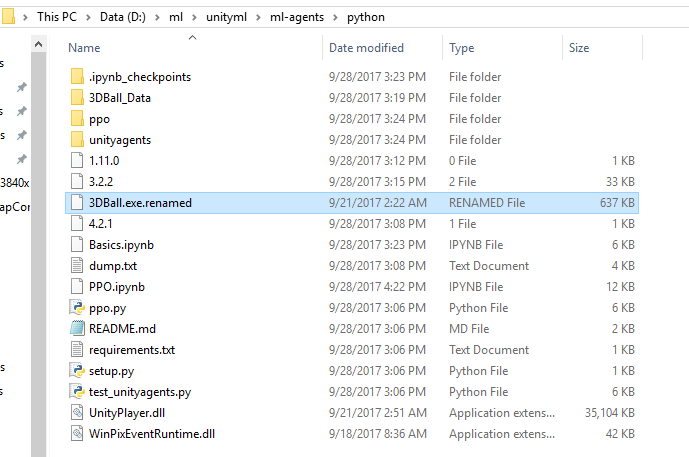
It is not possible to rename the .exe file after it has been built.
-- I tried renaming the exe to 3DBall.exe.renamed manually, it worked (screenshot below)
Make sure you build the right scene when building
-- screenshot below to show that I'm building the 3DBall scene

Make sure the brain is set to external like @eagleEggs said.
-- confirmed, see screenshot

Make sure you build the unity game in the right folder and replace the old version
-- I cleaned out the binaries and rebuilt to the same folder (ml-agentspython), no change
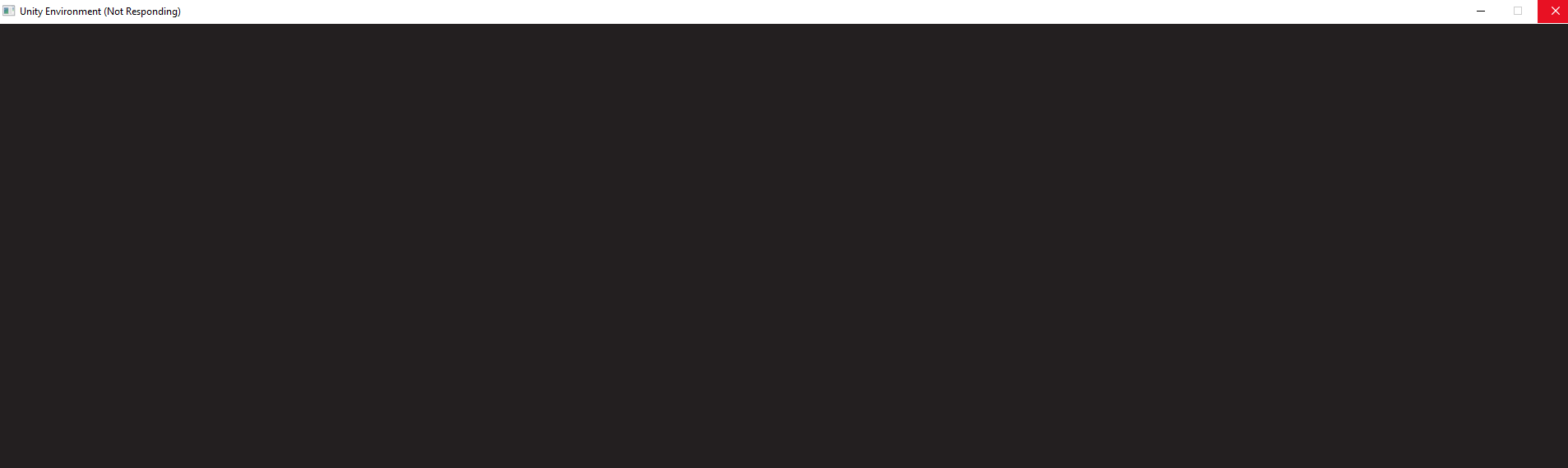
Could you also tell me what happens when you directly open the built environment ? (double click on it)
-- After the Made With Unity screen, it hangs. screenshot below.
Could you make a development build and tell us if there is an error in the C# code ?
-- I did enable Development Build settings (as in the earlier screenshot). As for the errors:
1) No error popped up as a dialog box when I double clicked the built exe, it appeared to be hanging with the spinner cursor.
2) Within the editor, I tried hitting the play button and that appeared to run the scene without errors.
3) From the editor, when I hit Build & Run as opposed to going through the build settings menu, I saw a crash and a crash log. Same thing happened when I re-ran as administrator. Attached crash logs below. Opening the crash.dmp file with visual studio, I found this to be of interest:

Now your turn :)
karthikveeramani
on 30 Sep 2017
By the way, I noticed that when I double clicked the exe, memory usage goes to 98-99% while it hangs.
karthikveeramani
on 30 Sep 2017
@karthikveeramani I think I was not clear, when I said "It is not possible to rename the .exe file after it has been built." I meant that you can rename it but if you do, it would not work. But this does not seem to be you issue.
Are you able to run the scene with a player brain in the editor? If you build with a player brain, does the game open ?
vincentpierre
on 30 Sep 2017
Are you running this from a pre-existing project? Can you create a blank scene in that project, build it, and see if it runs? Also, try creating this in a new project if not already. Redownload the entire package, dont change PPO parameter, keep everything default and try to rebuild the ball example.
eagleEggs
on 30 Sep 2017
@vincentpierre Do you have some instructions on how to run the scene with a "player brain in the editor"? Sorry I am new to to machine learning and not that familiar with Unity.
@eagleEggs I did a git clone of your project and opened straight from there. I can check Monday and do a git reset to blow away anything that may have changed. I can also try creating a new project, but are you suggesting I copy the 3DBall scene into that from the existing project? I could use some details on that part.
karthikveeramani
on 30 Sep 2017
@karthikveeramani You sent a screen shot of your brain component in a previous message, change the Type of Brain to Player and then try to run the scene in the editor and finally, build the game for windows machine. I am trying to figure out if the "Thread tried to read from or write to a virtual address..." is an issue specific to ML-Agents or if it happens with every game you build.
vincentpierre
on 30 Sep 2017
@vincentpierre got it. don't have that computer with me now but will do it Monday and report back.
karthikveeramani
on 1 Oct 2017
Hey. I have completely the same thing!
But for me, the first time I build the environment, it worked, though the simuilation launched in like 200x100 pixels resolution. THen I decided to turn on the Resolution Dialogue, changed the resolution. Unfortunately the timeout sprung. I turned it off again, and it cannot connect to Environment from Python again.
FIxed by changing instantiation of env to:
env = UnityEnvironment(file_name=env_name, worker_id=2, base_port=8080)
 Adamage
on 1 Oct 2017
Adamage
on 1 Oct 2017
@Adamage,
It is better to adjust resolution from within the Academy inspector window (see here: https://github.com/Unity-Technologies/ml-agents/blob/master/docs/Agents-Editor-Interface.md#academy), rather than the resolution window, since this allows the resolution to automatically be set, and there is no risk of timeout from delayed response.
 awjuliani
on 1 Oct 2017
awjuliani
on 1 Oct 2017
Thanks @awjuliani . I found it. The PPO example works flawlessly, although I need to change worker Id often. Actually on time scale 1, it converged to a reward~500 in a matter of minutes. ML agents will be my go to from now on...
Adamage
on 1 Oct 2017
@vincentpierre @eagleEggs I tried your suggestions and found a few things ...
It looks like the access violation may be outside the scope of ML project. I created a blank project, added a blank scene. Built it with similar settings (run in background, disable resolution display dialog) and it crashed with a similar error. I tried reverting each of those changed player settings back and that didn't help. Tried running as admin and no luck there too. The crash appears to be inside UnityPlayer.dll.
"
UnityPlayer.dll caused an Access Violation (0xc0000005)
in module UnityPlayer.dll at 0033:e4ec05d5."
Googling shows that that error is kinda broad and many people have faced it for various reasons. I'm stuck at this point. I realize it may be outside the scope of this project, but being Unity devs, if you have some wise words I would appreciate it. On the other hand if you don't want to pollute this thread with unrelated things, you can close it off, perhaps pointing me to some lead I can go investigate.
karthikveeramani
on 2 Oct 2017
Btw, I use Unity 2017.3.0b2 Personal 64bit (DX11)
karthikveeramani
on 2 Oct 2017
Hey guys, an update. I solved this problem. I uninstalled Unity 2017.3.0b2, installed 2017.1, and I could run through the entire 3DBall example just fine. You may want to consider fixing the problem I saw in the newer version.
Thank you for all your support, I appreciate it!
karthikveeramani
on 3 Oct 2017
Thanks @karthikveeramani for bringing this to our attention. We will look into it to ensure 2017.3 works properly with ML-Agents.
awjuliani
on 3 Oct 2017
Hi the same issue is encountered in 2017.1.1 ...However 2017.1.0 works. Cheers.
 srmojuze
on 4 Oct 2017
srmojuze
on 4 Oct 2017
I suggest adding a note to the readme page at the project root to install the specific version that works, until you guys fix this problem. It will save noobs like me a few days of debug time.
karthikveeramani
on 4 Oct 2017
12/23/2017. It is not working in both 2017.1.0f3 and 2017.3.0.f3.
Already set to external, the unity window popped up, the ball failed to the pad and then the game stuck.
Error message is the same as above:
timeout Traceback (most recent call last)
~\Desktop\ml-agentspython\unityagents\environment.py in __init__(self, file_name, worker_id, base_port, curriculum)
98 self._socket.listen(1)
---> 99 self._conn, _ = self._socket.accept()
100 self._conn.settimeout(30)
d:\softwarespython3\lib\socket.py in accept(self)
204 """
--> 205 fd, addr = self._accept()
206 # If our type has the SOCK_NONBLOCK flag, we shouldn't pass it onto the
timeout: timed out
During handling of the above exception, another exception occurred:
UnityTimeOutException Traceback (most recent call last)
----> 1 env = UnityEnvironment(file_name=env_name, curriculum=curriculum_file)
2 print(str(env))
3 brain_name = env.external_brain_names[0]
~\Desktop\ml-agentspython\unityagents\environment.py in __init__(self, file_name, worker_id, base_port, curriculum)
105 "The Unity environment took too long to respond. Make sure {} does not need user interaction to "
106 "launch and that the Academy and the external Brain(s) are attached to objects in the Scene."
--> 107 .format(str(file_name)))
108
109 if "apiNumber" not in p:
UnityTimeOutException: The Unity environment took too long to respond. Make sure ball does not need user interaction to launch and that the Academy and the external Brain(s) are attached to objects in the Scene.
 Mohan-Zhang-u
on 23 Dec 2017
Mohan-Zhang-u
on 23 Dec 2017
same error as in 2017.2 @Mohan-Zhang-u
 zzzhacker
on 16 Jan 2018
zzzhacker
on 16 Jan 2018
Hi, i am using Unity 2017.3.0f3 (64-bit). When I run Basics.ipynb it gives me this error

 aliBUT
on 18 Feb 2018
aliBUT
on 18 Feb 2018
Did you try to change this line?
So that it looks like this
env = UnityEnvironment(file_name=env_name, worker_id=2, base_port=8080)
Adamage
on 22 Feb 2018
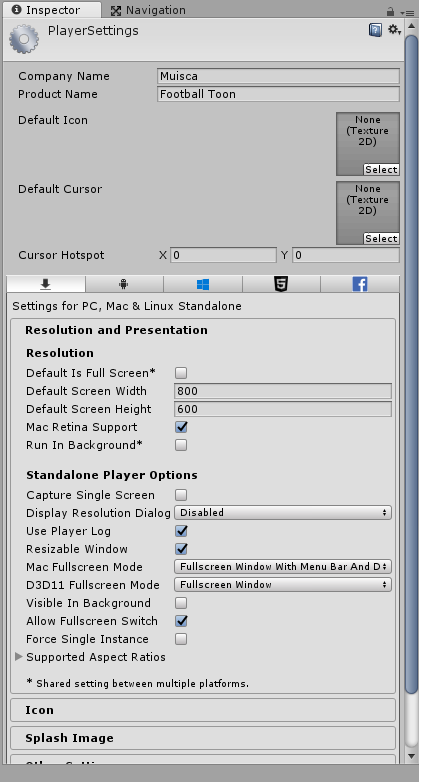
Uncheck DEFAULT IS FULL SCREEN
in Player Settings.
 sysmaya
on 1 Apr 2018
sysmaya
on 1 Apr 2018
This thread has been automatically locked since there has not been any recent activity after it was closed. Please open a new issue for related bugs.
![lock[bot] picture](https://avatars1.githubusercontent.com/in/6672?v=4&s=40) lock[bot]
on 3 Jan 2020
lock[bot]
on 3 Jan 2020
Related issues
 m-ronchi
·
22Comments
m-ronchi
·
22Comments
 KilianSillero
·
29Comments
KilianSillero
·
29Comments
 alexchacon2341
·
30Comments
alexchacon2341
·
30Comments
 phoenixSK
·
17Comments
phoenixSK
·
17Comments
 batu
·
22Comments
batu
·
22Comments