Mkdocs-material: 📚 Call for contributions: New tutorial section
With Material for MkDocs 5 being released, we want to add a new section to the site called __Tutorials__ (in the tabs, just before __Releases__), which provides step-by-step instructions for some standard cases.
Ideas (authors in brackets, if given):
- [ ] How to get up and running with pip, git or docker
- [x] How to deploy to GitHub Pages (@Andre601)
- [ ] How to customize colors with CSS variables (@diba1013)
- [x] How to add and use a custom icon set (@diba1013)
- [ ] ...?
I'm happy to expand on other topics and think it would give users a better starting point than just the description of features in the documentation. It would be really great, if this could be a community effort. If somebody went through one or more of the problems, writing a step-by-step guide should be quite straight forward. This will help other users and probably also reduce the number of issues opened.
Let's get started!
 squidfunk
All 21 comments
Just to reduce race conditions, I will start on the following topics and describe the basic approach to them. I will play around with them a bit more (e.g. try out a dark mode) in a separate repo (i.e. perform all above mentioned steps 🤔).
- How to customize Material for MkDocs with CSS variables.
- How to define your own icon sets.
I did this partially while updating to mkdocs-material-v5 (see PR retest/docs#106).
 diba1013
on 9 Apr 2020
diba1013
on 9 Apr 2020
@diba1013 both are great topics, looking forward! I added your name to the list, so we don't duplicate efforts.
squidfunk
on 9 Apr 2020
I could try working on the how to deploy to GitHub pages.
I assume the page should explain the mkdocs gh-deploy method, but also alternative methods like just building the page and pushing it manually?
I just need to know what should be included and some rough styling guidelines/rules to make it look good.
 Andre601
on 10 Apr 2020
Andre601
on 10 Apr 2020
I assume the page should explain the mkdocs gh-deploy method, but also alternative methods like just building the page and pushing it manually?
In my playground project, I use GitHub Actions. At work, we use Travis. But both build and push "manually".
I assume this strongly depends on what your workflow is or what CI you are using.
But I would love to see some alternative options at least outlined. E.g. you can deploy your static page using multiple approaches: mkdocs gh-deploy, manual using GitHub Actions or Travis, etc..
Maybe even recommend a method. Does the mkdocs gh-deploy do something special, ...?
diba1013
on 10 Apr 2020
Does the mkdocs gh-deploy do something special, ...?
I builts the docs and directly pushes it to the gh-pages branch of the connected GitHub repository
Andre601
on 10 Apr 2020
I would stick with GitHub actions. They're free for open source and don't require another account. Also the idea is not to duplicate some instructions but help people who have little knowledge, so they can hit the ground running 😊
Ideally we would have a set of how tos that build up on each other, so I would absolutely encourage cross referencing, especially to deduplicate efforts.
squidfunk
on 11 Apr 2020
Not 100% sure how I should setup the page then...
Andre601
on 11 Apr 2020
That is something we have to find out. Unfortunately, I don't have the time to think about this deeply, so this issue is meant as a general ground for discussion where we converge on a structure that makes sense. After all, it should be what you, the users, would want and expect.
Think of it as a curated list of cross-referenced Stackoverflow-like posts. What I will contribute, though, is a guide on how to use the new Reactive architecture to extend the theme, but we should start with the basic things first.
squidfunk
on 11 Apr 2020
A minor Idea/draft I have right now:
````
Publish to GitHub Pages
You can publish your documentation to GitHub Pages in various ways.
Some of those are listed below.
Using GitHub Actions
You can setup and use GitHub Actions in your repository to auto-publish your docs once you commit to a specific branch, merge pull requests, or whatever action you want to perform.
!!! warning "Important"
You need to create a Access Token with "repo" scope for the GitHub Action to work.
The GitHub Token that is created with Actions may work, but has some minor issues in combination with the gh-pages branch.
To beginn will you need to go to the Actions tab of your GitHub Repository.
There, create a new Action, give it a name and populate the file with the following content:
name: Deploy MkDocs files

on:
  push:
    paths:
    - 'docs/**'
    - '**.yml'
    branches:
    - master

jobs:
  build:
    runs-on: [ubuntu-latest]
    steps:
    - uses: actions/checkout@v2
    - name: Set up Python 3.7
      uses: actions/setup-python@v1
      with:
        python-version: 3.7
    - name: Install dependencies
      run: |
        python -m pip install --upgrade pip setuptools
        python -m pip install -r requirements.txt
    - name: Deploy Files
      run: |
        git config user.name ${{ secrets.GH_USER }}
        git config user.email "${{ secrets.GH_MAIL }}"
        git remote add gh-token "https://${{ secrets.GH_TOKEN}}@github.com/username/myrepo.git"
        git fetch gh-token && git fetch gh-token gh-pages:gh-pages
        python -m mkdocs gh-deploy --clean --remote-name gh-token
        git push gh-token gh-pages
!!! info "Notes"
- You can switch push with whatever valid Action GitHub supports.
- It's recommended to have the paths set in the above example to only trigger the action when committing changes towards the docs directory or while editing yaml files like mkdocs.yml
- You need to have a file called requirements.txt in the root directory of your repository, which should contain the required version of mkdocs-material (i.e. mkdocs-material>=5.0.0)
- ${{ secrets.GH_USER }} and ${{ secrets.GH_EMAIL }} can either be an actual secret containing your username and E-Mail (recommended) or you can just switch them with your Username and E-Mail.
- ${{ secrets.GH_TOKEN }} has to be a secret containing the aforementioned Access token.
The above action would now install Python, upgrade setuptools, download all listed dependencies in the requirements.txt, set up a temporary Git repository to take the files from your repository to the pushing them towards the gh-pages branch using the mkdocs gh-deploy command.
Using mkdocs gh-deploy
MkDocs comes packed with a command called gh-deploy.
This command builds the documentation (similar to mkdocs build) and then pushes it towards the repository defined in the repo_url of the mkdocs.yml.
Note that this push happens towards the gh-pages branch of your repository. If your repository doesn't have a gh-pages branch yet, or you didn't enable GitHub Pages yet for your repository, will this automatically create a branch and activate GitHub pages.
!!! info "Switching branches"
You can define a different branch that the built site should be pushed against, by adding a remote_branch option to your mkdocs.yml and give it any name you like.
Pushing manually
You can also push manually if you want to use a different method of displaying your documentation on GitHub Pages (i.e. using the docs folder on the master branch).
To do this, run the command mkdocs build to build the page. This won't deploy/push your changes!
Where the site is built towards depends on if and what path you set as site_dir in the mkdocs.yml
You can then just push the generated files towards your repository.
````
Andre601
on 11 Apr 2020
@Andre601 thanks for the draft! Some notes:
- I would recommend creating the file directly as part of source control, which will be automatically picked up by GitHub, e.h.
.github/workflows/ci.yml. When you create this file, populate it with the content and commit if, the action is set up. We can, however mention the GUI approach as an alternative. - You mention the
gh-deploycommand after using it in the GitHub action
Could you open a PR for this? It's better for the discussion of individual tutorials/howtos. We'll leave the separate PRs open until we've converged on a structure.
squidfunk
on 11 Apr 2020
@squidfunk To contribute something back to the project, I could do a similar howto deploy guide for GitLab. Gitlab-ci makes it really easy to deploy mkdocs with mkdocs-material to GitLab pages.
Is there demand for such a guide?
 ayeks
on 22 Apr 2020
ayeks
on 22 Apr 2020
@ayeks I guess we can add some directions on GitLab as an alternative to GitHub pages. Could this be integrated into the GitHub Pages tutorial? Maybe we can restructure it to account for different deployment scenarios. The tutorials should be as compact as possible while laying out the exact steps that are necessary to get from zero to one 😊
squidfunk
on 22 Apr 2020
I would probably add a page like GitHub pages and call it GitLab pages. Because of the nice integration of gitlab-ci with GitLab and its pages is basically a really simple pipeline without the need for configuring anything.
image: python:latest

stages:
  - build
  - deploy

build:
  stage: build
  script:
    - pip install -r requirements.txt
    - mkdocs build --strict
  artifacts:
    expire_in: 3h
    paths:
      - site/
  tags:
    - DOCKER

pages:
  stage: deploy
  script:
    - mv site public/
  dependencies:
    - build
  artifacts:
    paths:
    - public
  only:
    - master
  tags:
    - DOCKER
Just copy that pipeline into any mkdocs project on GitLab and it will build and publish the pages. If it is okay with you I will push a branch later this week with a GitLab Pages tutorials page.
ayeks
on 22 Apr 2020
I think it's better have too many rather than too few tutorials.
And I'm sure there are a few people that use GitLab pages and want to use MkDocs with it.
Andre601
on 22 Apr 2020
My feeling is that too many tutorials won't help anyone without a good structure. It's however fine to add it as a separate page for now, we can consolidate stuff later. The ultimate goal would be to have kind of a user guide by linking all tutorials, giving step by step instructions.
squidfunk
on 22 Apr 2020
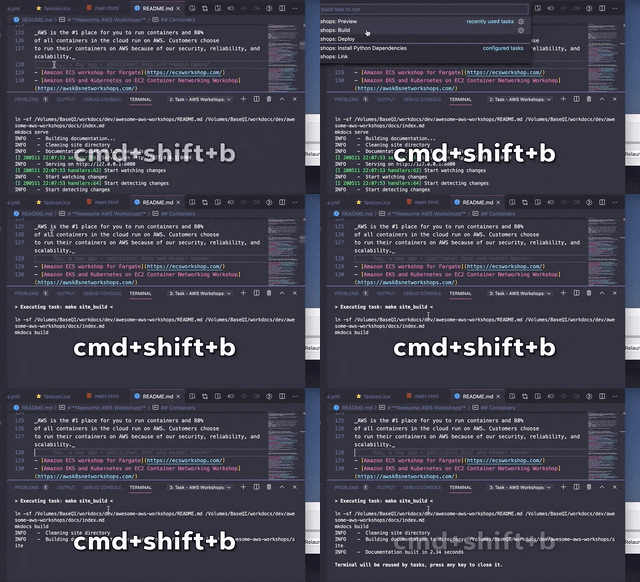
Is anyone interested in setting up local editors tasks to work with the projects?
eg.: dgomesbr/awesome-aws-workshops/blob/master/.vscode/tasks.json
With this, it's easy to invoke via cmd+shift+b the task list (which invokes make actions)
 dgomesbr
on 12 May 2020
dgomesbr
on 12 May 2020
Thanks for offering! However, I think it’s a little beyond the scope from what we want to present in the docs. I think we should concentrate on the outcome, not on the process of writing. It’s also specific to VSCode (which I love and use btw).
squidfunk
on 12 May 2020
Like @ayeks I'm also deploying mkdocs-material sites to GitLab. Happy to help with a tutorial on that.
 snim2
on 13 May 2020
snim2
on 13 May 2020
We already have a tutorial for that in-place :-) I'll just need to find some time and revisit everything that was written for consolidation. But thanks!
squidfunk
on 13 May 2020
I'm closing this in favor of #1735 and want to say thank you to everyone who contributed to this undertaking. Your work will be integrated into the new structure. I thought a lot about the tutorial section and came to the conclusion that we should rewrite the docs in a way that such a section isn't needed - the docs themselves should be tutorial-like.
squidfunk
on 31 May 2020
Awesome idea.
Andre601
on 31 May 2020
Related issues
 Timber232
·
3Comments
Timber232
·
3Comments
 danierutu
·
3Comments
danierutu
·
3Comments
 tiangolo
·
3Comments
tiangolo
·
3Comments
 michael-nok
·
3Comments
michael-nok
·
3Comments
 yannduran
·
4Comments
yannduran
·
4Comments