Mkdocs-material: No php syntax hightlighting
For example in default template I get for
```php

...some random php code...
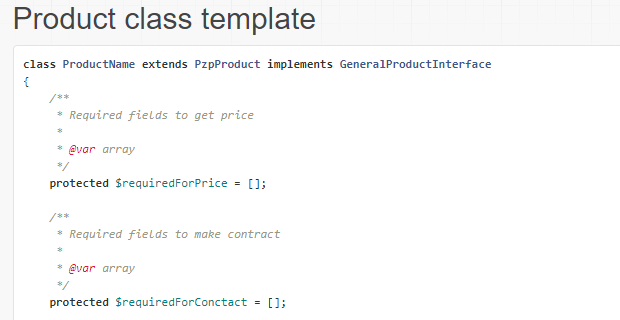
and in material
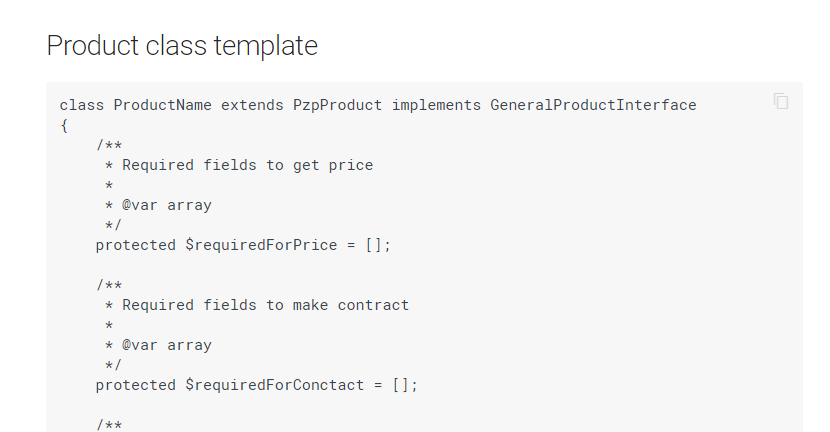
and in github
class ProductName extends PzpProduct implements GeneralProductInterface
{
    /**
     * Required fields to get price
     *
     * @var array
     */
    protected $requiredForPrice = [];

    /**
     * Required fields to make contract
     *
     * @var array
     */
    protected $requiredForConctact = [];
If you somehow could make it at least GIT version I would be really grateful
btw really good job done with this template
 tonoslav
All 10 comments
 squidfunk
on 19 Oct 2017
squidfunk
on 19 Oct 2017
Sorry
tonoslav
on 19 Oct 2017
No worries. You can achieve it without the <?php tag when using PyMdown extensions, see thread.
squidfunk
on 19 Oct 2017
In short, you'll have to migrate to using pymdownx.highlight instead of markdown.extensions.codehilite, but to save yourself some pain, configure it to use the .codehilite class as Material still has some corner cases that aren't fully supported for the default .highlight class that it uses. One of these days I plan to do a pull to fix those 😉 .
 facelessuser
on 19 Oct 2017
facelessuser
on 19 Oct 2017
@facelessuser, @squidfunk
Thank you,
I am not very good in Python, can you help me?
Do I need to install something or ?
I have found that I should add
markdown_extensions:
  - markdown.extensions.codehilite:
      guess_lang: false
  - pymdownx.inlinehilite:
  - pymdownx.superfences:
      extend_pygments_lang:
        - name: php
          lang: php
          options:
            startinline: true
but after that it shows me errors when I run mkdocs serve and I am not even good at debuging python errors
So what should I do please?
tonoslav
on 19 Oct 2017
Please post the errors you are getting.
squidfunk
on 19 Oct 2017
@squidfunk
ERROR   -  Error building page index.md
Traceback (most recent call last):
  File "c:\users\tonon\appdata\local\programs\python\python36\lib\runpy.py", line 193, in _run_module_as_main
    "__main__", mod_spec)
  File "c:\users\tonon\appdata\local\programs\python\python36\lib\runpy.py", line 85, in _run_code
    exec(code, run_globals)
  File "C:\Users\tonon\AppData\Local\Programs\Python\Python36\Scripts\mkdocs.exe\__main__.py", line 9, in <module>
  File "c:\users\tonon\appdata\local\programs\python\python36\lib\site-packages\click\core.py", line 722, in __call__
    return self.main(*args, **kwargs)
  File "c:\users\tonon\appdata\local\programs\python\python36\lib\site-packages\click\core.py", line 697, in main
    rv = self.invoke(ctx)
  File "c:\users\tonon\appdata\local\programs\python\python36\lib\site-packages\click\core.py", line 1066, in invoke
    return _process_result(sub_ctx.command.invoke(sub_ctx))
  File "c:\users\tonon\appdata\local\programs\python\python36\lib\site-packages\click\core.py", line 895, in invoke
    return ctx.invoke(self.callback, **ctx.params)
  File "c:\users\tonon\appdata\local\programs\python\python36\lib\site-packages\click\core.py", line 535, in invoke
    return callback(*args, **kwargs)
  File "c:\users\tonon\appdata\local\programs\python\python36\lib\site-packages\mkdocs\__main__.py", line 127, in serve_command
    livereload=livereload
  File "c:\users\tonon\appdata\local\programs\python\python36\lib\site-packages\mkdocs\commands\serve.py", line 110, in serve
    config = builder()
  File "c:\users\tonon\appdata\local\programs\python\python36\lib\site-packages\mkdocs\commands\serve.py", line 106, in builder
    build(config, live_server=live_server, dirty=dirty)
  File "c:\users\tonon\appdata\local\programs\python\python36\lib\site-packages\mkdocs\commands\build.py", line 380, in build
    build_pages(config, dirty=dirty)
  File "c:\users\tonon\appdata\local\programs\python\python36\lib\site-packages\mkdocs\commands\build.py", line 333, in build_pages
    dump_json)
  File "c:\users\tonon\appdata\local\programs\python\python36\lib\site-packages\mkdocs\commands\build.py", line 189, in _build_page
    site_navigation=site_navigation
  File "c:\users\tonon\appdata\local\programs\python\python36\lib\site-packages\mkdocs\commands\build.py", line 59, in convert_markdown
    extension_configs=config['mdx_configs']
  File "c:\users\tonon\appdata\local\programs\python\python36\lib\site-packages\mkdocs\utils\__init__.py", line 364, in convert_markdown
    extension_configs=extension_configs or {}
  File "c:\users\tonon\appdata\local\programs\python\python36\lib\site-packages\markdown\__init__.py", line 159, in __init__
    configs=kwargs.get('extension_configs', {}))
  File "c:\users\tonon\appdata\local\programs\python\python36\lib\site-packages\markdown\__init__.py", line 185, in registerExtensions
    ext = self.build_extension(ext, configs.get(ext, {}))
  File "c:\users\tonon\appdata\local\programs\python\python36\lib\site-packages\markdown\__init__.py", line 291, in build_extension
    return module.makeExtension(**configs)
  File "c:\users\tonon\appdata\local\programs\python\python36\lib\site-packages\pymdown_extensions-4.1-py3.6.egg\pymdownx\superfences.py", line 578, in makeExtension
  File "c:\users\tonon\appdata\local\programs\python\python36\lib\site-packages\pymdown_extensions-4.1-py3.6.egg\pymdownx\superfences.py", line 166, in __init__
  File "c:\users\tonon\appdata\local\programs\python\python36\lib\site-packages\markdown\extensions\__init__.py", line 51, in __init__
    self.setConfigs(kwargs)
  File "c:\users\tonon\appdata\local\programs\python\python36\lib\site-packages\markdown\extensions\__init__.py", line 82, in setConfigs
    self.setConfig(key, value)
  File "c:\users\tonon\appdata\local\programs\python\python36\lib\site-packages\markdown\extensions\__init__.py", line 70, in setConfig
    if isinstance(self.config[key][0], bool):
KeyError: 'extend_pygments_lang'
First, as mentioned, don't use markdown.extensions.codehilite. Instead use pymdownx.highlight. You'll find pymdownx.highlights documentation helpful in this regard.
In short, I have to take control of Pygments in code blocks because codehilite doesn't give me the flexibility I need. And I really don't care for codehilite's specialized code syntax for indented blocks.
If you are really looking for a quickstart, check out pymdown-extensions's mkdocs setup: https://github.com/facelessuser/pymdown-extensions/blob/master/mkdocs.yml.
Notice I crate a separate profile called php-inline, but you can override php if you prefer.
P.S. You are getting errors because you are using a highlight option in superfences which isn't supported. Maybe it was when I was playing around in development, but I pushed that logic into highlight for the actual release.
facelessuser
on 19 Oct 2017
All works now but I have grey comments and I am used to green color, can I somehow change it?
tonoslav
on 19 Oct 2017
Yes, you can do it with extra_css. Please see the documentation on that for further directions.
squidfunk
on 19 Oct 2017
Related issues
 bborysenko
·
4Comments
bborysenko
·
4Comments
 yogeshbeniwal
·
4Comments
yogeshbeniwal
·
4Comments
 michael-nok
·
3Comments
michael-nok
·
3Comments
 danierutu
·
3Comments
danierutu
·
3Comments
 Timber232
·
3Comments
Timber232
·
3Comments