Mkdocs-material: The logo option should link to the configured site_url
Description
The site logo currently has html source that looks like this
<a href="../.." title="My Docs" class="md-logo md-header-nav__button">
Expected behavior
Expected behavior would be that the yml configuration for site_url would be here if it is configured.
Actual behavior
The site_url configuration is not made available anywhere within the material theme.
Steps to reproduce the bug
- Set a logo in config
- Set a site_url in config
- Serve site in material theme
Package versions
- Python: 3.6.0
- MkDocs: 0.16.2
- Material: 1.5.0
Project configuration
# Project information
site_name: My Docs Example
site_url: https://www.mysite.com
site_description: My Test Documentation Site
site_author: John Do
repo_name: 'My Docs Example'
repo_url: 'https://www.mysite.com'

# Copyright
copyright: 'Copyright © 2016 - 2017 John Doe'

# Theme
theme: 'material'
theme_dir: 'theme'

extra_css:
  - 'css/extra.css'

# Options
extra:
  logo: 'assets/images/logo.svg'
  palette:
    primary: 'blue grey'
    accent: 'deep orange'
  font:
    text: 'Roboto'
    code: 'Roboto Mono'

# Settings
docs_dir: 'docs'
site_dir: 'site'

# Extensions
markdown_extensions:
    - admonition
    - smarty
    - codehilite
    - footnotes
    - meta
    - toc(permalink=true)
    - pymdownx.arithmatex
    - pymdownx.betterem(smart_enable=all)
    - pymdownx.caret
    - pymdownx.critic
    - pymdownx.inlinehilite
    - pymdownx.magiclink
    - pymdownx.mark
    - pymdownx.smartsymbols
    - pymdownx.superfences
    - pymdownx.tasklist(custom_checkbox=true)
    - pymdownx.tilde

# Pages
pages:
    - Home: 'index.md'
    - User Guide:
        - 'Step 1': 'user-guide/step1.md'
        - 'Step 2': 'user-guide/step2.md'
        - 'Step 3': 'user-guide/step3.md'
    - About:
        - 'License': 'about/license.md'
        - 'Release Notes': 'about/release-notes.md'
System information
- OS: Windows 10
- Browser: Firefox
 msudol
All 13 comments
That's actually a good point and interesting that nobody noted it up to now. Makes sense to me, because sometimes you may want to link to another page and not to the index page of the docs.
 squidfunk
on 30 Mar 2017
squidfunk
on 30 Mar 2017
Thanks, and amazing work on this theme by the way. I've been trying to settle on a framework for documentation and as a node.js developer wanted something node based.. but this theme along with how MkDocs is just so easy to get setup, it won me over.
msudol
on 30 Mar 2017
Fixed in 1.5.1 which was just released.
squidfunk
on 30 Mar 2017
I'm not sure this still works in the latest release – the icon links to 0.0.0.0:8000 in my case (I'm running the Docker container).
 borekb
on 19 Feb 2018
squidfunk
on 20 Feb 2018
borekb
on 19 Feb 2018
squidfunk
on 20 Feb 2018
Strange, this is the generated HTML:
<div class="md-flex__cell md-flex__cell--shrink">
        <a href="http://0.0.0.0:8000/" title="Example Docs" class="md-header-nav__button md-logo">

            <i class="md-icon">school</i>

        </a>
      </div>
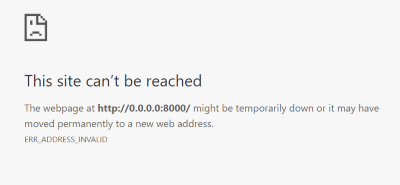
Wondering if this has something to do with Docker: I'm on Windows where 0.0.0.0 is not even valid. I can browse the docs in the browser at http://localhost:8000/ but when I click the home icon, the site doesn't load:
This is from my mkdocs.yml:
site_name: Example Docs
site_url: 'https://example.com'
(tried also without quotes).
borekb
on 20 Feb 2018
For reference:
borekb
on 20 Feb 2018
I will investigate.
squidfunk
on 20 Feb 2018
The header correctly sets the link containing the logo to thesite_url specified in the mkdocs.yml. When you inspect the source on the Material documentation, the link is exactly the site_url. If no site_url is specified, Material falls back to the home page of the documentation.
However, when MkDocs is run in watch mode, it sets the site_url to localhost:8000 by default. The address was set to be 0.0.0.0 in the dev container to ease testing on mobile devices on the same network. Maybe the best option would be to drop the --dev-addr flag on the Docker container, so MkDocs should expose the docs on localhost:8000. This suggests that the logo will always link to this very address in the watch mode.
I will remove the --dev-addr flag from the Docker container. Let's see if users complain about it.
squidfunk
on 21 Feb 2018
Removed in bdf24e255f5f66d26c6baf7124b22555e2fa2da7, will be released as part of 2.6.4 in a minute.
In case there are still problems, please re-open.
squidfunk
on 21 Feb 2018
Unfortunately, I'm unable to connect to the web server in 2.6.4 and my colleague on a Mac reports the same; --dev-adr=0.0.0.0:8000 seems to be a necessity.
What was not intuitive to me at all is that when dev_addr is set, my custom site_url is overwritten. I'm not sure it's the right behavior, or at least it should be documented in http://www.mkdocs.org/user-guide/configuration/#dev_addr; I'm going to report an upstream bug.
borekb
on 22 Feb 2018
Oops, I didn't test it properly myself and the smoke test on Travis did not catch it, as it only builds the documentation. Just released 2.6.5 which reverts the change in the Dockerfile.
squidfunk
on 22 Feb 2018
Thanks. The upstream issue is https://github.com/mkdocs/mkdocs/issues/1414.
borekb
on 22 Feb 2018
Related issues
 HerbFargus
·
4Comments
HerbFargus
·
4Comments
 Timber232
·
3Comments
Timber232
·
3Comments
 ngtrian
·
3Comments
ngtrian
·
3Comments
 madrus
·
3Comments
madrus
·
3Comments
 tiangolo
·
3Comments
tiangolo
·
3Comments
Most helpful comment
Thanks, and amazing work on this theme by the way. I've been trying to settle on a framework for documentation and as a node.js developer wanted something node based.. but this theme along with how MkDocs is just so easy to get setup, it won me over.