Mkdocs-material: Add support for fixed tabs
Description
Enhancement request
Tabs disappear when scrolling just a few lines. When having a long content you have to scroll all the way up to be able to go to another tab.
It would be useful if there was a way to avoid this, for example:
- Use Google's fixed tab style:
- Partially hide the tabs, when hovering the partially visible section fully show the tabs.
Expected behavior
There is a way to access the tabs without scrolling to the very top/
Actual behavior
Tabs only accessible when scrolled to the top.
I don't know if there is already something planned for this, so I rather keep track of the suggestion here.
 ovasquez
All 16 comments
This is something I deliberately decided not to do, because on small screens this clutters up the vertical space available for reading. In my opinion, the fixed tabs are the uppermost navigation links, so they are the least important when you scroll down, read, and navigate around the page you are currently reading. The Google Docs do it like this, but I don't really like it.
However, extending the theme you should be able to do it yourself. Just add the tabs to the header partial, tweak some CSS and you should be good to go.
The Material theme will not support fixed tabs out of the box.
Addendum:
Partially hide the tabs, when hovering the partially visible section fully show the tabs.
I don't really get what you mean here.
 squidfunk
on 23 Mar 2017
squidfunk
on 23 Mar 2017
Hiding tabs when scrolling down and showing them scrolling up could be a compromise.
 max-ci
on 23 Mar 2017
max-ci
on 23 Mar 2017
This doesn't work well with the Material theme as the tabs would overlay the sidebar which will look pretty strange, or the sidebar height would need to be updated. Eitherway it would look pretty strange.
squidfunk
on 23 Mar 2017
I understand this could be an issue in small screens (even though at the common 1366 X 768, a very small vertical screen that displays the tabs it's still less than 10% of it), however my suggestion was aimed towards providing the option to enable this fixed style while retaining the default behavior of hiding the tabs on scroll if the user doesn't explicitly configures fixed tabs.
And why do I don't just update the style myself locally?
- I think I'm not the only one who could find this useful.
- The update process would be a lot smoother by just updating the _pip_ package in future versions.
Please let me know if you are still interested in allowing this optional behavior even if you're not planning on working on it, I'd gladly spent some time on this knowing that there's willingness to accept the functionality.
ovasquez
on 23 Mar 2017
If you implement it anyway, I would really like to see how you think it should work and whether it works cross-browser and without a lot of repaints. Maybe we can integrate it if we find a good solution, but at the moment I cannot think of how this should work with the other mechanics of the template. In my opinion it's orthogonal to the sidebar logic.
squidfunk
on 23 Mar 2017
My intention is to only remove the code that hides the tabs when scrolling bottom if the user specifies it in the configuration, nothing else. This is only relevant in large screens because below 1200px wide (if I'm not mistaken) the tabs aren't shown anyway, everything else should remain the same.
Configuration could be like:
extra:
  feature:
    tabs: true
    fixed-tabs: true
The tabs are part of the normal content, so they hide when scrolled. The Header is fixed. The sidebars check the height of the header in order to calculate the height for stretching. You would have to move the tabs inside the header, so the header includes them and the sidebar height calculation respects that.
squidfunk
on 23 Mar 2017
OK, this would be a bit more complex that I originally thought, nonetheless I'll still give it a try. Feel free to close this issue if you rather not wait for a pull request with undetermined completion time.
ovasquez
on 24 Mar 2017
I will close it for now, but feel free to use this thread to keep us updated on your progress.
squidfunk
on 24 Mar 2017
Has anyone been able to implement adding the tabs bar to the header bar?
 banesullivan
on 3 Jun 2018
banesullivan
on 3 Jun 2018
@banesullivan I stopped working on it a long time ago :( I've using the stock material theme since.
ovasquez
on 8 Jun 2018
@ovasquez I am not a JS or CSS developer and I don't really know what I am doing but from playing around with the source code, I was able to get the tab bar to stay while scrolling and implemented it such that it has a low visual impact by being thin. Unfortunately, I did this in a manner that constructs two tab bars... What I did was add the tabs to the header.html file but I had to leave the tabs snippet below in the base.html file in order for the navigation panel on the left to be generated correctly.
<!-- Tabs with outline -->
{% if feature.tabs %}
    {% include "partials/tabs.html" %}
{% endif %}
If I leave that code in the base.html I get a working hack of a solution that looks like this:

If I take that code out of base.html then I get the following... note how the navigation bar on the left contains the whole project tree which is not what we want for using tabs. I cannot seem to track down where to fix this. Any ideas?
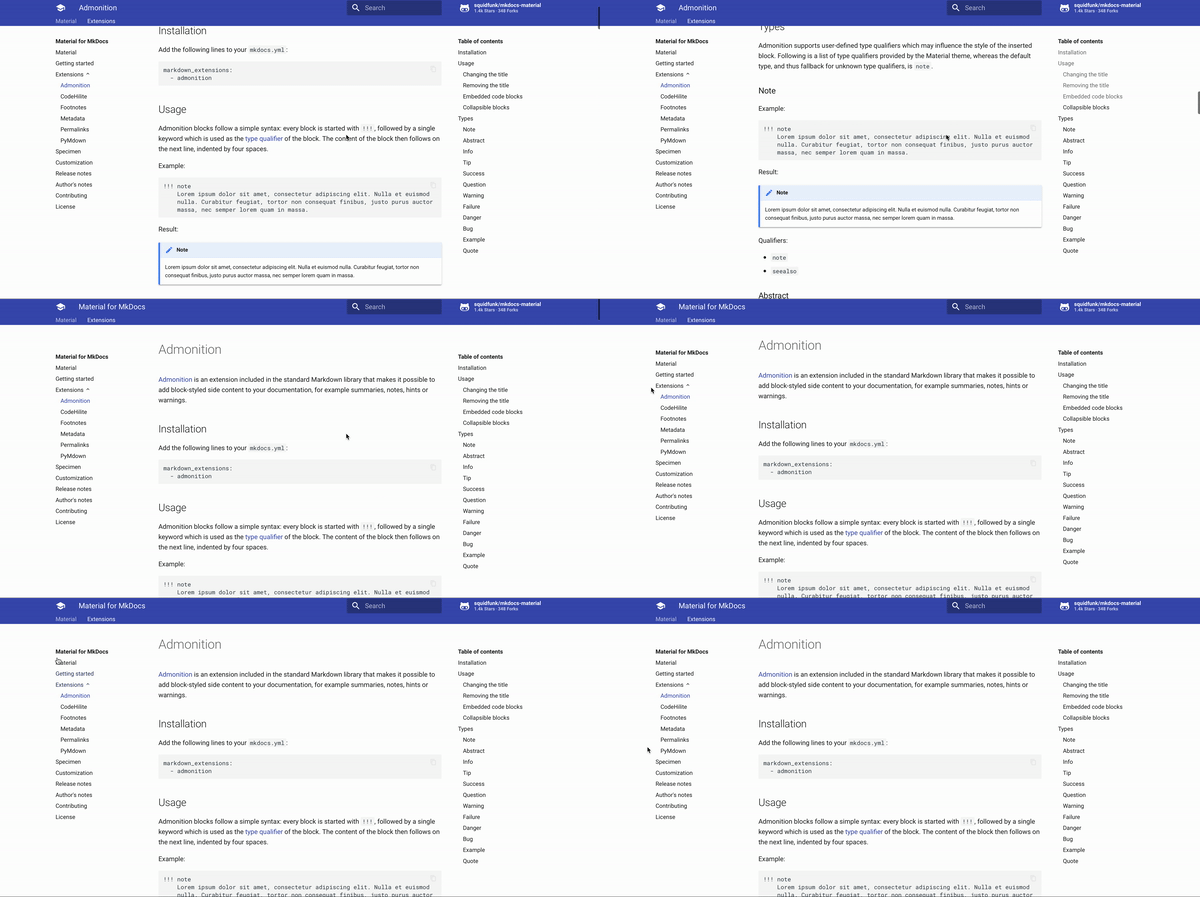
I'd love to push these changes up to a fork and share them with you if you are a better web developer than I and might know how to fix this. Would you be interested?
banesullivan
on 8 Jun 2018
You can start with this (just pure MkDocs repo + this code):
Additional CSS:
/* Remove shadow from header */
.md-header[data-md-state="shadow"] {
  box-shadow: none;
}

/* Make tabs fixed */
.md-tabs {
  transition: background 0.25s, box-shadow 0.25s;
  position: fixed;
  left: 0;
  top: 4.8rem;
  width: 100%;
  z-index: 1;
}

/* Add shadow to tabs */
.md-header[data-md-state="shadow"] + .md-container > .md-tabs {
  box-shadow: 0 0 0.4rem rgba(0, 0, 0, 0.1), 0 0.4rem 0.8rem rgba(0, 0, 0, 0.2);
}

/* Tab links always visible */
.md-tabs[data-md-state="hidden"] .md-tabs__link {
  transform: none;
  opacity: 1;
}

/* Respect tabs height for main content (+ 4.8rem) */
.md-main__inner {
  padding-top: 7.8rem;
}

/* Respect tabs height for sidebars (+ 4.8rem) */
.md-sidebar[data-md-state="lock"] {
  top: 9.6rem;
  padding-bottom: 7.2rem;
}
JavaScript (Position.js file line 77)
/* 48 is height of the tabs */
this.offset_ = top - 48 - (this.pad_ ? this.header_.offsetHeight : 0)
This is very hard-coded, you can make it universal.
max-ci
on 8 Jun 2018
@makshh Thank you very much!... This is exactly what I am looking for and it seems to work except none of the tab items are clickable... I made these changes and built the site on a fork here: https://banesullivan.github.io/mkdocs-material/
banesullivan
on 9 Jun 2018
True
.md-tabs[data-md-state="hidden"] .md-tabs__link--active,
.md-tabs[data-md-state="hidden"] .md-tabs__link:hover {
  opacity: 1;
}
.md-tabs[data-md-state="hidden"] {
  pointer-events: auto;
}
Add this styles and you will be fine
And change opacity: 1 to opacity: 0.7 in .md-tabs[data-md-state="hidden"] .md-tabs__link selector.
Remember that it's very hacky, it may not work after MkDocs Material update (for example when tabs height will change or something else).
Unfortunately I don't have time to make it more bulletproof.
max-ci
on 9 Jun 2018
Support for sticky navigation tabs has been added to Insiders a few minutes ago:

squidfunk
on 13 Dec 2020
Related issues
 lupupitkanen
·
4Comments
lupupitkanen
·
4Comments
 LinusGeffarth
·
3Comments
LinusGeffarth
·
3Comments
 ngtrian
·
3Comments
ngtrian
·
3Comments
 nikramakrishnan
·
3Comments
nikramakrishnan
·
3Comments
 Timber232
·
3Comments
Timber232
·
3Comments