I need a way to make links in mj-social to be just regular URL links and not shareable links.
Reproduction Steps:
When I enter the code as bellow:
<mj-social-element name="facebook" href="https://www.facebook.com/Ariel.Property.Advisors" background-color="#343b3f">
Expected behavior:
<a href="https://www.facebook.com/Ariel.Property.Advisors" target="_blank">
Observed behavior:
<a href="https://www.facebook.com/sharer/sharer.php?u=https://www.facebook.com/Ariel.Property.Advisors" target="_blank">
MJML version:
4.0.3
 milos5593
All 11 comments
Hi @milos5593 i'll see with the others if we implement an option, it can be useful indeed
For now you could define your own mj-social-element, using src and color from the default social networks values (their default values can be found at the top of this file : https://github.com/mjmlio/mjml/blob/master/packages/mjml-social/src/SocialElement.js)
i.e. a twitter social-element with a custom link would be like this :
<mj-social-element src="https://www.mailjet.com/images/theme/v1/icons/ico-social/twitter.png" href="https://my-unchanged-url" background-color="#55acee">
  Twitter
</mj-social-element>
 kmcb777
on 15 Apr 2018
kmcb777
on 15 Apr 2018
@kmcb777 This works as a workaround. Thanks
milos5593
on 16 Apr 2018
UPDATED: if I export footer.mjml as html, it works just fine.
@kmcb777 It's not working for me.
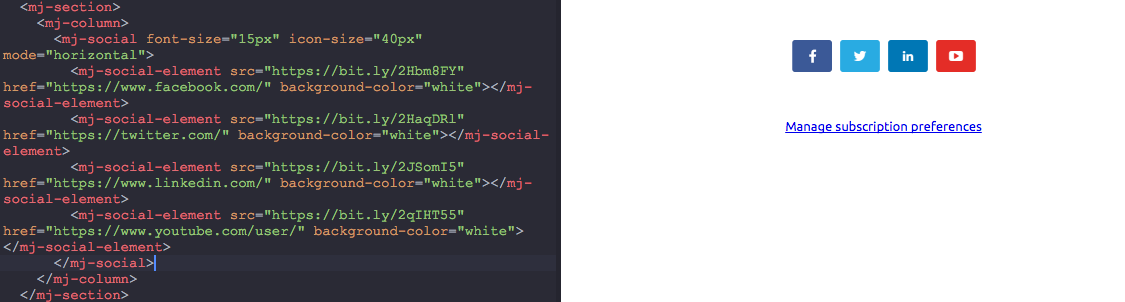
      <mj-social font-size="15px" icon-size="40px" mode="horizontal">
        <mj-social-element src="https://bit.ly/2Hbm8FY" href="https://www.facebook.com/" background-color="white"></mj-social-element>
        <mj-social-element src="https://bit.ly/2HaqDRl" href="https://twitter.com/" background-color="white"></mj-social-element>
        <mj-social-element src="https://bit.ly/2JSomI5" href="https://www.linkedin.com/" background-color="white"></mj-social-element>
        <mj-social-element src="https://bit.ly/2qIHT55" href="https://www.youtube.com/" background-color="white"></mj-social-element>
      </mj-social>
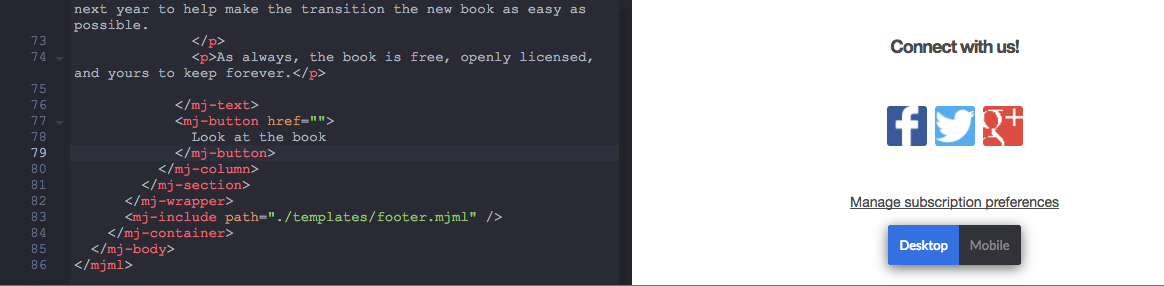
Although, the custome icons show up in the footer template, it shows the default icons when I get back to the main page.
Footer.mjml
Main-template.mjml
MJMLApp v2.8.0
MJML v^4.0.0
Thanks!
 maherelaridi
on 18 Apr 2018
maherelaridi
on 18 Apr 2018
From what I can see, you're using the v4 syntax (mj-social-element) in your footer while you're using the v3 sytnax (mj-container) in your main-template. Can you try to remove the mj-container tags in your main-template?
 ngarnier
on 19 Apr 2018
ngarnier
on 19 Apr 2018
Thanks @ngarnier! Works like a charm now by removing the mj-container
maherelaridi
on 20 Apr 2018
The following code:
<mj-social>
    <mj-social-element src="https://www.mailjet.com/images/theme/v1/icons/ico-social/facebook.png" href="https://facebook.com/">Facebook</mj-social-element>
    <mj-social-element src="https://www.mailjet.com/images/theme/v1/icons/ico-social/twitter.png" href="https://twitter.com/">Twitter</mj-social-element>
</mj-social>
Throws: TypeError: Cannot read property 'icon-height' of undefined in version 4.0.4. But it works in 4.0.1.
 splitt3r
on 25 Apr 2018
splitt3r
on 25 Apr 2018
@splitt3r Hi, thanks for reporting this. A bug was indeed introduced in 4.0.4, the fix is already done and we will release a 4.0.5 very soon to fix this
kmcb777
on 25 Apr 2018
4.0.5 did the job 👍
splitt3r
on 27 Apr 2018
This site is relevant to the discussion: http://www.socicon.com/generator.php (disclaimer: I'm entirely unaffiliated with it).
 yrammos
on 9 Aug 2018
yrammos
on 9 Aug 2018
Hi @milos5593 in the new release mjml4.2-beta you can now use name="[network-name]-noshare" to avoid the url from being inserted in the share url , you can check it with npm install mjml
kmcb777
on 13 Sep 2018
Excellent! Many thanks.
On Sep 13, 2018, at 16:32, Cedric Cavrois notifications@github.com wrote:
Hi @milos5593 in the new release mjml4.2-beta you can now use name="[network-name]-noshare" to avoid the url from being inserted in the share url , you can check it with npm install mjml
—
You are receiving this because you commented.
Reply to this email directly, view it on GitHub, or mute the thread.
yrammos
on 13 Sep 2018
Related issues
 viniciusvinicius
·
19Comments
viniciusvinicius
·
19Comments
 lookfirst
·
20Comments
lookfirst
·
20Comments
 yumyo
·
25Comments
yumyo
·
25Comments
 jitendravyas
·
18Comments
jitendravyas
·
18Comments
 br4nnigan
·
18Comments
br4nnigan
·
18Comments
Most helpful comment
Hi @milos5593 i'll see with the others if we implement an option, it can be useful indeed
For now you could define your own mj-social-element, using src and color from the default social networks values (their default values can be found at the top of this file : https://github.com/mjmlio/mjml/blob/master/packages/mjml-social/src/SocialElement.js)
i.e. a twitter social-element with a custom link would be like this :