Mixedrealitytoolkit-unity: Better guidance on how to set up XR management in MRTK 2.3.0 and Unity 2019
Describe the issue
I've recently upgraded to Unity 2019.3.3f1 and MRTK 2.3.0. Unity tells me that Windows Mixed Reality is deprecated and will be removed. Since we're starting a new project that may last a while, we want to move to the new XR Management early to be prepared. Unfortunately, I ran into an issue upgrading my WMR based project to the new XR packages.
Even if I use the DefaultXRSDKConfigurationProfile, the app gets locked up when trying to run it on HoloLens 2. It is not clear what the Default profile is referring to: VR, HoloLens 1, HoloLens 2? It seems at least that the default camera is set up with a Skybox, which seems that it's rather set up for VR than for AR.
It would be great to extend the documentation to make it clearer how to upgrade an existing MRTK project to the new XR packages:
https://microsoft.github.io/MixedRealityToolkit-Unity/Documentation/GettingStartedWithMRTKAndXRSDK.html
It would be nice to know what developers should set up for:
- Input Helpers
- XR Tracking
In addition, I got stuck when trying to update my existing MRTK profiles: A table shows which legacy XR profiles have to be updated with the new XR SDK profiles, however, for somebody who is not super familiar with the nuances of the different types of profiles, it's difficult to know where to exactly find and change them.
https://microsoft.github.io/MixedRealityToolkit-Unity/Documentation/GettingStartedWithMRTKAndXRSDK.html#required-in-mrtk
 sostel
All 13 comments
I find myself in the same situation. I followed the steps in the aforementioned documentation, but when deploying to the HoloLens 2, all my scene content becomes head-locked and I'm not sure what I need to do to get tracking working as before.
 cfabrito
on 16 Mar 2020
cfabrito
on 16 Mar 2020
Same situation. for unity 2019.3.6f1 with 2.3.0 MRTK, XRSDK.
 ilanb
on 30 Mar 2020
ilanb
on 30 Mar 2020
Even if I use the DefaultXRSDKConfigurationProfile, the app gets locked up when trying to run it on HoloLens 2.
This is currently a known issue with the latest preview WMR package for XR SDK. It's been fixed internally and will ship with the next version. I'll try to get a date for the next version.
As a temporary workaround, you should be able to regain positional tracking by covering the sensors with your hands, forcing the device to fully lost tracking, then remove your hands to allow it to regain tracking.
It is not clear what the Default profile is referring to: VR, HoloLens 1, HoloLens 2? It seems at least that the default camera is set up with a Skybox, which seems that it's rather set up for VR than for AR.
The camera profile allows you to specify the skybox and clearflags per-transparent or opaque device. I'll double check that this is set up correctly. Otherwise, the profile should work across all three.
It would be nice to know what developers should set up for:
Input Helpers
XR Tracking
I'll make this more explicit in the docs. You shouldn't have to do anything with Input Helpers, and I think the same is true for XR Tracking but I'll double check.
A table shows which legacy XR profiles have to be updated with the new XR SDK profiles, however, for somebody who is not super familiar with the nuances of the different types of profiles, it's difficult to know where to exactly find and change them.
Will update this too!
 keveleigh
on 30 Mar 2020
keveleigh
on 30 Mar 2020
This is currently a known issue with the latest preview WMR package for XR SDK. It's been fixed internally and will ship with the next version. I'll try to get a date for the next version.
Update! Unity shipped a new preview package with this fix. At the moment, the preview package is waiting on the next version of 2019.3 to be successfully deployable to an HL2. As far as I'm aware, things should align then.
keveleigh
on 6 Apr 2020
@keveleigh it looks like part of the issues here have been addressed in Unity's latest packages - what still remains on this particular issue?
 wiwei
on 17 Apr 2020
wiwei
on 17 Apr 2020
@wiwei I still want to take the action item of improving the MRTK + XR SDK docs a bit as a result of this feedback.
keveleigh
on 17 Apr 2020
I find myself in the same situation. I followed the steps in the aforementioned documentation, but when deploying to the HoloLens 2, all my scene content becomes head-locked and I'm not sure what I need to do to get tracking working as before.
I have the same problem with Unity 2019.3.10.f1, MRTK 2.3.0 and Windows XR Plugin 2.1.5 but on HoloLens 1. Is there a fix for this already, and if so, what do I have to update to make this work?
 cgsaxner
on 28 Apr 2020
cgsaxner
on 28 Apr 2020
I have the same problem with Unity 2019.3.10.f1, MRTK 2.3.0 and Windows XR Plugin 2.1.5 but on HoloLens 1. Is there a fix for this already, and if so, what do I have to update to make this work?
Are you using the MRTK default XR SDK profiles, or your own custom profiles? If you're using your own profiles, you'll want to make sure GenericXRSDKCameraSettings is present in your camera profile. With either the default MRTK profiles or your own, you'll also want to double check that the XR Legacy Input Helpers package is installed. Windows XR Plugin 2.1.5 should import it as a dependency, but it's good to double check.
The previous issue in the plugin itself is fixed in 2.1.5.
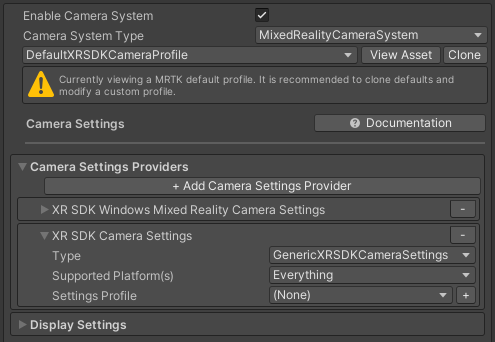
keveleigh
on 28 Apr 2020
Thank you, I was indeed missing the GenericXRSDKCameraSettings in my custom profile :) After adding it, everything works now.
cgsaxner
on 29 Apr 2020
@cgsaxner Excellent! I'll work on updated docs today, since the existing table isn't the most clear as far as what's required
keveleigh
on 29 Apr 2020
I updated our docs with the new XR Management flow and package requirements. Looking through here, I think all questions are updated either by the new docs or by certain things (Input Helpers and XR Tracking, for example) being removed by the new XR Management version
keveleigh
on 5 May 2020
fwiw, I'm still seeing the head locking with the config from the document. It started after 'upgrading' to XR Management.
It works fine with Holographic Remoting, but headlocked on the device unless I manually add a Tracked Pose Driver to the camera. (note I have the GenericXRSDKCameraSettings, which is suppose to add this).
Unity 2019.4.9f1 LTS + MRTK 2.4
 brandf
on 3 Sep 2020
brandf
on 3 Sep 2020
@brandf If I keep the Default XR SDK Settings on the Toolkit everything seems to work fine. If I change the camera or the input section of the settings, I get "2D" headlocked content. Maybe it helps! Took me two days to figure out.
 andreasanta
on 22 Sep 2020
andreasanta
on 22 Sep 2020
Related issues
 overedge
·
3Comments
overedge
·
3Comments
 nrchuanqi
·
3Comments
nrchuanqi
·
3Comments
 dustin2711
·
3Comments
dustin2711
·
3Comments
 DanAndersen
·
3Comments
DanAndersen
·
3Comments
 dfields-msft
·
3Comments
dfields-msft
·
3Comments
Most helpful comment
fwiw, I'm still seeing the head locking with the config from the document. It started after 'upgrading' to XR Management.
It works fine with Holographic Remoting, but headlocked on the device unless I manually add a Tracked Pose Driver to the camera. (note I have the GenericXRSDKCameraSettings, which is suppose to add this).
Unity 2019.4.9f1 LTS + MRTK 2.4