Mixedrealitytoolkit-unity: Hand-attached mesh gets clipped with Mixed Reality Capture and hologram alignment
Describe the bug
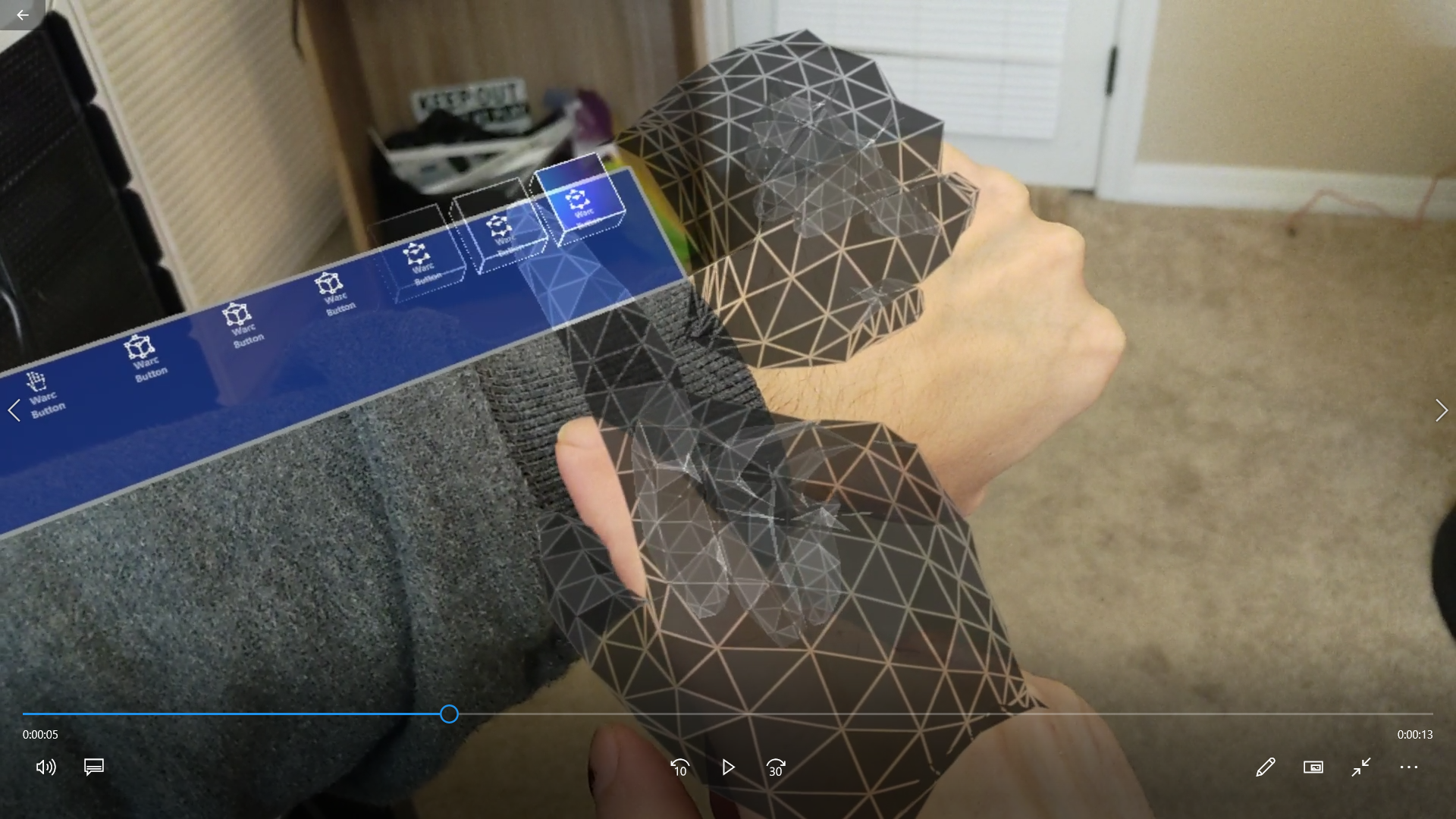
When using the Mixed Reality Capture via device portal or video/screen capture the mesh surrounding a user's hand appears offset compared to what it really is. This makes MRC experiences play poorly with customers as they immediately notice this issue. This issue does not occur when in the home/desktop environment.
Screenshots
Expected behavior
Mesh and related objects would be aligned properly to the user's hands in the Mixed Reality Capture view.
Your setup (please complete the following information)
- Unity Version 2018.4.12
- MRTK Version 2
Target platform (please complete the following information)
- HoloLens 2
 Naphier
All 17 comments
Any work around to this would really be helpful.
 csantangelo
on 24 Feb 2020
csantangelo
on 24 Feb 2020
We currently have a feature that will help align the mesh with your hands by changing the rendering point of the MRC camera. It can be enabled via the WMR camera settings provider: https://microsoft.github.io/MixedRealityToolkit-Unity/Documentation/CameraSystem/WindowsMixedRealityCameraSettings.html#configuring-the-windows-mixed-reality-camera-settings-provider
Unfortunately at the moment, this also leads to hologram instability in the video in current versions of Unity (photos should work though). I'm working with them to update how this additional MRC camera is handled to stabilize things. I can update this thread when these fixes are released.
 keveleigh
on 24 Feb 2020
keveleigh
on 24 Feb 2020
Thanks @keveleigh . I'll test it in a bit. I never even noticed it before.
csantangelo
on 24 Feb 2020
Thanks! This seemed to help. Is there a way to turn this on/off at runtime (I dug in quite a bit and seems no)? If not is performance/stability only impacted when MRC is actually running or is this just always on?
Naphier
on 25 Feb 2020
Thanks! This seemed to help. Is there a way to turn this on/off at runtime (I dug in quite a bit and seems no)?
Within MRTK, there's not currently a way to toggle this at runtime. If you want to toggle it yourself, you can add this code to your app and set enabled to false.
If not is performance/stability only impacted when MRC is actually running or is this just always on?
This setting will only affect anything when MRC is actually running
keveleigh
on 26 Feb 2020
Thanks!!!
Naphier
on 26 Feb 2020
We currently have a feature that will help align the mesh with your hands by changing the rendering point of the MRC camera. It can be enabled via the WMR camera settings provider: https://microsoft.github.io/MixedRealityToolkit-Unity/Documentation/CameraSystem/WindowsMixedRealityCameraSettings.html#configuring-the-windows-mixed-reality-camera-settings-provider
Unfortunately at the moment, this also leads to hologram instability in the video in current versions of Unity (photos should work though). I'm working with them to update how this additional MRC camera is handled to stabilize things. I can update this thread when these fixes are released.
This works. If you have a hologram too close though it will clip it. I have a hologram thats connected to my hand but it gets clipped. I tried changing the near clip settings but get the same results. Any thoughts on a way to get around it?
csantangelo
on 26 Feb 2020
I tried changing the near clip settings but get the same results. Any thoughts on a way to get around it?
I'll look into this as well. It's possible the clipping information isn't being properly copied to the additional camera
keveleigh
on 27 Feb 2020
Super useful feature which works well. If there would not be that Unity issue. Thanks for working on that. Looking forward to a fix. 😁
 reneschulte
on 27 Feb 2020
reneschulte
on 27 Feb 2020
@keveleigh Any progress on the instability issue when the PV camera is enabled? Is there an issue in the Unity issue tracker that I can follow? It's such an important feature for creating demo videos where direct hand manipulation is used. I ran into this issue yesterday with Unity 2018.4.21f1
 rolandsmeenk
on 14 May 2020
rolandsmeenk
on 14 May 2020
@rolandsmeenk Yes! 2018.4.21f1 shipped with a couple stability fixes for PV camera-based MRC, especially when setting the focus point in your app.
Unfortunately, it also appears to have shipped with a regression for stability in both versions of MRC (have you tried "regular" MRC and seen this?). I don't yet have an update on that issue, but Unity's actively investigating.
keveleigh
on 14 May 2020
@keveleigh Regular MRC is stable, PV camera is jittering.
Here's a recording of what I am seeing https://youtu.be/nR95eIBjhUU
rolandsmeenk
on 14 May 2020
@rolandsmeenk Hmm, thanks for the data point! I'll forward that along to Unity.
Can you also implement the focus point setting code (linked in my previous comment) and see how that looks? It _should_ be an improvement.
keveleigh
on 14 May 2020
@keveleigh Just tested this, no noticeable difference. The white sphere in the video is the focus object. https://youtu.be/ywCjydir9Bw
rolandsmeenk
on 14 May 2020
Are we able to get a simple repro project here that we can observe the issue?
 rickj-unity
on 26 May 2020
rickj-unity
on 26 May 2020
I prepared a project, but decided to go with Unity 2018.4.23f1 instead of 2018.4.21f1 and of course I could not reproduce it with that version.
So that means that with Unity 2018.4.23f1 you can now record videos with improved overlapping of holograms!
rolandsmeenk
on 28 May 2020
Any news on the issues with near/far clipping planes being different than the Unity/MRTK camera settings? We're in MRTK 2.3.0 and Unity 2019.3.7f1 and not seeing any notes about it. Thanks!
Naphier
on 27 Aug 2020
Related issues
 nrchuanqi
·
3Comments
nrchuanqi
·
3Comments
 dfields-msft
·
3Comments
dfields-msft
·
3Comments
 overedge
·
3Comments
overedge
·
3Comments
 Alexees
·
3Comments
Alexees
·
3Comments
 rigma
·
3Comments
rigma
·
3Comments
Most helpful comment
I prepared a project, but decided to go with Unity 2018.4.23f1 instead of 2018.4.21f1 and of course I could not reproduce it with that version.
So that means that with Unity 2018.4.23f1 you can now record videos with improved overlapping of holograms!