Mixedrealitytoolkit-unity: DirectoryNotFoundException - Issues with MSBuild integration
Describe the bug
When setting up a new MRTK project, either by adding MRTK to the project, or simply opening Unity have a fresh clone, letting the MRTK editor window configure my project introduces MSBuild, which will often lead to a flurry of exceptions, which prevent building on any platform, including UWP and Android.
To reproduce
My repro steps aren't 100% reliable, but what often triggers it for me is.
- Clone MRTK, or add MRTK to a new project before opening it for the first time.
- Open the project with MRTK.
- Let MRTK configure your project for you.
- Try and make a build.
Expected behavior
Letting MRTK configure your project should not introduce errors.
Screenshots

Your setup (please complete the following information)
- Unity Version [2018.4.12f1 and 2018.4.14f1]
- MRTK Version [v2.2.0 and latest dev branch]
Target platform (please complete the following information)
- HoloLens
- HoloLens 2
- WMR immersive
- OpenVR
Additional Context
The exception in question is this
DirectoryNotFoundException: Could not find a part of the path "C:\Users\[username]\Documents\Github\MRTK\MixedRealityToolkit-Unity\Assets\MixedRealityToolkit.Providers\WindowsMixedReality\DotNetAdapter\Plugins\net46\Microsoft.Windows.MixedReality.DotNetWinRT\Editor\Microsoft.Windows.MixedReality.DotNetWinRT.Editor.asmdef"
System.IO.FileStream..ctor (System.String path, System.IO.FileMode mode, System.IO.FileAccess access, System.IO.FileShare share, System.Int32 bufferSize, System.Boolean anonymous, System.IO.FileOptions options) (at <e1319b7195c343e79b385cd3aa43f5dc>:0)
System.IO.FileStream..ctor (System.String path, System.IO.FileMode mode, System.IO.FileAccess access, System.IO.FileShare share, System.Int32 bufferSize, System.IO.FileOptions options, System.String msgPath, System.Boolean bFromProxy, System.Boolean useLongPath, System.Boolean checkHost) (at <e1319b7195c343e79b385cd3aa43f5dc>:0)
(wrapper remoting-invoke-with-check) System.IO.FileStream..ctor(string,System.IO.FileMode,System.IO.FileAccess,System.IO.FileShare,int,System.IO.FileOptions,string,bool,bool,bool)
System.IO.StreamReader..ctor (System.String path, System.Text.Encoding encoding, System.Boolean detectEncodingFromByteOrderMarks, System.Int32 bufferSize, System.Boolean checkHost) (at <e1319b7195c343e79b385cd3aa43f5dc>:0)
System.IO.StreamReader..ctor (System.String path, System.Text.Encoding encoding, System.Boolean detectEncodingFromByteOrderMarks, System.Int32 bufferSize) (at <e1319b7195c343e79b385cd3aa43f5dc>:0)
System.IO.StreamReader..ctor (System.String path, System.Boolean detectEncodingFromByteOrderMarks) (at <e1319b7195c343e79b385cd3aa43f5dc>:0)
System.IO.StreamReader..ctor (System.String path) (at <e1319b7195c343e79b385cd3aa43f5dc>:0)
(wrapper remoting-invoke-with-check) System.IO.StreamReader..ctor(string)
System.IO.File.ReadAllText (System.String path) (at <e1319b7195c343e79b385cd3aa43f5dc>:0)
UnityEditor.Scripting.ScriptCompilation.EditorCompilation.LoadCustomScriptAssemblyFromJson (System.String path) (at C:/buildslave/unity/build/Editor/Mono/Scripting/ScriptCompilation/EditorCompilation.cs:469)
UnityEditor.Scripting.ScriptCompilation.EditorCompilation.SetAllCustomScriptAssemblyJsons (System.String[] paths) (at C:/buildslave/unity/build/Editor/Mono/Scripting/ScriptCompilation/EditorCompilation.cs:698)
UnityEditor.BuildPipeline:BuildPlayer(String[], String, BuildTarget, BuildOptions)
Microsoft.MixedReality.Toolkit.Build.Editor.UnityPlayerBuildTools:BuildUnityPlayer(IBuildInfo) (at Assets/MixedRealityToolkit/Utilities/BuildAndDeploy/UnityPlayerBuildTools.cs:114)
Microsoft.MixedReality.Toolkit.Build.Editor.<BuildPlayer>d__2:MoveNext() (at Assets/MixedRealityToolkit/Utilities/BuildAndDeploy/UwpPlayerBuildTools.cs:118)
System.Runtime.CompilerServices.AsyncTaskMethodBuilder`1:Start(<BuildPlayer>d__2&)
Microsoft.MixedReality.Toolkit.Build.Editor.UwpPlayerBuildTools:BuildPlayer(UwpBuildInfo, CancellationToken)
Microsoft.MixedReality.Toolkit.Build.Editor.<BuildPlayer>d__1:MoveNext() (at Assets/MixedRealityToolkit/Utilities/BuildAndDeploy/UwpPlayerBuildTools.cs:101)
System.Runtime.CompilerServices.AsyncTaskMethodBuilder`1:Start(<BuildPlayer>d__1&)
Microsoft.MixedReality.Toolkit.Build.Editor.UwpPlayerBuildTools:BuildPlayer(String, Boolean, CancellationToken)
Microsoft.MixedReality.Toolkit.Build.Editor.<BuildAll>d__105:MoveNext() (at Assets/MixedRealityToolkit.Tools/BuildWindow/BuildDeployWindow.cs:1134)
System.Runtime.CompilerServices.AsyncVoidMethodBuilder:Start(<BuildAll>d__105&)
Microsoft.MixedReality.Toolkit.Build.Editor.BuildDeployWindow:BuildAll(Boolean)
Microsoft.MixedReality.Toolkit.Build.Editor.<>c:<RenderWSABuildView>b__85_0() (at Assets/MixedRealityToolkit.Tools/BuildWindow/BuildDeployWindow.cs:316)
UnityEditor.EditorApplication:Internal_CallDelayFunctions()
 provencher
All 23 comments
After chatting with @provencher on Slack: I think my best guess at this point is an issue with the NuGet restore on .NET Standard 2.0. The path is specifically looking for net46 for some reason. I had never seen this issue before, but the MRTK project is set to .NET 4.x and I think all the people I've helped get up and running with this have been as well. I think @andreiborodin will need to investigate on the MSBuildForUnity side.
 keveleigh
on 3 Jan 2020
keveleigh
on 3 Jan 2020
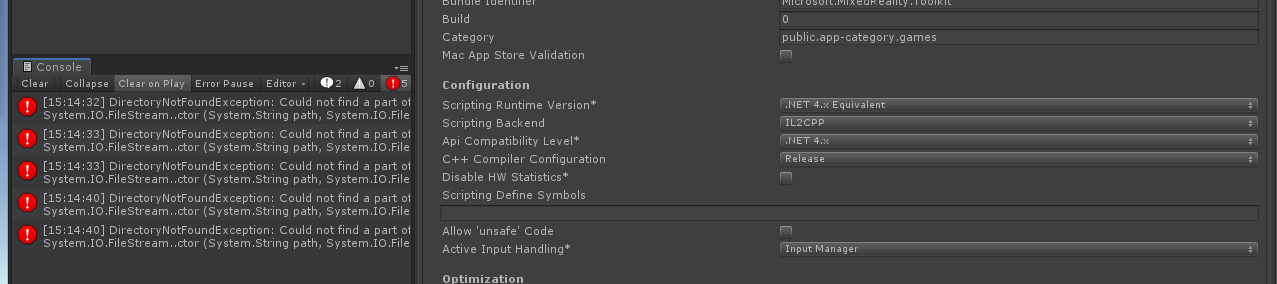
Actually - I just reproduced this bug on .net 4.x.
As soon as I let the MRTK editor add MSBuild to my project, these errors appeared. Didn't even have to try making a build.
provencher
on 3 Jan 2020
Did this repro start as .NET 4.x from the beginning, or did you switch?
keveleigh
on 3 Jan 2020
I did not switch.
This occurred with a fresh clone of the MRTK dev branch.
I'm starting to wonder if there might be a DLL that is being hosted on an internal microsoft server, that's not getting pulled in properly. Just a thought.
provencher
on 3 Jan 2020
Can you post the call stack of those non-build related errors please?
keveleigh
on 3 Jan 2020
First error
"DirectoryNotFoundException: Could not find a part of the path "C:\Users[Usser]\Documents\Github\MRTK\MixedRealityToolkit-Unity\Assets\MixedRealityToolkit.Providers\WindowsMixedReality\DotNetAdapter\Pluginsnet46\Microsoft.Windows.MixedReality.DotNetWinRT\EditorMicrosoft.Windows.MixedReality.DotNetWinRT.Editor.asmdef"
System.IO.FileStream..ctor (System.String path, System.IO.FileMode mode, System.IO.FileAccess access, System.IO.FileShare share, System.Int32 bufferSize, System.Boolean anonymous, System.IO.FileOptions options) (at
System.IO.FileStream..ctor (System.String path, System.IO.FileMode mode, System.IO.FileAccess access, System.IO.FileShare share, System.Int32 bufferSize, System.IO.FileOptions options, System.String msgPath, System.Boolean bFromProxy, System.Boolean useLongPath, System.Boolean checkHost) (at
(wrapper remoting-invoke-with-check) System.IO.FileStream..ctor(string,System.IO.FileMode,System.IO.FileAccess,System.IO.FileShare,int,System.IO.FileOptions,string,bool,bool,bool)
System.IO.StreamReader..ctor (System.String path, System.Text.Encoding encoding, System.Boolean detectEncodingFromByteOrderMarks, System.Int32 bufferSize, System.Boolean checkHost) (at
System.IO.StreamReader..ctor (System.String path, System.Text.Encoding encoding, System.Boolean detectEncodingFromByteOrderMarks, System.Int32 bufferSize) (at
System.IO.StreamReader..ctor (System.String path, System.Boolean detectEncodingFromByteOrderMarks) (at
System.IO.StreamReader..ctor (System.String path) (at
(wrapper remoting-invoke-with-check) System.IO.StreamReader..ctor(string)
System.IO.File.ReadAllText (System.String path) (at
UnityEditor.Scripting.ScriptCompilation.EditorCompilation.LoadCustomScriptAssemblyFromJson (System.String path) (at C:/buildslave/unity/build/Editor/Mono/Scripting/ScriptCompilation/EditorCompilation.cs:469)
UnityEditor.Scripting.ScriptCompilation.EditorCompilation.SetAllCustomScriptAssemblyJsons (System.String[] paths) (at C:/buildslave/unity/build/Editor/Mono/Scripting/ScriptCompilation/EditorCompilation.cs:698)
UnityEditor.Scripting.ScriptCompilation.EditorCompilationInterface:SetAllCustomScriptAssemblyJsons(String[])"
provencher
on 3 Jan 2020
I'm starting to wonder if there might be a DLL that is being hosted on an internal microsoft server
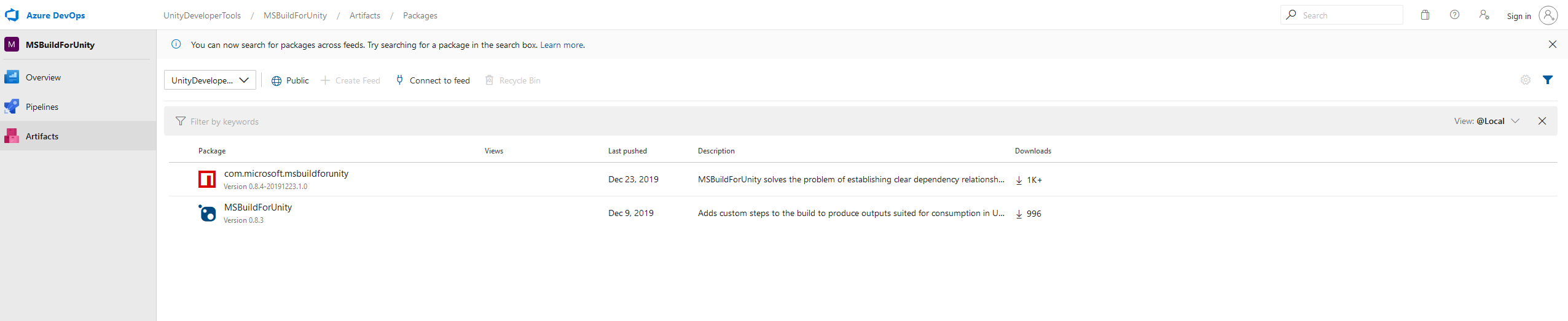
Everything here is either coming from NuGet.org or https://dev.azure.com/UnityDeveloperTools/MSBuildForUnity/_packaging?_a=feed&feed=UnityDeveloperTools%40Local, which should be fully public. Are you unable to access those feeds?
keveleigh
on 3 Jan 2020
Second error (this one comes up when restarting the editor)
ArgumentException: Given file 'C:\Users[user]\Documents\Github\MRTK\MixedRealityToolkit-Unity\Assets\MixedRealityToolkit.Providers\WindowsMixedReality\DotNetAdapter\Plugins\net46\Microsoft.Windows.MixedReality.DotNetWinRT\Editor\Microsoft.Windows.MixedReality.DotNetWinRT.Editor.asmdef' does not exist.
Microsoft.Build.Unity.ProjectGeneration.AssemblyDefinitionInfo.Parse (System.IO.FileInfo file, Microsoft.Build.Unity.ProjectGeneration.UnityProjectInfo unityProjectInfo, UnityEditor.Compilation.Assembly assembly, System.Boolean isBuiltInPackage) (at Library/PackageCache/[email protected]/Editor/ProjectGenerator/Scripts/AssemblyDefinitionInfo.cs:53)
Microsoft.Build.Unity.ProjectGeneration.UnityProjectInfo.CreateUnityProjects () (at Library/PackageCache/[email protected]/Editor/ProjectGenerator/Scripts/UnityProjectInfo.cs:184)
Microsoft.Build.Unity.ProjectGeneration.UnityProjectInfo.RefreshProjects () (at Library/PackageCache/[email protected]/Editor/ProjectGenerator/Scripts/UnityProjectInfo.cs:104)
Microsoft.Build.Unity.ProjectGeneration.UnityProjectInfo.RefreshPlugins () (at Library/PackageCache/[email protected]/Editor/ProjectGenerator/Scripts/UnityProjectInfo.cs:99)
Microsoft.Build.Unity.ProjectGeneration.UnityProjectInfo..ctor (System.Collections.Generic.HashSet`1[T] supportedBuildTargets) (at Library/PackageCache/[email protected]/Editor/ProjectGenerator/Scripts/UnityProjectInfo.cs:75)
Microsoft.Build.Unity.ProjectGeneration.MSBuildTools.get_UnityProjectInfo () (at Library/PackageCache/[email protected]/Editor/ProjectGenerator/Scripts/MSBuildTools.cs:89)
Microsoft.Build.Unity.ProjectGeneration.MSBuildTools.RefreshGeneratedOutput (System.Boolean forceGenerateEverything) (at Library/PackageCache/[email protected]/Editor/ProjectGenerator/Scripts/MSBuildTools.cs:187)
Microsoft.Build.Unity.ProjectGeneration.MSBuildTools+<>c.<.cctor>g__OnUpdate|18_0 () (at Library/PackageCache/[email protected]/Editor/ProjectGenerator/Scripts/MSBuildTools.cs:149)
UnityEditor.EditorApplication.Internal_CallUpdateFunctions () (at C:/buildslave/unity/build/Editor/Mono/EditorApplication.cs:200)
provencher
on 3 Jan 2020
I'm starting to wonder if there might be a DLL that is being hosted on an internal microsoft server
Everything here is either coming from NuGet.org or https://dev.azure.com/UnityDeveloperTools/MSBuildForUnity/_packaging?_a=feed&feed=UnityDeveloperTools%40Local, which should be fully public. Are you unable to access those feeds?
Those feeds work fine... Weird.
provencher
on 3 Jan 2020
I wonder if the path is too long...
The path you pasted (plus however long your username is) is pretty close, if not longer than, the 255-260 character limit for paths. We've run into this before with Unity, where an SDK installed in too long of a path caused a few files to be unloadable.
Does that file actually exist in your file system, and Unity is unable to load it? Or is the file missing?
keveleigh
on 3 Jan 2020
Good hunch @keveleigh!
I moved my folder to the root of my C drive, and then all the errors went away.
Wonder if there's some way to work around the path limit.
provencher
on 4 Jan 2020
We can do some work on our side to resolve that package to a shorter path (maybe a new MixedRealityToolkit.Plugins folder instead of nested several levels inside the .Providers folder).
As far as working around it, I'm not sure. There could be a change internal to Unity that could be made to support longer paths, but I think it's a limit to the Windows APIs being used.
keveleigh
on 4 Jan 2020
Wonder if there's some way to work around the path limit.
Along with the Plugins folder proposal from @keveleigh, we can shorten "MixedRealityToolkit" to "MRTK" and save 15 characters.
 davidkline-ms
on 6 Jan 2020
davidkline-ms
on 6 Jan 2020
Hey everyone - I noticed that if we deselect msbuild from the MRTK popup with suggested configurations, I don't get this error. Is msbuild required only if I wanted to build packages directly from Unity? Any other benefit of having msbuild?
 mr0ng
on 17 Jan 2020
mr0ng
on 17 Jan 2020
@mr0ng Right now, MSBuildForUnity is only used for pulling in the DotNetWinRT package to allow for additional Windows API calls in-editor (for example, for holographic remoting).
We use a subset of it (currently checked in directly to MRTK, but we may eventually migrate to the NuGet package) for our automated packaging and I think certain parts of the build window, but neither of those are affected by the presence of that package.
We should improve the messaging in the configuration window to better provide this info.
keveleigh
on 17 Jan 2020
The full path to the Microsoft.Windows.MixedReality.DotNetWinRT.Editor.asmdef file (that file name alone is 56 characters), is 184 characters, about 71% of the character limit for "regular paths" (vs "long paths").
That full path is \MixedRealityToolkit.Providers\WindowsMixedReality\DotNetAdapter\Plugins\net46\Microsoft.Windows.MixedReality.DotNetWinRT\Editor\Microsoft.Windows.MixedReality.DotNetWinRT.Editor.asmdef
We also started running into a lot of long file path issues. With our build machines the first to have issues, because their automation pulls down the project a bit deeper than the root. And it was git complaining about not being able to pull down those files.
Also note that Windows Home also has a 256 character limit.
I'm not sure the fix is going to be in Unity, it'll be best to just shorten the paths. I'd suggest not taking up more than 50-60% of the available limit, or 128 to 153 characters max.
 michael-house
on 23 Jan 2020
michael-house
on 23 Jan 2020
Fixed by #7210
davidkline-ms
on 3 Feb 2020
May anyone help me to fix this error ?
error: cannot stat 'GraduationProject/Assets/MRTK/MixedRealityToolkit.Providers/WindowsMixedReality/Shared/DotNetAdapter/.bin/net46/Microsoft.Windows.MixedReality.DotNetWinRT/Editor/Microsoft.Windows.MixedReality.DotNetWinRT.Editor.asmdef.meta': Filename too long
 ZyadTarek
on 5 Apr 2020
ZyadTarek
on 5 Apr 2020
What are you trying to do when you see that? I'm not familiar with that error message
keveleigh
on 6 Apr 2020
@keveleigh he's got the path length error. David's fix only applies to the dev branch of MRTK. 2.3 is still problematic.
provencher
on 6 Apr 2020
he's got the path length error. David's fix only applies to the dev branch of MRTK. 2.3 is still problematic.
@provencher That's true, but I don't think this error is in Unity, so it'd be good to figure out the use case and make sure the work we've done is good enough for that case as well. Specifically, his path includes .bin, which shouldn't be visible to Unity.
keveleigh
on 6 Apr 2020
has the path name been shortened yet since this was discussed earlier this year? I have the same issue
 jwlondon98
on 9 Jun 2020
jwlondon98
on 9 Jun 2020
@jwlondon98 The paths are all much shorter in 2.4.
michael-house
on 10 Jun 2020
Related issues
 ritijain
·
3Comments
ritijain
·
3Comments
 dustin2711
·
3Comments
dustin2711
·
3Comments
 Alexees
·
3Comments
Alexees
·
3Comments
 StephenHodgson
·
3Comments
StephenHodgson
·
3Comments
 nrchuanqi
·
3Comments
nrchuanqi
·
3Comments
Most helpful comment
We can do some work on our side to resolve that package to a shorter path (maybe a new
MixedRealityToolkit.Pluginsfolder instead of nested several levels inside the.Providersfolder).As far as working around it, I'm not sure. There could be a change internal to Unity that could be made to support longer paths, but I think it's a limit to the Windows APIs being used.