Mixedrealitytoolkit-unity: Proposal: Modify camera system to support data providers.
We have heard from a set of customers that there is a desire for the MRTK to use an application provided camera and playspace. Often there is a desire for the MRTK to "leave the camera alone" or to allow for configuring a specific prefab to be instantiated.
This proposal describes changes to make this include:
- Adding camera "data providers" to allow for platform specific configuration
- MixedRealityCameraSystem will implement IMixedRealityDataProviderAccess
- Allow camera providers to extend the MixedRealityCameraProfile to add additional configuration options
- [Breaking change] Modifying the camera system interface to add a "leave the scene alone" option (ex: use the camera and playspace that already exist)
This work will simplify adding support for AR Foundation and potentially other future platforms.
 davidkline-ms
All 23 comments
Here are the proposed interface changes for IMixedRealityCameraSystem. NOTE: This will require any custom camera systems to require modification.
```c#
public interface IMixedRealityCameraSystem : IMixedRealityEventSystem, IMixedRealityEventSource, IMixedRealityService
{
///
/// Typed representation of the ConfigurationProfile property.
///
MixedRealityCameraProfile CameraProfile { get; }
    /// <summary>
    /// Is the current camera displaying on an opaque device (VR / immersive) or a transparent (AR) device
    /// </summary>
    [Obsolete("The IsOpaque property is obsolete and will be removed in a future version of the Mixed Reality Toolkit. Please use the CurrentCamera property to access camera state.")]
    bool IsOpaque { get; }

    /// <summary>
    /// Indicates whether or not the camera system is to use a pre-existing camera instead of modifying the scene structure.
    /// </summary>
    bool UseExistingCamera { get; }

    /// <summary>
    /// Indicates whether or not the camera system is to use a pre-existing playspace instead of modifying the scene structure.
    /// </summary>
    /// <remarks>
    /// In order to be identified, the existing object must be tagged as "MixedRealityPlayspace".
    /// </remarks>
    bool UseExistingPlayspace { get; }

    /// <summary>
    /// The camera settings provider currently in use by the camera system.
    /// </summary>
    IMixedRealityCamera CurrentCamera { get; }
}
```
davidkline-ms
on 16 Oct 2019
Marking as a breaking change due to the need to recompile custom camera system implementations.
davidkline-ms
on 16 Oct 2019
Possiblity to avoid a breaking change
There is a possibility to avoid changing the camera system... The registrar that manages the camera system (ex: the MixedRealityToolkit object) can check to see if the specified camera system implements a new interface. If so, uses the new behavior. If not, uses the current (2.0/2.1) behavior.
davidkline-ms
on 16 Oct 2019
We might be able to handle much of this in profiles, without changing the camera system interface.
UseExistingCamera and UseExistingPlayspace might be platform-specific, and I'm not sure at the moment what things I'd use an IMixedRealityCamera class for that couldn't be on a profile.
 keveleigh
on 16 Oct 2019
keveleigh
on 16 Oct 2019
Instead of useExistingCamera, could the code not just check whether there is a camera assigned to CurrentCamera, and if there is use it? The current pairing of those two properties seems odd. What happens if I drop a camera onto CurrentCamera and set useExistingCamera to false - does it delete my camera? replace it? create new one but not use it? Similarly does it make sense to just have a CurrentPlayspace property instead of a useExistingPlayspace boolean?
 REscanDon
on 16 Oct 2019
REscanDon
on 16 Oct 2019
Currently, MRTK does not actually create a camera. When added to the scene, it automatically parents the camera underneath one of it's scene objects (MixedRealityPlayspace). The "leave alone" request is to not change the hierarchy (ex: AR Foundation already parents the camera to the AR Scene Origin).
I agree that the proposed variable names / changes could use some refinement :)
Thanks for the feedback!
davidkline-ms
on 16 Oct 2019
@davidkline-ms here are some design-oriented suggestions based on our experience with AR projects:
IMixedRealityCamera ActiveMainCamera { get; }

IEnumerable<Camera> SecondaryCameras { get; }

IEnumerable<Camera> UICameras { get; }
ActiveMainCamera
In a complex app there may be more than one main camera present at a time, and the 'active' main camera may change from scene to scene or even moment to moment. This is especially true in AR projects where you're often loading and unloading scenes with an existing main camera and passing the baton between them. The camera system's job is to deliver the 'active' main camera.
SecondaryCameras / UICameras
These address some common design needs. They're critical for smooth transitions, compositing and post effects. The default implementation of the camera service would likely deliver empty arrays for both - the purpose of including them is to open the door for custom implementations in apps that have strong design needs or uniquely thorny camera logic.
Secondary cameras are 'slaves' to the main camera and usually (but not always) render elements from the same perspective for later compositing. They're common in AR but we've used them in Hololens and VR projects too. Example usage would be our transition service using the camera service to apply a consistent fade across all 'main' content.
UICameras are a catch-all for overlay content that designers want to treat differently than 'main' content. Again, the differentiation is useful for transitions and post effects.
Provide multiple implementations
bool UseExistingCamera { get; }

bool UseExistingPlayspace { get; }
Agree with @keveleigh I see the logic but parenting behavior and camera re-use should probably be determined by implementation, not configuration.
Camera logic is either platform-driven or totally app-specific, which isn't the case with most services. An 'ARCameraSystem' implementation wouldn't parent the camera under the playspace under any circumstances - so why provide the option to break it in that way?
A default uber-implementation could be written to handle most common platforms and offer configuration options galore - but why not provide 2-3 extremely lean platform-specific implementations with more predictable behavior instead?
Remove profile access
MixedRealityCameraProfile CameraProfile { get; }
I don't understand why we're providing direct access to the config profile. This smells like bad practice. As long as we're updating the interface, consider removing. Related: #5012
Future work: CameraCache
In the past I've suggested eliminating the CameraCache in favor of CameraSystem.ActiveMainCamera. An alternative is to update CameraCache to deliver CameraSystem.ActiveMainCamera when the service is active, and to seek out the main camera by tag otherwise. This change was implemented here and it worked well: #4455 Related: #4896
 Railboy
on 16 Oct 2019
Railboy
on 16 Oct 2019
More general feedback and questions but:
What is the overall plan or default / recommended setup approach for working across platforms?
Will it be similar to the various sample projects (azure anchors, spectator view with UI Picker et.al.), with both sets of UIs and Cameras in the same scene and then switching between them based on the current output platform? Or having separate scenes and choosing between them using the Scene System / just having separate scenes for each?
I find the first approach falls apart quickly for anything other than a simple app. The second approach provides more flexibility but requires a lot more effort to maintain. Anything that allows for components that work equally well in both, even if you can't get to a single scene that truly works on all platforms or where the switching overhead is minimal, will still be a major benefit.
I like the idea of having a configurable prefab for Playspace/Camera, with a default setup per platform.
Documentation needs to clearly lay out where the ownership lies between MRTK and ARF and where there is overlap -- where you can just use the MRTK on both platforms and where you need to separately implement code using ARF. And, anything that reduces the need for preprocessor directives in your code is also good.
I'm fine with a breaking change here as I think AR Foundation support is critical and better to pay now than later.
I also think a "leave the scene alone" option is needed. AR Foundation requires a lot of components to be added to the camera and its parent. Anything that makes changes to those needs an off switch to avoid inadvertently messing up your setup.
 genereddick
on 16 Oct 2019
genereddick
on 16 Oct 2019
What is the overall plan or default / recommended setup approach for working across platforms?
I was considering allowing camera providers to specify a prefab that would get dynamically added if one of the specified platforms was detected. This would potentially fall apart (without internal management) if multiple camera providers supported the same platform (think android with both ar founation and ar core as available technologies).
One additional thing is that we would also need an Edit mode camera that gets added / removed as appropriate (ex: when going in and out of play mode)
davidkline-ms
on 16 Oct 2019
Question Is it worth creating a simple ARFoundation camera system now and then doing a through design review for an enhanced camera system (with providers, etc) that is more flexible?
davidkline-ms
on 16 Oct 2019
Or having separate scenes and choosing between them using the Scene System / just having separate scenes for each?
@genereddick I expect this to be the case.
AR Foundation requires a lot of components to be added to the camera and its parent. Anything that makes changes to those needs an off switch to avoid inadvertently messing up your setup.
Agreed, this is partly why I gravitate towards multiple lean implementations. Something like a 'SimpleCameraSystem' could be absolutely hands-off. We'd still get the benefit of having a camera system for other services to talk to, but without the danger of accidentally mucking up an AR scene by clicking a checkbox.
Railboy
on 16 Oct 2019
I was considering allowing camera providers to specify a prefab that would get dynamically added if one of the specified platforms was detected.
@davidkline-ms This is appealing but we bump into the same issue as parenting behavior. AR apps may want to pull cameras from the scene exclusively, in which case instantiating a new main camera would break things. So the camera system would have to choose between honoring the configuration and breaking things or disregarding it and acting unpredictably.
Railboy
on 16 Oct 2019
@Railboy,
I am leaning towards shipping a basic AR Foundation camera system implementation for 2.2,0 and in 2.3.0 introducing an experimental "pluggable camera system" to allow for a longer discussion and development cycle and completely avoid breaking changes.
davidkline-ms
on 16 Oct 2019
Please keep the feedback coming! This has been very enlightening
davidkline-ms
on 16 Oct 2019
I'm in the middle of building an app that needs to work across HoloLens and iOS so, though some of this is not directly related to the camera system, it is fresh in my mind so I thought I would go ahead and post it here. I can move it somewhere more appropriate if useful.
Some of this stems from a lack of understanding, or being unfamiliar with the available options, but I expect they will be pain points for others as well.
In no particular order or priority, these are the issues I have encountered in building an app targeting both AR Foundation (iOS) and HoloLens.
Uncertainty about best practices for scene management. I tried all in one scene, separate platform specific scenes, a master scene with platform specific addtive scenes. They each had issues, but having two complex UIs -- screenspace for ARF and worldspace for HoloLens -- in the same scene created too much confusion. Still, even in a 1:1 scene to platform scenario, any components that work identically across both will at least reduce the amount of overhead in finding and configuring them in each scene.
Clarity around which MRTK elements will work on both. Boundingbox worked great in my tests (at least with 2.1) while anything involving spatial mapping, such as SurfaceMagnetism solvers, did not. The more of these that work the better, but at a minimum information around which are cross platform or need additional configuration will avoid a lot of trial and error.
And related, uncertainty about which MRTK toolkit options and camera components were required versus possibly conflicting or redundant with AR Foundation components.
Also related, need specifics on what MRTK features are cross platform versus those that need to be specifically implemented using AR Foundation. Seems like this will also be a moving target as AR Foundation adds more features that duplicate those currently provided by the MRTK.
Playspace and Camera. As per the discussion above, AR Foundation objects are placed on the camera and camera parent. Had to be extra careful not to have these regenerated.
Nesting under the MixedRealityPlayspace. There was a lot of uncertainty around what needed to nested under the Playspace versus optionally elsewhere in the hierarchy. ARF seems like it wants anything it will track under the Playspace (or whatever camera parent you use with all the AR subsystems) but I don't think it is necessary for HoloLens. However, keeping the same structure in the hierarchy, as much as possible, is important to reduce complexity. So will be helpful to provide best practices/examples that will be, as much as possible, identical across platforms.
AR Foundation documentation and examples are sparse but MRTK documenation is excellent. Would be great to see similar levels of documentation on using AR Foundation.
Best practices for sharing UI classes, buttons, text. It is difficult to have single classes that handle UI interaction: want to update a text block in the UI? Is that Text, TextMeshPro, TextMeshProUGUI? Which leads to...
Preprocessor Directives are unpleasant. They also hide various errors. You can enclose something in a if UNITY_IOS preproc while working on PC, check it in, but if you don't immediately check on your Mac you may find you are missing a using statement. Using prepocessor directives to enclose properties that vary by platform and which are meant to be assigned in the scene doesn't work (or works but leads to surprise nulls if you open an ARF scene in Windows and it can't find the right element type).
Information on possible cross platform solutions for various important functionality: Spatial Anchors, image tracking, etc. Or alternately, options for separate, per platform, implementations.
In Editor Testing. The ability to test on Mac is an issue while Holographic simulation on PC seems much more advanced where you can do a lot w/o deploying to a device. Discussion of options for testing on Mac, or testing Android on PC, as well as better support for input simulation when working in the editor on the Mac is good.
Cross platform performance issues. Any available information on features that work well on one platform but which are more limited / slower / non-performant on other platforms will be useful. Spatial mapping on HoloLens, for example is an order of magnitude or two faster and more accurate than on ARF devices requiring different design decisions for cross platform functionality. The less you have to discover by trial and error the better.
genereddick
on 17 Oct 2019
Simple feedback: Yes - a "leave the camera alone" option would be valuable for those of us doing our own crazy and specific things with the camera and prefer not to have it touched.
 mr0ng
on 18 Oct 2019
mr0ng
on 18 Oct 2019
I would have to agree with @mr0ng , changing anything to do with the Camera architecture, which mainly relies on Unity's own camera implementation feels like the wrong direction.
Whilst I've not delved into the ARFoundation too much, if there are components that need to be added only for ARFoundation, then surely this would be the responsibility for the ARFoundation data provider. In that, when the system starts, it will need to prepare the scene and simply add the required components and configuration at runtime. This would avoid any unpleasantries of having to disable "stuff" as it would solely be managed when running on an ARFoundation compatible device/platform (when requested)
As for Multiple Camera support, especially with VR, this has to be handled very carefully and will differ from project to project, so it isbest to leave to the developer to manage. The best advice would be to collate some "Best Practice" documentation in this area advising devs of the best paths forward.
 SimonDarksideJ
on 18 Oct 2019
SimonDarksideJ
on 18 Oct 2019
Plan of record is to add Camera Settings Providers to enable support for AR Foundation and @mrOng's "crazy and specific things".
Here's the current, in progress, profile UI
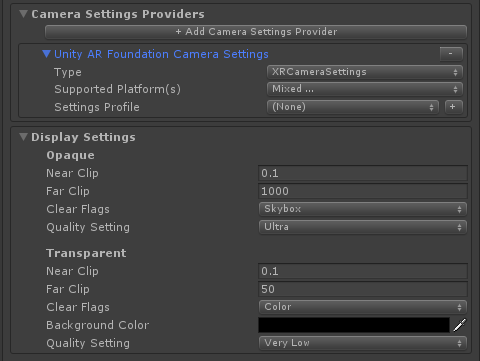
Still investigating a "leave the camera alone" option.
davidkline-ms
on 19 Oct 2019
Thanks to all for the valuable feedback!
@genereddick, I plan on carving out some time early next week to thoroughly read your AR Foundation / iOS / HoloLens issues list.
davidkline-ms
on 19 Oct 2019
Does IMixedRealityCamera have a transform definition or extend Camera? Does this design allow users to easily apply parent transforms to cameras? When aligning multiple devices to the same anchor/coordinate, we've learned that there's preference in applying parent transforms to cameras compared to 3D content. It would be good to make sure this is possible in the final design.
 chrisfromwork
on 21 Oct 2019
chrisfromwork
on 21 Oct 2019
Today, the MRTK ensures that the camera is parented to an object (ex: MixedRealityPlayspace). This is one of the aspects of MRTK that the "leave the camera alone" would potentially change.
davidkline-ms
on 21 Oct 2019
Final implementation required no breaking changes.
davidkline-ms
on 22 Oct 2019
having support for like adding network/device camera could be bonus camera system plus support for AR foundation
 Janisku7
on 28 Oct 2019
Janisku7
on 28 Oct 2019
Related issues
 dustin2711
·
3Comments
dustin2711
·
3Comments
 ritijain
·
3Comments
ritijain
·
3Comments
 brean
·
3Comments
brean
·
3Comments
 rigma
·
3Comments
rigma
·
3Comments
 dfields-msft
·
3Comments
dfields-msft
·
3Comments
Most helpful comment
We might be able to handle much of this in profiles, without changing the camera system interface.
UseExistingCameraandUseExistingPlayspacemight be platform-specific, and I'm not sure at the moment what things I'd use anIMixedRealityCameraclass for that couldn't be on a profile.