Mixedrealitytoolkit-unity: Toggle-Dot moves outside of control constraints
from: https://stackoverflow.com/questions/58283654/mrtk-v2-toggle-dot-moves-outside-of-constraints
Description - I have a settings panel in my scene which appears if I click the settings button on my toolbar. By repeating this, I noticed one bug → The dot of all toggled toggles moves further and further. The dot of an untoggled toggle stays in the right position. Did someone fix that bug in the script interactable or did a workaround?
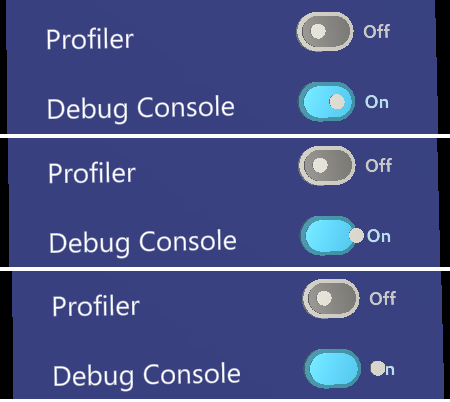
How to reproduce - I used the toggles that were given by the example package. Place one that is already toggled and one not toggled and start play mode. Activate and deactivate the script Interactable on your toggle and you should see this behavior
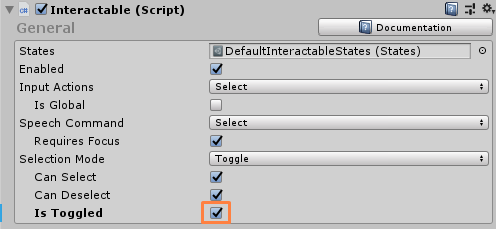
Unity 2019.2.8f1
MRTK 2.0.0
 davidkline-ms
All 2 comments
@davidkline-ms, I believe this was fixed for 2.1.
I think this is actually related to the bug fix @CDiaz-MS did
 Troy-Ferrell
on 9 Oct 2019
Troy-Ferrell
on 9 Oct 2019
@Troy-Ferrell @davidkline-ms, just confirmed that this issue has been fixed in 2.1.
 CDiaz-MS
on 10 Oct 2019
CDiaz-MS
on 10 Oct 2019
Related issues
 MatteoFantasy
·
3Comments
MatteoFantasy
·
3Comments
 provencher
·
3Comments
provencher
·
3Comments
 overedge
·
3Comments
overedge
·
3Comments
 Alexees
·
3Comments
Alexees
·
3Comments
 ritijain
·
3Comments
ritijain
·
3Comments
Most helpful comment
@Troy-Ferrell @davidkline-ms, just confirmed that this issue has been fixed in 2.1.