Mixedrealitytoolkit-unity: Apps deployed on HoloLens are in a "screen form"
Describe the bug
When i play an app that i deploy on HoloLens, the device show me just a "screen" of the first scene.
To reproduce
Steps to reproduce the behavior:
Create a new project
Add Mrtk on it
build it
Deploy it on HoloLens 1
Play the app
See the problem
Expected behavior
Normal behavior of an holoLens's application : immersion of the user.
Screenshots

Your Setup (please complete the following information)
- Unity Version 2019.1.7f1
- MRTK Version v2.0.0
Target Platform (please complete the following information)
- HoloLens 1
 Lepiaf95
All 4 comments
Might be happening when the "Windows Mixed Reality" Virtual Reality SDK is missing in the XR Settings of the Player Settings.
 Alexees
on 2 Sep 2019
Alexees
on 2 Sep 2019
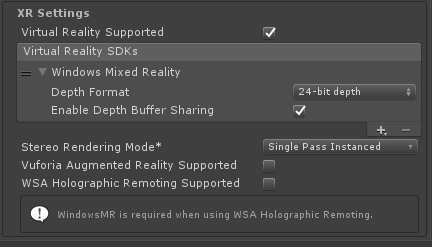
I have this settings
Lepiaf95
on 3 Sep 2019
Seems similar to this report:
https://github.com/microsoft/MixedRealityToolkit-Unity/issues/5447
Note that the MRTK doesn't have control over how Unity renders things on the device (if it could, that would be interesting... but weird... but interesting!).
For simplicity's sake, I would just try to get things working WITHOUT the MRTK, and you should be able to then copy the exact settings and get things to work with the MRTK.
I remember hearing about a buggy WMR package (i.e. UPM package) - I used 1.0.12 recently which works fine.
 wiwei
on 4 Sep 2019
wiwei
on 4 Sep 2019
It was actually in the XR settings with the "WSA Holographic...".
Problem solved, thank you.
Lepiaf95
on 4 Sep 2019
Related issues
 DanAndersen
·
3Comments
DanAndersen
·
3Comments
 overedge
·
3Comments
overedge
·
3Comments
 jimstack
·
3Comments
jimstack
·
3Comments
 markgrossnickle
·
3Comments
markgrossnickle
·
3Comments
 nuernber
·
3Comments
nuernber
·
3Comments
Most helpful comment
Might be happening when the "Windows Mixed Reality" Virtual Reality SDK is missing in the XR Settings of the Player Settings.