Mixedrealitytoolkit-unity: Copying assembly InputSimulation.Editor.dll failed
Describe the bug
Copying assembly from 'Temp/Microsoft.MixedReality.Toolkit.Services.InputSimulation.Editor.dll' to 'Library/ScriptAssemblies/Microsoft.MixedReality.Toolkit.Services.InputSimulation.Editor.dll' failed
To reproduce
Steps to reproduce the behavior:
- Create a new project with Unity 2019.1.8f1
- Import MRTK 2.0.0 RC2.1 Foundation + Examples
- Search in the Assets browser for Slate.prefab
- Drag it into the Hierarchy view to create an instance
Expected behavior
No error message
Your Setup (please complete the following information)
- Unity 2019.1.8f1
- MRTK Version 2.0.0 RC2.1
Target Platform (please complete the following information)
Editor issue
Workaround
Restart Unity several times and/or try to manually copy the file. The error message eventually went away.
 djee-ms
All 2 comments
This is an issue caused by the interplay between some OS code on 1903, and more prevalent on the MRTK because the of the amount of asmdefs we have + other assets that get moved around.
I'm not sure exactly when the OS fix is going to happen, but there's nothing for us on the MRTK that we can do. You can repro the exact same thing with any other arbitrarily large set of code.
 wiwei
on 8 Jul 2019
wiwei
on 8 Jul 2019
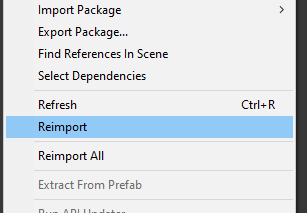
Another workaround is to right click on the offending .asmdef and select Reimport:
 keveleigh
on 8 Jul 2019
keveleigh
on 8 Jul 2019
Related issues
 nuernber
·
3Comments
nuernber
·
3Comments
 dustin2711
·
3Comments
dustin2711
·
3Comments
 matatabi-ux
·
3Comments
matatabi-ux
·
3Comments
 jimstack
·
3Comments
jimstack
·
3Comments
 overedge
·
3Comments
overedge
·
3Comments