Mixedrealitytoolkit-unity: Hololens 1 keyboard
Describe the bug
When opening the system keyboard, the layout of the keyboard is completely messed up. see pictures below:


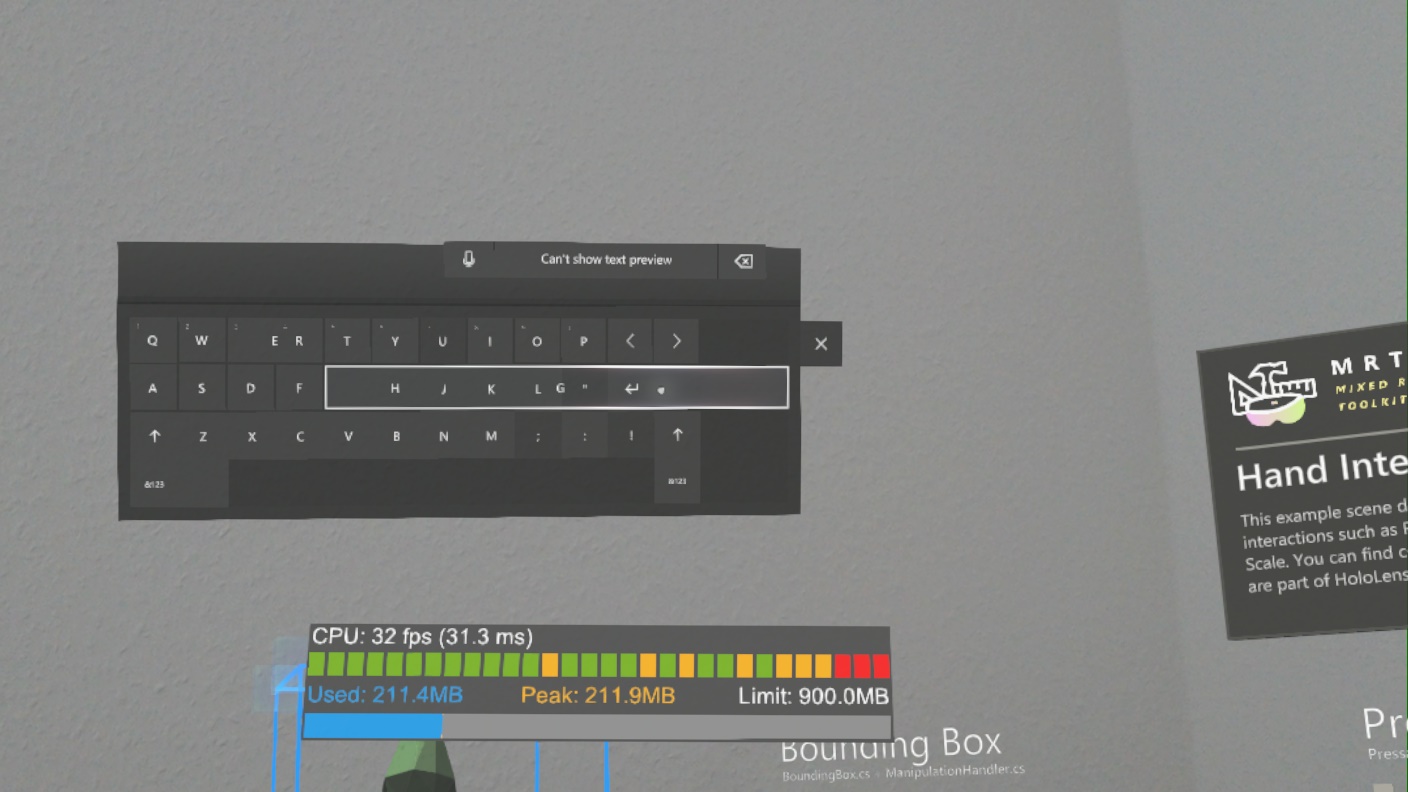
To reproduce
Steps to reproduce the behavior:
- Open and deploy HandInteractionExamples demo scene to Hololens 1
- Open keyboard (left side). The first time it may looks good, after opening it again will mess up the keyboard layout.
Expected behavior
Working keyboard every time.
Your Setup (please complete the following information)
- Unity Version: 2019.1.6f1
- MRTK Version: v2.0.0 RC2.1
Target Platform (please complete the following information)
- HoloLens
Additional context
I am not sure if it is related to MRTK or a Unity / Hololens issue.
Also the keyboard is looking different every time you open it.
You can also see a lot of exceptions be thrown after opening the keyboard and the framerate droping
 FlorianJa
All 5 comments
Tested it with the latest mrtk_development commit and unity 2018.3.11f1 and it work fine except opening the keyboard again (#4373)
FlorianJa
on 2 Jul 2019
AFAIK this is the system keyboard (i.e. something that the MRTK itself has no control over).
I'll forward this on to the folks who own the system keyboard here at MSFT.
 wiwei
on 2 Jul 2019
wiwei
on 2 Jul 2019
Hi @FlorianJa, this is an OS bug that was recently fixed. Make sure your HoloLens is fully up to date. You'll want at least the 2019-06 Cumulative Update. If you have an OS version number of at least 17763.557, you have the fix for this.
Please let us know if you continue to see this issue on newer OS versions.
 kevbarn
on 16 Jul 2019
kevbarn
on 16 Jul 2019
Yeah, the layout bug is gone, but unfortunately the workaround (https://github.com/microsoft/MixedRealityToolkit-Unity/pull/5018) for reinvoking the keyboard does not work on Hololens 1
FlorianJa
on 16 Jul 2019
Yes, unfortunately that workaround doesn't have the intended effect on HoloLens 1. Please open a new issue to track this and we can discuss options.
kevbarn
on 16 Jul 2019
Related issues
 nrchuanqi
·
3Comments
nrchuanqi
·
3Comments
 rigma
·
3Comments
rigma
·
3Comments
 provencher
·
3Comments
provencher
·
3Comments
 reillydonovan
·
3Comments
reillydonovan
·
3Comments
 MatteoFantasy
·
3Comments
MatteoFantasy
·
3Comments
Most helpful comment
AFAIK this is the system keyboard (i.e. something that the MRTK itself has no control over).
I'll forward this on to the folks who own the system keyboard here at MSFT.