Mixedrealitytoolkit-unity: UDP client not working on Hololens
Describe the bug
I'm trying to communicate with the Hololens through UDP to send and receive data: I made a C++ socket (Winsock) which is the Udp server and a C# script (the Udp client) on Unity.
When I run the Unity scene on my local machine (my PC), it works fine. But when I deploy it on the Hololens, it seems that the UdpClient cannot find the UdpServer on the PC.
Both are on the same wifi connection though. I can't figure out why it still doesn't work.
To reproduce
I give below the scripts I used.
- Launch the server (server_win.cpp) first
- Create an empty scene on Unity
- Attribute the UdpClient C# script (Client.cs) on a GameObject
- Build the project
- Deploy the scene on Hololens
olens via Visual Studio
Expected behavior
The server prints the received and sent data if the connection
Screenshots
If applicable, add screenshots to help explain your problem.
Your Setup (please complete the following information)
-Unity Version 2018.3.7f1
-MRTK Version v2.0.0 RC1
-Visual Studio Community 2019
Target Platform (please complete the following information)
- HoloLens 1
Source Code
server_win.cpp
```
include
include
include
include
include
pragma comment(lib,"ws2_32.lib") //Winsock Library
define BUFLEN 512 //Max length of buffer
define PORT 8888 //The port on which to listen for incoming data
int main()
{
SOCKET s;
struct sockaddr_in server, si_other;
int slen, recv_len;
char buf[BUFLEN];
WSADATA wsa;
slen = sizeof(si_other);

//Initialise winsock
printf("\nInitialising Winsock...");
if (WSAStartup(MAKEWORD(2, 2), &wsa) != 0)
{
    printf("Failed.Error Code : % d ", WSAGetLastError());
    exit(EXIT_FAILURE);
}
printf("Initialised.\n");

//Create a socket
if ((s = socket(AF_INET, SOCK_DGRAM, 0)) == INVALID_SOCKET)
{
    printf("Could not create socket : % d", WSAGetLastError());
}
printf("Socket created.\n");

//Prepare the sockaddr_in structure
server.sin_family = AF_INET;
server.sin_addr.s_addr = INADDR_ANY;
server.sin_port = htons(PORT);

//Bind
if (bind(s, (struct sockaddr*) &server, sizeof(server)) == SOCKET_ERROR)
{
    printf("Bind failed with error code : % d", WSAGetLastError());
    exit(EXIT_FAILURE);
}
puts("Bind done");


printf("Waiting for data...\n");
fflush(stdout);

double tab_s[6] = { 0.0, 0.0, 0.0, 4.0, 5.0, 6.0 };
double tab_r[3];


//keep listening for data
while (1)
{

    //clear the buffer by filling null, it might have previously received data
    memset(buf, 0, BUFLEN);

    //try to receive some data, this is a blocking call
    if ((recv_len = recvfrom(s, (char*)& tab_r, sizeof(tab_r), 0, (struct sockaddr*) & si_other, &slen)) == SOCKET_ERROR)
    {
        printf("recvfrom() failed with error code : % d", WSAGetLastError());
        exit(EXIT_FAILURE);
    }

    printf("\nOn recoit:\n");
    std::cout << "fx: " << tab_r[0] << " fy: " << tab_r[1] << " fz: " << tab_r[2] << std::endl;

    tab_s[0] = tab_s[0] - 0.1;

    printf("\nOn envoie:\n x = %f, y = %f, z = %f\n", tab_s[0], tab_s[1], tab_s[2]);
    printf("vx = %f, vy = %f, vz = %f\n", tab_s[3], tab_s[4], tab_s[5]);

    //now reply the client with the same data
    if (sendto(s,(char*)&tab_s, sizeof(tab_s), 0, (struct sockaddr*) &si_other, slen) == SOCKET_ERROR)
    {
        printf("sendto() failed with error code : % d", WSAGetLastError());
        exit(EXIT_FAILURE);
    }
}

closesocket(s);
WSACleanup();

return 0;
}
````
Client.cs
````
using System.Collections;
using System.Collections.Generic;
using UnityEngine;
using System;
using System.Net;
using System.Net.Sockets;
using System.Text;
public class Client : MonoBehaviour
{
UdpClient udpClient;
private Vector3 read_buff1 = new Vector3(0f, 0f, 0f);
private Vector3 read_buff2 = new Vector3(0f, 0f, 0f);
private Vector3 send_buff = new Vector3(1f, 2f, 3f);

// IP du serveur
String Ip_wifi = "192.168.43.87"; // put the IP adress of you PC here when you deploy on Hololens
String Ip_local = "127.0.0.1"; // localhost

int port_rcv = 11000; // port where we receive data
int port_send = 8888; // port where we send data

// Start is called before the first frame update
void Start()
{
    Connection(Ip_local); // put Ip_local or Ip_wifi here
    SendData(); // first send, in order to get in touch with the server

}

void Update()
{
    ReadData();
    SendData();
}

public void Connection(String Ip)
{
    // Initialisation of the UdP Connection
    try
    {
        udpClient = new UdpClient(port_rcv);
        udpClient.Connect(Ip, port_send);
        Debug.Log("Connection established");
    }
    catch (Exception exception)
    {
        Debug.Log("Exception caught: " + exception.Message);
    }
}

// Synchrone read function
public void ReadData()
{
    try
    {
        //IPEndPoint object will allow us to read datagrams sent from any source.
        IPEndPoint RemoteIpEndPoint = new IPEndPoint(IPAddress.Any, 0);

        Byte[] receiveBytes = udpClient.Receive(ref RemoteIpEndPoint);
        this.read_buff1 = new Vector3((float)BitConverter.ToDouble(receiveBytes, 8),
                                (float)BitConverter.ToDouble(receiveBytes, 16),
                                -1 * ((float)BitConverter.ToDouble(receiveBytes, 0)));

        this.read_buff2 = new Vector3((float)BitConverter.ToDouble(receiveBytes, 32),
                                   (float)BitConverter.ToDouble(receiveBytes, 40),
                                   -1 * (float)BitConverter.ToDouble(receiveBytes, 24));

        Debug.Log("Received: " + this.read_buff1);
    }
    catch (Exception e)
    {
        Debug.Log(e.ToString());
    }
}

public void SendData()
{
    // Formatting data to send
    byte[] dataX = BitConverter.GetBytes((double)-1 * this.send_buff.z);
    byte[] dataY = BitConverter.GetBytes((double)this.send_buff.x);
    byte[] dataZ = BitConverter.GetBytes((double)this.send_buff.y);

    byte[] dataToSend = new byte[24];
    for (int i = 0; i < dataX.Length; i++)
    {
        dataToSend[i] = dataX[i];
        dataToSend[i + 8] = dataY[i];
        dataToSend[i + 16] = dataZ[i];
    }

    try
    {
        udpClient.Send(dataToSend, dataToSend.Length);
    }
    catch (Exception exception)
    {
        Debug.Log("Exception caught: " + exception.Message);
    }

    Debug.Log("Sent: " + this.send_buff);
}
}
 mattandria
All 10 comments
you are receiving data from 'any' ip :
check that you configured your wifi router to enable udp broadcast for wifi (disabled by default on most of them)
 gilbdev
on 20 Jun 2019
gilbdev
on 20 Jun 2019
Ok. But I tested the UDP connection between 2 computers on the same wifi and it works. So normaly, my wifi network is able to exchange data through UDP. Maybe there is a parameter to enable in order to permit udp broadcasting with the hololens?
mattandria
on 20 Jun 2019
Did you enable the appropriate capabilities?
 Jarodshow
on 20 Jun 2019
Jarodshow
on 20 Jun 2019
Yes, I've enabled these capabilities:
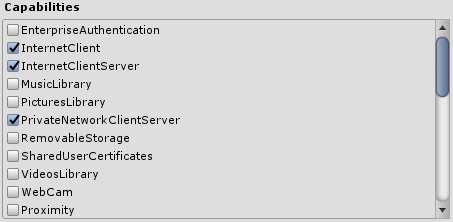
I don't know if I missed some.
mattandria
on 20 Jun 2019
Your IPEndPoint points to port 0, it should point to the port you're listening to.
Jarodshow
on 20 Jun 2019
@Jarodshow Effectively I forgot to put the port there, but on Unity Editor, it works even it's 0.
mattandria
on 21 Jun 2019
I've done some researches and I found that UdpClient is not compatible with the Hololens. I have to use DatagramSocket instead.
I will test and I will tell you if it works
mattandria
on 21 Jun 2019
Hi Mattandria, did you find out if using DatagramSocket the connection works fine?
Thanks!
 chiarapalu
on 11 May 2020
chiarapalu
on 11 May 2020
Hey did you find the solution with the Datagram socket? @chiarapalu
 Samvid95
on 21 May 2020
Samvid95
on 21 May 2020
@chiarapalu sorry for the late answer
Eventually, it works fine with DatagramSocket ;)
UdpClient really doesn't work on the Hololens
mattandria
on 19 Jun 2020
Related issues
 chrisfromwork
·
3Comments
chrisfromwork
·
3Comments
 ritijain
·
3Comments
ritijain
·
3Comments
 rigma
·
3Comments
rigma
·
3Comments
 nuernber
·
3Comments
nuernber
·
3Comments
 dfields-msft
·
3Comments
dfields-msft
·
3Comments