Mixedrealitytoolkit-unity: Local/World space setting for PressableButton should be visible with press settings
Describe the bug
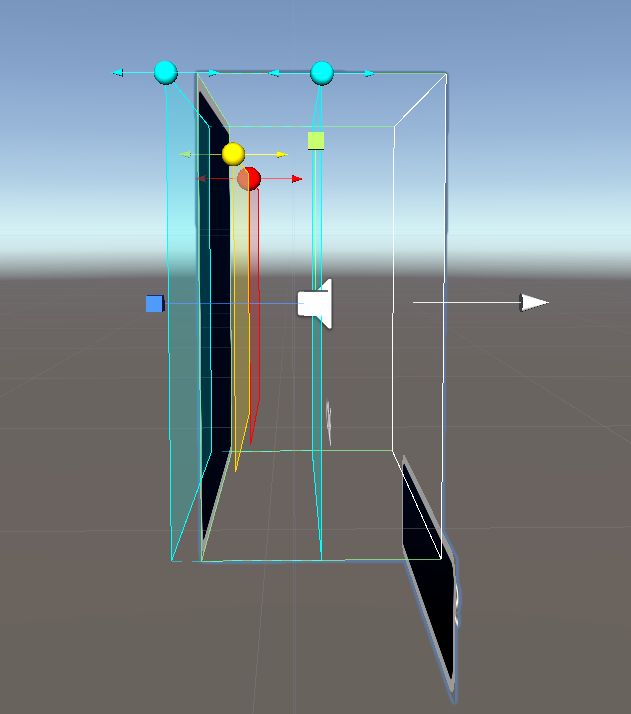
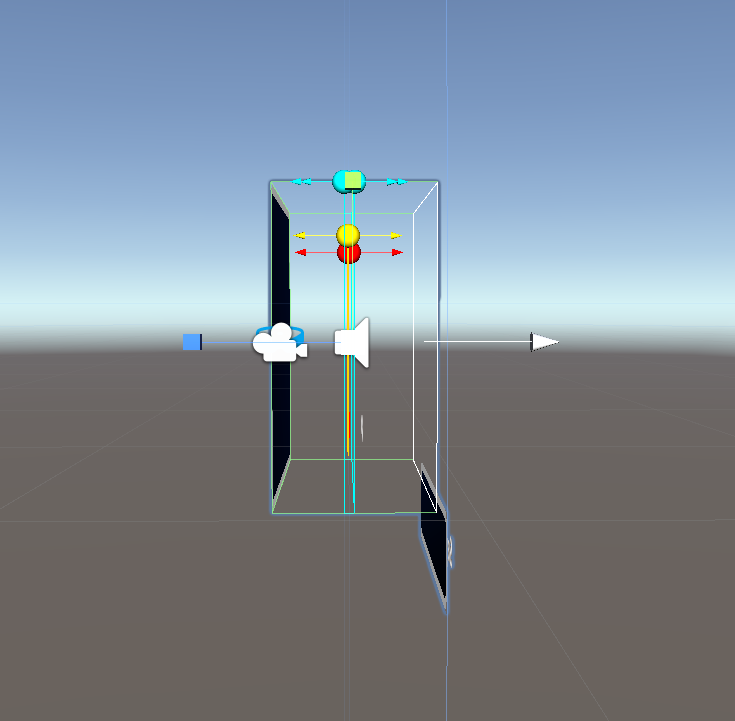
The PressableButton component and related-prefab have absolute press setting distance values and thus when scaling the button, their position relative to the button is not maintained as seen in the buttons below.
1) Changing pressable button from world space to local space would be a breaking change. The inspector updates for converting the plane distance values between coordinate spaces should be visible next to the press settings. Possibly also as an enum to simplify interaction and selection
2) Additionally, I would like to propose an extension for a "Fix now" button or "reset to recommended settings" similar to the approach in PR #4734 (Depth buffer sharing material warning). I understand changing the default behavior of pressablebutton to local space instead of world space could break some customers but we really need to set up future customers that drag and drop a new hololens2 button and scale/modify it for success.
3) Also, whatever is decided, please make sure all updates are posted in: https://microsoft.github.io/MixedRealityToolkit-Unity/Documentation/README_Button.html
- Element of world space vs local space
- Also maybe point out the plane colors to each settings and elaborate on the purpose of these settings a bit and their importance
Button as-is out of prefab:
Button homogeneously scaled
To reproduce
Drag the pressable button prefab and apply some kind of scale, enable plane editing mode
Expected behavior
The distance of the press planes to one another and within the button's colliders should remain the same ratio if scaled homogeneously
Screenshots
If applicable, add screenshots to help explain your problem.
Your Setup (please complete the following information)
- Unity Version 2018.4
- MRTK Version (latest mainline)
Target Platform (please complete the following information)
- HoloLens
- HoloLens 2
- WMR immersive
- OpenVR
Additional context
Add any other context about the problem here.
 Troy-Ferrell
All 4 comments
I think berni has fixed this recently but assigning to her to verify.
 julenka
on 20 Jun 2019
julenka
on 20 Jun 2019
bug is fixed but it's not clearly visible to the user what's going on - Troy is going to change the bug so we add better feedback and inspector controls
 thalbern
on 20 Jun 2019
thalbern
on 20 Jun 2019
if we could really just have a fix button that switches user to local space and sets correct ratios we believe are good (probably relationship between planes similar for current square button), then that would be fantastic. And in next few, we need to call out for people to update or even better provide automator tool to just search scene or asset database and reset all button planes for you. Sort of similar to @Cameron-Micka upgrade materials for LWRP.
Troy-Ferrell
on 21 Jun 2019
if we could really just have a fix button that switches user to local space and sets correct ratios we believe are good (probably relationship between planes similar for current square button), then that would be fantastic. And in next few, we need to call out for people to update or even better provide automator tool to just search scene or asset database and reset all button planes for you. Sort of similar to @Cameron-Micka upgrade materials for LWRP.
that auto tool would be good for world to local space - though not sure if everyone would want their planes to be reset as it's dependent on their button style. We can do the plane reset as well but i would at least offer them a possibility to just change the world - local space so their existing setups won't get messed up
thalbern
on 21 Jun 2019
Related issues
 reillydonovan
·
3Comments
reillydonovan
·
3Comments
 MatteoFantasy
·
3Comments
MatteoFantasy
·
3Comments
 markgrossnickle
·
3Comments
markgrossnickle
·
3Comments
 StephenHodgson
·
3Comments
StephenHodgson
·
3Comments
 brean
·
3Comments
brean
·
3Comments