Mixedrealitytoolkit-unity: Text/mesh distortion when moving head.
When set to 16 bit depth buffers, text and meshes distort slightly when moving head side to side. Disappears when you manually calculate the gaze stabilization plane and set it using SetFocusPointForFrame.
 jackiebecker
All 2 comments
@jackiebecker, this is due to the fact that the depth buffer is not properly set for LSR.
"Enable depth buffer sharing" under XR settings allows the platform to read the app's depth buffer in order to perform Late-stage reprojection of the scene. In case you or others reading this aren't aware of LSR, the short version is it is a platform feature that stabilizes holograms by directly modifying pixels of the output RGB texture rendered by the app every frame, to account for head movement in the 10's of milliseconds it took the app to render the frame. The platform can make holograms look stable by utilizing the depth buffer provided by the app to know how far away a given pixel/hologram is so it knows how much to transform for some given head movement.
Depth buffer LSR per pixel works really well if:
1) App is running at 60 FPS (which is standard guidance across the board for HL (1 or 2) apps)
2) There is an accurate depth buffer (i.e there is depth written for all visible objects)
3) Objects aren't too close to the user's face (which should generally be avoided even without this feature on)
Any text or transparent meshes in your scene will generally not write to the depth buffer by default. There is PR #4734 Depth Buffer Sharing Material Warning to help warn developers of this but unfortunately it did not make RC2.
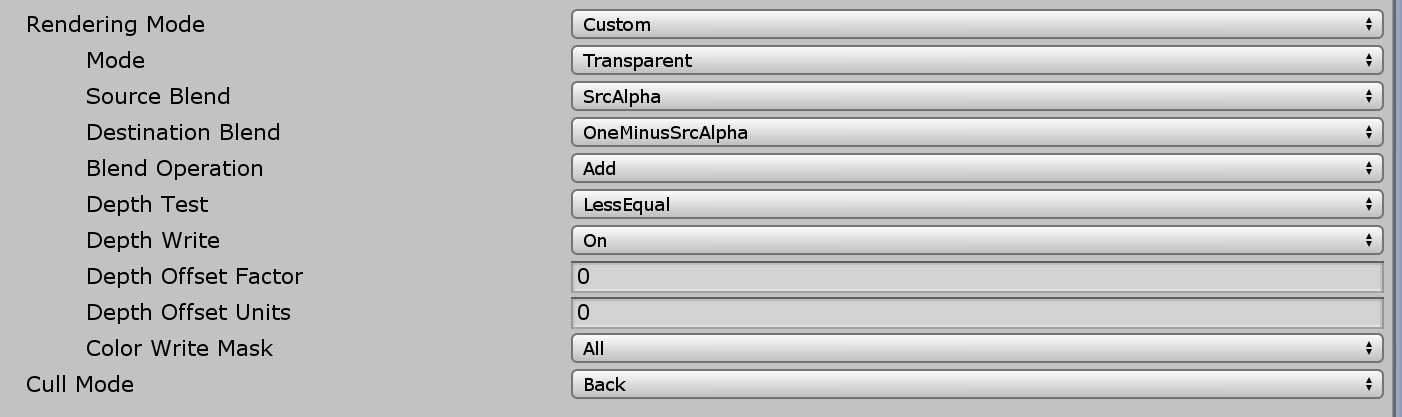
The guidance for rendering when using Depth buffer LSR is when writing color, write depth. If using the MRTK standard shader, with Render Mode to "Opaque" or "transparentCUTOUT", it automatically write to depth. To use the MRTK shader on a transparent material/mesh but also write depth, you can set the Render mode to "Custom", Mode under that to "Transparent', and most importantly set Depth Write to "On"
I am in the middle of updating our docs to better communicate what I have outlined above. I'll try to expedite that work to our recommended settings page and other locations
 Troy-Ferrell
on 14 Jun 2019
Troy-Ferrell
on 14 Jun 2019
PR to update Recommended settings at least:
https://github.com/MicrosoftDocs/mixed-reality/pull/1278
Troy-Ferrell
on 14 Jun 2019
Related issues
 overedge
·
3Comments
overedge
·
3Comments
 chrisfromwork
·
3Comments
chrisfromwork
·
3Comments
 jimstack
·
3Comments
jimstack
·
3Comments
 nuernber
·
3Comments
nuernber
·
3Comments
 DanAndersen
·
3Comments
DanAndersen
·
3Comments
Most helpful comment
@jackiebecker, this is due to the fact that the depth buffer is not properly set for LSR.
"Enable depth buffer sharing" under XR settings allows the platform to read the app's depth buffer in order to perform Late-stage reprojection of the scene. In case you or others reading this aren't aware of LSR, the short version is it is a platform feature that stabilizes holograms by directly modifying pixels of the output RGB texture rendered by the app every frame, to account for head movement in the 10's of milliseconds it took the app to render the frame. The platform can make holograms look stable by utilizing the depth buffer provided by the app to know how far away a given pixel/hologram is so it knows how much to transform for some given head movement.
Depth buffer LSR per pixel works really well if:
1) App is running at 60 FPS (which is standard guidance across the board for HL (1 or 2) apps)
2) There is an accurate depth buffer (i.e there is depth written for all visible objects)
3) Objects aren't too close to the user's face (which should generally be avoided even without this feature on)
Any text or transparent meshes in your scene will generally not write to the depth buffer by default. There is PR #4734 Depth Buffer Sharing Material Warning to help warn developers of this but unfortunately it did not make RC2.
The guidance for rendering when using Depth buffer LSR is when writing color, write depth. If using the MRTK standard shader, with Render Mode to "Opaque" or "transparentCUTOUT", it automatically write to depth. To use the MRTK shader on a transparent material/mesh but also write depth, you can set the Render mode to "Custom", Mode under that to "Transparent', and most importantly set Depth Write to "On"

I am in the middle of updating our docs to better communicate what I have outlined above. I'll try to expedite that work to our recommended settings page and other locations