Mixedrealitytoolkit-unity: LWRP not working in RC2
Describe the bug
When using LWRP With MRTK V2.0.0 RC2.1 , nothing shows up in the game window when in play mode.
To reproduce
Steps to reproduce the behavior:
- Import & Configure LWRP
- Convert standard shader to LWRP using the MRTK Menu.
- Open any example scene
- Screen only show skybox
- Unity Version : 2019.1.5f1
- MRTK Version : V2.0.0 RC2.1
Target Platform (please complete the following information)
- Editor
- HoloLens
 tomkrikorian
All 15 comments
I can take a look at this tomorrow. Out of curiosity, what LWRP package version did you see this problem in?
 Cameron-Micka
on 14 Jun 2019
Cameron-Micka
on 14 Jun 2019
I'm using 5.7.2. I'm trying another version (5.16.1) to see if it fixes the issue.
tomkrikorian
on 14 Jun 2019
I'm using lwrp 5.7.2 too and unity 2018.4.0f1 !I use the same procedure.I'm using a completely new project. There's only one cube in the scene. I created a PBR material and assigned it to the cube.When I switched the platform to uwp, the cube displayed normally
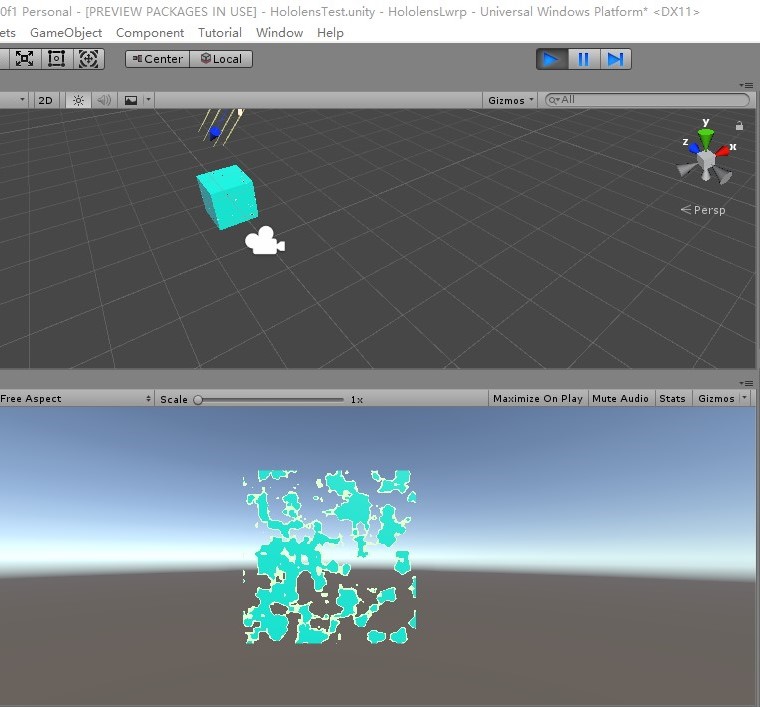
when I clicked the play button of the unit editor, but when I checked the XR Settings in the player settings to Virtual Reality Supported, the cube in the game view would be reduced to the lower left corner of the screen,and it is very smaller,
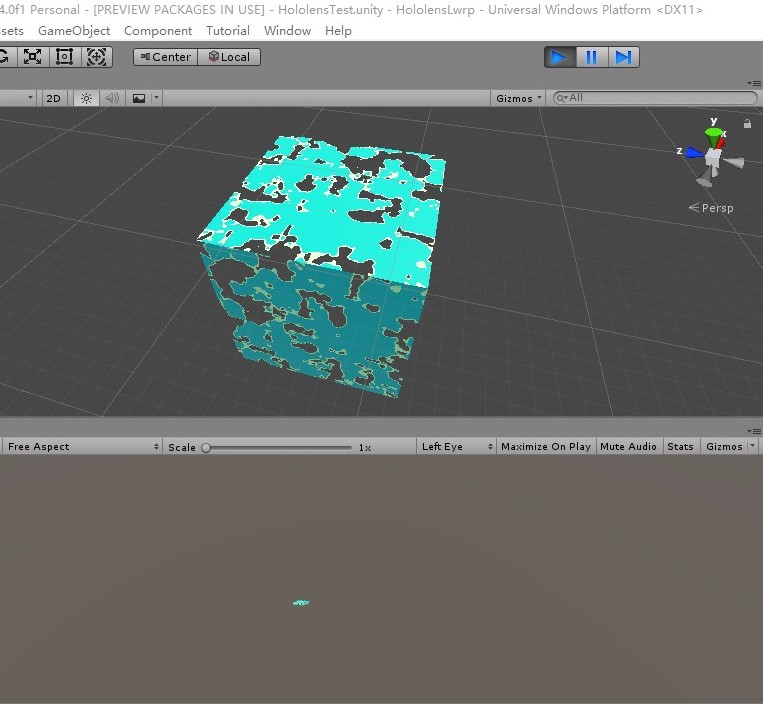
and when unchecked, they would return to normal.
 Lenovezhou
on 14 Jun 2019
Lenovezhou
on 14 Jun 2019
Hi @tomkrikorian & @Lenovezhou I have some good news and bad news. The good news is I was able to reporduce the issue you are seeing. The bad news is I believe this is a Unity issue and _not_ an MRTK issue. It looks like when Virtual Reality Supported is checked _and_ a stereo headset is not attach, the scene renders in the bottom left of the viewport (and scaled oddly). I was able to reproduce this issue without the MRTK installed (and using the built in Unity shaders, please see the below screenshot). So, I would recommend reporting this issue to Unity via their bug report tool.

As a workaround, you can make sure you have a stereo headset attached to your computer when testing in the editor or you can temporarily un-check Virtual Reality Supported when working in the editor and re-check it when building for a device. Not the best workflow, but a potential stopgap until Unity addresses this issue.
I'm going to close this issue for now, but please don't hesitate to ask any questions!
Cameron-Micka
on 14 Jun 2019
https://github.com/microsoft/MixedRealityToolkit-Unity/releases
Here says MRTK Standard Shader works with Unity’s Lightweight Render Pipeline;
But I can't do it according to the steps here.
https://github.com/microsoft/MixedRealityToolkit-Unity/pull/4311
Is there demo project available? Or more detailed steps
Lenovezhou
on 15 Jun 2019
Hi @Lenovezhou, you should be good to go after following those steps. I made a quick demo project for you in this branch: https://github.com/Cameron-Micka/MixedRealityToolkit-Unity/tree/mrtk_release_lwrp_example
Note, I had to disable "Virtual Reality Supported" in the project settings to see anything in the editor. But, when you got to play/build on a stereo headset please remember to re-enable the "Virtual Reality Supported" option.
Cameron-Micka
on 17 Jun 2019
@Cameron-Micka thank you
Lenovezhou
on 18 Jun 2019
Anyone contacted Unity concerning this issue? Is there any issue open that we can track so we can be aware of any released fix?
Thank you.
 benjamincoven
on 26 Jun 2019
benjamincoven
on 26 Jun 2019
Hi @benjamincoven, I have a bug open with Unity but haven't heard back from them yet. Sadly you can't open issues on Unity's Scriptable Render Pipeline repo anymore and have to open/track them though their internal database. I'll let you know when I hear back!
Cameron-Micka
on 26 Jun 2019
Thank you very much!
benjamincoven
on 27 Jun 2019
I found the public tracker for this bug, Unity should update it with progress on it's fix: https://issuetracker.unity3d.com/issues/uwp-xr-lwrp-gameview-camera-rendering-from-incorrect-transform-when-entering-play-mode
Cameron-Micka
on 27 Jun 2019
Any update or movement on this? Would be great to be able to use LWRP with hololens given that its been out of preview for a while now
 isurfraz
on 5 Jul 2019
isurfraz
on 5 Jul 2019
Hi @isurfraz, you should be good to use the LWRP with HoloLens and MRTK right now (we are using it for a few projects). You may just have to follow Unity’s recommendation to disable VR while using the editor if you don’t have a stereo headset attached with playing in the editor.
Cameron-Micka
on 5 Jul 2019
Found a simpler workaround: instead of toggling virtual reality supported on / off for editor vs HoloLens, instead switch the camera target eye property from both to left eye when working in the editor (and switch back to both when building).
 christjt
on 3 Oct 2019
christjt
on 3 Oct 2019
Great find @christjt!
Cameron-Micka
on 3 Oct 2019
Related issues
 ritijain
·
3Comments
ritijain
·
3Comments
 dustin2711
·
3Comments
dustin2711
·
3Comments
 nuernber
·
3Comments
nuernber
·
3Comments
 matatabi-ux
·
3Comments
matatabi-ux
·
3Comments
 overedge
·
3Comments
overedge
·
3Comments
Most helpful comment
I found the public tracker for this bug, Unity should update it with progress on it's fix: https://issuetracker.unity3d.com/issues/uwp-xr-lwrp-gameview-camera-rendering-from-incorrect-transform-when-entering-play-mode