Mixedrealitytoolkit-unity: Exceptions thrown when playing via Holographic Remote Player
NullReferenceException in GGVPointer.OnPreSceneQuery
When following the 'getting started with MRTK Guide' and opening the HandInteractoinExamplesScene or any other scene, an exception is thrown when gazing upon an Item. Playing the Scene via Holographic Remoting Player.
To reproduce
Prequesites
- download and import MRTK Foundation and Examples packages (v2.0.0 RC1 Refresh)
- download and insall Holographic Remoting Player on HoloLens 1
- Set Unity Target Platform to UWP
- In XR settings, enable Virtual Reality, add MRTK to list
Steps
- Create a new Scene in Unity
- Top Panels > Mixed Reality Toolkit > Add to Scene and Configure
- Add a Cube GameObject
- Properly scale and place the object in the scene
translation:x: 0; y: 0; z:2;
scale:x: 0.2; y: 0.2; z: 0.2; - Create and add a script containing the following:
using Microsoft.MixedReality.Toolkit.Input;
public class CubeSelector : MonoBehaviour, IMixedRealityInputHandler
void IMixedRealityInputHandler.OnInputDown(InputEventData eventData){/*any simple functionality*/}
void IMixedRealityInputHandler.OnInputUp(InputEventData eventData){/*any simple functionality*/}
Expected behavior
When gazing upon a selectable item (Cube in custom scene or any object in the HandInteractionExamples demo scene) and selecting it by gesture, the defined selection behaviour should apply.
Screenshots

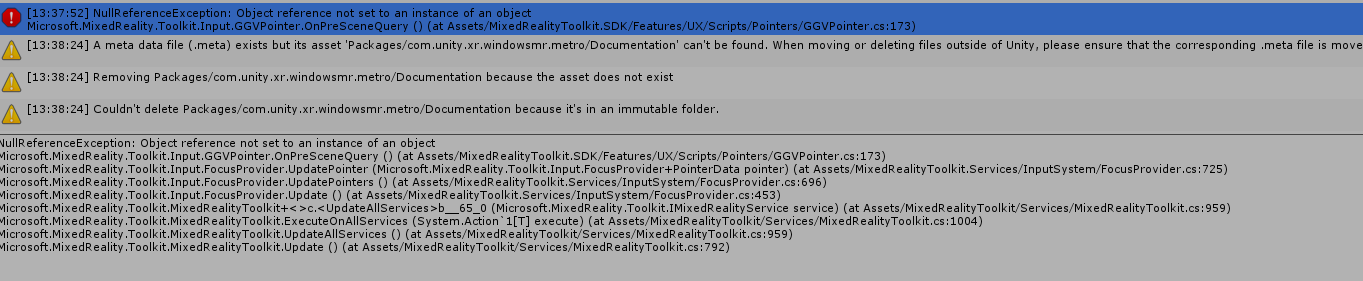
In GGVPointer.cs:

Your Setup (please complete the following information)
- Unity Version [e.g. 2018.3.14f1]
- MRTK Version [e.g. v2.0.0 RC1 Refresh]
Target Platform (please complete the following information)
- HoloLens
Additional context
I am just getting started with HoloLens development (moreover I'm completely alone so noone can help me with their experience). When running examples in the editor everything works as expected (except that I have to click 2-3 times before the interaction is recognized. When using the holographic remoting player, and playing any scene via HoloLens(1), I get a crash either upon gaze or AirTap Gesture.
 RomanStadlhuber
All 16 comments
It's the same for me with every kind of input on the HoloLens 1.
My setup is:
Unity 2019.1.4f1
MRTK v2.0.0-RC1-Refresh (Foundation + Examples)
 Weasy666
on 27 May 2019
Weasy666
on 27 May 2019
@Weasy666 I'd like to add that the docs recommend one of the 2018.3.x versions because they're the most stable. That doesn't seem to do anything for me (I too started out with some 2019 version) but maybe it fixes it for you. Do you get the same exception (in addition to some others)?
RomanStadlhuber
on 27 May 2019
Yeah i know that 2018 is recommended, but the error is the same regardless of the Unity version.
NullReferenceException in Microsoft.MixedReality.Toolkit.Input.GGVPointer.OnPreSceneQuery() and not only in the HandInteractionExamplesScene but in every scene with hand input.
Weasy666
on 27 May 2019
@Weasy666 can you try pulling the latest mrtk_development and see if this fixes the issue?
I believe I fixed this issue in https://github.com/microsoft/MixedRealityToolkit-Unity/pull/4380 a week or so ago, but it hasn't been cut into a particular release yet.
You could also just code directly from that change and patch it in locally.
The underlying issue appears to be a regression in Unity or Unity's WMR packages, so the fix that we adopted here is merely a workaround.
 wiwei
on 28 May 2019
wiwei
on 28 May 2019
Sorry it took so long. I deleted all MRTK stuff and copied the Assests of the current mrtk_development branch into my unity project and started holographic remoting.
With the mrtk_development branch the hand interaction is working. Previously when a hand was detected for the first time, the pointer changed accordingly but then stayed in the hand-detected mode, even when there was no hand and interaction was impossible. Like i said, it is working now, but i still did get one NullReferenceException:
NullReferenceException: Object reference not set to an instance of an object
Microsoft.MixedReality.Toolkit.Input.GGVPointer.OnPreSceneQuery () (at Assets/MixedRealityToolkit.SDK/Features/UX/Scripts/Pointers/GGVPointer.cs:173)
Microsoft.MixedReality.Toolkit.Input.FocusProvider.UpdatePointer (Microsoft.MixedReality.Toolkit.Input.FocusProvider+PointerData pointer) (at Assets/MixedRealityToolkit.Services/InputSystem/FocusProvider.cs:772)
Microsoft.MixedReality.Toolkit.Input.FocusProvider.UpdatePointers () (at Assets/MixedRealityToolkit.Services/InputSystem/FocusProvider.cs:736)
Microsoft.MixedReality.Toolkit.Input.FocusProvider.Update () (at Assets/MixedRealityToolkit.Services/InputSystem/FocusProvider.cs:475)
Microsoft.MixedReality.Toolkit.MixedRealityToolkit+<>c.<UpdateAllServices>b__67_0 (Microsoft.MixedReality.Toolkit.IMixedRealityService service) (at Assets/MixedRealityToolkit/Services/MixedRealityToolkit.cs:927)
Microsoft.MixedReality.Toolkit.MixedRealityToolkit.ExecuteOnAllServices (System.Action`1[T] execute) (at Assets/MixedRealityToolkit/Services/MixedRealityToolkit.cs:972)
Microsoft.MixedReality.Toolkit.MixedRealityToolkit.UpdateAllServices () (at Assets/MixedRealityToolkit/Services/MixedRealityToolkit.cs:927)
Microsoft.MixedReality.Toolkit.MixedRealityToolkit.Update () (at Assets/MixedRealityToolkit/Services/MixedRealityToolkit.cs:668)
@Weasy666 same here
RomanStadlhuber
on 31 May 2019
@wiwei to me it seems like the Nullreference Exception Thrown in the OnPreSceneQuery() function seems to be unrelated to the AirTap or any Gesture in general. I used Holographic Remoting and did not select anything in the scene and it seemed to occur randomly.
There have been occasions where the exception was thrown while either entering or exiting gaze at selectable objects but not all the time.
Is there another issue which references the same behaviour?
RomanStadlhuber
on 3 Jun 2019
Yep, that's a new one to me. Let's keep this open to track that issue.
I'm currently travelling away from hardware access, so I'll be a week or so out from being able to physically repro this. Someone else on the team may be able to jump in to help here, but just calling things out for transparency.
wiwei
on 3 Jun 2019
I have yet to find a reliable way to reproduce it, but it will happen every time I run. Sometimes it's clearly attached to me doing something, like an airtap, but it's unclear why I can airtap a number of times no problem but the fifth air tap will cause the error.
One thing I'm noting is it definitely does not require an airtap in order to happen. The event of my hand coming into the tracking view is enough to set it off, I think without necessarily needing to gesture. Happens with holographic remoting and when I build and run. I already added the workaround for the other bug that doesn't let you tap again after your first tap. Unity version 2018.4.0f1
 ChrisHorrigan
on 21 Jun 2019
ChrisHorrigan
on 21 Jun 2019
I pulled mrtk_development and implemented the workaround that was mentioned above, I still get this error when using holographic remoting player. Just as mentioned by @ChrisHorrigan, there does not seem to be a direct relation to tapping, gaze or any other gesture (once it ran without interaction and crashed after 3ish minutes). When deploying a build - which also only works when using mrtk_development - such behaviour has not occurred yet.
RomanStadlhuber
on 22 Jun 2019
@RomanStadlhuber how are you deploying your builds? I'm running via Visual Studio solution to the Hololens which is connected by USB and I do get the error in the output window.
ChrisHorrigan
on 24 Jun 2019
@ChrisHorrigan I'm depolying via WIFI - make sure to a) paired the HoloLens to your machine via its settings and b) have developer mode enabled in W10. Note that when first enabling dev mode, some packets might not be loaded but they're not needed for HoloLens deployment.
It only worked for me after meeting these requirements. I followed some MS Docs Guide doing so, I can post it if you want to (am on mobile right now)
RomanStadlhuber
on 24 Jun 2019
@RomanStadlhuber Thanks, I think I am familiar with the doc you're talking about so maybe I'll check that out.
ChrisHorrigan
on 24 Jun 2019
What was the document? I'm having the same issue.
 dariusjulian
on 15 Aug 2019
dariusjulian
on 15 Aug 2019
@ChrisHorrigan Could you tell me your HoloLens build settings? I am a beginner in HoloLens development, and come across problems when deploying my app to device. I use Unity2018.4.0f1 too.
 lizs17
on 18 Aug 2019
lizs17
on 18 Aug 2019
Closing out some old issues, we've seen some reports of OnPreSceneQuery but nothing on recent builds - if folks are still hitting this definitely open a new issue (with min repro + other information for how you're hitting it)
If folks are able to hit this reliably we might want to add some logging to some of these paths to better understand what's really going on.
wiwei
on 5 Feb 2020
Related issues
 MatteoFantasy
·
3Comments
MatteoFantasy
·
3Comments
 dustin2711
·
3Comments
dustin2711
·
3Comments
 markgrossnickle
·
3Comments
markgrossnickle
·
3Comments
 StephenHodgson
·
3Comments
StephenHodgson
·
3Comments
 provencher
·
3Comments
provencher
·
3Comments
Most helpful comment
Yep, that's a new one to me. Let's keep this open to track that issue.
I'm currently travelling away from hardware access, so I'll be a week or so out from being able to physically repro this. Someone else on the team may be able to jump in to help here, but just calling things out for transparency.