Mixedrealitytoolkit-unity: No way to identify loaded holographic device
Describe the bug
HoloLens 1 and HoloLens 2 are both considered windows Holographic, and there is no way to differentiate them within a C# codebase, beyond manually testing if certain capabilities are available.
Beyond that, testing capabilities can fail if permissions are not accepted, and so it is not a reliable way to differentiate devices.
Expected behavior
A clear enum or string identifying the hardware loaded.
An easy to access capabilities profile identifying what the hardware is capable of doing, irrespective of the accepted permissions.
Your Setup (please complete the following information)
- Unity Version 2018.3.8f1]
- MRTK Version v2.0 latest dev branch
Target Platform (please complete the following information)
- HoloLens
- HoloLens 2
- WMR immersive
 provencher
All 13 comments
It seems that you can at least get the OS architecture information from interop services
https://docs.microsoft.com/en-us/dotnet/api/system.runtime.interopservices.runtimeinformation.osarchitecture?view=netstandard-1.3
I created an active device checker like this. Its not perfect for distinguishing WMR from HoloLens however
```
public static MixedRealityDevice CurrentlyActiveDevice
{
get
{
if UNITY_EDITOR
return MixedRealityDevice.HoloLens2;
elif UNITY_WSA
            switch (RuntimeInformation.OSArchitecture)
            {
                case Architecture.Arm:
                case Architecture.Arm64:
                    return MixedRealityDevice.HoloLens2;
                case Architecture.X86:
                    return MixedRealityDevice.HoloLens;
                default:
                case Architecture.X64:
                    return MixedRealityDevice.WMR;
            }
endif
        }
    }```
Ok this doesn't work
Unsupported internal call for IL2CPP:"Is64BitOs" - L"It is not possible to check if the OS is a 64bit OS on the current platform."
provencher
on 9 May 2019
Do you generate different appx's for hololens 1 vs hololens 2? It may not be an ideal long term solution, but you could create a custom preprocessor directive that you change in your player settings based on what you are building: https://docs.unity3d.com/Manual/PlatformDependentCompilation.html
Before we commit to exposing this hololens 1 vs hololens 2 hardware check, what scenarios do you have that require knowing the specific hardware? Keying off of the availability of a functional capability may be more extensible long term (i.e. different hardware versions/manufacturers of hardware may have the same capabilities). It feels like there could be a variety of solutions to this problem, but we may be able to pick the best/most appropriate one with more information. :)
 chrisfromwork
on 9 May 2019
chrisfromwork
on 9 May 2019
This should get fixed soon.
With this bug, the developer can't differentiate HL1 and HL2 and do different things at runtime.
We should discuss if we want to let people differentiate hardware vs ask for capabilities.
 Yoyozilla
on 9 May 2019
Yoyozilla
on 9 May 2019
@chrisfromwork. Setting a serialized field at compile time to change the runtime functionality is the solution I landed on at the end of the day today. It's certainly not ideal long term though.
There are a few reasons I need to know the differences, but the main one is that hand tracking and eye tracking are not available, and the hand tracking service, from what I noticed could return that a hand was tracked even on HL2, which led to poor behavior.
Beyond that, interaction bounding boxes, and near interactibles shouldn't show up at all for HL1 users, while they should for HL2 users. Another example is the fitbox display, or the near plane, which are different due to platform differences in hardware nearplane cutoff and field of view size.
So to sum up.
- HL1 doesn't have hand tracking, but it can detect hand motion vectors. That's a key distinction.
- Eye tracking simply isn't available on HL1
- Field of view size can affect how content is displayed
- Near cut plane limits affect how content is displayed
- APIs using improved depth cameras should be blocked off on HL1
provencher
on 10 May 2019
Thanks for this context, @provencher.
In terms of content/ui design, would you expect to design separate, specialized AR/UI experiences for these different FOVs/near cut planes? Or would you anticipate building FOV/cut plane agnostic ui that would work for any FOV/cut plane configuration?
chrisfromwork
on 10 May 2019
I don't think the experiences will be starkly different, but I anticipated tuning them to better suit the detected device.
For cut plane, things just don't look good below roughly 40cm on Hl1, while that's not the case on HL2 due to better vergence accommodation.
For the Fitbox, or some of our persistent headlocked HUD UI that we place in the view periphery, positioning and scale will change depending on supported device fov.
provencher
on 10 May 2019
Since I added a hardcode enum in a serialized field that represents the compiled device target, in order to granularize functionality based on detected capabilities, I added some code that looks like this:
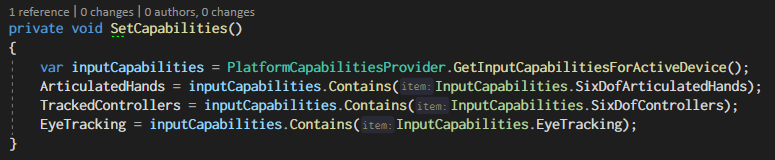
It'd be great to have something similar. Basically a Hashet is generated when the detected device is registered, and then user-space code can query individual capabilities out of an enum.
provencher
on 10 May 2019
The recommendation is to query for capabilities instead of device type.
Yoyozilla
on 6 Jun 2019
Documentation here would be helpful since this is a commonly asked question by partners
Yoyozilla
on 6 Jun 2019
The issue is that querying for capabilities is non trivial from what I've found.
When I ran a build on HL1, the hand tracking service still told me that my hand was tracked when it was in view, which made my hand tracking code provide garbage, and fail spectacularly.
provencher
on 6 Jun 2019
Yeah, we really should figure this one out - other folks are asking the same questions.
The tricky part is that when we ask folks working on the underlying OS/device, there's immediate pushback saying "we shouldn't do that" so we're about in the same position. We'll try to work on multiple fronts here to convince folks of the value (i.e. it's not like you're building an OS that is being deployed to a billion different types of devices which is why there's that hesistation, you're building toward a device that is one of a small number N)
Anyways just wanted to plus one this
 wiwei
on 7 Jun 2019
wiwei
on 7 Jun 2019
Fixed in the mrtk_development branch via #4882
 davidkline-ms
on 17 Jun 2019
davidkline-ms
on 17 Jun 2019
Related issues
 dustin2711
·
3Comments
dustin2711
·
3Comments
 MatteoFantasy
·
3Comments
MatteoFantasy
·
3Comments
 Alexees
·
3Comments
Alexees
·
3Comments
 reillydonovan
·
3Comments
reillydonovan
·
3Comments
 nrchuanqi
·
3Comments
nrchuanqi
·
3Comments
Most helpful comment
Yeah, we really should figure this one out - other folks are asking the same questions.
The tricky part is that when we ask folks working on the underlying OS/device, there's immediate pushback saying "we shouldn't do that" so we're about in the same position. We'll try to work on multiple fronts here to convince folks of the value (i.e. it's not like you're building an OS that is being deployed to a billion different types of devices which is why there's that hesistation, you're building toward a device that is one of a small number N)
Anyways just wanted to plus one this