Mixedrealitytoolkit-unity: Toggle button has design and feature bugs
Describe the bug
The Interactable component can be utilized for Toggle button functionality and there is a toggle prefab available. However, there are two bugs: a design bug and a feature bug.
Design:
To create a toggle button, one has to modify the dimensions to "2" and then they will get the "Can select" and "Can deselect" options available. Also it is not obvious that the additional theme field provided for the 2nd dimensions corresponds to the "selected" dimension state.
Feature:
In order to validate whether the button is in the toggled state, one would think to use the "Interactable.IsToggled" property but this is only set by "Interactable.SetToggled" which is never called. Instead, the developer must call "Interactable.GetDimensionIndex == 1" which is not obvious.
To reproduce
Steps to reproduce the behavior:
Look at Interactable.cs and the inspector
Expected behavior
1) Configuring a button to be "toggleable" should be easier
2) SetToggled and IsToggled should be set as the user clicks on the button and selects/deselects
Screenshots
If applicable, add screenshots to help explain your problem.
Your Setup (please complete the following information)
- Unity Version 2018.3 or 2019.1
- MRTK Version RC1
Target Platform (please complete the following information)
- HoloLens 2
Additional context
Microsoft => trferrel
 Troy-Ferrell
All 6 comments
Any updates to this? I spent a while trying to figure out why SetToggled(bool) would not change the visual state (dimension) before I found this. For now I created a workaround that simply sets the DimensionIndex to 0 or 1.
 thedevleon
on 13 Jun 2019
thedevleon
on 13 Jun 2019
SetToggled(bool) only sets the toggled state, it does not change the dimensions, your workaround is the proper way at this point.
This is great feedback and similar to another issue (#3603) around easier access to toggle functionality and making sense of this system.
Thinking out loud for clarification, its valid to say when speaking about toggles, we would expect a two state system, so we would also expect that SetToggled(bool) would also control dimension index (setting to 0 or 1) based on the toggled state. Then we can look at Interactable.IsToggled to determine Toggle state value and dimension value (0 or 1) in this context.
On the issue of setting an initial checked or toggled state, having a Default Dimension field under Can Deselect would be fine?
Dimensions allow Interactable to go beyond two states, but toggles are a much more common use-case. I understand the confusion that comes with trying to be too flexible.
Proposal:
- Use Dimensions to enable Toggle functionality - Is a tooltip and documentation enough to discover this feature of someone is looking for toggle? Update field to say Dimensions (Toggle)
- When dimensions == 2, we will add "Toggled" to the second theme title
- When dimensions > 2 add dimension index reference to the theme title
- Make SetToggle(bool) effect dimension index.
- When dimensions == 2, Add IsToggled toggle under the Can Deselect Field, so user can set the initial toggled state.
- When dimensions > 2, change IsToggled toggle to a number field called Dimension Index for setting initial toggled state and exposing way to get dimension info.
None of this should be breaking, except for adding dimension changing to SetToggle(bool), otherwise mostly Inspector work.
Worse case for those using current workaround.
``` C#
Interactable.SetToggle(true);
// sets toggle state
// sets Dimension Index to 1
Interactable.SetDimensinIndex(1);
// sets Dimension Index to 1
```
Not really breaking if end result does not change?
Let me know if I'm missing anything.
 killerantz
on 14 Jun 2019
killerantz
on 14 Jun 2019
@killerantz , this is great! Great discussion on the right track. I would propose the following extensions on what you have proposed to cover everything.
Scripts:
SetToggled - as you said makes a lot of sense
IsToggled/GetToggled - if dimension index == 1, this should return true. Right now it just returns the Toggled state which is only being set in "SetToggled". If you click a button, it will update the dimension index but not the toggled state
It is also worth considering that when a developer calls SetToggled, there may be two options: 1) the state is set and no events are fired or 2) the state is set and any related unity events (i.e onclick, etc) are fired. Regardless it will be very common for developers to hide or show a toggle button in UI and then have to update the toggle state based on other scene changes, etc.
Inspector UI:
I actually like the idea of hiding the "Dimensions" field entirely at first.
Dimension == 1 (Default for interactable)
- Hide Dimensions field, show buttons or notice to create toggle button or set multi-dimensional button
Dimension == 2 (Toggle button)
- Show Can Select/Can Deselect, show default state option for toggle on start, on theme properties label each as Deslected/Selected or off/On or Default/Toggled etc. to differentiate
Dimensions > 2 (Multi-dimensional Button)
- Only show Dimensions field count and label each theme as 1,2,3,4,5 etc based on dimension index
Troy-Ferrell
on 15 Jun 2019
I'll put a PR up for this shortly.
Most of this is purely Inspector work, so the main functionality will still be the same except when Dimensions is set to 2 and someone calls Interactable.SetToggle(bool toggle). When Dimensions is set to 2 (toggle mode), then calling SetToggle will also call SetDimensionIndex(0/1).
For the Inspector updates. We now have a drop down for Selection Type
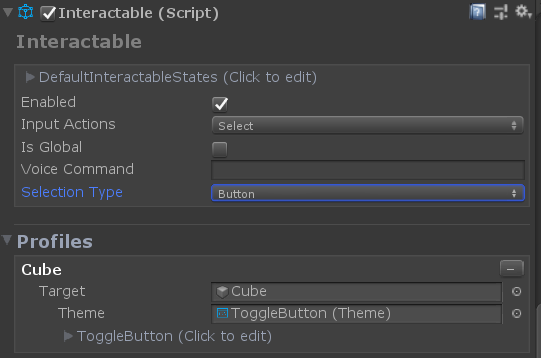
The default value is button, or sets Dimensions to 1.
Setting the drop down to Toggle will set Dimensions to 2.

There's also a number added to each themes with a "(Toggled)" added to the second theme label.
The IsToggled checkbox will set the initial state at runtime. When the app is running, the IsToggled checkbox becomes read-only, but still reflects the toggled state. We don't want anyone overriding the toggle in the inspector when running, but it can be done through code at run-time.
Lastly, the Multi Dimensions option
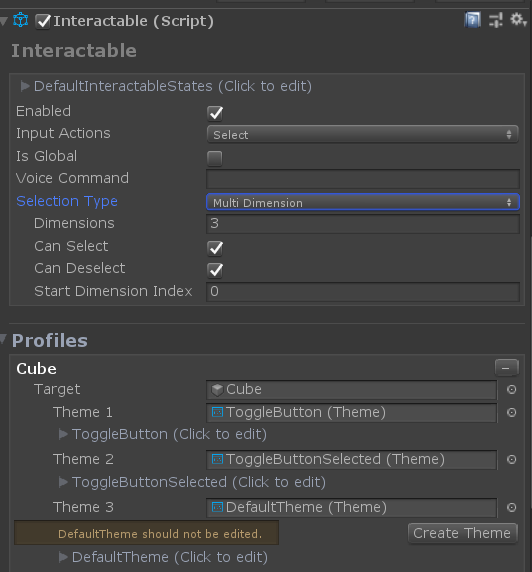
In this mode we refer to Dimensions for everything, setting dimensions to at least 3 with the option to set the start Dimension index value.
killerantz
on 26 Jun 2019
What about "Selection Mode" instead of "Selection Type"?
killerantz
on 26 Jun 2019
Just created PR #5069 with the outlined changes.
https://github.com/microsoft/MixedRealityToolkit-Unity/pull/5069
killerantz
on 26 Jun 2019
Related issues
 nrchuanqi
·
3Comments
nrchuanqi
·
3Comments
 StephenHodgson
·
3Comments
StephenHodgson
·
3Comments
 matatabi-ux
·
3Comments
matatabi-ux
·
3Comments
 nuernber
·
3Comments
StephenHodgson
·
3Comments
nuernber
·
3Comments
StephenHodgson
·
3Comments
Most helpful comment
Just created PR #5069 with the outlined changes.
https://github.com/microsoft/MixedRealityToolkit-Unity/pull/5069