Mixedrealitytoolkit-unity: HL1 opens MRTK 2 RC1 sample project in "window mode" instead of full screen
Describe the bug
I am testing the MRTK 2 RC 1, I made a build with the HandInteractionExamples and installed it on a Hololens 1. However when I start the application it creates a holographic 2D window (like a UWP application) where the camera is rendered and no interactions are captured.
To reproduce
Create a blank project with only the MRTK 2 RC 1 foundation and exemples then create a build with the HandInteractionExamples scene.
Expected behavior
When the app starts, all app holograms should disappear and the app should be rendered in 3D with all interactions working.
Screenshots
Please ask if needed.
Your Setup (please complete the following information)
- Unity Version 2019.1
- MRTK Version 2 RC 1
Target Platform (please complete the following information)
- HoloLens 1
 benjamincoven
All 8 comments
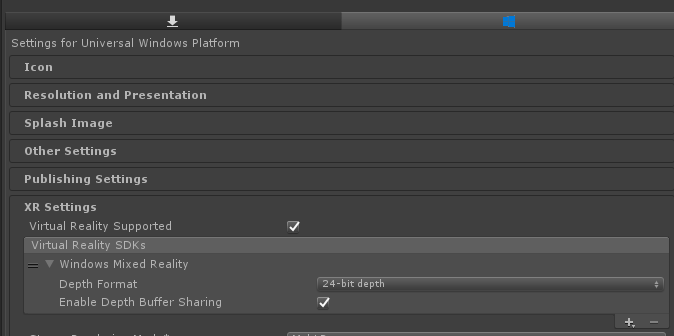
Did you enable Virtual Reality Supported in your UWP settings?
 keveleigh
on 29 Apr 2019
keveleigh
on 29 Apr 2019
@benjamincoven
 Yoyozilla
on 30 Apr 2019
Yoyozilla
on 30 Apr 2019
Sorry I was not in my office.
Yes now it works, Virtual Reality Supported was enabled but there was no sdk in the Virtual Reality SDK. Adding Windows Mixed Reality did the job.
I let you choose to close or not this issue since the MRTK2 automaticly enables Virtual Reality Supported but does not seem to add WMR to SDK list.
Thank you.
benjamincoven
on 2 May 2019
I think that someone else hit something similar here because their gitignore rules were ultimately ignoring the manifest.json that we have (which will ensure that the WMR package gets pulled down).
It would be interesting to check to see that you didn't hit this issue.
Going forward if you hit this again + have a min repro we can look at, feel free to reopen this issue or file a new issue.
 wiwei
on 8 May 2019
wiwei
on 8 May 2019
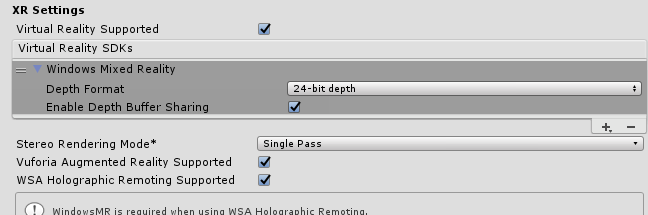
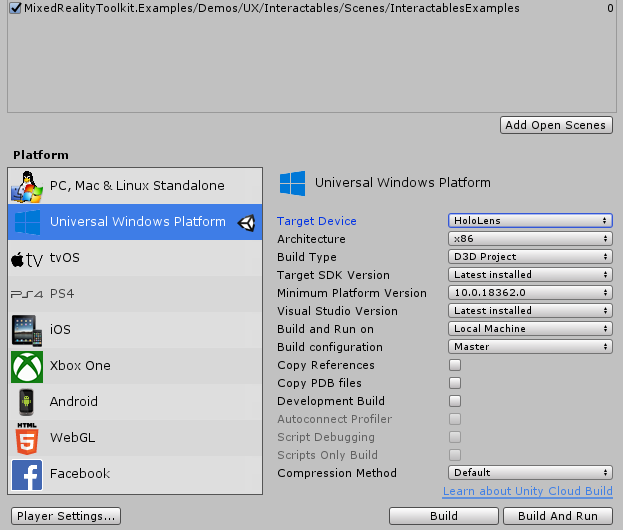
Um...i'm experiencing the same issue, even with a Virtual Reality SDK.
Here my config:
Unity 2019.1.4f1
Visual Studio 2019
MRTK v2.0.0-RC1-Refresh (Foundation + Examples)
 Weasy666
on 3 Jun 2019
Weasy666
on 3 Jun 2019
@Weasy666 A few things to try:
- Open the Package Manager to verify that the Windows Mixed Reality package successfully downloaded
- Try deploying with the "WSA Holographic Remoting Supported" checkbox unchecked. I think I've seen weird behavior before with that checked, though I'm not sure if it's this specifically
keveleigh
on 3 Jun 2019
@keveleigh i checked it out with "WSA Holographic …" unchecked and that did the trick. Thanks for that!
Weasy666
on 4 Jun 2019
@keveleigh Maybe a stupid question but do you think it is possible to develop an Unity application that is not in fullscreen but in window mode, and that would reacts to inputs. This can be really interesting for developping 2D application with Unity instead of classic UWP.
benjamincoven
on 6 Jun 2019
Related issues
 MatteoFantasy
·
3Comments
MatteoFantasy
·
3Comments
 chrisfromwork
·
3Comments
chrisfromwork
·
3Comments
 rigma
·
3Comments
rigma
·
3Comments
 amfdeluca
·
3Comments
amfdeluca
·
3Comments
 markgrossnickle
·
3Comments
markgrossnickle
·
3Comments
Most helpful comment
@keveleigh i checked it out with "WSA Holographic …" unchecked and that did the trick. Thanks for that!