Mixedrealitytoolkit-unity: It's unclear how to generate and edit copies of sub profiles making for a bad MRTK configuration experience
Overview
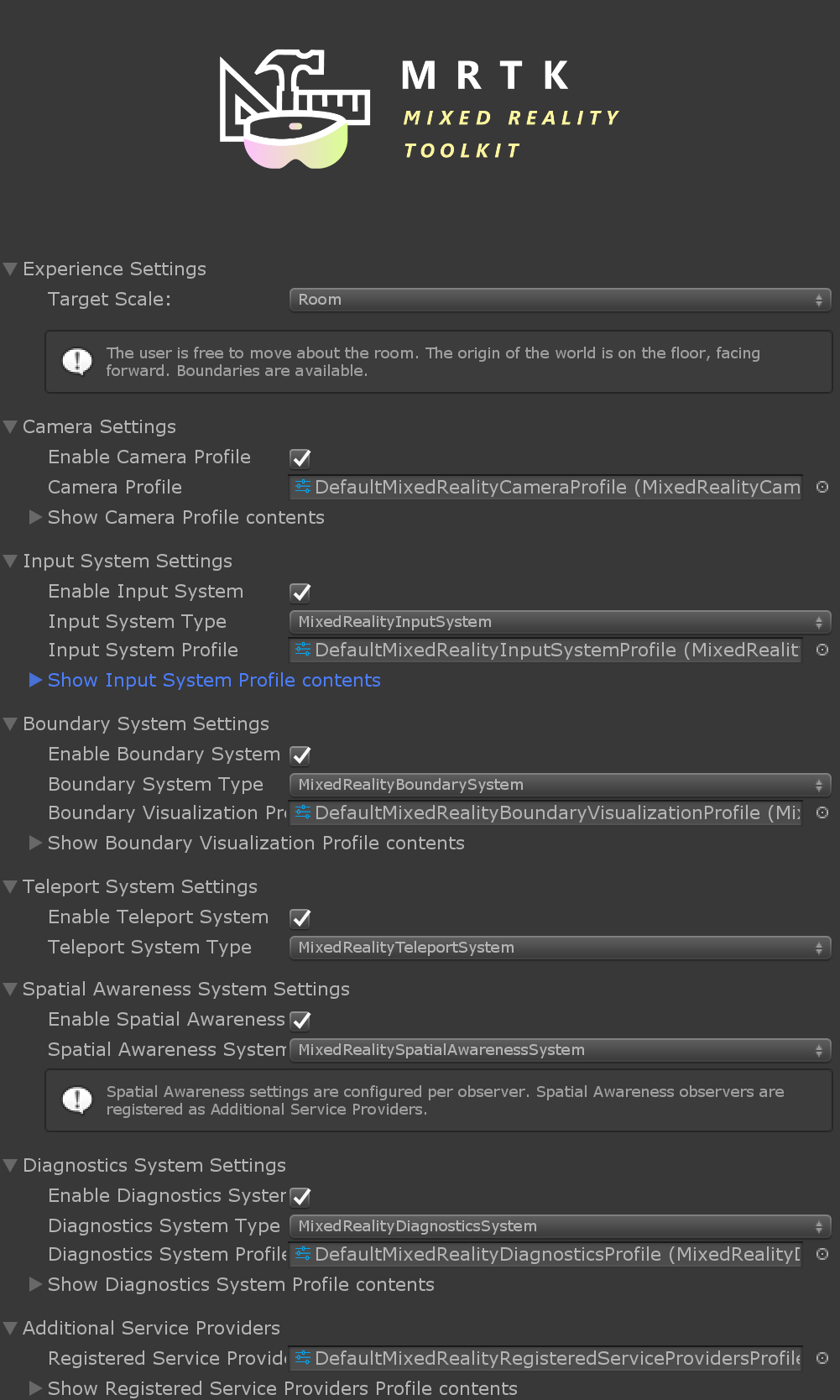
Its unclear how to generate copies of sub profiles. If I create a copy of the default mixed reality toolkit configuration profile, the inspector ends up in a state where some items are editable. However, drop down menus for things like "Show Camera Profile contents" and "Show Input System Profile contents" don't seem to allow generating copies of the default input system profile. This makes for a bad developer experience and detracts from understanding the worth in creating/using profiles.
Expected Behavior
If I create a copy of the default mixed reality configuration profile, I should be able to create copies of the sub profiles (Input System Profile, Camera System Profile, etc).
Actual Behavior
If I create a copy of the default mixed reality configuration profile, It's unclear how to create copies of the sub profiles. The inspector remains dithered for these components marking default profiles as non-editable.
Steps to reproduce
1) Create a few copies of the default configuration profile
2) Attempt to create copies of the subprofiles
Note: It seems like there is sometimes a button for copying/creating a new sub profile. However after creating one additional profile, it no longer appears possible to create more profiles.
Unity Editor Version
n/a
Mixed Reality Toolkit Release Version
v2/mrtk_development
 chrisfromwork
All 18 comments
If you create a copy of the main default configuration profile, then you should see a button with < / >
I'd like to update this with a real copy image to make it clearer, but didn't have time on the fist pass.
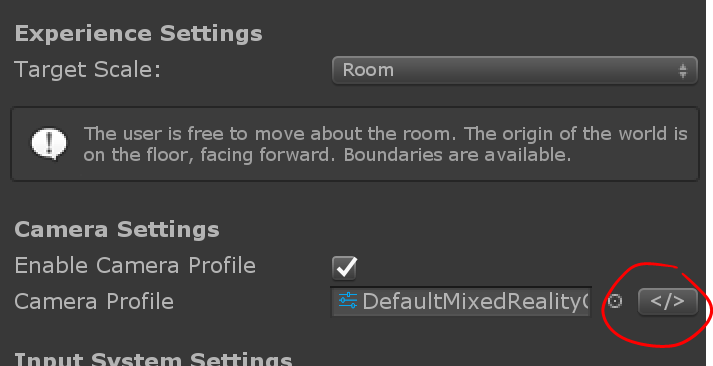
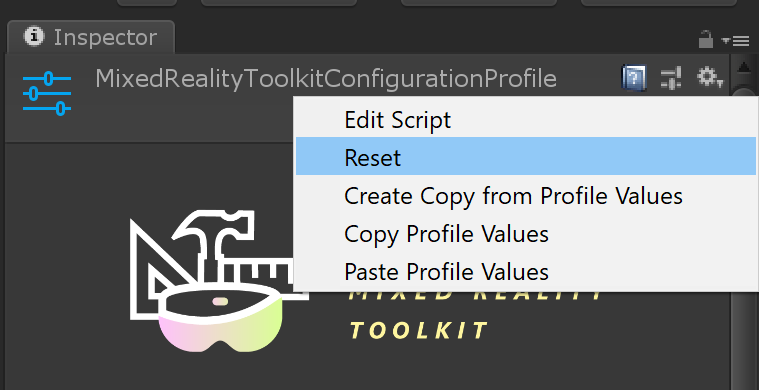
Users should also be able to copy/paste profile values and create a clone via the gear on the top right of the inspector.
 StephenHodgson
on 11 Mar 2019
StephenHodgson
on 11 Mar 2019
I've seen this button before, but for some reason it has disappeared in my local setup.
Reset seems like some important functionality and may be what I was looking for. That going said, this UX story feels unclear. As a new user, my first instinct wasn't to right click anywhere in the inspector.
chrisfromwork
on 11 Mar 2019
Reset is a default on all context menus. I didn't intentionally highlight it.
StephenHodgson
on 11 Mar 2019
@Railboy has the new foldouts effected the visibility of the copy button?
StephenHodgson
on 11 Mar 2019
I'm curious to see what Lars has to say. This issue may get resolved by other work already underway. I just want to make sure that this issue is acknowledged/documented
chrisfromwork
on 11 Mar 2019
I found that all the copy buttons turn into selection indicators when manually assigning to one of them profiles. Reselecting the profile lets them appear again.
 Alexees
on 12 Mar 2019
Alexees
on 12 Mar 2019
True, the "Copy" option is only currently available from the "Default" profiles, If you create a new/copy, then the "Copy" option is no longer available. There wasn't an intent that you would want multiple copies of your own profile as most systems only need one.
Can you think of use cases @chrisfromwork where you would want to copy a copy?
Perhaps @StephenHodgson the Cog Copy profiles option is really key then.
 SimonDarksideJ
on 12 Mar 2019
SimonDarksideJ
on 12 Mar 2019
@StephenHodgson I don't believe so. This is the line controlling whether it appears:
if (!renderedProfile.IsCustomProfile && profile.IsCustomProfile)
And it seems to works as expected. When the base profile IS custom and the rendered profile is NOT custom, the copy button appears.
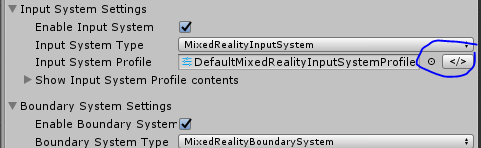
@SimonDarksideJ I could see wanting to copy your own profile if it has taken a while to set up and you want to try a couple of permutations.
 Railboy
on 12 Mar 2019
Railboy
on 12 Mar 2019
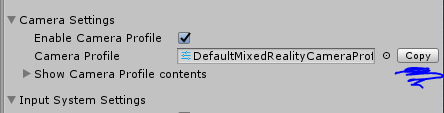
This is slightly off topic but what's the reasoning for the copy button saying </> instead of this:
Railboy
on 12 Mar 2019
I think that's a very simple fix! Let's do it 😆
StephenHodgson
on 12 Mar 2019
Although in reality it should probably say "clone"
StephenHodgson
on 12 Mar 2019
@StephenHodgson @SimonDarksideJ Is there ever an unwanted side effect to cloning a profile? I'm trying to grok why we don't keep the clone button active by default.
Railboy
on 12 Mar 2019
This is slightly off topic but what's the reasoning for the copy button saying
</>instead of this:
At first glance, I interpret that to mean "Copy the contents of this field to the clipboard".
Given some sleuthing I would figure out it means "Make a copy of this profile and insert it here", so it's better than "", which still doesn't mean anything to me.
I wonder if there's another word that works at first glance?
 Ecnassianer
on 12 Mar 2019
Ecnassianer
on 12 Mar 2019
I'm trying to grok why we don't keep the clone button active by default.
That's a good point, I don't see any valid reason why we _don't_ but we need to make sure that when the object reference is null the + button shows up correctly
StephenHodgson
on 12 Mar 2019
@Ecnassianer I think Stephen's 'clone' suggestion is pretty good.
@StephenHodgson In the next PR I'll turn it on by default and we can see how it strikes us. I think it will be less confusing.
Railboy
on 12 Mar 2019
Missed a refresh, seems like everyone is on the same page. :) Thanks @Railboy for stepping in.
Original comment:
I think that there may still be a bug here (or at least I experienced this) where if you reselect the default profile after having cloned the default profile that the button remains hidden.
@SimonDarksideJ I don't know that having the ability to clone a profile you created is the highest priority. But a developer team working in their own fork may create their own "default" profile and then also want this same clone functionality for their "default" profile. We could probably also avoid any regressions/testing around this button appearing/disappearing by having it visible all the time.
chrisfromwork
on 12 Mar 2019
But a developer team working in their own fork may create their own "default" profile and then also want this same clone functionality for their "default" profile.
This functionality already exists in the context menus, so keeping it enabled/visible makes sense to me
StephenHodgson
on 12 Mar 2019
Closing this out - I was looking through old issues and I think that @Railboy already fixed this particular issue in PR #3610
 wiwei
on 8 May 2019
wiwei
on 8 May 2019
Related issues
 MatteoFantasy
·
3Comments
MatteoFantasy
·
3Comments
 matatabi-ux
·
3Comments
matatabi-ux
·
3Comments
 DanAndersen
·
3Comments
DanAndersen
·
3Comments
 overedge
·
3Comments
overedge
·
3Comments
 dfields-msft
·
3Comments
dfields-msft
·
3Comments
Most helpful comment
At first glance, I interpret that to mean "Copy the contents of this field to the clipboard".
Given some sleuthing I would figure out it means "Make a copy of this profile and insert it here", so it's better than "", which still doesn't mean anything to me.
I wonder if there's another word that works at first glance?