Mixedrealitytoolkit-unity: Editing default MRTK profiles doesn't seem possible through unity inspector
Overview
Configuring the MRTK seems to add a default mixed reality toolkit profile to the scene that can be viewed in the inspector. However, its unclear how to edit the default profile for contributing back to the MRTK/unblocking your own local work
Expected Behavior
Inspector allows users to edit the default mrtk profiles.
Actual Behavior
Inspector dithers the mrtk default profiles. This didn't personally instill confidence in using the MRTK. It ends up seeming like everything is hard coded/default behaviors are enforced even though things are intended to be editable.
I can understand that we want to make sure that the default MRTK profiles remain stable in the repo, but not being able to edit them in the inspector makes for a bad contributing experience. Its non-intuitive to open an asset file in a text editor to make changes.
Steps to reproduce
1) Open Unity project and configure scene
2) Select Mixed Reality Toolkit component and view in Unity's inspector
Unity Editor Version
n/a
Mixed Reality Toolkit Release Version
v2 work/mrtk_development
 chrisfromwork
All 18 comments
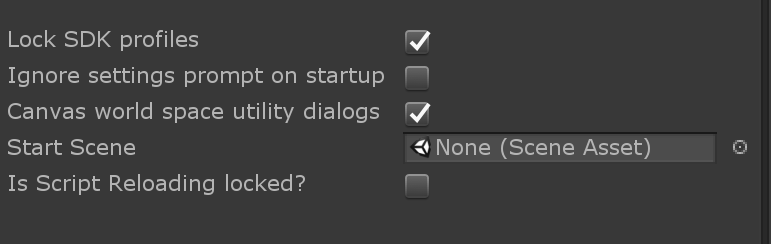
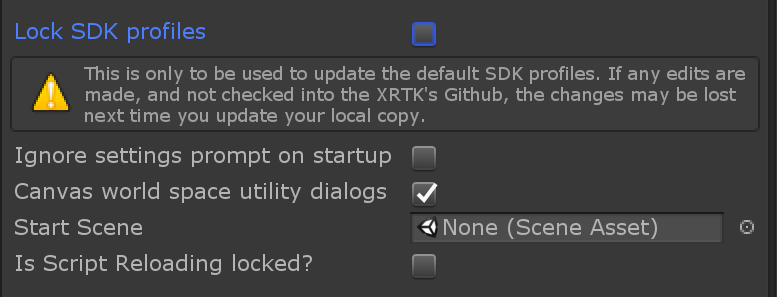
It is possible to edit the default profiles for contributions back into the MRTK repo.
Edit/Project Settings/MRTK/Uncheck Lock SDK Profiles
 StephenHodgson
on 11 Mar 2019
StephenHodgson
on 11 Mar 2019
Do we have documentation calling out our settings pages? Is this lock flag something that should be viewable in the inspector?
chrisfromwork
on 11 Mar 2019
I don't recommend this lock flag should be viewable from the inspector or else developers will attempt to unlock and edit the default profiles.
StephenHodgson
on 11 Mar 2019
What's the main incentive in adding additional steps to prevent consumers from editing default profiles in their local setup? Is it to maintain a more stable repo? Does that outweigh the benefits to new consumer productivity? In my opinion, this flag isn't discoverable in its current state. And I would guess that its not documented?
In the past I've received feedback on code reviews that we shouldn't hinder consumer productivity (I was asked not to check in a .gitignore change that prevented checking in APK's because it could detract from consumer productivity even though it would help maintain a cleaner repo). Here it seems like we are promoting the opposite saying that we don't want consumers to be able to easily do as they please?
chrisfromwork
on 11 Mar 2019
I don't believe this would hinder consumer productivity at all as it's expected they copy/clone the default or start from scratch. The goal here was to make sure that everything worked out of the box, and if we made any changes/edits to the profiles that users wouldn't all of the sudden have their custom edits disappear when they imported/pulled an update. That imho would hider consumer productivity more than anything. In the past, I've received lots of feedback about how changing a prefab, or it's serialization would stomp many HTK adopters from wanting to update for fear that their customization would evaporate. That my friend is the benefit.
Now as for undocumented, yes there's isn't anything specifically in the docs and I apologize for not specifically adding it, but it was very publicly tasked (#3062), discussed (#2825), and reviewed (#2831) here on GitHub. I know that isn't great documentation, but we do have a record and great discussions we can reference for the documentation we can add. Hope this helps.
StephenHodgson
on 11 Mar 2019
Thank you for sharing this context around prefabs/serialization and update stories.
It seems like this issue should be renamed 'Inspector UX appears to require usage of hard coded default MRTK configuration profile when customization is possible'. Was there any previous thought around having all settings hidden until after a user had decided to copy and customize the profile? Seeing a dithered wall of fields in the inspector menu (as well as missing copy and customize buttons filed in #3605) seems to generate the bulk of my confusion/frustration with first using the profile system.
chrisfromwork
on 12 Mar 2019
Maybe we should also add a flag to the inspector window with a warning stating that using said flag can result in broken updates in the future?
chrisfromwork
on 12 Mar 2019
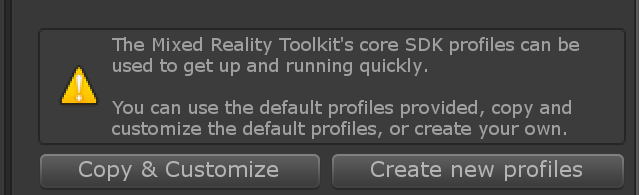
Generally the first profile most people encounter is the main one. There's two convenience buttons at the top to get started quickly with your own, or start from a blank slate with everything disabled.
The "copy/clone" </> button isn't immediately obvious what it does, even with the tooltip. I think updating this from text to an actual copy icon or something similar would go a long way to help people immediately recognize its function.
Unless this was removed, this warning should show up at the top of each locked default profile:

I think adding a flag to the inspector window is unnecessary as most of the time the default profiles will not need to be edited much once a feature is complete. It's also something only contributors should really know about, and giving consumers the ability to unlock them may add confusion or ruin their projects if they used the edited default profiles, then grab an update.
StephenHodgson
on 12 Mar 2019
One other thing I was looking into was the problem where doing a actual copy/paste of the selected asset in the project window (either via ctrl + c, ctrl + p or ctrl + d) will render the copied profile locked as well.
Not sure how to work around this one, as we'd need intercept the commands and check the if the selected object is a default profile, copy the asset, then disable the lock.
StephenHodgson
on 12 Mar 2019
@Jarodshow and @Ecnassianer do you two have any thoughts on whether this flag to enable editing defaults should be added to the inspector window? I can now understand that editing the default profile is not a great practice for developers building applications that will take MRTK updates. But, what have your twos' experiences been with the default mrtk profile inspector?
I don't necessarily agree that there should be anything in the MRTK that 'only contributors should really know about'. A consumer one day may be a contributor the next, but adding lesser known items like this flag makes the transition more difficult. It also generates more potential for regression if different contributors don't know that this functionality exists.
But back to my original UX confusion, is there any reason why these dithered subsystems are all shown when first selecting the default configuration profile? Could hiding these dithered items behind a drop down menu cut some of the cognitive load associated with first starting to use the profile system?
chrisfromwork
on 12 Mar 2019
I don't necessarily agree that there should be anything in the MRTK that 'only contributors should really know about'. A consumer one day may be a contributor the next, but adding lesser known items like this flag makes the transition more difficult.
It was not my intent to say that it's not something we want to intentionally hide, but that is why contribution, and feature guidelines exist. That's likely the best places this kind of documentation should be.
StephenHodgson
on 12 Mar 2019
dithered
I don't understand what you mean when you say this. It's Unity's own feature to show that a gui is disabled or inactive.
Could hiding these dithered items behind a drop down menu cut some of the cognitive load associated with first starting to use the profile system?
You mean how it is now with the nested foldouts?
StephenHodgson
on 12 Mar 2019
Yeah, nested foldouts may be the correct term. Similar to how sub profiles are only shown after digging into the inspector.
chrisfromwork
on 12 Mar 2019
I thought that's how it currently is/looks?
StephenHodgson
on 12 Mar 2019
@chrisfromwork I think the desire to more easily change the Lock Default Profiles setting is a feature request in the service of an ugly workaround, so I'd rather take a step back and look at what's generating the desire to change that setting.
On the one hand, the way I think about the data in the default profiles is "These are the settings we'll use by default if our users don't customize the toolkit". (Same as the default value specified in a monobehavior variable declaration is used when a prefab hasn't had that value set in the inspector). This leads me down a road that says there is no justification for a user to edit this data. All they're going to do is end up with merge conflicts on their next upgrade. A pretty sound argument for obfuscating them.
On the other hand, every person I know who has discovered the Lock Default Profiles setting has immediately unlocked them and proceeded to abuse the Default Profiles as their own (this is the ugly workaround I mentioned earlier). Later on they deal with the merge conflicts. That's not to say the merge conflicts make it not worth it: since if a user creates their own customized profiles, then we add a field to the profile class and set that to reasonable defaults in MRTK's Default Profiles, the customized user profiles now are likely to have null or some other junk value, rather than the reasonable defaults we recommend. Might as well just fix your old abused profiles. That user behavior is a pretty sound argument for the profile inspector to allow users to edit values immediately and directly.
So the real question is: how do we let users view and edit their customized profiles immediately upon importing MRTK, while keeping the default state of the toolkit ready-out-of-the-box? I think there are a few approaches we could take.
In the past I have advocated for a system where the "reasonable defaults" are not stored in "profiles" at all. Instead they are stored in some other format* which is clearly not intended to be edited by MRTK users. Values in profiles serve only as overrides to the "reasonable defaults". If they are absent (for example, immediately after a user imports MRTK for the first time), all the "reasonable defaults" are used. When the user begins customization (in this world, this could be as effortless as clicking a field in the MixedRealityToolkit scene object inspector), we generate the necessary profiles and set them to override the "reasonable default" of the fields the user customizes.
*From an implementation perspective, we could save work by making it a readonly child of the profile class, but that detail is irrelevant to the larger goal.
When it's time to update, we add a new field to the profile class, and a new "reasonable default" value to our hidden format, and ship a release. The user's profiles don't have an override for that value, and so they fall back to the "reasonable default", and they new feature is automatically enabled.
When a new contributor realizes they need to add a new default value for something in a profile, they are left with a very actionable question to seek in help chat or documentation: "Where are the default values for configuration settings stored?" There's no misleading thoughts about editing readonly default profiles.
 Ecnassianer
on 12 Mar 2019
Ecnassianer
on 12 Mar 2019
@StephenHodgson by dithered i just mean grayed out/disabled.
There are nested foldouts per setting. Default behavior post configuration seems to be for all of them to be open with some sub profiles closed. It ends up looking like a wall of unchangeable text for the first naive glimpse at the inspector window, which I personally struggled with understanding.
It may be worth having one nested folder that contains all settings that're closed by default for the default configuration profile. We could also choose to have each high level settings nested foldout closed post initial configuration. It may also be that what we have today is the best experience for developers and I am in a minority group that wants things simpler. :)
@Ecnassianer thank you for sharing your experience. I am going to spend some time digesting this information before trying to suggest a potential solution/course of action.
chrisfromwork
on 12 Mar 2019
Great stuff @Ecnassianer.
I also thought about just serializing this stuff in a json file someplace as a "default" configuration as well, but thought that it'd be a lot more work to maintain. Keeping the serialized values in the class' fields made more sense, and if we make sure to use attributes like FormerlySerializedAs we should generally be able to make changes without too much of a hassle.
One last option I don't think anyone really touched on was the Presets. I briefly looked into using these, but couldn't figure out an easy way to utilize them them in code the way I wanted with the "One click configuration" scenario.
StephenHodgson
on 12 Mar 2019
@StephenHodgson and @Ecnassianer if either of you would like to pick up the work associated with these improvements feel free to speak up. :)
I'm going to get some tasks filed internally in our backlog calling out these sorts of inspector/editor ux changes so that there's more hope of getting a formal owner to drive the integration/coordination of these improvements. I'll reference this issue here as well so that we don't end up duplicating work/so that external contributors can pick up the work if they would like.
chrisfromwork
on 12 Mar 2019
Related issues
 nuernber
·
3Comments
nuernber
·
3Comments
 markgrossnickle
·
3Comments
markgrossnickle
·
3Comments
 amfdeluca
·
3Comments
amfdeluca
·
3Comments
 jimstack
·
3Comments
jimstack
·
3Comments
 reillydonovan
·
3Comments
reillydonovan
·
3Comments
Most helpful comment
@chrisfromwork I think the desire to more easily change the Lock Default Profiles setting is a feature request in the service of an ugly workaround, so I'd rather take a step back and look at what's generating the desire to change that setting.
On the one hand, the way I think about the data in the default profiles is "These are the settings we'll use by default if our users don't customize the toolkit". (Same as the default value specified in a monobehavior variable declaration is used when a prefab hasn't had that value set in the inspector). This leads me down a road that says there is no justification for a user to edit this data. All they're going to do is end up with merge conflicts on their next upgrade. A pretty sound argument for obfuscating them.
On the other hand, every person I know who has discovered the Lock Default Profiles setting has immediately unlocked them and proceeded to abuse the Default Profiles as their own (this is the ugly workaround I mentioned earlier). Later on they deal with the merge conflicts. That's not to say the merge conflicts make it not worth it: since if a user creates their own customized profiles, then we add a field to the profile class and set that to reasonable defaults in MRTK's Default Profiles, the customized user profiles now are likely to have null or some other junk value, rather than the reasonable defaults we recommend. Might as well just fix your old abused profiles. That user behavior is a pretty sound argument for the profile inspector to allow users to edit values immediately and directly.
So the real question is: how do we let users view and edit their customized profiles immediately upon importing MRTK, while keeping the default state of the toolkit ready-out-of-the-box? I think there are a few approaches we could take.
In the past I have advocated for a system where the "reasonable defaults" are not stored in "profiles" at all. Instead they are stored in some other format* which is clearly not intended to be edited by MRTK users. Values in profiles serve only as overrides to the "reasonable defaults". If they are absent (for example, immediately after a user imports MRTK for the first time), all the "reasonable defaults" are used. When the user begins customization (in this world, this could be as effortless as clicking a field in the MixedRealityToolkit scene object inspector), we generate the necessary profiles and set them to override the "reasonable default" of the fields the user customizes.
*From an implementation perspective, we could save work by making it a readonly child of the profile class, but that detail is irrelevant to the larger goal.
When it's time to update, we add a new field to the profile class, and a new "reasonable default" value to our hidden format, and ship a release. The user's profiles don't have an override for that value, and so they fall back to the "reasonable default", and they new feature is automatically enabled.
When a new contributor realizes they need to add a new default value for something in a profile, they are left with a very actionable question to seek in help chat or documentation: "Where are the default values for configuration settings stored?" There's no misleading thoughts about editing readonly default profiles.