Mixedrealitytoolkit-unity: Standard Shader transparency not working on Android
Overview
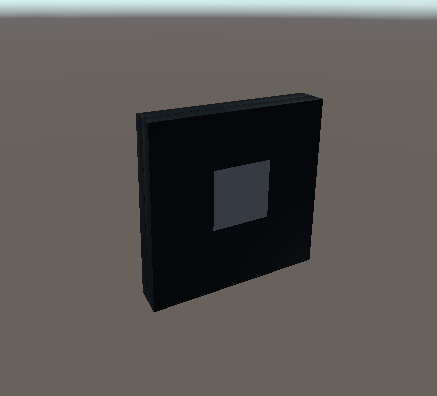
Using the Toolkit Dev Branch with Unity 2017.2.1f1 has an issue with the Standard Shader on the ButtonHolographic prefab on Android platform. It does not render the button icon, where the shader is configured as transparent. Furthermore, the usual blue transparent glass front is replaced with just dull blackness. The button does not look very much like the one when using Windows platform.
Expected Behavior
Button shows the same as under Windows Platform
Actual Behavior
On Android, the button looks different
Steps to reproduce
Open the dev branch with the mentioned Unity version under Android platform and drag the ButtonHolographic prefab into the scene.
Unity Editor Version
2017.2.1f1
Mixed Reality Toolkit Release Version
current dev branch
 Alexees
All 13 comments
@Cameron-Micka as suggested, I created my issue posted in #2129 here since it still exists
Alexees
on 30 Jul 2018
@Cameron-Micka it's actually just a bug in the editor. When built to the device (in my case the Oculus GO), at first glance the button looks as expected.
Alexees
on 31 Jul 2018
Taking a peek at this now, just to be sure you are working in the https://github.com/Microsoft/MixedRealityToolkit-Unity/tree/Dev_Working_Branch branch?
 Cameron-Micka
on 1 Aug 2018
Cameron-Micka
on 1 Aug 2018
@Alexees I was able to reproduce this. To fix this I recommend turning off graphics emulation in the editor (Edit->Graphics Emulation->No Emulation). Or, if you need graphics emulation you can open the Standard shader and remove/comment out these lines:
#if defined(SHADER_API_D3D11)
#pragma target 5.0
#endif
Cameron-Micka
on 2 Aug 2018
@Cameron-Micka yes, disabling emulation does show the buttons as expected. I'm Using 2018.2.1f1 if that's of interest and it works.
Alexees
on 7 Aug 2018
@Cameron-Micka I was also having transparency issues when building for other openGL platforms.
 StephenHodgson
on 9 Nov 2018
StephenHodgson
on 9 Nov 2018
@StephenHodgson Oh really? What version of OpenGL, Core, ES2, etc? And, if you can say what platform and Unity version that would help me reproduce locally.
Cameron-Micka
on 9 Nov 2018
I was building to WebGL so I'm not sure exactly what it was using haha.
Just switched to the WebGL, built the project, and tried running it in the browser with a demo scene.
Let me try and get you an example repro. A little busy tho, so it could take some time.
StephenHodgson
on 9 Nov 2018
Just a quick follow up, I was able to repo this. It is due to me setting the shader model to 5.0 when WebGL doesn't support it and is falling back to vertex lit shader. I'll add a better way to conditionally set the shader model other than assuming the SHADER_API_D3D11 directive is set.
Cameron-Micka
on 10 Jan 2019
@Cameron-Micka Just confirming that this is also an issue in the beta, correct?
StephenHodgson
on 29 Jan 2019
Yep! I need to reach out to Unity about their predefined shader preprocessor macros since I'm seeing some inconsistencies.
Cameron-Micka
on 29 Jan 2019
@Cameron-Micka anything new about this? I'm cleaning up my own old issues and this is the oldest one.
Alexees
on 28 Sep 2019
It's funny you ask, because I made some changes on Friday to address this. Going to give it a little bit more testing locally before I submit a PR.
Cameron-Micka
on 30 Sep 2019
Related issues
 amfdeluca
·
3Comments
amfdeluca
·
3Comments
 brean
·
3Comments
StephenHodgson
·
3Comments
brean
·
3Comments
StephenHodgson
·
3Comments
 dustin2711
·
3Comments
dustin2711
·
3Comments
 jimstack
·
3Comments
jimstack
·
3Comments
Most helpful comment
@Cameron-Micka yes, disabling emulation does show the buttons as expected. I'm Using 2018.2.1f1 if that's of interest and it works.