Mixedrealitytoolkit-unity: InputManager Singletons prevent using Multiple scenes
Overview
How is the Input system usable if you have multiple scenes using MRTK and one loading another?
I use the InputManager prefab in a Hololens menu scene, which then loads up another scene which also uses the InputManager.
Running both scenes alone is fine, but when one is loaded after the other the input system screws up and does not work anymore!!!!
Even the suggestion of having only one InputManager prefab in the menu scene does not work because the world space canvases in the to be loaded scene need a link to the EventSystem Raycast camera which is not possible this way.
Has anyone used MRTK to load multiple scenes? What do you do?
The 1.5.5 version was fine..... without the invasive new Singletons....
Here are the error messages i get, the World space UI is not interactable anymore. An i assume nothing else would work either.
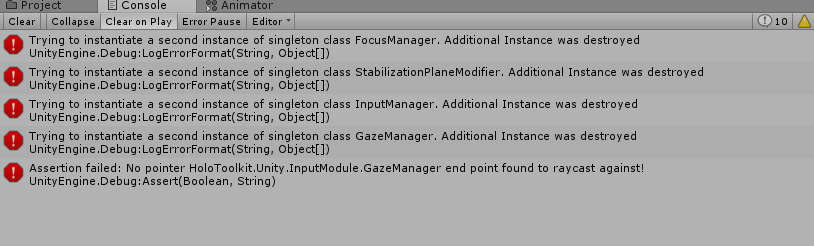
Thanks
Expected Behavior
The Input system should work acress scenes
Actual Behavior
It does not work, because the InputManager never dies and screws up input altogether.
Steps to reproduce
Just create 2 scenes using the InputManager where one scene loads another.
Unity Editor Version
2017.3.1
Mixed Reality Toolkit Release Version
2017.2.1.1
 MrDChristop
All 20 comments
If i downgrade the Singleton to what it was before (No DontDestroyOnLoad) do i break anything else in MRTK?
MrDChristop
on 12 Mar 2018
I agree the current setup is not great for working with multi-scene projects. I have worked through the same issues which, though I'm always looking for a better work flow, I address as follows:
- Having only a single Camera/Input/Cursor in the project, and only in the first scene makes it difficult to test any scene after the first one. To handle this, I place the MixedRealityToolkitCameraParent, InputManager and DefaultCursor in a separate scene (here named "WMRBase"). I add some code to run at each scene start to I check to see if this WMRBase scene has been loaded in the current scene, and if not do an additive load:
public const string WindowsMixedRealitySceneName = "WMRBase";

var wmrScene = SceneManager.GetSceneByName(WindowsMixedRealitySceneName);
if (!wmrScene.isLoaded) {
        SceneManager.LoadSceneAsync(WindowsMixedRealitySceneName, LoadSceneMode.Additive);
} else {
        var currentScene = SceneManager.GetActiveScene();
        SceneManager.MergeScenes(wmrScene, currentScene);
}
In the editor you can also drag this scene into the Hierarchy window beneath any other scene after the first so you have a camera available in the Scene window.
Cursor. I add a script with DontDestroyOnLoad. This gets around the (minor) issue of losing the Cursor assigned to the InputManager in the new scene as well a few other timing issues.
For the Camera, this may have been fixed in the Dev branch (not sure), and maybe it can be fixed by removing and reading the Canvas in the extra scenes (also not sure). Originally I addressed it by adding this:
FocusManager.Instance.UpdateCanvasEventSystems()
But check this for more information: https://github.com/Microsoft/MixedRealityToolkit-Unity/issues/1420
 genereddick
on 12 Mar 2018
genereddick
on 12 Mar 2018
Hi
thanks for the reply but this does not help in the case of world space canvases where you need a pointer to the EventSystem/RaycastCamera. Not to speak if you address the Cursor directly using Unity events.
Thanks for the pointer though. Was your message complete, i saw that you cut it off at point 2.
MrDChristop
on 12 Mar 2018
@MrDChristop The Camera issue was one I never really understood (despite @StephenHodgson's best efforts!). Initially I had to include the UpdateCanvasEventSystems line in my code, But, the issue is no longer there. I'm not sure if it was handled by some change in the dev branch, or by adding / removing the canvas's in the follow-on scene (maybe removing some cached reference).
genereddick
on 12 Mar 2018
I had issues getting the cursor to work with the EventSystem. Unity Buttons would work in the editor but not in the HoloLens emulator or on HoloLens. Maybe there is a fix for this, but I just removed the Unity buttons and replaced them with the UX buttons in the MRKT which don't have the issue (and are 3D which I wanted).
In any case, may be fixed in dev:
https://github.com/Microsoft/MixedRealityToolkit-Unity/issues/1451
genereddick
on 12 Mar 2018
Having multiple scenes is vital and there should be provision for it. You proposed a nice workaround that does not work on all cases. I feel that these classes should not be on Unity DontDestroyOnLoad because they do more harm than good.
MrDChristop
on 12 Mar 2018
You can have multiple scenes, just don't put all the singleton classes in each one.
 StephenHodgson
on 12 Mar 2018
StephenHodgson
on 12 Mar 2018
Hi thanks for replying.
did you see my error messages. I use the InputManager prefab nothing out of the ordinary.
How would you setup 2 scenes which use both MRTK input and one loads up the other?
The problem is that this results in error messages and in unusable World canvases.
MrDChristop
on 12 Mar 2018
If you were determined to allow for the MRKTCamera/Input/Cursor in each scene, you could attempt to undo the DontDestroyOnload property, but I think this would be difficult given the amount of interdependence each gameObject has and many of the nested scripts also have DontDestroyOnLoad. At least my naïve attempt (just now) to comment that out in the Singleton base class had issues.
However, in my scheme, I was able to do this by:
a) Grabbing a reference to each when loading:
camera = FindObjectOfType<MixedRealityCameraManager>();
cursor = FindObjectOfType<AnimatedCursor>();
input = FindObjectOfType<InputManager>();
Destroying them before loading the next scene and then reloading my base scene
 public IEnumerator LoadNextScene() {
            yield return null;

            var currentIndex = SceneManager.GetActiveScene().buildIndex;

            Destroy(cursor.gameObject);
            Destroy(input.gameObject);
            Destroy(camera.transform.parent.gameObject);

            var asyncLoad = SceneManager.LoadSceneAsync(currentIndex >= FinalSceneIndex ? 1 : currentIndex + 1);


            //Wait until the last operation fully loads to return anything
            while (!asyncLoad.isDone) {

                var anotherAsyncLoad = SceneManager.LoadSceneAsync(WindowsMixedRealitySceneName, LoadSceneMode.Additive);
                while (!anotherAsyncLoad.isDone) {
                    yield return null;
                }
            }
        }
How would you setup 2 scenes which use both MRTK input and one loads up the other?
Set up a single scene with all your global singletons and load each scene in additively as you need them.
Start the global scene as your first initial one.
StephenHodgson
on 12 Mar 2018
you could attempt to undo the DontDestroyOnload property
I def recommend against doing this.
StephenHodgson
on 12 Mar 2018
Undoing DontDestroyOnLoad def created a mess. But the grabbing a reference, destroying them before loading the next scene and then reloading (or simply having the Camera/Input/Cursor in the next scene) seemed to work OK. Though not tested much to be sure.
Only mentioning this as something to explore if @MrDChristop wants to try a different work around for multi-scene projects. My current solution works well enough for me.
genereddick
on 12 Mar 2018
Yes but the proposed solutions here, either do not seem allow you to test an individual scene, you always have to start from the 1st scene, AND do not allow you to keep references to the Cursor. AND do not work with World space Canvases on the to be loaded scene because they expect the EventSystem Raycast camera reference.
@StephenHodgson The approach you mentioned is really forcing you to work with a specific way only for the sake of keeping the classes as non destroyable singletons. Is this worth it? Is there really a specific reason you use Singletons other than ease of access in MRTK, does the InputManager or any other classes do soemthing that can be done only once?
I removed the DontDestoy functions from the Singleton and all worked fine. The Singleton classes did not have this function in 1.5.5 and all worked fine.
@genereddick I am pretty sure you got problems because you have this specific scheme setup and rely on additive loading. In essence you implemented this whole sheme just for circumventing the problem.
What i dont understand in your approach is option 2. You dont detail it, but why would the cursor be lost from the InputManager. The cursor and the input manager are in the same scene that is loaded additively?
I thank you both for the time spend on this thread.
Dimi
MrDChristop
on 13 Mar 2018
@MrDChristop Actually my scheme is specifically designed to allow you to test each individual scene. As the Camera/Input/Cursor are placed in their own standalone scene, when any of your scenes are first loaded you can first test if the scene containing the Camera/Input/Cursor scene has already been loaded. If not --whether you are starting with the first scene or a subsequent scene -- then you load it additively. If previously loaded then you already have a Camera/Input/Cursor available so you don't need to reload.
More info on managing this in the Unity Editor here: https://docs.unity3d.com/Manual/MultiSceneEditing.html
The cursor is a minor issue. The Input has a reference to the Cursor you can assign in the editor. It loses that reference in a follow-on scene if the Cursor doesn't survive from the scene where you first assigned it. It will find and reassign a new Cursor however, so it just prevents a small bit of extra processing, as well as keeping the Cursor scheme consistent with the Camera/Input (assuming you stick with the Singleton pattern.
genereddick
on 13 Mar 2018
Guys, most of these issues are getting address soon, we're moving away from using singletons in the project in as many places as possible.
Hopefully that'll solve much of the pain points here.
StephenHodgson
on 14 Mar 2018
The approach you mentioned is really forcing you to work with a specific way only for the sake of keeping the classes as non destroyable singletons. Is this worth it? Is there really a specific reason you use Singletons other than ease of access in MRTK, does the InputManager or any other classes do soemthing that can be done only once?
Yeah pretty much for the sake of performance and more control over the lifecycles of the objects themselves. Although, I thought that there is now a flag on the Singleton objects that should enable you to have the option of using DontDestroyOnLoad, (Or is that only in the dev working branch?)
StephenHodgson
on 14 Mar 2018
Hey this may be a naive approach - but could you leave the InputManager and MixedRealityCameraParent in all scenes, but keep them inactive unless you're testing that particular scene?
 beccannlittle
on 21 Apr 2018
beccannlittle
on 21 Apr 2018
Just chiming in to say that I have recently run into a similar scene-related InputManager issue.
I will often use a mostly-empty startup scene for initialization, then additively load a primary scene when I'm ready for user input.
When I attempted to follow this pattern for an MRTK immersive project the InputManager in my primary scene would crash.
Point being, I think MRTK has been a bit myopic about scene management up until now - I'm hopeful that the new manager classes will address this but it might be wise to create some automated scene loading tests to make sure we're not tying anyone's hands.
 Railboy
on 21 Apr 2018
Railboy
on 21 Apr 2018
@Railboy,
Multi-scene tests are an absolute MUST for vNext.
 davidkline-ms
on 23 Apr 2018
davidkline-ms
on 23 Apr 2018
Closing issues older than 180 days. If this is still an issue, please reactivate with recent information.
 wiwei
on 11 Apr 2019
wiwei
on 11 Apr 2019
Related issues
 ritijain
·
3Comments
ritijain
·
3Comments
 nrchuanqi
·
3Comments
nrchuanqi
·
3Comments
 provencher
·
3Comments
provencher
·
3Comments
 amfdeluca
·
3Comments
amfdeluca
·
3Comments
 jimstack
·
3Comments
jimstack
·
3Comments
Most helpful comment
@Railboy,
Multi-scene tests are an absolute MUST for vNext.