Mixedrealitytoolkit-unity: Blurring and wobbling holograms
Overview
I followed this manual https://github.com/Microsoft/MixedRealityToolkit-Unity/blob/master/GettingStarted.md and added a cube, a sphere and a capsule to the scene. After building and deploying it to the HoloLens, all 3 objects are blurring when I move or turn my head. Since this did'nt happen with previous versions of HoloToolkit, I think that this is a bug of the current version.
Expected Behavior
No blurring of 3D objects.
Actual Behavior
Objects are blurring and wobbling.
Unity Editor Version
2017.2.1f1
Mixed Reality Toolkit Release Version
HoloToolkit-Unity-2017.2.1.1
 CarpeTempus
All 29 comments
Well, when i was using that version of unity, I had the same issue as mentioned in #1481
Try using 2017.1.2.0f3 instead. Although those hologram that are not in focus and not in the same plane wobbles a bit for me.... Not sure what do i do about that.
 Firifire
on 8 Feb 2018
Firifire
on 8 Feb 2018
Thanks for your reply :)
I tried it with Unity 2017.1.2.0f3 but the blurring still occurs. Stabilization Plane didn't solved it as well. I noticed that the problem is not appearing when I use the Tutorial Code from Microsoft Holo Academy and Unity 2017.2.1p2 so I think I use that instead and addopt it, hope it works..
CarpeTempus
on 9 Feb 2018
Unity 2017.1.2.0f3 ??
Try Unity 2017.2.0f3
There is confirmed a bug with Stabilization plane in 2017.2.1 patches, and tracking problems in 2017.2.1 original.
You could also add a World Anchor to the object if it is stationary. Should help.
 eirikhollis
on 9 Feb 2018
eirikhollis
on 9 Feb 2018
Hi eirikhollis, thanks for the tip, I will take a look at world anchors!
But isn't 2017.2.1p2 which I'm currently using better than 2017.2.0f3?
CarpeTempus
on 9 Feb 2018
Not every new version is better. Unity is used to a lot of things other than HoloLens, which in itself has a quite small user base. Currently, none of our applications work well on 2017.2.1xx, but simply opening them in 2017.2.0f3 and building them from there solves all stabilization plane / tracking issues.
I believe that in 2017.3++, you have to check "Enable Depth Buffer Sharing" in
Edit -> ProjectSettings -> Player -> XR Settings -> Windows Mixed Reality
to solve the 'wobbly' holograms, but I could be wrong.
eirikhollis
on 9 Feb 2018
My bad, i accidentally typed in .1 in there. Really sorry, I actually meant 2017.2.0f3
Firifire
on 9 Feb 2018
I have not tried it out, but i think they have fixed the issue in Patch 2017.3.1p1
(993880) - XR: Fixed stabilization plane not getting set correctly via the SetFocusPointForFrame() API, resulting in poor hologram stabilization and color separation on HoloLens.
Firifire
on 15 Feb 2018
I just tested Unity 2017.3.1p1 with MRTK version 2017.2.1.0 because I had the same problems with blurring and wobbling 3D elements. It seems that the patch fixed this issue in my project.
 msdoseightysix
on 16 Feb 2018
msdoseightysix
on 16 Feb 2018
Hi everybody, thanks for the tips! I will give it a try and download Unity 2017.3.1p1 :)
CarpeTempus
on 16 Feb 2018
It works well in the 2017.3.1p1, it seems to be also fixed in the latest 2018 beta
Firifire
on 19 Feb 2018
Still got the same issues in Unity 2017.3.1p1. Enabling "Depth Buffer Sharing" in XR Settings results in:
Failed to get rendering parameters for main camera - view transforms may get out of sync! Error code: '0x80004002'
Bug seems to be reported here: 995002
Anyone else?
 sebrk
on 21 Feb 2018
sebrk
on 21 Feb 2018
I had the same wobbling blurring holograms problem and I solved thanks to eirikhollis comment.
Simply go into PlayerSettings and check the EnableDepthBufferSharing variable under XR Settings:
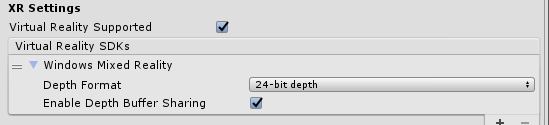
Doing this the stabilization plane will follow the Camera ahead and not behind!
I've tested both with:
- Unity 2017.3.0f3
- Unity 2017.3.1f1
and MRTK 2017.2.1.2
My "Orange Cube" is now stable.
Thanks again eirikhollis.
 luigioliveto
on 13 Mar 2018
luigioliveto
on 13 Mar 2018
With "Enable Depth Buffer Sharing" checked, I also get the error:
Failed to get rendering parameters for main camera - view transforms may get out of sync! Error code: '0x80004002'
Tested with:
- Unity 2017.3.1f1
- Unity 2017.4.0f1
Is there still no solution available?
 Syntax134
on 29 Mar 2018
Syntax134
on 29 Mar 2018
You also need to have the RS4 OS installed on your HoloLens to properly take advantage of the shared depth buffer. Microsoft had to make a OS change to make this work properly.
 StephenHodgson
on 29 Mar 2018
StephenHodgson
on 29 Mar 2018
@StephenHodgson I haven't updated my Hololens to RS4 OS yet but I'm excited to read about this. My project for Hololens is using MRTK 2017.2.1.1 with Unity 2017.4.0f1. I've been having stability issues with my 17m x 10m stationary hologram w/ a world anchor with the Depth Buffer Sharing enabled. It's been happening for a few months now and just want it resolved. With the Depth Buffer Sharing enabled my hologram experiences a steady shaking as I walk around it but it at least allows me to pass through the hologram without issue. On the other hand with the Depth Buffer disabled the shaking goes away but I can't seem to pass through the hologram without it shaking, losing color stabilization, and losing tracking. The Z offset also seems off and wobbly without the Depth Buffer at a distance of 3m+. I've seen this with every newer version and patch version of Unity 2017. I also tried it with various versions of MRTK and the older HoloToolKit 1.5.8.0. Unity's upgrade seems to be the underlying issue since Unity 2017 and the XR Settings update, so I can't place blame on the HoloToolKit or MRTK. Going forward, since we are using the Depth Buffer Sharing, are we still required to use the Stabilization Plane Modifier Script on the InputManager? I had one version of my project working without it. I read in some posts that there was a conflict between the two. https://forum.unity.com/threads/what-version-of-unity-is-best-for-hololens-development-at-this-time.511058/ I'm just trying to figure out the optimal Hololens project setup. Should I leave the InputManager alone and just enable the Depth Buffer and upgrade to RS4 OS? Just wondering if erasing everything on my Hololens with this upgrade will resolve my issue. I'm also confused how the InputManager works with the Stabilization Plane and the SetFocusPoint now that the Depth Buffer Sharing is being used. Do they work together? Additionally, the Depth Buffer Sharing was said to be for use with MR headsets tethered to a desktop. Has that changed? Sorry I know I asked a ton of questions but seems like your the best source.
 JOESIDinc
on 5 Apr 2018
JOESIDinc
on 5 Apr 2018
I'm also confused how the InputManager works with the Stabilization Plane the SetFocusPoint now that the Depth Buffer Sharing is being used. Do they work together.
Nope, they don't.
Just for the clarity of everyone else, you'll also need to remove the StabilizationPlaneModifer.cs script from the camera prefab.
StephenHodgson
on 5 Apr 2018
@StephenHodgson My camera prefab only uses the ManualGazeControl.cs script with the GazeControls prefab inside of it.
My InputManager is the one that uses the GazeManager.cs + GazeStabilizer.cs + InputManager.cs + StabilizationPlaneModifier.cs + FocusManager.cs + SimpleSinglePointerSelector.cs.
I guess what I'm trying to say is that StabilizationPlaneModifer.cs has this "HolographicSettings.SetFocusPointForFrame(planePosition, -GazeNormal, velocity);" So I'm assuming it works with the FocusManager.cs and the GazeManager,cs to SetFocusPoint.
Do you mean for me to remove the scripts from the InputManager? If not, is this an okay setup?
Also for the Depth Format do you recommend 16-bit depth or 24-bit depth?
I read this from https://docs.microsoft.com/en-us/windows/mixed-reality/performance-recommendations-for-unity
"The "Use 16-bit Depth Buffers" setting allows you to enable 16-bit depth buffers, which drastically reduces the bandwidth (and thus power) associated with depth buffer traffic. This can be a big power win, but is only applicable for experiences with a small depth range. You should carefully tune your near/far planes to tightly encapsulate your experience so as to not waste any precision here."
I'm assuming 16-bit only if you don't have to move far from the Hologram and 24-bit if you have to walk around. In my case 10m+. There really should be a guide about how to set the near/far planes in regard this kind of user case now that Unity is changing things around.
JOESIDinc
on 5 Apr 2018
@StephenHodgson It's unfortunate but the new Hololens OS is still causing the hologram to swim/lever arm effect/translate with me as I move around it at 1m+. Even more so than the older version of the OS. It jitters less which is nice but nothing seems to lock on and it translates with me seemingly where ever I go. It's enough to make the experience seem fake. I'm using Unity 2017.4.0f1. I have to use this version because I'm using my project with the Vuforia Model Target API which is only included in Unity 2017.3 and up. I'll consider this still unfixed at this point. I will revert back to Unity 5.5.0f3 with the older HoloToolKit and just use a stationary hologram. I'll test that build on the new Hololens OS and see if it isolates the issue to Unity. Hoping to god they fix this in Unity 2018. I got a lot of people depending on me to fix this and everything we've tried has let us down. :( I' will let you know if looks any different with the old version running on the new OS. I'll switch to Vuforia image targets for now. This may also be an issue relating to Vuforia 7.0.47 integrated into Unity which is something I have enabled.
JOESIDinc
on 7 Apr 2018
We're using Vuforia and 2017.4 with the RS4 OS as well, but don't see the effects you're talking about.
Then again, we're not using the MRTK, and don't have anything setting the focus point.
StephenHodgson
on 7 Apr 2018
If you can get some solid repro steps for me that'd be very useful.
StephenHodgson
on 7 Apr 2018
@StephenHodgson Oh wow you're not using MRTK? Ok I have a version with the old HoloToolKit that I haven't tried yet. I'll delete the StabilizationPlaneModifier.cs from the InputManager and I'll report back. I'll give more details for some solid repro steps. I hope this combo works.
JOESIDinc
on 7 Apr 2018
@StephenHodgson I tried the combo and it still had the same effect. I downgraded my Hololens back to OS Build: 10.0.14393.2125 since I was having more stable results. More jittery but at least it looked like it was staying in place more.
To reproduce what I'm seeing:
1.) Create an object that is 17m long by 10m wide by 3m tall. It doesn't happen as much on the small models. *This might be why I'm noticing it. It's big enough to exaggerate the effect. A hologram that is 1m long by 0.5m wide will not show this effect. The model target from the generator needs to have a height of 2m for the Model Target Generator.
2.) Use Vuforia Model Target 7.0.47 (which is the only one available integrated into Unity at the moment) to have the Hologram appear.
3.) Have the Depth Buffer Sharing Enabled at 24bit.
4.) Set a World Anchor at the object's origin.
5.) Use Unity 2017.4.0f1 but any version of Unity 2017.3+ has the same effect and (MRTK 2017.2.1.1 or HoloToolKit 1.5.8.0).
6.) Windows SDK 10.0.16299.0 or 10.0.14393.0 (for HoloToolKit)
7.) Script Runtime Version Stable(.NET 3.5 Equivalent)
8.) Scripting Define Symbols: VUFORIA_WSA_SETTINGS
9.) SpatialPerception: Enabled
10.) Hololens Camera Field of Depth: 16
11.) Device Type: Digital Eyewear
12.) Device Config: Hololens
When you say nothing changes the focus point do you mean you just removed the StabilizationPlaneModifier.cs?
Do you think that DigitalEyewearARController.Instance.EnableWorldAnchorUsage(false); needs to be set?
I'm not using Extended Tracking after recognition. Instead just Hololens spatial perception.
JOESIDinc
on 7 Apr 2018
When you say nothing changes the focus point do you mean you just removed the StabilizationPlaneModifier.cs?
Yes. I just meant to remove that one component.
StephenHodgson
on 7 Apr 2018
Hi all. I am facing the model swimming (blurring, wobbling) issue in my application. If I use MRTK stabilization plane modifier script, it makes the application jittery and still the model swimming would be there. As @eirikhollis pointed out, I have enabled Depth buffer sharing and tried out, that also doesn't make a difference. I am using Unity2017.4.2f2 with Vuforia 7.0.50 SDK. Any suggestions on this would be of great help to me.
 krreddy888
on 15 May 2018
krreddy888
on 15 May 2018
After I updated my devices to Preview RS4 stuff is smooth. Try that.
On 15 May 2018, at 13:18, Roopesh Reddy notifications@github.com wrote:
Hi all. I am facing the model swimming (blurring, wobbling) issue in my application. If I use MRTK stabilization plane modifier script, it makes the application jittery and still the model swimming would be there. As @eirikhollis pointed out, I have enabled Depth buffer sharing and tried out, that also doesn't make a difference. I am using Unity2017.4.2f2 with Vuforia 7.0.50 SDK. Any suggestions on this would be of great help to me.
—
You are receiving this because you commented.
Reply to this email directly, view it on GitHub, or mute the thread.
sebrk
on 17 May 2018
With unity 17.2.1.p2 and mrtk 2.1.4 i am still having this issue. Any suggestions?
@sebrk which version are you using?
 firativerson
on 24 May 2018
firativerson
on 24 May 2018
@JOESIDinc did you find an optimal combination to improve the stability of big Holograms?
 mvaloriani
on 6 Jun 2018
mvaloriani
on 6 Jun 2018
@mvaloriani we are also after the same info, this is a huge a time sink and causing our customers to question using HL.
 Siman007
on 12 Jun 2018
Siman007
on 12 Jun 2018
@Siman007 we are also looking for this info.
 isurfraz
on 19 Oct 2018
isurfraz
on 19 Oct 2018
Related issues
StephenHodgson
·
3Comments
 overedge
·
3Comments
overedge
·
3Comments
 ritijain
·
3Comments
ritijain
·
3Comments
 dfields-msft
·
3Comments
StephenHodgson
·
3Comments
dfields-msft
·
3Comments
StephenHodgson
·
3Comments
Most helpful comment
Not every new version is better. Unity is used to a lot of things other than HoloLens, which in itself has a quite small user base. Currently, none of our applications work well on 2017.2.1xx, but simply opening them in 2017.2.0f3 and building them from there solves all stabilization plane / tracking issues.
I believe that in 2017.3++, you have to check "Enable Depth Buffer Sharing" in
Edit -> ProjectSettings -> Player -> XR Settings -> Windows Mixed Reality
to solve the 'wobbly' holograms, but I could be wrong.