Mixedrealitytoolkit-unity: The IsInteractable function in InteractionReceiver is not matching gameobjects from ObjectCollection
Overview
The IsInteractables function in InteractionReceiver is not matching my gameobjects from ObjectCollection
       protected bool Isinteractable(GameObject interactable)
       {
           return (interactables != null && interactables.Contains(interactable));
       }
Expected Behavior
Even though im doing this..
public class RegisterWithInteractionReceiver : MonoBehaviour {
   [SerializeField]
   public GameScreen m_InteractionReceiver;

   [SerializeField]
   public ObjectCollection m_Interactables;

   // Use this for initialization
   void Awake () {

       if (m_Interactables != null)
       {
           if (m_InteractionReceiver != null)
           {
               foreach (CollectionNode node in m_Interactables.NodeList)
               {
                   m_InteractionReceiver.Registerinteractable(node.transform.gameObject);

               }
           }
       }
    }
}
Actual Behavior
When i use the immediate window both interactable and interactable[2] have the same values..
"Difficulty (UnityEngine.GameObject)"
base: "Difficulty (UnityEngine.GameObject)"
activeInHierarchy: true
activeSelf: true
gameObject: "Difficulty (UnityEngine.GameObject)"
isStatic: false
layer: 5
scene: {UnityEngine.SceneManagement.Scene}
tag: "Untagged"
transform: "Difficulty (UnityEngine.Transform)"
Steps to reproduce
wire up the RegisterWithInteractionReceiver.cs above with a InteractionReceiver and ObjectCollection representing some buttons
Unity Editor Version
2017.2.1.f1
Mixed Reality Toolkit Release Version
Current version MixedRealityToolkit for Unity 2017.2.1f1
 juansuerogit
All 21 comments
im new to C# .. but i see the different objects have different hashcodes
seems like something gone wrong coming out of the MRTK i get a hascode of -1286
for the object i clicked on. different than the one i grabbed from the object collection. -1152
at InteractionReceiver.cs line 250
        public void OnInputClicked(InputClickedEventData eventData)
        {
            if (Isinteractable(eventData.selectedObject))
            {
                InputClicked(eventData.selectedObject, eventData);
            }
        }
((object)interactable).GetHashCode()
-1286
((object)interactables[2]).GetHashCode()
-1152
juansuerogit
on 13 Jan 2018
so far im getting the wrong? hascode as far back as
FocusManager.cs
public FocusDetails? TryGetFocusDetails(BaseEventData eventData)
pointers[i].End.Object.GetHashCode()
-1286
juansuerogit
on 13 Jan 2018
-1286 all the way back to original RayCast of the FocusManager so maybe something wrong with the object collection
public void UpdateHit(RaycastHit hit, RayStep sourceRay, int rayStepIndex)
juansuerogit
on 13 Jan 2018
Yeah they're not the same objects because the eventData.selectedObject comes from Unity's mouse pointer click. It's better to get the currently focused object directly from the Focus manager with TryGetFocusedObject(eventData).
 StephenHodgson
on 13 Jan 2018
StephenHodgson
on 13 Jan 2018
No. I'm not suggesting that at all.
StephenHodgson
on 13 Jan 2018
I'm saying you're looking for an object that doesn't get set unless it's inherited from UnityEngine.UI.Graphics. that's the only time the event data's selectedObject gets set.
I'm saying that you're checking the wrong object for sameness for the raised event.
StephenHodgson
on 13 Jan 2018
oh ok.. but im saying that its not me doing the checking its the holotoolkit doing the checking.. im just giving my butttons to Holotoolkit InteractionManager
juansuerogit
on 13 Jan 2018
all i did was send in the same objects that clicked on into the Holotoolkit InteractionManagers RegisterInteractable and the Holotoolkit does a List.Contains checking what comes from InputManager against the object i just handed to it.
juansuerogit
on 13 Jan 2018
Oh my apologies, you mean the current interaction input receiver is doing this. Yeah maybe that class needs to he updated, but the core input system shouldn't be changed at this time.
StephenHodgson
on 13 Jan 2018
its all good no worries just trying to understand. So it sounds like im stuck :(
juansuerogit
on 13 Jan 2018
I'll take a look today to see. I'm doing a refactor anyway so I'll be sure to verify it's fixed.
StephenHodgson
on 13 Jan 2018
But it answer your question, it makes sense they're hash codes are different because they're from two different event data's.
StephenHodgson
on 13 Jan 2018
cool , Im slowly trying to move the MRDL LunarLander sample app to the current Holotoolkit so the way they do menus there is they consolidate input handling into similar InteractionReceiver and drive a number of menus from that. Instead of Applying the Handlers on the buttons themselves which would be very messy. They use InteractionReceiver to centralize.
juansuerogit
on 14 Jan 2018
The MRDL stuff has a long way to go.
StephenHodgson
on 14 Jan 2018
We're working on it tho.
StephenHodgson
on 14 Jan 2018
Its for personal learning purposes.
juansuerogit
on 14 Jan 2018
Dude youre not gonna beleive its all my fault. i was clicking on 1 menu but had a twin off the scene somewhere that was the actual one sending the objects to InteractionReceiver :(:( #eggOnFaceHere #sorry
i found out when i started injecting a monobehavior with my own guid before i registered the interactible with InteractionReceiver and it was coming back null from the holotoolkit.
t.gameObject.AddComponent(MRTKID)();
ill crawl back in my hole now
juansuerogit
on 14 Jan 2018
Naw man. There was an issue here. We should have getting the Focused object from focus manager.
StephenHodgson
on 14 Jan 2018
i see. i have another issue inside the latest Holotoolkit InteractiveReceiver.
Im getting two InputDowns for one click
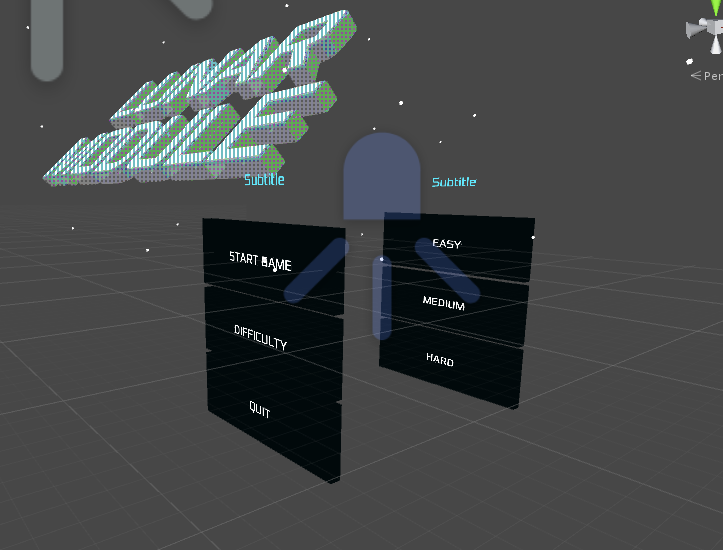
ive got two menus that run back to back. both are child of a parent that runs a single Holotoolkit InteractiveReceiver and both register thier buttons as interactables with that InteractiveReceiver
On InputDown , a button I call "Difficulty" in my StartMenu is suppose to disable the StartMenu and then enable the DifficultyMenu, and then a click in my DifficultyMenu is supposed to disable the DifficultyMenu and enable the StartMenu .
I dont get two InputDowns in my InteractiveReceiver if i run the menus side by side on the X axis.
but when they are both on the same Z axis 1 click results in two calls to the same InteractiveReceiver
its almost as if while im in the first case statement the Raycast keeps going and as i enable my 2nd menu it hits that too ,
Heres my InteractiveReceiver that has interactables from both menus..
    protected override void InputDown(GameObject obj, InputEventData eventData)
    {
        eventData.Use();

       switch (obj.name)
        {
            case "Difficulty":
                // switch to difficulty menu
                startupMenu.SetActive(false);
                difficultyMenu.SetActive(true);
                break;

            case "Medium":
                // switch back to main menu
                startupMenu.SetActive(true);
                difficultyMenu.SetActive(false);
                break;
juansuerogit
on 14 Jan 2018
Just tested on the Hololens and Emulator and no issues .
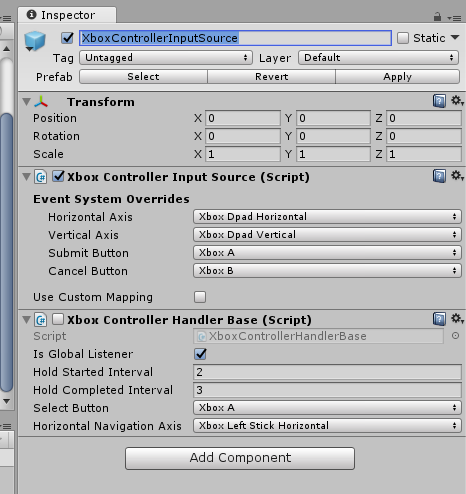
Turns out it was the same bug? from the other day inside the InputManager of XboxControllerInputSource object. I disabled one of the XboxControllerInputSource scripts and im all good now :) :)
juansuerogit
on 15 Jan 2018
Closing issues older than 180 days. If this is still an issue, please reactivate with recent information.
 wiwei
on 11 Apr 2019
wiwei
on 11 Apr 2019
Related issues
 provencher
·
3Comments
StephenHodgson
·
3Comments
provencher
·
3Comments
StephenHodgson
·
3Comments
 MatteoFantasy
·
3Comments
MatteoFantasy
·
3Comments
 dfields-msft
·
3Comments
dfields-msft
·
3Comments
 brean
·
3Comments
brean
·
3Comments