Mixedrealitytoolkit-unity: Mixed Reality UI System?
_(Note that this is a follow-up to #1599, I just think it needs an own discussion because it is about more than just the examples.)_
I think there is need for a default UI-system as the to-go thing that can be reused in a wide variety of projects. Based on @StephenHodgson's idea to split the examples of into an own project in #1599 I think it would be a good idea to also start a new project as modular UI-system (that can maybe also be used in other VR/AR-systems so we have a coherent style with Rift/Occulus apps).
This would also solve my confusion with multiple buttons (see #1323 ): Except maybe some basic interactive scripts every visibile UI related stuff would be removed from the MRTK-Unity into the new project (or get deleted).
I think the InteractiveExamples are a good starting point for such a system (also there is some way for improving, its theming system for example still confuses me).
What do you guys think? Good idea in general or should we keep UI as examples?
 brean
brean
All 13 comments
@brean Thanks for great suggestion! Definitely it would be great to have unified common UI control sets. I think this could be part of refreshing all example projects too, having common splash, description text and UI controls. I'll sync with Todd Williams (@killerantz) who built InteractiveExamples.
@Railboy @radicalad @KatVHarris for visibility.
 cre8ivepark
on 12 Jan 2018
cre8ivepark
on 12 Jan 2018
I'd like to go on with this but noone of the guys @cre8ivepark mentioned answered yet. I could fork this repo and create my own idea of a ui system but I fear this would lead to a separated development of my stuff and the toolkit, so worst case is we end up with even more Button-classes (#1323) and confusion than we already have and I would do a lot of work for nothing.
However I will outline some ideas for it next week (just some general digging into the existing code, maybe doing some experiments but not commiting anything, just seeing how it could look and what problems occur when you e.g. delete some stuff or move some things around).
brean
on 23 Jan 2018
Hi @brean, @killerantz, @Railboy and I had a conversation about merging existing UI related components. As a first step, we will merge Interactable Object and Interactive Button Components. I'll also move some of the core components into main HoloToolkit folder (e.g. Holographic Button)
Thanks!
cre8ivepark
on 23 Jan 2018
@brean We want to consolidate the UI components and get a standard, modular set as @cre8ivepark mentioned. It would be great to get some feedback of what you like and do not like, as well as what's lacking.
 killerantz
on 23 Jan 2018
killerantz
on 23 Jan 2018
awesome. I will be happy to give feedback.
brean
on 23 Jan 2018
2607 - linked to task
@brean I know it's been a while, but I put together a proposal that we can discuss and refine a good approach to building UI controls. This leverages the front-end of InteractableObjects and allows more advanced theming and easy voice commands like InteractiveElements.
Summary
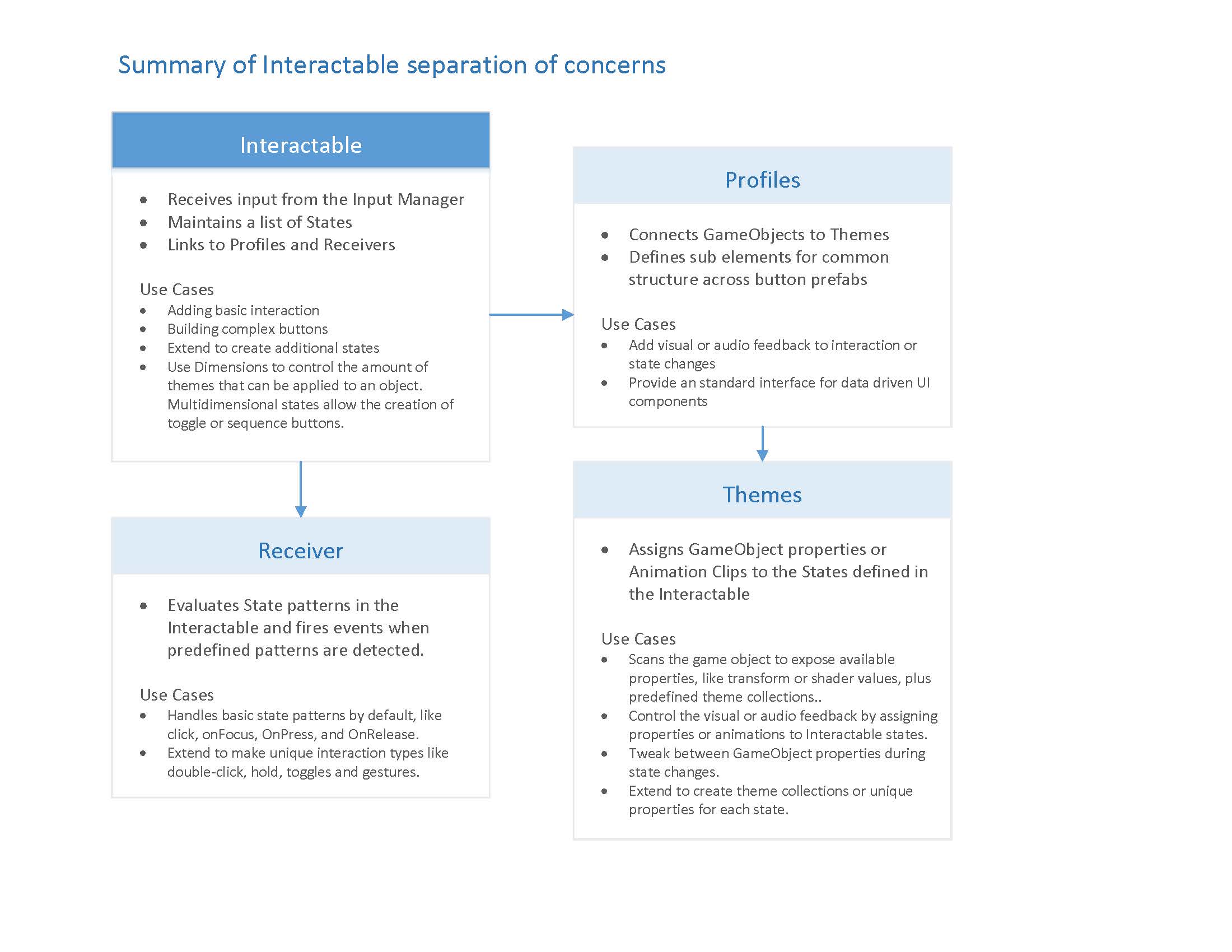
First up is a summary of breaking the logic up to allow more flexibility. One area I'm still iterating on is how to build a state system that drives everything, but allows additional states for more advanced feedback like collision when moving an object or transitions in and out. I'm using a custom class to define states right now that's working and I would just extend the Interactable class for additional state handling, but the community may have some better ideas.
Outline
The overview shows the structure and how each feature can be extended to create all kinds of control types. Profiles define the button elements and connect theme to themes. Events and receivers are extended to handle different input types.
Wireframes
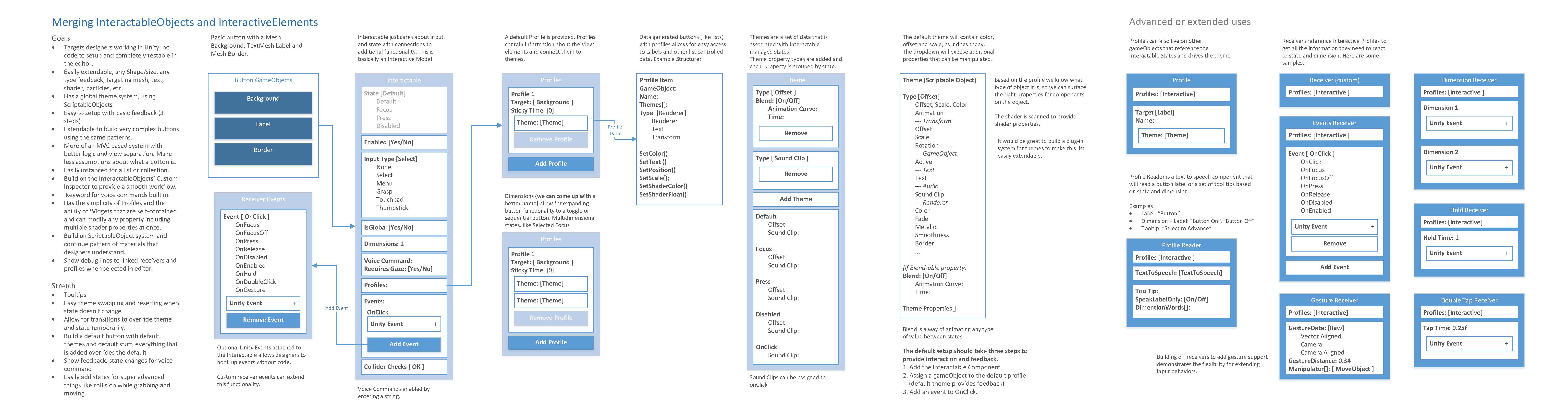
Lastly, the link below is a PowerPoint file with wireframes of the Unity UI flow for building a custom control, setting up feedback and hooking up events. See the notes for details about each screen. I have tested this with designers that have limited Unity exposure to build something that makes sense from the user perspective as well as a technical one.
https://1drv.ms/p/s!AqOxnyip025RjKZMACd5wK3dMC4pgQ
I'm now working on a prototype of the Unity custom inspectors and testing some of the technical challenges, so please review and provide feedback.
killerantz
on 9 Mar 2018
Hey, this is cool, definitely an improvement over the current state! So here is my feedback:
I would suggest to make it a bit more modular.
Lets say I build a small game for Hololens where the player can tap a button to activate some action. Its just a GameObject that changes its position when it is pressed, I guess in that case I just need the events (and maybe some convenient script where I enter the end-positon so it changes its position when the press is emitted).
For a very complex example I could think of a Spatial Mail-Client for Mixed-Reality (so I can receive mails that have some location and that are shown at their locations). So I want buttons with some more text on it, including the text content in a big font, the time when the message has been created and some icons showing the importance of the message. When I air-tap on a message I see the whole message, so I would like to use a button for this.
I think it would be nice to have some scripts that I could reuse to build this, so one script just for event-handling, one that is for color (it iterates over all text-elements and applies the color based on the button state), one script that changes the text z-positon on focus to simulate hover and pressed in 3d etc.
So I would like to customize a lot of things but having multiple helper classes I just adjust to my gameobjects.
I can still have a prefab that has mutliple scripts attached to it for the default case and call it a Button.
I am also not so sure if we really need profiles, maybe I don't fully understand the concept but I would instead just have some Theme-Singletons that can be referenced in a drop-down list. (And I would also implement this as single Theme-Selection script).
brean
on 10 Mar 2018
Great stuff @killerantz and is very much along the lines of the SDK approach proposed for vNext (with a a lot of more detail)
https://github.com/Microsoft/MixedRealityToolkit-Unity/blob/MRTK-Version-Next/MRTK-SDK.md
So it would be great to see more of this documented and add to the currnet vNext plans.
 SimonDarksideJ
on 10 Mar 2018
SimonDarksideJ
on 10 Mar 2018
@brean thanks for the feedback. You bring up a couple edge cases that will help round out the design. I can see how you might feel the current design would be too heavy, though it could do what you wanted. I do like the option of having something more modular and lighter as you mentioned.
Once the current prototype is complete, I'll see if we can deconstruct it some more, but overall I think we can get pretty close to having something as modular as you would like.
killerantz
on 13 Mar 2018
@killerantz awesome, looking forward to see the code.
brean
on 13 Mar 2018
Def looking to see more lightweight/modular components as well.
 StephenHodgson
on 14 Mar 2018
StephenHodgson
on 14 Mar 2018
@killerantz I know it's been a while on this issue, but could you write up a formal task for your outline in https://github.com/Microsoft/MixedRealityToolkit-Unity/issues/1625#issuecomment-371936938? I think it'd be super helpful.
StephenHodgson
on 17 Sep 2018
Closing this one out, as I believe that @killerantz already implemented the flow/description above.
Feel free to reopen with deltas if this is not correct.
 wiwei
on 8 May 2019
wiwei
on 8 May 2019
Related issues
 overedge
·
3Comments
overedge
·
3Comments
 reillydonovan
·
3Comments
reillydonovan
·
3Comments
 dfields-msft
·
3Comments
dfields-msft
·
3Comments
 provencher
·
3Comments
provencher
·
3Comments
 nuernber
·
3Comments
nuernber
·
3Comments
Most helpful comment
@brean Thanks for great suggestion! Definitely it would be great to have unified common UI control sets. I think this could be part of refreshing all example projects too, having common splash, description text and UI controls. I'll sync with Todd Williams (@killerantz) who built InteractiveExamples.
@Railboy @radicalad @KatVHarris for visibility.