Mixedrealitytoolkit-unity: Build MixedRealityToolkit-Unity-releases v1.2017.2.0 failed in Visual Studio 2017 Pro
Overview
I installed Unity 2017.2.0p1-MRTp4, downloaded MixedRealityToolkit-Unity v1.2017.2.0. I open HoloToolkit-Examples/Sharing/Scenes/SharingTest in Editor and build it in Build Settings with SDK=10.0.16299.0. Then I open the sln in Visual Studio 2017 Pro, set it as Release-x86-Remote Machine(give IP of my HoloLens device). When I click on Build, it failed because of an error saying that one of dll not found. I checked why the dll is not found and see that its path string is incorrect because of one letter of one digit-number missing with no any reason. For example of SharingTest, the error message is
System.IO.DirectoryNotFoundException: Could not find a part of the path 'C:\Users\Public\Documents\UnityProjects2017\HoloLens*MRT-Unity-Releases-2017125*\App-SharingTest\MRT-Unity-Releases-20171205\UnityEngine.Networking.dll'.
In the path string, my project name is MRT-Unity-Releases-20171205, but in error message it shows "MRT-Unity-Releases-2017125", missing "0".
I tested Examples/InputScenes/KeyboardTest too. The error is also missing a letter as this:
System.IO.DirectoryNotFoundException: Could not find a part of the path 'C:\Users\Public\Documents*UntyProjects2017*\HoloLens\MRT-Unity-Releases-20171205\App-KeyboardTest\MRT-Unity-Releases-20171205\UnityEngine.Networking.dll'.
In this test, "UnityProjects2017" becomes "UntyProjects2017", missing letter "i'.
Expected Behavior
Should pass the build.
Actual Behavior
Build failed
Steps to reproduce
download this MixedRealityToolkit-Unity: https://github.com/Microsoft/MixedRealityToolkit-Unity/releases
- As I said in Overview, simply load Examples/Sharing/Scenes/SharingTest into Unity 2017.2.0p1 Editor
- build it with SDK = 10.0.16299.0.
- Load the solution into Visual Studio 2017 pro
- Set to: Release, x86, Remote Machine (type the HoloLens IP address)
- Click on Build
- you can the build error in Output window
Unity Editor Version
Unity 2017.2.0p1
Mixed Reality Toolkit Release Version
v1.2017.2.0
 gzpUnreal
All 16 comments
Seems rather arbitrary. What's the line, and in which class is the directory not found exception being thrown?
 StephenHodgson
on 5 Dec 2017
StephenHodgson
on 5 Dec 2017
I can't reproduce this with the steps provided.
Is there a step you may have missed when building in the Unity editor?
StephenHodgson
on 5 Dec 2017
I did one more time. the project is v1.2017.2.0: this folder "MixedRealityToolkit-Unity-1.2017.2.0"
Build Settings in Unity is
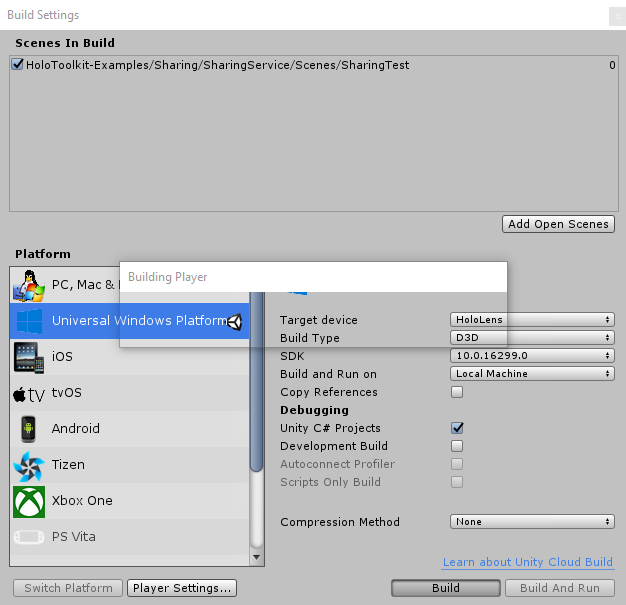
The solution is in this folder: C:\Users\Public\Documents\UnityProjects2017\HoloLens\MixedRealityToolkit-Unity-1.2017.2.0\App-SharingTest
Open MixedRealityToolkit-Unity.sln in Visual Studio 2017 Pro
Settings in Visual Studio 2017 Pro is (Release x86 Remote machine)
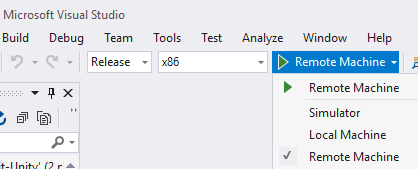
Click on Build, then I see Build error:
2> System.IO.DirectoryNotFoundException: Could not find a part of the path 'C:\Users\Public\Documents\UnityProjects2017*HolLens*\MixedRealityToolkit-Unity-1.2017.2.0\App-SharingTest\MixedRealityToolkit-Unity\UnityEngine.HoloLens.dll'.
This time, HoloLens becomes "HolLens", missing "o".
gzpUnreal
on 5 Dec 2017
I think it happens when running AssemblyConverter.
gzpUnreal
on 5 Dec 2017
Attach lines from Output and Error windows.
MRT-VS2017Pro-Failed-Error-Messages.txt
gzpUnreal
on 5 Dec 2017
the right project folder is
C:\Users\Public\Documents\UnityProjects2017\HoloLens\MixedRealityToolkit-Unity-1.2017.2.0
But when Build in Visual Studio Pro, it becomes
C:\Users\Public\Documents\UnityProjects2017\HolLens\MixedRealityToolkit-Unity-1.2017.2.0
This happens randomly in a line.
gzpUnreal
on 5 Dec 2017
Try using the build and deploy window.
StephenHodgson
on 5 Dec 2017
Also, try using the default build directory name 'uwp' when making a build from unity.
StephenHodgson
on 5 Dec 2017
where is the build and deploy window?
BTW, I build solution into uwp, then Build in visual studio 2017 pro is ok. And then deploy is also ok.
Why have to use uwp folder?
gzpUnreal
on 5 Dec 2017
I also tried to build solution into a folder named "App", it has no problem to build in Visual Studio. But I try to build the solution into a folder named "App-SharingTest2", when I build in Visual Studio pro, the build failed again. This time the error message said
Running AssemblyConverter...
2> System.IO.PathTooLongException: The specified path, file name, or both are too long. The fully qualified file name must be less than 260 characters, and the directory name must be less than 248 characters.
gzpUnreal
on 5 Dec 2017
So the solution for this problem is: DON'T make the path or file name too long. Have to follow what is said in the error message:
The fully qualified file name must be less than 260 characters, and the directory name must be less than 248 characters.
gzpUnreal
on 5 Dec 2017
I close this one myself. But I still think it is a problem that there is a character or digit missing in the file path string.
gzpUnreal
on 6 Dec 2017
We should report this issue to Microsoft. ;)
 jwittner
on 28 Mar 2018
jwittner
on 28 Mar 2018
I really forgot what is this issue? I reported it?
Best,
Zhenping Guo
On Thursday, March 29, 2018 03:56:01 AM CST, Josh Wittner <[email protected]> wrote:
We should report this issue to Microsoft. ;)
—
You are receiving this because you modified the open/close state.
Reply to this email directly, view it on GitHub, or mute the thread.
gzpUnreal
on 29 Mar 2018
I found the cause of this issue: The total lenght of the argument to the assemblyconverter is above 8192 characters.
From the example in comment above: https://github.com/Microsoft/MixedRealityToolkit-Unity/issues/1472#issuecomment-349210601
The character at position 8192 is removed from the argument.

This major increase in assemblyconverter argument size happens after the Unity 2017.2 update: "Scripting: UnityEngine.dll is now split into separate dlls for each UnityEngine module". All unity engine components now repeats the entire path for each UnityEngine module.
It is possible to work around this limitation by limiting path length because this is repeated for every DLL, but for every non-unity DLL added to the project this argument list will increase in size by "path+name.dll" characters.
 Strepto
on 6 May 2018
Strepto
on 6 May 2018
Experienced same issue recently. Shortening the path resolved the issue.
 cre8ivepark
on 20 May 2018
cre8ivepark
on 20 May 2018
Related issues
StephenHodgson
·
3Comments
 overedge
·
3Comments
overedge
·
3Comments
 jimstack
·
3Comments
jimstack
·
3Comments
 Alexees
·
3Comments
Alexees
·
3Comments
 brean
·
3Comments
brean
·
3Comments
Most helpful comment
I found the cause of this issue: The total lenght of the argument to the assemblyconverter is above 8192 characters.
From the example in comment above: https://github.com/Microsoft/MixedRealityToolkit-Unity/issues/1472#issuecomment-349210601

The character at position 8192 is removed from the argument.
This major increase in assemblyconverter argument size happens after the Unity 2017.2 update: "Scripting: UnityEngine.dll is now split into separate dlls for each UnityEngine module". All unity engine components now repeats the entire path for each UnityEngine module.
It is possible to work around this limitation by limiting path length because this is repeated for every DLL, but for every non-unity DLL added to the project this argument list will increase in size by "path+name.dll" characters.