Mixedrealitytoolkit-unity: Error CS0012 when building for Hololens
Overview
I am working on a simple prototype. I have a 3D scan of a part which we have prepared into an FBX and would like to view in augmented reality. Scan is fine and object is added to unity however when I build using the latest release of the toolkit on the latest release of Unity I am met with errors on the Visual Studio side of things.
Unity Scene:

Unity Build Window:

Visual Studio Window:

Error I am receiving:
Severity    Code    Description Project File    Line    Suppression State
Error   CS0012  The type 'IAsyncAction' is defined in an assembly that is not referenced. You must add a reference to assembly 'Windows, Version=255.255.255.255, Culture=neutral, PublicKeyToken=null, ContentType=WindowsRuntime'.    Assembly-CSharp D:\Users\cmdann\Development\Games\TurbineAR\Assets\HoloToolkit\Utilities\Scripts\ApplicationViewManager.cs  62  Active
All error output: https://gist.github.com/CMDann/1c843168953160a6c94e00b831b58fc1
Notes:
- I tried cleaning the solution which resulted in more CS0012 errors
- I am running Visual Studio 2017 Enterprise
Expected Behavior
I would like to deploy the application to the Hololens hardware.
Actual Behavior
Errors (CS0012) in visual studio preventing the application from building.
Steps to reproduce
- Prepare Scene
- Build to visual studio
- Attempt to run on device
Unity Editor Version
- Unity 2017.2.0b11
Mixed Reality Toolkit Release Version
- HoloToolkit-Unity-v1.2017.2.0
- HoloToolkit-Unity-Examples-v1.2017.2.0
 CMDann
All 20 comments
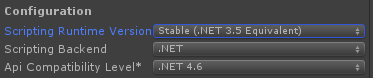
Make sure your Scripting Compatibility level .net 4.6
You may also need to change your scripting runtime version to 4.6 as well.
 StephenHodgson
on 17 Nov 2017
StephenHodgson
on 17 Nov 2017
Thanks @StephenHodgson I am going to try this right now.
Edit: Unfortunately changing the scripting run time version to 4.6 did not affect it, I had the compatibility level at 4.6 already.
CMDann
on 17 Nov 2017

StephenHodgson
on 17 Nov 2017
If you really need to use the 2017.2 editor then pull the latest master and import a custom package.
StephenHodgson
on 17 Nov 2017
I have 2017.1.2 installed on my machine, I will open the project and try a rebuild.
I have set the SDK target to 10.0.15063
CMDann
on 17 Nov 2017
@StephenHodgson Switching to 2017.1.2 with the target SDK switched to 10.0.15063 removed most of the errors but I am still having a few of the same issues.
Severity    Code    Description Project File    Line    Suppression State
Error   CS0006  Metadata file 'D:\Users\cmdann\Development\Builds\HoloTest\GeneratedProjects\UWP\Assembly-CSharp\Assembly-CSharp-firstpass.dll' could not be found  Assembly-CSharp D:\Users\cmdann\Development\Builds\HoloTest\GeneratedProjects\UWP\Assembly-CSharp\CSC   1   Active
Severity    Code    Description Project File    Line    Suppression State
Error   CS0006  Metadata file 'D:\Users\cmdann\Development\Builds\HoloTest\TurbineAR\Assembly-CSharp-firstpass.dll' could not be found  TurbineAR   D:\Users\cmdann\Development\Builds\HoloTest\TurbineAR\CSC   1   Active
Severity    Code    Description Project File    Line    Suppression State
Error   CS0006  Metadata file 'D:\Users\cmdann\Development\Builds\HoloTest\GeneratedProjects\UWP\Assembly-CSharp\bin\x86\Release\Assembly-CSharp.dll' could not be found    TurbineAR   D:\Users\cmdann\Development\Builds\HoloTest\TurbineAR\CSC   1   Active
Seems as though it is having a difficult time finding the assembly?
Severity    Code    Description Project File    Line    Suppression State
Warning     The referenced component 'Assembly-CSharp-firstpass' could not be found.    TurbineAR
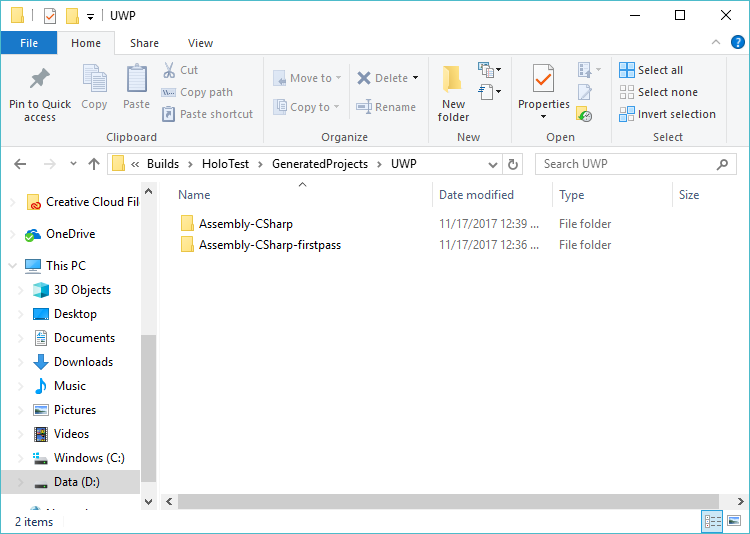
Try deleting your build folder and rebuild the player.
StephenHodgson
on 17 Nov 2017
No affect, I do see assembly it is referencing in the project folder.
CMDann
on 17 Nov 2017
Delete the whole UWP folder.
StephenHodgson
on 17 Nov 2017
Uncheck C# projects.
StephenHodgson
on 17 Nov 2017
Removing the UWP fixed an issue (it now sees the assembly). These are the current errors:
Severity    Code    Description Project File    Line    Suppression State
Error   CS0012  The type 'CoreApplicationView' is defined in an assembly that is not referenced. You must add a reference to assembly 'Windows, Version=255.255.255.255, Culture=neutral, PublicKeyToken=null, ContentType=WindowsRuntime'. TurbineAR   D:\Users\cmdann\Development\Builds\HoloTest\TurbineAR\App.cs    34  Active
Which is referencing this line:
m_AppCallbacks.SetCoreApplicationViewEvents(applicationView);
And
Severity    Code    Description Project File    Line    Suppression State
Error   CS0012  The type 'CoreWindow' is defined in an assembly that is not referenced. You must add a reference to assembly 'Windows, Version=255.255.255.255, Culture=neutral, PublicKeyToken=null, ContentType=WindowsRuntime'.  TurbineAR   D:\Users\cmdann\Development\Builds\HoloTest\TurbineAR\App.cs    58  Active
Which references:
m_AppCallbacks.SetCoreWindowEvents(coreWindow);
CMDann
on 17 Nov 2017
I tried with C# projects both checked and unchecked which seemed to have no affect.
CMDann
on 17 Nov 2017
What happens when you create a build from the MRTK build window?
Will it build APPX for you?
StephenHodgson
on 17 Nov 2017

Unity said it failed, it did build however same issues when I build from Visual Studio.
CMDann
on 17 Nov 2017
Is this bug resolved? I am still facing this problem with Unity 2017.3.1f1
 marklinmao
on 26 Feb 2018
marklinmao
on 26 Feb 2018
I followed Hololens100 tutorial and I am blocked with this error:
...
错误 CS0012 类型“CoreApplicationView”在未引用的程序集中定义。必须添加对程序集“Windows, Version=255.255.255.255, Culture=neutral, PublicKeyToken=null, ContentType=WindowsRuntime”的引用。 HoloPM C:\workspace\unity\HoloPM\App\HoloPM\App.cs 34 活动的
...
marklinmao
on 26 Feb 2018
Hey guys, I had the same problem and now I have figured it out, please take a look here:
https://stackoverflow.com/questions/50314519/cs0012-error-when-building-origami-hololens-101-tutorial/50407748#50407748
 gladys0313
on 18 May 2018
gladys0313
on 18 May 2018
That link 404s
StephenHodgson
on 18 May 2018
@StephenHodgson The link was formatted weirdly. I just edited it.
 keveleigh
on 18 May 2018
keveleigh
on 18 May 2018
Closing issues older than 180 days. If this is still an issue, please reactivate with recent information.
 wiwei
on 11 Apr 2019
wiwei
on 11 Apr 2019
Related issues
 markgrossnickle
·
3Comments
markgrossnickle
·
3Comments
 reillydonovan
·
3Comments
reillydonovan
·
3Comments
 ritijain
·
3Comments
ritijain
·
3Comments
 matatabi-ux
·
3Comments
matatabi-ux
·
3Comments
 dfields-msft
·
3Comments
dfields-msft
·
3Comments