Mixedrealitytoolkit-unity: SpawnSyncModel Clarification Regarding Changes in Children
I am trying to implement the sharing service and am having troubles wrapping my mind around the SyncSpawnModels. So for this initial test I would have 2 Buttons (btnA, btnB) and 2 primitive game objects (cubeA, sphereB). Where pressing a button displays or hides the corresponding game object (setActive(!activeSelf)). So below is an image of the setup I would like.
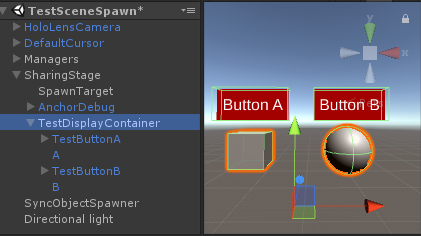
First off, from what I can find online, the only way to have shared game objects is to use the PrefabSpawnManager to spawn a prefab of it. Is this correct? So there would be no way to share a locally placed Object, aka I don't have to spawn a prefab in order to share?
Secondly and most importantly, when I use the PrefabSpawnManager to create the TestDisplayContainer the displaying/hiding of the game objects does sync up. So if I press Button A on Client A, the cube disappears to Client A, but it is still there for Client B. Why is this? I figure I need to modify and create my own SyncSpawnModel to account for any children a game object. Is this on target? And how would I do that? My initial thought is to make a "SyncSpawnContainer" class that might have an array of children Game Objects? But honestly I am completely lost as to how to do it, so if anyone can provide some insight that would be greatly appreciated.
 kyleWillson
All 11 comments
First off, from what I can find online, the only way to have shared game objects is to use the PrefabSpawnManager to spawn a prefab of it. Is this correct?
yes
So there would be no way to share a locally placed Object, aka I don't have to spawn a prefab in order to share?
Not with the sharing service, no.
 StephenHodgson
on 11 Oct 2017
StephenHodgson
on 11 Oct 2017
I'd love to go more in depth for an answer but I don't have time right now.
StephenHodgson
on 11 Oct 2017
That definitely helped shape my dev path, which I think is to extend CustomMessages so that it knows when something was toggled. At least the way I think I have to do this, is not going to be the easiest. So if you could, when you get some free time go into more depth because I can't find much documentation out there.
kyleWillson
on 11 Oct 2017
You're on the right path with the custom messages. CustomMessages can do what you need, but the SyncModel will be better if you have lots of things you're trying to sync.
StephenHodgson
on 11 Oct 2017
O thank god! I did not want to do CustomMessages for that exact reason. There are a lot of objects to sync, so I will try and dig around to see what I can learn about SyncModel in the mean time
kyleWillson
on 11 Oct 2017
Alright I tried one way where I created a SyncSpawnedContainer, where I created an extension of SyncPrefabObject that had the following extra fields:
[SyncDataClass]
public class SyncSpawnedSceneContainer : SyncSpawnedObject

{

    [SyncData] public SyncTransform[] ChildrenTransforms;

    [SyncData] public SyncString[] ChildrenNames;

    [SyncData] public SyncString[] ChildrenParentPaths;

    [SyncData] public SyncString[] ChildrenObjectPaths;

    public GameObject[] Children;

    ...

}
But for that to work I had to do a little work around in PrefabSpawnManager.Spawn() so the Model could iterate through the Prefab's children and populate the values:
if (dataModel.GetType() == typeof(SyncSpawnedSceneContainer))

{

    ((SyncSpawnedSceneContainer)dataModel).InitializeChildren(prefabToSpawn);

}
This obviously isnt the proper technique, so I saw "Defining the SyncModel" here, which might suggest that I need to create a SyncArray for my Prefab. And I would essentially create an array of SyncSpawnedObject's for each Child of the prefab parent?
Does that sound closer?
kyleWillson
on 11 Oct 2017
I figured it somewhat out with adding to the custom SyncSpawnedSceneContainer. A lot of debugging and probably further questions to come...
kyleWillson
on 13 Oct 2017
Glad to hear! sorry I couldn't answer all your questions right away.
I'm going to do a livestream in a next few weeks that covers the sharing service. PM me on Linkedin or Slack if you wanna know more.
StephenHodgson
on 13 Oct 2017
No worries, I'm actually kind of glad I got it on my own.
And I am definitely interested, I think I sent you a request on LinkedIn.
kyleWillson
on 14 Oct 2017
Yeah I agree, learning it on your own is usually the best way. Give you a better understanding, but having someone at least give you hints on what to look at is good too.
StephenHodgson
on 14 Oct 2017
Kyle would you mind elaborating on your workflow? I can't seem to wrap my mind around how to properly structure a project using the sync system. Any suggestions would be very helpful, thanks!
 reillydonovan
on 22 Nov 2017
reillydonovan
on 22 Nov 2017
Related issues
 jimstack
·
3Comments
jimstack
·
3Comments
 chrisfromwork
·
3Comments
chrisfromwork
·
3Comments
 overedge
·
3Comments
overedge
·
3Comments
 brean
·
3Comments
reillydonovan
·
3Comments
brean
·
3Comments
reillydonovan
·
3Comments
Most helpful comment
I figured it somewhat out with adding to the custom SyncSpawnedSceneContainer. A lot of debugging and probably further questions to come...