Mixedrealitytoolkit-unity: Fast Configurable shader looks very different than old obsolete Standard Fast
I've been running 5.6.x for a while now, but wanted to switch to 2017.x, and after doing so, the new shader is messing up my materials.
Has anyone else experienced this, or has suggestions on how to resolve?
Standard and Standard Fast appear the same, and reimporting the fbx and materials resulted in the same look.
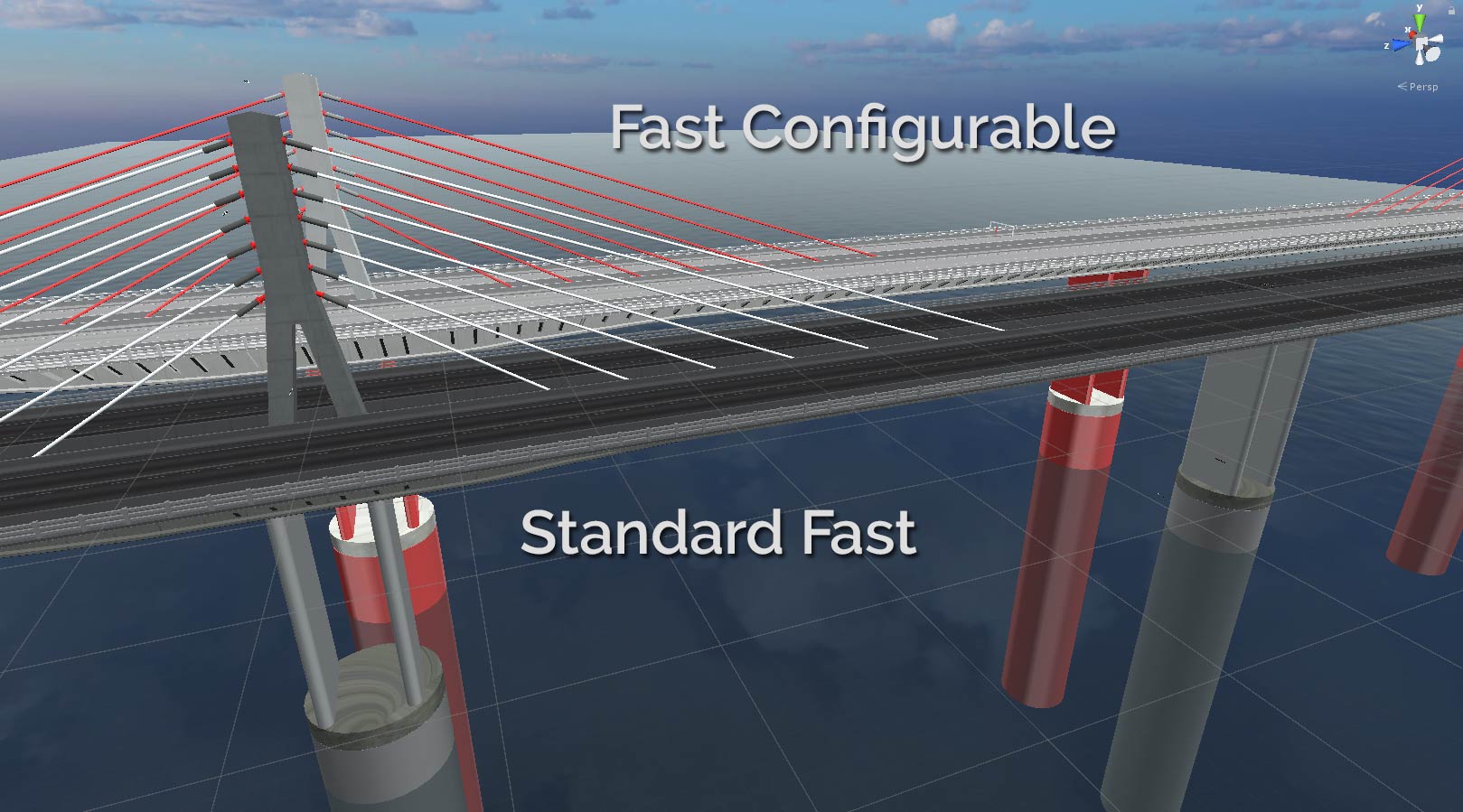

As you can see in this picture, the Fast Configurable is all red, and lighter colored.
 ShadowshotSys
All 6 comments
I experienced a similar problem after updating from 2017.1.1f to 2017.1.1p4. HoloToolkit's InteractiveMeshCursor or to be precise it's materials were red instead of white like before. They also use the FastConfigurable shader.
I tried the InteractiveMeshCursor prefab in a clean project (importing the HoloToolkit again) and the Cursor was white. After examining the FastConfigurable.shader script I realized the main texture is set to "red" intentionally in line 14: [NoScaleOffset]_MainTex("Main Texture", 2D) = "red" {}. Changing it to "white" would turn the cursor back to normal color and changing it back to "red" would surprisingly do nothing. It stayed white as it was ever since. I have no clue of writing shaders but that seems odd to me.
 derdimi
on 5 Oct 2017
derdimi
on 5 Oct 2017
@CrazyTegger your link is dead.
 StephenHodgson
on 5 Oct 2017
StephenHodgson
on 5 Oct 2017
Uploaded files directly to post
ShadowshotSys
on 5 Oct 2017
I fixed my issue by right-clicking on all the shaders and choosing "Reimport".
derdimi
on 11 Oct 2017
Reimporting the shaders does not resolve the issue.
ShadowshotSys
on 2 Nov 2017
Please try with the new Mixed Reality Toolkit / Standard shader
 davidkline-ms
on 22 May 2018
davidkline-ms
on 22 May 2018
Related issues
 dustin2711
·
3Comments
StephenHodgson
·
3Comments
dustin2711
·
3Comments
StephenHodgson
·
3Comments
 nuernber
·
3Comments
StephenHodgson
·
3Comments
nuernber
·
3Comments
StephenHodgson
·
3Comments
 nrchuanqi
·
3Comments
nrchuanqi
·
3Comments