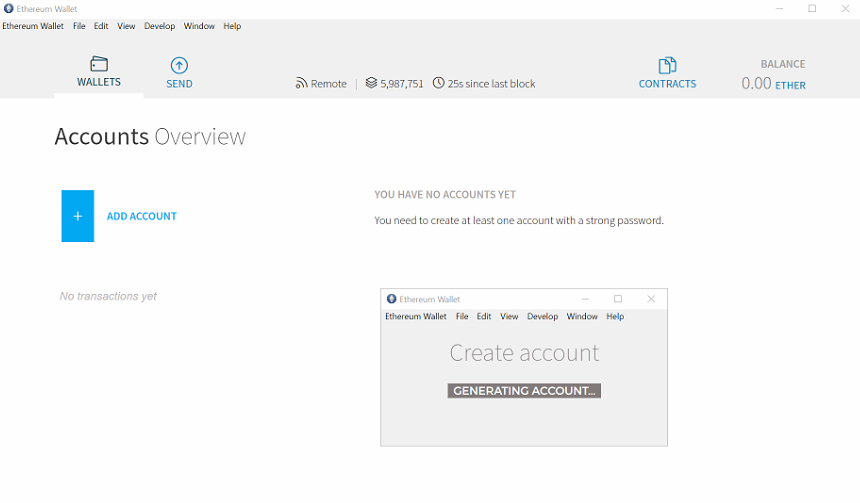
Still the same as in #1716. After creating it is stuck with "Generating account" message.
thats the issue with not poping up accounts while syncing i guess. This should be fixed in the next release.
Looks as if it hasn't been fixed. Is it hard to display a proper note message? Like, new accounts can't be created while we're synchronizing. :man_shrugging:
--
Meta:
Version: `0.11`
OS & Version: Windows 7
Node version: `geth 1.8.11`
Number of blocks synchronized: 0
Dev console has something:

 pravic
All 30 comments
I think I am having the same issue generating a new wallet account. New wallet install (never used it before) and it gets stuck on "generating account". Do I need to let the wallet sync first, even though it is in "Light" mode?
Version: 0.11.0
OS: Windows 10
 ksnell88
on 18 Jul 2018
ksnell88
on 18 Jul 2018
Thanks for reporting. While testing, I was able to reproduce the hanging window on mainnet with no-sync, but the account was still generated and viewable in the wallet. Will investigate further.
 marcgarreau
on 19 Jul 2018
marcgarreau
on 19 Jul 2018
I'm having a similar issue as described by @ksnell88 , as a fresh install on Win10, when I open up Ethereum Wallet and click 'Add Account', it requests a password, then verification of the password, and then it sits on the 'Generating Account' message indefinitely in that same window. This happened regardless of the 'Sync mode' preference I had Ethereum Wallet on. No files were generated in the 'keystore' folder, and no accounts are visible upon restarting the Wallet or the computer. Below is part of the main.log file that I found may be of some use?
[2018-07-20T10:47:42.752] [ERROR] (ui: popupWindow) - Unable to load preload script: C:\Program Files\Ethereum-Wallet\resources\app.asar\modules/preloader/popupWindows.js

[2018-07-20T10:47:42.753] [ERROR] (ui: popupWindow) - Error: %1 is not a valid Win32 application.
\\?\C:\Users\user\AppData\Local\Temp\34b63e59-94da-4378-8bd8-bd38f678aa27.tmp.node
    at process.module.(anonymous function) [as dlopen] (ELECTRON_ASAR.js:172:20)
    at Object.Module._extensions..node (module.js:598:18)
    at Object.module.(anonymous function) [as .node] (ELECTRON_ASAR.js:186:18)
    at Module.load (module.js:503:32)
    at tryModuleLoad (module.js:466:12)
    at Function.Module._load (module.js:458:3)
    at Module.require (module.js:513:17)
    at require (internal/module.js:11:18)
    at Object.<anonymous> (C:\Program Files\Ethereum-Wallet\resources\app.asar\node_modules\scrypt\index.js:3:20)
    at Object.<anonymous> (C:\Program Files\Ethereum-Wallet\resources\app.asar\node_modules\scrypt\index.js:388:3)

[2018-07-20T10:47:42.850] [WARN] Sockets/node-ipc - Connection failed, retrying after 1000ms...
 jnoranbrock
on 20 Jul 2018
jnoranbrock
on 20 Jul 2018
Same problem...
what is interesting - It possible to create an account with Geth in command line. It works fine and lists new account. But Mist or Etherium Wallet hangs on same step.
Win 10, win firewall in shut, so I'm confused.
Could anybody help?
logs below:
consoleLogCapture.js:40 Error: %1 is not a valid Win32 application.
\?\C:\Users\AYRomanov.LANIT\AppData\Local\Temp\a0590098-b654-4fe9-8374-a650aa2d2b0c.tmp.node
at process.module.(anonymous function) [as dlopen] (ELECTRON_ASAR.js:172:20)
at Object.Module._extensions..node (module.js:598:18)
at Object.module.(anonymous function) [as .node] (ELECTRON_ASAR.js:186:18)
at Module.load (module.js:503:32)
at tryModuleLoad (module.js:466:12)
at Function.Module._load (module.js:458:3)
at Module.require (module.js:513:17)
at require (internal/module.js:11:18)
at Object.
at Object.
(anonymous) @ consoleLogCapture.js:40
 Koderr74
on 20 Jul 2018
Koderr74
on 20 Jul 2018
we'll have this sorted for the next release, but if you want to get a new account into Mist/Ethereum Wallet, you can generate one with MyCrypto or MyEtherWallet, then move that keystore file into your geth keystore directory (location varies based on OS).
marcgarreau
on 20 Jul 2018
I'm having the same issue on latest Win 10.
 MasterNeuron
on 20 Jul 2018
MasterNeuron
on 20 Jul 2018
Can anyone give the steps required to make a MyEtherWallet to then move that keystore file to the geth keystore directory
 Deancregan77
on 22 Jul 2018
Deancregan77
on 22 Jul 2018
Hi everyone, this issue was fixed in version 0.11.1. please update.
thank you for reporting!
 evertonfraga
on 25 Jul 2018
evertonfraga
on 25 Jul 2018
I am running 0.11.1 on macOS High Sierra 10.13.6 and it is stuck
 jamesy0ung
on 25 Jul 2018
jamesy0ung
on 25 Jul 2018
Hi there. Im in the same boat, and running 011.1 on windows 10.
Some kind of solution??
 YellowMimic
on 29 Jul 2018
YellowMimic
on 29 Jul 2018
@jamesy0ung I think this is a macOS firewall issue. I had the same issue. I quit the app and restarted it. Upon restart it prompted me to allow incoming connections. After I allowed incoming connections and created a wallet again, it completed instantly.
 mauvity
on 31 Jul 2018
mauvity
on 31 Jul 2018
Thanks @mauvity. I faced the same issue in Windows10 however it gets resolved once I allow it through firewall after restarting the wallet.
 sathirei
on 31 Jul 2018
sathirei
on 31 Jul 2018
I just had the same issue on MAC OS Sierra 10.12.2 and don't have the firewall enabled so its not specifically a firewall issue. However closing the app, reopening the app and then repeating the procedure to create an account worked fine so it may just be an issue which occurs when the app is first installed.
 scottay12
on 2 Aug 2018
scottay12
on 2 Aug 2018
I had reports from people that don't have firewall as well. Restarting seems to work.
It's under investigation, but it seems Geth (ethereum node) might be the culprit. It hangs with lots of CPU usage.
evertonfraga
on 2 Aug 2018
I have the same issue on Windows 10. Can't generate anymore wallets even on the test network. Running the latest version of Mist.
 olegmitrakhovich
on 3 Aug 2018
olegmitrakhovich
on 3 Aug 2018
I fixed this by changing sync mode from light to fast back to light again.
 SecretRecipe
on 5 Aug 2018
SecretRecipe
on 5 Aug 2018
Please update to Geth 1.8.13 from within Mist (option Check for node updates). I've got some positive indications it would work.
Let me know if it worked for you. Cheers
evertonfraga
on 21 Aug 2018
Follow SecretReceipe Suggestion, that worked for me. However it just created a trust issue for that perticular wallet. A Wallet that isnt working as intended and get fix by switching option back and foward doesnt seem to me like a viable secure option right now.
 Madeindreams
on 27 Aug 2018
Madeindreams
on 27 Aug 2018
It was also hanging on "generating account..." for me (v0.11.1, Ubuntu 16.04):
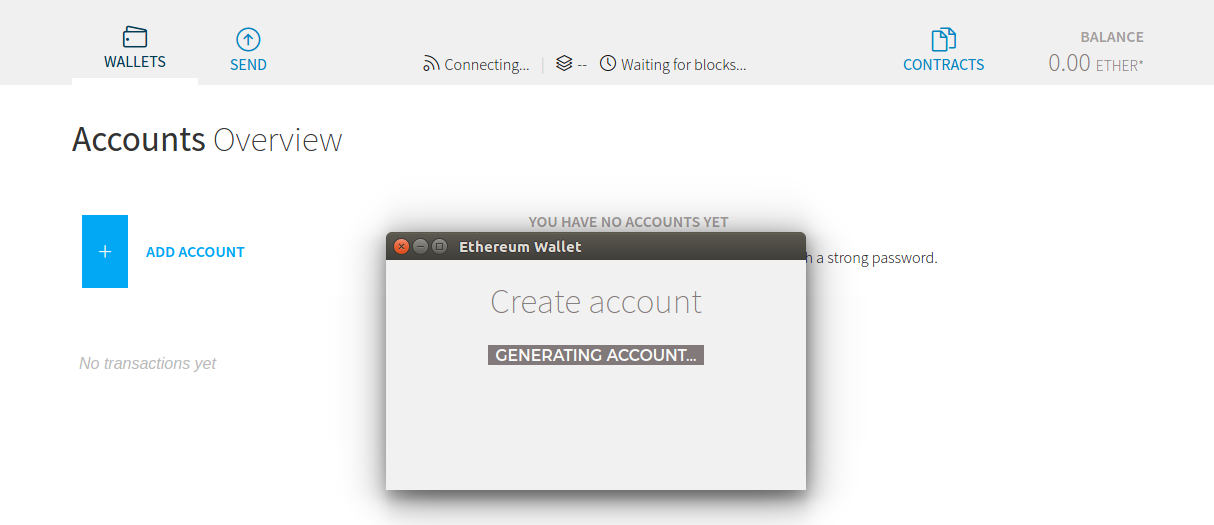
I think it may be because I tried to create an account while it was still connecting? I restarted the app and it worked fine.
 josephrocca
on 5 Sep 2018
josephrocca
on 5 Sep 2018
I faced same issue in Windows 10, eth ver: 0.11.1
Tried firewall off, app restart didn't work
Resolved:
Open wallet as "run as administrator"
created account immediately.
 nirmalmandhata
on 6 Sep 2018
nirmalmandhata
on 6 Sep 2018
I faced same issue in Windows 10, eth ver: 0.11.1
Tried firewall off, app restart didn't work
Resolved:
Open wallet as "run as administrator"
created account immediately.
thank you! It works.
 trieu-hphuc96
on 14 Oct 2018
trieu-hphuc96
on 14 Oct 2018
Faced the same issue. Stuck on generating wallet. First install ever, ver 0.11.1. Fresh Ubuntu 18.4. No firewalls at all.
Restarted Ethereum Wallet and it then worked.
Note: The GUI still got stuck generating wallet, but this time it created an account in the background.
 Ofelion
on 24 Oct 2018
Ofelion
on 24 Oct 2018
Hi Guys
Any solutions to this. I am having same issue. Downloaded Ethereum wallet but its stuck on generating account.
Please suggest what to do.
 objectivelearning
on 20 Nov 2018
objectivelearning
on 20 Nov 2018
Did you try right clicking on it and clicking "Run as administrator"? Other than that, make sure it is not a firewall or antivirus interfering.
ksnell88
on 20 Nov 2018
I got the same issue with you guys, and it works fine after restarting the Ethereum Wallet.
Version 0.11.1
 m1n9o
on 9 Dec 2018
m1n9o
on 9 Dec 2018
sudo open -a "Ethereum Wallet". (Essentially opening it as Admin on mac).
If you downloaded and installed the "Ethereum Wallet", apparently it restricts you to a user level accessibility.
This should allow you to generate a new account without a hick. Cheers
 Prem0821
on 17 Dec 2018
Prem0821
on 17 Dec 2018
Having the same issue on a fresh install of 0.11.1 x64 on windows 10.
Running as administrator, clicked add account, prompts for password twice, then sits there indefinitely saying "Generating account..."
In the background, I can see it has created "Account 1" with 0.00 ether, but its the generating account... window that never closes.
No feedback to indicate whether that window is safe to close now or not.. how long do I wait for some kind of feedback from the create account process?
 tandyuk
on 16 Jan 2019
tandyuk
on 16 Jan 2019
Close and reopen fixed it for me on windows
 jamesonsaunders
on 27 Feb 2019
jamesonsaunders
on 27 Feb 2019
Indeed, also on Mac OS 10.14.3 I got this bug (Mist 0.11.1). Close and reopen and the wallet appeared.
 belgacoin
on 4 Apr 2019
belgacoin
on 4 Apr 2019
Ditto. macOS 10.14.4, Ethereum Wallet 0.11.1. Once I quit and restart, I tried to create an account again, and it took a couple of seconds rather than the ten minutes I waited before giving up previously.
 Calorion
on 10 Apr 2019
Calorion
on 10 Apr 2019
Related issues
 stephantual
·
7Comments
stephantual
·
7Comments
 tomtom87
·
4Comments
tomtom87
·
4Comments
 ivica7
·
6Comments
ivica7
·
6Comments
 Scrooge69
·
3Comments
Scrooge69
·
3Comments
 pingram3541
·
6Comments
pingram3541
·
6Comments
Most helpful comment
I am running 0.11.1 on macOS High Sierra 10.13.6 and it is stuck