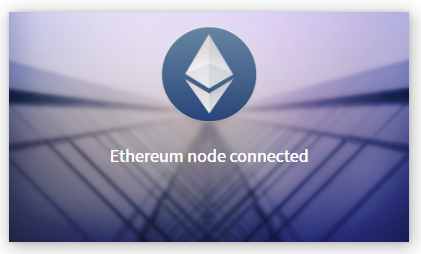
Mist: Mist won't start - Stuck on "Ethereum node connected" squash image
I installed the latest version of mist on my HDD computer, which had the problem for synching. As the solution for the isssue 2508 states that I should use the new feature Synch with light client (beta) to solve it - I did just that. Initially it solved because my ether arrived to my account, but after closing the application, I can't get back to it because it is frozen on the squash page saying "Ethereum node connected". It doesn't show me the "Lanch application" option as before.
What should I do? I need to make a transfer.
I appreciate any help.
- [ ] I've asked for help in the Mist Gitter before filing this issue.
Version: `0.9.1`
OS & Version: windows 8.1 64bit
Node version: `geth 1.7.0`
Number of blocks synchronized: fully synch (I can't see it because application won't start)
 vitormessias
All 62 comments
I have been having the same issue. I am using v0.9.1
 bertolo1988
on 9 Oct 2017
bertolo1988
on 9 Oct 2017
Add me to the list, same problem, tried reinstalling 0.9.1 again to no effect.
 sprkoolguy
on 13 Oct 2017
sprkoolguy
on 13 Oct 2017
Same as the above. Really need to have access to my wallets and such right now and this is kinda screwing me.
EDIT 16.Oct.17: Managed to work around this by installing the newest version (still had the problem at first) and creating a new account rather than trying to import my old one. Then after creating the new account I could import the old one with my Ether intact.
 Akiryx
on 13 Oct 2017
Akiryx
on 13 Oct 2017
I just started having this same issue today using 0.9.1.... I launched the application and that splash screen came up along with the window notifying me to update to 0.9.2.... after it didn't work, I tried restarting it... same thing..... I then installed the update and tried opening again and it's still doing the same thing. I had been using the light sync for a few weeks with no issue until today. I'm using this on Ubuntu 16.04.3 (64 bit)
EDIT:
I decided to launch "ethereumwallet" from a terminal window instead of using the icon on my Ubuntu launcher so that I could watch for any console messages and interestingly this time everything worked fine. I quit the application normally from the GUI and it exited cleanly in the terminal window.... I then relaunched from the icon on the launcher and it started up fine again.
 bblboy54
on 26 Oct 2017
bblboy54
on 26 Oct 2017
One workaround for this issue is to launch the client in the normal mode and wait for the wallet UI to appear. Once that happens, you can switch to Light client mode and wait for sync to complete.
 bdjukic
on 21 Nov 2017
bdjukic
on 21 Nov 2017
Bug still here.As someone else mentioned, this started happening after the notification to upgrade to 0.9.3 and persists after the update.
 yomon598
on 23 Nov 2017
yomon598
on 23 Nov 2017
For me the solution was waiting :) I tried going back to the last version and other different things. Then I just tried to leave it there and after a few minutes it started. Next time it started fast, maybe it was doing some check or repair?
 dlezama
on 23 Nov 2017
dlezama
on 23 Nov 2017
Same problem here on updating to 0.9.3.
 ManuelS89
on 24 Nov 2017
ManuelS89
on 24 Nov 2017
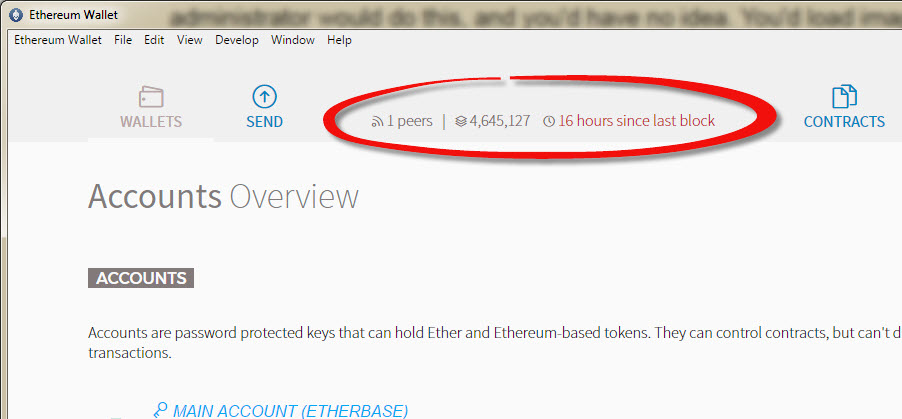
The same problem after updating to v0.9.3 (Ethereum-Wallet, not Mist). Also very few peers (0-2) and the application refuses to sync sometimes for minutes/hours even if there is one peer connected.
Otherwise great job with the light chain, I've deleted the old chain and saved 200Gb, now the entire "Ethereum" folder is only 500Mb.
 atreyyu
on 28 Nov 2017
atreyyu
on 28 Nov 2017
Same problem on version 0.9.3
Could some dev answer this?
bertolo1988
on 29 Nov 2017
Same here.
Running on Win 10 machine. It started right after the notifications about the update, and it still there after the update to 0.9.3

 yuvalgut
on 30 Nov 2017
yuvalgut
on 30 Nov 2017
I have the same mini-window as yuvalgut (one post above)
But after three hours or so waiting it suddenly showed the "launch application" button and the text switched to "Ethereum node needs to sync, please wait ... looking for peers..."
probably it is just some kind of super slow connection issue thing?
 ma68546
on 1 Dec 2017
ma68546
on 1 Dec 2017
Same issue. Ethereum Wallet 0.9.3 on MacOS 10.12.6
At first it was 1 to 0 peers. Now it just stuck on this message.
 apatsekin
on 4 Dec 2017
apatsekin
on 4 Dec 2017
Yes same here! First problems with tokens and now it's not even connecting. Come on, make some good working Ethereum wallet for us!
 dcnl1980
on 5 Dec 2017
dcnl1980
on 5 Dec 2017
I have MacOS High Sierra and latest Ethereum Wallet, also Mist hangs on this one.
dcnl1980
on 5 Dec 2017
Just to let you know, after some hours it did open the gui with the wallets, just like other ppl said(@ma68546 , @dlezama )
yuvalgut
on 5 Dec 2017
bump
 GiorgioG
on 6 Dec 2017
GiorgioG
on 6 Dec 2017
I was waiting for days to get payment from mining pool. when i get it, mist is stuck with this screen. And no solution here.
Edit: When i was looking for a solution, it was open. Seems it passed to next stage as stuck looking for peers.
Edit2: After sometime it started downloading blocks
 bozgoren
on 6 Dec 2017
bozgoren
on 6 Dec 2017
same issue. On one occasion it did open after fully syncing, but the amount in one of my accounts was not displayed correctly (etherscan showed the balance i was expecting)
 Munzey
on 7 Dec 2017
Munzey
on 7 Dec 2017
Did what @bblboy54 suggested - launch from terminal - it fixes the problem. But I can't connect to any peers yet...
 tndog
on 8 Dec 2017
tndog
on 8 Dec 2017
Launched from Windows Powershell and I got the following msg:
PS F:\__Crypto\Ethereum> & '.\Ethereum Wallet.exe'
PS F:\__Crypto\Ethereum>
[2017-12-08 07:51:41.527] [INFO] main - Running in production mode: true
[2017-12-08 07:51:41.575] [INFO] EthereumNode - undefined 'light' 'fast'
[2017-12-08 07:51:41.576] [INFO] EthereumNode - Defaults loaded: geth main light
[2017-12-08 07:51:42.250] [INFO] main - Starting in Wallet mode
[2017-12-08 07:51:42.274] [INFO] Db - Loading db: C:\Users\danpark\AppData\Roaming\Ethereum Wallet\mist.lokidb
[2017-12-08 07:51:42.286] [INFO] Windows - Creating commonly-used windows
[2017-12-08 07:51:42.287] [INFO] Windows - Create secondary window: loading, owner: notset
[2017-12-08 07:51:42.333] [INFO] updateChecker - Check for update...
[2017-12-08 07:51:45.789] [INFO] Windows - Create primary window: main, owner: notset
[2017-12-08 07:51:45.805] [INFO] Windows - Create primary window: splash, owner: notset
[2017-12-08 07:51:46.306] [INFO] ipcCommunicator - Backend language set to:  en
[2017-12-08 07:51:46.859] [INFO] (ui: splashscreen) - Web3 already initialized, re-using provider.
[2017-12-08 07:51:46.937] [INFO] (ui: splashscreen) - Meteor starting up...
[2017-12-08 07:51:46.986] [INFO] ClientBinaryManager - Initializing...
[2017-12-08 07:51:46.987] [INFO] ClientBinaryManager - Checking for new client binaries config from: https://raw.githubusercontent.com/ethereum/mist/master/clientBinaries.json
[2017-12-08 07:51:47.103] [INFO] ClientBinaryManager - Initializing...
[2017-12-08 07:51:47.103] [INFO] ClientBinaryManager - Resolving platform...
[2017-12-08 07:51:47.103] [INFO] ClientBinaryManager - Calculating possible clients...
[2017-12-08 07:51:47.105] [INFO] ClientBinaryManager - 1 possible clients.
[2017-12-08 07:51:47.105] [INFO] ClientBinaryManager - Verifying status of all 1 possible clients...
[2017-12-08 07:51:47.106] [INFO] ClientBinaryManager - Verify Geth status ...
[2017-12-08 07:51:47.255] [INFO] ClientBinaryManager - Checking for Geth sanity check ...
[2017-12-08 07:51:47.255] [INFO] ClientBinaryManager - Checking sanity for Geth ...
[2017-12-08 07:51:47.401] [INFO] Sockets/node-ipc - Connect to {"path":"\\\\.\\pipe\\geth.ipc"}
[2017-12-08 07:51:47.404] [WARN] Sockets/node-ipc - Connection failed, retrying after 1000ms...
[2017-12-08 07:51:48.407] [INFO] updateChecker - App (0.9.1) is out of date. New v0.9.3 found.
[2017-12-08 07:51:48.412] [INFO] Windows - Create popup window: updateAvailable
[2017-12-08 07:51:48.413] [INFO] Windows - Create secondary window: updateAvailable, owner: notset
[2017-12-08 07:51:48.440] [WARN] Sockets/node-ipc - Connection failed, retrying after 1000ms...
[2017-12-08 07:51:49.230] [INFO] (ui: popupWindow) - Web3 not yet initialized, doing so now with HttpProvider.
[2017-12-08 07:51:49.322] [INFO] (ui: popupWindow) - Meteor starting up...
[2017-12-08 07:51:49.440] [WARN] Sockets/node-ipc - Connection failed, retrying after 1000ms...
[2017-12-08 07:51:50.404] [ERROR] Sockets/node-ipc - Connection failed (3000ms elapsed)
[2017-12-08 07:51:50.405] [WARN] EthereumNode - Failed to connect to node. Maybe it's not running so let's start our own...
[2017-12-08 07:51:50.405] [INFO] EthereumNode - Node type: geth
[2017-12-08 07:51:50.405] [INFO] EthereumNode - Network: main
[2017-12-08 07:51:50.405] [INFO] EthereumNode - SyncMode: light
[2017-12-08 07:51:50.406] [INFO] EthereumNode - Start node: geth main light
[2017-12-08 07:51:50.407] [INFO] EthereumNode - Start node using C:\Users\danpark\AppData\Roaming\Ethereum Wallet\binaries\Geth\unpacked\geth.exe
[2017-12-08 07:51:53.564] [INFO] EthereumNode - 3000ms elapsed, assuming node started up successfully
[2017-12-08 07:51:53.564] [INFO] EthereumNode - Started node successfully: geth main light
[2017-12-08 07:51:53.567] [INFO] Sockets/node-ipc - Connect to {"path":"\\\\.\\pipe\\geth.ipc"}
[2017-12-08 07:51:53.568] [INFO] Sockets/node-ipc - Connected!
[2017-12-08 07:51:53.569] [INFO] NodeSync - Ethereum node connected, re-start sync
[2017-12-08 07:51:53.569] [INFO] NodeSync - Starting sync loop
[2017-12-08 07:51:53.570] [INFO] Sockets/3 - Connect to {"path":"\\\\.\\pipe\\geth.ipc"}
[2017-12-08 07:51:53.571] [INFO] Sockets/3 - Connected!
[2017-12-08 07:51:53.571] [INFO] main - Connected via IPC to node.
[2017-12-08 07:51:53.609] [INFO] (ui: splashscreen) - Network is mainnet
[2017-12-08 07:51:53.611] [INFO] (ui: splashscreen) - Network is mainnet
[2017-12-08 07:51:55.573] [ERROR] NodeSync - Node crashed while syncing? TypeError: Cannot read property 'number' of undefined
    at ethereumNode.send.then.ret2 (F:\__Crypto\Ethereum\resources\app.asar\modules\nodeSync.js:143:68)
    at tryCatcher (F:\__Crypto\Ethereum\resources\app.asar\node_modules\bluebird\js\release\util.js:16:23)
    at Promise._settlePromiseFromHandler (F:\__Crypto\Ethereum\resources\app.asar\node_modules\bluebird\js\release\promise.js:512:31)
    at Promise._settlePromise (F:\__Crypto\Ethereum\resources\app.asar\node_modules\bluebird\js\release\promise.js:569:18)
    at Promise._settlePromise0 (F:\__Crypto\Ethereum\resources\app.asar\node_modules\bluebird\js\release\promise.js:614:10)
    at Promise._settlePromises (F:\__Crypto\Ethereum\resources\app.asar\node_modules\bluebird\js\release\promise.js:693:18)
    at Async._drainQueue (F:\__Crypto\Ethereum\resources\app.asar\node_modules\bluebird\js\release\async.js:133:16)
    at Async._drainQueues (F:\__Crypto\Ethereum\resources\app.asar\node_modules\bluebird\js\release\async.js:143:10)
    at Immediate.Async.drainQueues (F:\__Crypto\Ethereum\resources\app.asar\node_modules\bluebird\js\release\async.js:17:14)
    at runCallback (timers.js:672:20)
    at tryOnImmediate (timers.js:645:5)
    at processImmediate [as _immediateCallback] (timers.js:617:5)
[2017-12-08 07:51:55.577] [ERROR] NodeSync - Sync error TypeError: Cannot read property 'number' of undefined
    at ethereumNode.send.then.ret2 (F:\__Crypto\Ethereum\resources\app.asar\modules\nodeSync.js:143:68)
    at tryCatcher (F:\__Crypto\Ethereum\resources\app.asar\node_modules\bluebird\js\release\util.js:16:23)
    at Promise._settlePromiseFromHandler (F:\__Crypto\Ethereum\resources\app.asar\node_modules\bluebird\js\release\promise.js:512:31)
    at Promise._settlePromise (F:\__Crypto\Ethereum\resources\app.asar\node_modules\bluebird\js\release\promise.js:569:18)
    at Promise._settlePromise0 (F:\__Crypto\Ethereum\resources\app.asar\node_modules\bluebird\js\release\promise.js:614:10)
    at Promise._settlePromises (F:\__Crypto\Ethereum\resources\app.asar\node_modules\bluebird\js\release\promise.js:693:18)
    at Async._drainQueue (F:\__Crypto\Ethereum\resources\app.asar\node_modules\bluebird\js\release\async.js:133:16)
    at Async._drainQueues (F:\__Crypto\Ethereum\resources\app.asar\node_modules\bluebird\js\release\async.js:143:10)
    at Immediate.Async.drainQueues (F:\__Crypto\Ethereum\resources\app.asar\node_modules\bluebird\js\release\async.js:17:14)
    at runCallback (timers.js:672:20)
    at tryOnImmediate (timers.js:645:5)
    at processImmediate [as _immediateCallback] (timers.js:617:5)
[2017-12-08 07:51:55.581] [ERROR] main - Error syncing node TypeError: Cannot read property 'number' of undefined
    at ethereumNode.send.then.ret2 (F:\__Crypto\Ethereum\resources\app.asar\modules\nodeSync.js:143:68)
    at tryCatcher (F:\__Crypto\Ethereum\resources\app.asar\node_modules\bluebird\js\release\util.js:16:23)
    at Promise._settlePromiseFromHandler (F:\__Crypto\Ethereum\resources\app.asar\node_modules\bluebird\js\release\promise.js:512:31)
    at Promise._settlePromise (F:\__Crypto\Ethereum\resources\app.asar\node_modules\bluebird\js\release\promise.js:569:18)
    at Promise._settlePromise0 (F:\__Crypto\Ethereum\resources\app.asar\node_modules\bluebird\js\release\promise.js:614:10)
    at Promise._settlePromises (F:\__Crypto\Ethereum\resources\app.asar\node_modules\bluebird\js\release\promise.js:693:18)
    at Async._drainQueue (F:\__Crypto\Ethereum\resources\app.asar\node_modules\bluebird\js\release\async.js:133:16)
    at Async._drainQueues (F:\__Crypto\Ethereum\resources\app.asar\node_modules\bluebird\js\release\async.js:143:10)
    at Immediate.Async.drainQueues (F:\__Crypto\Ethereum\resources\app.asar\node_modules\bluebird\js\release\async.js:17:14)
    at runCallback (timers.js:672:20)
    at tryOnImmediate (timers.js:645:5)
    at processImmediate [as _immediateCallback] (timers.js:617:5)
[2017-12-08 07:51:55.581] [INFO] NodeSync - Sync loop ended
[2017-12-08 07:51:55.582] [ERROR] main - Error starting up node and/or syncing TypeError: Cannot read property 'number' of undefined
    at ethereumNode.send.then.ret2 (F:\__Crypto\Ethereum\resources\app.asar\modules\nodeSync.js:143:68)
    at tryCatcher (F:\__Crypto\Ethereum\resources\app.asar\node_modules\bluebird\js\release\util.js:16:23)
    at Promise._settlePromiseFromHandler (F:\__Crypto\Ethereum\resources\app.asar\node_modules\bluebird\js\release\promise.js:512:31)
    at Promise._settlePromise (F:\__Crypto\Ethereum\resources\app.asar\node_modules\bluebird\js\release\promise.js:569:18)
    at Promise._settlePromise0 (F:\__Crypto\Ethereum\resources\app.asar\node_modules\bluebird\js\release\promise.js:614:10)
    at Promise._settlePromises (F:\__Crypto\Ethereum\resources\app.asar\node_modules\bluebird\js\release\promise.js:693:18)
    at Async._drainQueue (F:\__Crypto\Ethereum\resources\app.asar\node_modules\bluebird\js\release\async.js:133:16)
    at Async._drainQueues (F:\__Crypto\Ethereum\resources\app.asar\node_modules\bluebird\js\release\async.js:143:10)
    at Immediate.Async.drainQueues (F:\__Crypto\Ethereum\resources\app.asar\node_modules\bluebird\js\release\async.js:17:14)
    at runCallback (timers.js:672:20)
    at tryOnImmediate (timers.js:645:5)
    at processImmediate [as _immediateCallback] (timers.js:617:5)
[2017-12-08 07:52:42.497] [INFO] Windows - All primary windows closed/invisible, so quitting app...
[2017-12-08 07:52:42.498] [INFO] main - Defer quitting until sockets and node are shut down
[2017-12-08 07:52:42.503] [INFO] Sockets - Destroy all sockets
[2017-12-08 07:52:42.504] [INFO] Sockets/3 - Disconnecting...
[2017-12-08 07:52:42.506] [INFO] Sockets/node-ipc - Disconnecting...
[2017-12-08 07:52:43.009] [INFO] NodeSync - Ethereum node stopping, so stop sync
[2017-12-08 07:52:43.009] [INFO] ipcProviderBackend - Ethereum node stopping, disconnecting sockets
[2017-12-08 07:52:43.011] [INFO] EthereumNode - Stopping existing node: geth main
[2017-12-08 07:52:43.058] [INFO] main - About to quit...
[2017-12-08 07:52:43.064] [INFO] Windows - All primary windows closed/invisible, so quitting app...
[2017-12-08 07:52:43.084] [INFO] Windows - All primary windows closed/invisible, so quitting app...
 danjpark
on 8 Dec 2017
danjpark
on 8 Dec 2017
I get the same problem today
 ja72topu
on 8 Dec 2017
ja72topu
on 8 Dec 2017
so my solution is not to set it in "sync in light client".
It may help you
ja72topu
on 8 Dec 2017
Problem is, I can't get into the GUI so I can't unset that setting.
danjpark
on 8 Dec 2017
@danjpark download the installer not the zip version and try more times (4 or 5 times) , everytime wait for 3 minuets. It may be work.
ja72topu
on 8 Dec 2017
Nice. I'm in.
For those who haven't tried using the installer, try that. It worked for me.
danjpark
on 8 Dec 2017
Same here
 yugui923
on 12 Dec 2017
yugui923
on 12 Dec 2017
Same here, OSX Sierra
I updated the wallet and now it wont start
 betoharres
on 20 Dec 2017
betoharres
on 20 Dec 2017
same problem as @yugui923 using Windows 7.
 avalyn2
on 22 Dec 2017
avalyn2
on 22 Dec 2017
+1
 KingLegend
on 27 Dec 2017
KingLegend
on 27 Dec 2017
+1
 ravigill
on 27 Dec 2017
ravigill
on 27 Dec 2017
Clean up your hard disk space. That will solve the problem.
 mcna72
on 30 Dec 2017
mcna72
on 30 Dec 2017
you can disabled the light sync option by removing the content of file "C:\Users[UserName]\AppData\Roaming\Ethereum Wallet\syncmode.
It should resolve the problem as long as you won't re-enable the light sync mode.
 GuillaumeKG
on 1 Jan 2018
GuillaumeKG
on 1 Jan 2018
Syncing will take a long time. Some of the people here seeing this issue are "stuck" just because they have not waited the full 7 days to sync. And some people may have waited the full seven days but another issue (connectivity, peer issues) have conspired against them. In these cases, the "stuck" experience is consistent with Mist's full node functionality and this issue is not actionable.
HOWEVER, if you believe that Mist should start and open right away and then sync later, then please consider #3476. That issue is actionable and changes the user experience and the design of the Mist project. Please give us a comment or thumbs up there if you think that actionable solution helps you.
 fulldecent
on 2 Jan 2018
fulldecent
on 2 Jan 2018
It appears that the chain is growing faster than the application can load so it appears to be stuck in an endless loop of trying to catch-up and appears to be getting 'stuck'. Just having the option to sync to point in time would be good enough. I don't see how syncing later would resolve this issue as it would still require a full sync to see your balance updated.
 dreamwagon
on 7 Jan 2018
dreamwagon
on 7 Jan 2018
Man. If its not the endless sync issue, its this one where the UI never shows up. What good is ethereum if I cant open the wallet to send somebody money? This is an embarrassment.
I'm getting it to at least do something by launching it manually and having it use a different mode than the light mode. I had to try this 10 times with fast, light, fast, fast, fast, and eventually it started up and started downloading stuff.
sh
$ ethereumwallet --syncmode fast
If it ever starts up, I think I'm just gonna send all my ethereum to the exchange. Using this ethereum wallet feels like carrying around $20k printed on tissuepaper.
 giantpune
on 8 Jan 2018
giantpune
on 8 Jan 2018
@fulldecent we can't really know.
Why not remove the splashscreen entirely and just open the app and there provide proper feedback of wha is happening?
bertolo1988
on 8 Jan 2018
@fulldecent i waited the time and let it sync and had a functioning ethereum wallet. Then like an idiot, I closed it and tried to open it 2 days later, expecting it to work. It refused to open and I google the issue and ended up here in this thread. I really hope you aren't expected to wait 7 days every time you want to open your ethereum wallet.
giantpune
on 8 Jan 2018
Thanks for the discussion.
This issue, and several duplicates, are clearly describing the problem. There are several solutions to the problem. So I am advocating that visitors here decide which solution they think is appropriate and then go follow that issue and help develop it with your comments. I recommend #3476, which guarantees zero lag on first run and every run. If you are interested, please make a comment or subscribe on that issue.
fulldecent
on 9 Jan 2018
Mist and Ethereum Wallet seriously suck. Took me three days of non-stop issues and I never got them to work. I ended up importing my private keys on MyEtherWallet.com. Kind of risky due to fishing issues, but just triple check the URL and security certificate. Once I uploaded my private key, I could send to my new Ledger address.
 kevinbright
on 16 Jan 2018
kevinbright
on 16 Jan 2018
@kevinbright do something to improve them.
bertolo1988
on 16 Jan 2018
@kevinbright It seems like you are not a developer and you wont code and fix the solution. No worry, you can still carefully evaluate potential solutions to this problem and contribution to the discussion. Issue aren't for bitching, they are for locking down solutions and implementing the solutions.
Here's further reading https://github.com/ethereum/mist/issues/3476. You can decide if that proposed solution sounds good to you. If yes, subscribe and/or comment and then help raise awareness of that issue to people that are affected.
fulldecent
on 17 Jan 2018
 vil4max
on 20 Jan 2018
vil4max
on 20 Jan 2018
+1 same error Mist 0.9.3 and geth 1.8.1
 liushuigs
on 21 Feb 2018
liushuigs
on 21 Feb 2018
Hello Guy's Uninstall geth from your computer and reinstall it on its default directory C:\Program Files\Geth
after that Wallet will show the Application launch option again. Works for me. 🥇
 bunnyext
on 23 Feb 2018
bunnyext
on 23 Feb 2018
Uninstall geth and reinstall it (Used with brew on my MacOs Sierra 10.13.3.) Then run in terminal "geth --light" and then start Ethereum Wallet. Worked for me. Ethereum Wallet version 0.9.3, geth version 1.8.2.
 biotin
on 15 Mar 2018
biotin
on 15 Mar 2018
Same problem to me. Ethereum Wallet 0.10 and geth 1.8.2-stable-b8b9f7f4
 hungpham2411
on 9 Apr 2018
hungpham2411
on 9 Apr 2018
Just leave the wallet running, it will complete it's synch loop check and then proceed to open the actual application window. Here's a recent example in my case: the log would show the following as final entries when it "hangs" at the splash screen:
[2018-04-13T16:46:37.114] [INFO] NodeSync - Ethereum node connected, re-start sync
[2018-04-13T16:46:37.151] [INFO] NodeSync - Starting sync loop
[2018-04-13T16:46:37.156] [INFO] main - Connected via IPC to node.
[2018-04-13T16:46:37.229] [INFO] Sockets/4 - Connected!
[2018-04-13T16:46:37.231] [INFO] Sockets/2 - Connected!
[2018-04-13T16:46:37.469] [INFO] (ui: splashscreen) - Network is mainnet
[2018-04-13T16:46:37.478] [INFO] (ui: splashscreen) - Network is mainnet
It then sat there for around 20 mins before it updated the logs with:
[2018-04-13T17:06:15.459] [INFO] NodeSync - No more sync necessary
[2018-04-13T17:06:15.463] [INFO] NodeSync - Sync loop ended
After which the main app window appeared and everything was normal.
If you enable 'trace' level logging, you'll see that what it's doing (while it appears to "hang") is issuing "eth_getBlockByNumber" JSON-RPC requests for the latest block. But the response it gets is "{ code: -32000, message: 'no suitable peers available' }" because it is unable to locate a Geth node with the 'lightserv' option enabled (ie. service light clients feature enabled). Thus the wallet app sits there in a loop constantly trying to discover a node which has 'lightserv' enabled in order for it to get a valid response to it's JSON-RPC calls. How long it "hangs" thus depends on when it's finally able to connect to a node which does service light clients. That's the price to pay for using a wallet in light synch mode.
(This was tested on the latest release, Ethereum-Wallet-linux64-0-10-0.zip)
 cudapop
on 13 Apr 2018
cudapop
on 13 Apr 2018
Bump.
3 days + 4 hours on this screen. Nothing is happening.
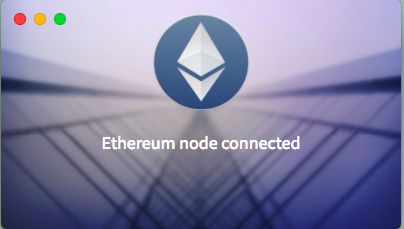
Been stuck here now for 3 days. Am I supposed to do something? The program won't load.
 Poincare1
on 15 Apr 2018
Poincare1
on 15 Apr 2018
The same issue. MacOS Sierra

 orokhovatskiy
on 15 Apr 2018
orokhovatskiy
on 15 Apr 2018
Seems Ethereum Wallet got some updates a few day ago and the problem has gone on my (even though if you run on Terminal then node-rpc connection failed is still there).
Now, after Ethereum Wallet download all the blocks, actual window will automatically open.
Help menu item was removed
hungpham2411
on 15 Apr 2018
@hungpham2411 I tired fight with Misp. So I exported private key and moved all my funds to another wallet.
orokhovatskiy
on 15 Apr 2018
@mrsanchos I just got this today after updating my Arch OS. Seems like a recent bug.
Output to terminal doesn't say much either. Just says that it's connected fine and nothing else happens
 Emobe
on 17 Apr 2018
Emobe
on 17 Apr 2018
@Emobe I've started use Exodus and I really like it. Also I don't need more store all transactions in my macbook pro. So I am happy with it.
orokhovatskiy
on 17 Apr 2018
Just a quick update. It EVENTUALLY opens! After like 10-15 minutes of waiting, the application opens properly. I recall this happening before too.
Emobe
on 17 Apr 2018
Same here, Mac OS High Sierra. It used to work w/o any issues and then suddenly stopped to launch, just hanging on "Ethereum node connected" splash screen :(
 k-vladyslav
on 20 Apr 2018
k-vladyslav
on 20 Apr 2018
I thinks its take 5-15 min. After this time its connect and work properly. Just wait. (You must have new versions geth and wallets).
biotin
on 20 Apr 2018
Same issue here waited a couple hours OS X 10.12.6
 ncsolar
on 18 May 2018
ncsolar
on 18 May 2018
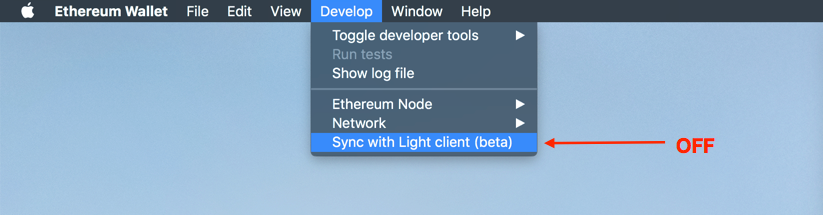
Finally, it worked for me. I've disabled the light mode (Develop -> Sync with Light client) and then waited for a couple of minutes.
 mushketyk
on 23 May 2018
mushketyk
on 23 May 2018
I love how there is NOT one real solution! Try this or try that, uninstall then... Look folks it's the Wild West! I have never had any consistent launch EVER! Sometimes it works and... For me I must launch it from the command line "Ethereum Wallet" --syncmode=fast. Then when it launches I switch back to light client from the GUI.
 tessr8
on 24 May 2018
tessr8
on 24 May 2018
Hi there, ok, I had this issue more than once. in my case the problem came mostly when the update geth window appear and I click to update.
It seams that the current network get out of sync.
To solve it what I do is change my network from main to rinkeby or ropsten and then the GUI come up, then once I am in the GUI I change back to main network.
To change the network, you can go to the Ethereum Wallet folder in AppData (Windows) or copy and paste this path on any window url bar. %appdata%/Ethereum Wallet,
and then find the file network, you can open that file with any text editor, in my case Notepad++,
then change the text main with other network like rinkeby.
Save the file and open the wallet as you do it normally, click on the icon, if you have luck you will get the GUI, and then go back to main network by selecting Develop -> Network -> Main Network or you can use the GUI shortcut Ctrl+Alt+1.
I hope it works with some one else, for me always works :)
 scionGbh
on 28 Jun 2018
scionGbh
on 28 Jun 2018
Hi all, we've been working hard on solutions to sync problems — we know it's painful to get ethereum to sync on full mode.
On the recently released version 0.11.0, you can get connected almost instantly, while syncing in the background with the Light Client.
Version 0.11.0:
https://github.com/ethereum/mist/releases/tag/v0.11.0
 evertonfraga
on 10 Jul 2018
evertonfraga
on 10 Jul 2018
Related issues
 stbregeon
·
3Comments
stbregeon
·
3Comments
 chanukya246
·
5Comments
chanukya246
·
5Comments
 jaumevn
·
5Comments
jaumevn
·
5Comments
 brandoncurtis
·
4Comments
brandoncurtis
·
4Comments
 tymat
·
6Comments
tymat
·
6Comments
Most helpful comment
Same here.

Running on Win 10 machine. It started right after the notifications about the update, and it still there after the update to 0.9.3