Mist: Ethereum Wallet cannot connect to node

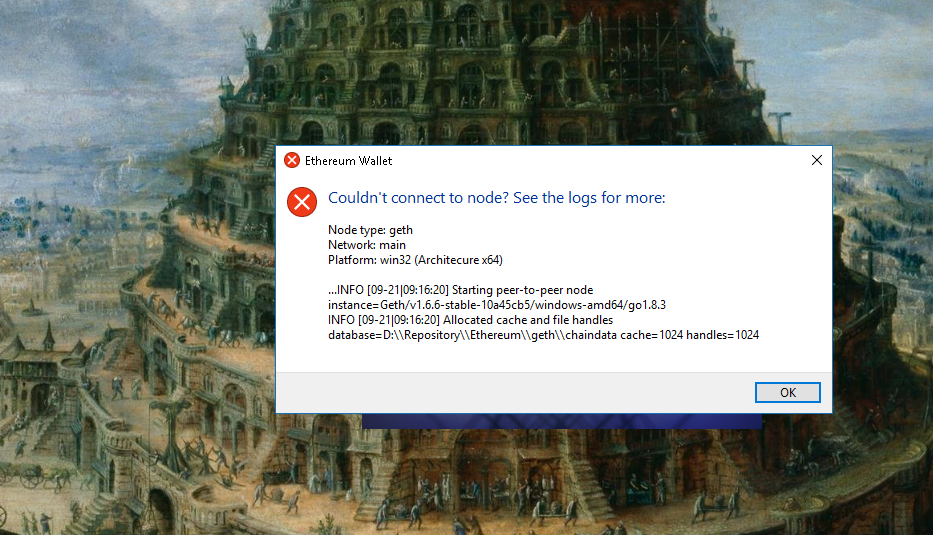
Have anyone know how to resolve this error? It won't allow me to open my Ethereum Wallet
 Keniper
All 7 comments
Same problem since 4 days ago, cannot get my ether wallet synced either on mac osx
 tomtom87
on 18 Aug 2017
tomtom87
on 18 Aug 2017
I may have found a temporary solution, i followed the below guide from https://github.com/ethereum/mist/wiki and started the node manually. When i launch Ethereum Wallet it launches.
But if i don't start the node manually and follow the below steps it gives me the same error.
===========================
Start the node manually
Sometimes its useful to start the node manually to see what its doing:
Stop Mist and any other ethereum client, if they are still running. You can start the node manually and see its output on the command line.
Windows
Open cmd.exe
Navigate to geth directory by running cd %APPDATA%\Mist\binaries\geth and look for geth.exe
Execute the following command: geth.exe --fast --cache 1024
Linux
Open your terminal of choice
Go to .config/Mist/binaries/geth
Run ./geth --fast --cache 1024
Mac
Open Terminal.app
Run cd ~/Library/Application\ Support/Mist/binaries/geth
Run ./geth --fast --cache 1024
You can optionally increase the log level by adding --verbosity 5.
================================
Keniper
on 18 Aug 2017
I have the same problem. After changing to a test network in Ethereum Wallet (or Mist) I can't connect to the network. After using geth manually as described in the previous comment I was able to see the problem.
Using geth directly and specifying the test network, the data-dir becomes AppData\Roaming\Ethereum\rinkeby\geth\chaindata. When specifying the data-dir manually it doesn't matter which test network is specified, the data-dir ist the data-dir, probably correctly so. In the provided screenshot the same problem exists, While the network is rinkeby, the data-dir is .../Eteherum/geth/... instead of .../Ethereum/rinkeby/geth/..... The error geth gets is:
Fatal: Error starting protocol stack: database already contains an incompatible genesis block (have d4e56740f876aef8, new 6341fd3daf94b748).
The Ethereum Wallet shortcut uses --node-datadir and then uses this as data-dir parameter for geth, instead of including the network you want to connect to.
So, switching networks isn't possible using the GUI of Etherum Wallet, and as a workaround you have to manually change the node-datadir in the Ethereum Wallet shortcut (removing it might work as well, as long as you use the default dir for the blockchain) or create a second shortcut for using a different network (also change the network in the Ethereum Wallet directory).
 denniskaselow
on 18 Aug 2017
denniskaselow
on 18 Aug 2017
Having these issues now using --fast and --cache=1024
WARN [08-21|11:48:26] Stalling state sync, dropping peer       peer=655c0278c317a012
WARN [08-21|11:48:26] Stalling state sync, dropping peer       peer=f26dce0aea871dc8
WARN [08-21|11:48:26] Stalling state sync, dropping peer       peer=0fb49536fda319d3
WARN [08-21|11:48:27] Stalling state sync, dropping peer       peer=ae8de9feee4df4e6
WARN [08-21|11:48:27] Stalling state sync, dropping peer       peer=e7a69c447cb83857
WARN [08-21|11:48:30] Stalling state sync, dropping peer       peer=8e8edc9627fedc6b
WARN [08-21|11:48:32] Stalling state sync, dropping peer       peer=606587b48a16fd10
WARN [08-21|11:48:32] Node data write error                    err="state node 638deb…cf0f09 failed with all peers (4 tries, 4 peers)"
 lnaie
on 21 Sep 2017
lnaie
on 21 Sep 2017
Try changing your Network back to "main." Find either AppData\RoamingEthereum Wallet or AppData\Roaming\Etherium, Change the value in the Network folder to "main." At least you'll be able to open the application again. Not sure why we can't connect to the Rinkeby test environment.
 pkitko
on 28 Oct 2017
pkitko
on 28 Oct 2017
denniskaselow was right!
I am on windows 10 using Ethereum Wallet -
I removed the following from the short cut (right click on the Ethereum Wallet short cut, choose Properties and edit Target). I simply removed the following:
--node-datadir="C:\Users\username\AppData\Roaming\Ethereum"
Now when I start the wallet application I can choose the network found under the Develop tab.
- Good Luck,
MMS
 MMS256
on 3 Apr 2018
MMS256
on 3 Apr 2018
Related issues
tomtom87
·
4Comments
 sluTTYusr
·
3Comments
sluTTYusr
·
3Comments
 Scrooge69
·
3Comments
Scrooge69
·
3Comments
 tymat
·
6Comments
tymat
·
6Comments
 brandoncurtis
·
4Comments
brandoncurtis
·
4Comments
Most helpful comment
I have the same problem. After changing to a test network in Ethereum Wallet (or Mist) I can't connect to the network. After using geth manually as described in the previous comment I was able to see the problem.
Using
gethdirectly and specifying the test network, the data-dir becomesAppData\Roaming\Ethereum\rinkeby\geth\chaindata. When specifying the data-dir manually it doesn't matter which test network is specified, thedata-dirist thedata-dir, probably correctly so. In the provided screenshot the same problem exists, While the network is rinkeby, the data-dir is.../Eteherum/geth/...instead of.../Ethereum/rinkeby/geth/..... The errorgethgets is:Fatal: Error starting protocol stack: database already contains an incompatible genesis block (have d4e56740f876aef8, new 6341fd3daf94b748).The Ethereum Wallet shortcut uses
--node-datadirand then uses this asdata-dirparameter for geth, instead of including the network you want to connect to.So, switching networks isn't possible using the GUI of Etherum Wallet, and as a workaround you have to manually change the
node-datadirin the Ethereum Wallet shortcut (removing it might work as well, as long as you use the default dir for the blockchain) or create a second shortcut for using a different network (also change the network in theEthereum Walletdirectory).