Version: `0.8.10`
OS & Version: windows
Node type: `eth/geth`
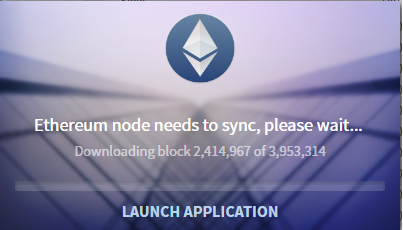
Number of blocks synchronized: 2, 414, 972
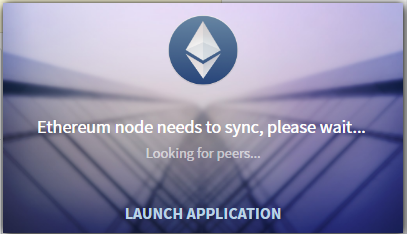
Hi all. Why such a slow sync?? 8 hours. >100 block. Reinstalled the new version geth.exe nothing has changed, for 1 hour. 5 blocks very cool?:) for this I looked at the node.log file. When you restart Ethereum Wallet for a long time looking for peers? Tortured to wait.
 IvanM1993
All 30 comments
I have the same problem. It's even worse in Test-Net. It is impossible to synchronize the whole chain. I've spent one week and still waiting.
 arturosanz
on 30 Jun 2017
arturosanz
on 30 Jun 2017
Same problem here. It usually freezes after a certain amount of time and have to close the program and open it again. Sometimes blocks counting lasts for some hours and some other times it lasts for some minutes only.
 evryalos
on 30 Jun 2017
evryalos
on 30 Jun 2017
I can't get the wallet to sync on main or testnet
 Patrick-W-McMahon
on 1 Jul 2017
Patrick-W-McMahon
on 1 Jul 2017
same issue here - my wallet sits at 'Looking for peers' for some time, finds 1 or maybe 2-3 peers. then it begins to download blocks
I'm stuck at 2,447,024 out of 3,956,215
 cheddle
on 1 Jul 2017
cheddle
on 1 Jul 2017
It seems that either in main or in tesnet it is not able to sync more than 75%. The same happens in a torrent service when there are not enough seeders for a specific file. How can this happen to Ethereum?
arturosanz
on 1 Jul 2017
Same here, needed to relaunch Mist multiples times to get it totally sync.
 NicolasConstant
on 1 Jul 2017
NicolasConstant
on 1 Jul 2017
I'm trying to sync it for two weeks now, i have cleared chain few times, i always stuck at 99%.
 monsunek
on 2 Jul 2017
monsunek
on 2 Jul 2017
Synching the whole chain takes about 6h on decent internet (100+ MBit/s downstream) and a decent HDD (~ 150MB/s RW + high IOPS).
The speed of synching is highly dependent on your IO. The sync gets more and more intense at the end of the chain using up to 700 MB/s RW IO on an NVMe ssd.
To speed up the sync you can start the wallet using:
ethereumwallet --node-maxpeers 256 --node-cache=6144
to allocate more RAM as cache (6GB) and allow more peers.
(on Linux, Windows may vary)
In case you are stuck -> delete the whole chain (don't delete your wallet!) and start again.
synching on a pc that's as fast as a potato will increase the time to sync by about 2^n
n being the so called "potato factor" :rofl:
 BentHaase
on 3 Jul 2017
BentHaase
on 3 Jul 2017
@ET-Bent , hey thank you very much for this info!! Do you know whre i can find my whole chain?
 Arnie8
on 3 Jul 2017
Arnie8
on 3 Jul 2017
@Arnie8 if you think that I am a trustworthy guy then I can send you a link to my mirrored chain as of today, block 3967621 that you can drop into your geth.
BentHaase
on 3 Jul 2017
@Arnie8 chaindata folder for different operating systems: https://ethereum.stackexchange.com/questions/6550/how-can-i-find-my-chaindata-folder
 sathishvj
on 3 Jul 2017
sathishvj
on 3 Jul 2017
@Arnie8 you can find my dump of the chain from today (2017/07/03) here:
https://dl.ender.io/eth-chain/eth_chaindata_20170703_3967621.tar.gz (27.5 GB @ block 3967621).
If you want to validate your download use this sha256sum.
BentHaase
on 3 Jul 2017
@ET-Bent , yes i think you are a trustworthy guy :-) Actualy i sync 71 %, (-3,318) block 3959645 , i think the sync will be end this night. I think its better to wait. If it dont work ( last time it dont work, and i forgot the error massage, anything with pipe... ) i try to download your blockchain, thanks for that. I m not really a nerd :-( I tryed also the sha256linksum, but what i have to do? If i download (eth_chaindata_2017..) its only 104 bytes in the downloadfolder of my browser ?
Arnie8
on 3 Jul 2017
@ET-Bent , on the other side, i have to wait for the error massege, cause I dont think mist will work correctly when i copy only the blockchain in the folder. How do you start mist? At first cmd and then the app?
Arnie8
on 3 Jul 2017
if you click this link here https://dl.ender.io/eth-chain/eth_chaindata_20170703_3967621.tar.gz then it should immediately start downloading. @Arnie8
The sha256sum is just the extra cream on your ice cream. I am pretty certain that our servers (on which the file is hosted on) do a good job uploading the file to you (when you download it). They will provide you with up to 1 GBit/s speeds so ;)
The sha256sum is just there to validate your downloaded file if it's corrupted but if the archive is corrupted then you will not be able to extract it anyways.
To extract it use 7zip or WinRAR.
BentHaase
on 3 Jul 2017
Also what kind of HDD / SSD do you sync things on ? "How fast is it regarding read and write speeds?"
BentHaase
on 3 Jul 2017
My HDD is regular and maybe 10 yaers old, if i start resource monitor i see 7 MB/sec in average :-(
thanks for help.
Arnie8
on 3 Jul 2017
your downloading link work now, thx
Arnie8
on 3 Jul 2017
@Arnie8 oh dear. As I have initially written on my HDD with caching and about 150 MB/s RW, a full sync takes up to 8-12 hours. So yeah. With 7 MB/s ... and probably even worse IOPS this can literally take weeks. Even syncing the last few thousand blocks since my dump from today will take you hours.
If you have anything faster use that.
BentHaase
on 3 Jul 2017
If the downloading is ready, i replace the files in the ethereum folder? thats all? then i start cmd and geth.exe and then the mist app, and then all things will be ok? :-) - ah, ok, i see, i will buy a new ssd disk next week :-)
Arnie8
on 3 Jul 2017
after replacing your current chaindata folder with the one from the download you should just have to start Ethereum / Mist app which should run geth automatically.
Make sure not to overwrite your wallet files, else everything will be lost :warning:
Then after some time it should show that it's syncing about 2-3k blocks.
SSD :+1:
BentHaase
on 3 Jul 2017
@ET-Bent Ok cool, know i know my problem, thank you for help. It is my old HDD. I have had one week befor a crash with mist. After a new start it only start when i open cmd, geth.exe, then i wait for 3 minutes, and then i start the mist app. Only this way :-)
Arnie8
on 3 Jul 2017
I was getting out of memory errors my system has 8gig's
On Jul 3, 2017 2:52 PM, "krypto" notifications@github.com wrote:
@ET-Bent https://github.com/et-bent Ok cool, know i know my problem,
thank you for help. It is my old HDD. I have had one week befor a crash
with mist. After a new start it only start when i open cmd, geth.exe, then
i wait for 3 minutes, and then i start the mist app. Only this way :-)
—
You are receiving this because you commented.
Reply to this email directly, view it on GitHub
https://github.com/ethereum/mist/issues/2672#issuecomment-312713510, or mute
the thread
https://github.com/notifications/unsubscribe-auth/AB79tjydaNyyg2jvKAeubbDQEnNX0RLBks5sKThUgaJpZM4OKz4Y
.
Patrick-W-McMahon
on 3 Jul 2017
@Patrick-W-McMahon most certainly because you added --node-cache=6144 where 6144 stands for the MB for a system with 8 GB RAM (8192 MB) I recommend using 3072 MB cache.
BentHaase
on 3 Jul 2017
Would be nice if there was a GUI setting to change the memory used by the
wallet.
On Mon, Jul 3, 2017 at 4:29 PM, Bent notifications@github.com wrote:
@Patrick-W-McMahon https://github.com/patrick-w-mcmahon most certainly
because you added --node-cache=6144 where 6144 stands for the MB for a
system with 8 GB RAM (8192 MB) I recommend using 3072 MB cache.—
You are receiving this because you were mentioned.
Reply to this email directly, view it on GitHub
https://github.com/ethereum/mist/issues/2672#issuecomment-312728264, or mute
the thread
https://github.com/notifications/unsubscribe-auth/AB79tiOuXSYSacAqNmKa-VvltzKpXRQtks5sKU8pgaJpZM4OKz4Y
.
Patrick-W-McMahon
on 3 Jul 2017
I think UX could be improved in general. But that's another story.
The fact that actually syncing the chain is so "hard" for most people is a major drawback that keeps this technology from triggering down to the masses, unfortunately. (IMHO)
BentHaase
on 3 Jul 2017
my solution was open a terminal and run geth -rpc and keep this open. It's
not a great solution.
On Mon, Jul 3, 2017 at 5:24 PM, Bent notifications@github.com wrote:
I think UX could be improved in general. But that's another story.
The fact that actually syncing the chain is so "hard" for most people is a
major drawback that keeps this technology from triggering down to the
masses, unfortunately. (IMHO)—
You are receiving this because you were mentioned.
Reply to this email directly, view it on GitHub
https://github.com/ethereum/mist/issues/2672#issuecomment-312736228, or mute
the thread
https://github.com/notifications/unsubscribe-auth/AB79tsy7HznnAbHsVIVtzoPFtsA-KIrvks5sKVwkgaJpZM4OKz4Y
.
Patrick-W-McMahon
on 7 Jul 2017
@ET-Bent , good morning, thanks fot the download of yort blockchain, it worked ! :-)
And the second thing, i have bought a 500 GB SSD HDD, now he run like a new i7 with 16 GB Ram .
And Mist starts perfectly and is very fast. JUHU :-)
Arnie8
on 8 Jul 2017
@Arnie8 excellent! Glad it worked. I will mirror my latest blockchain today again :)
BentHaase
on 8 Jul 2017
This thread has been automatically locked because it has not had recent activity. Please open a new issue for related bugs and link to relevant comments in this thread.
![lock[bot] picture](https://avatars.githubusercontent.com/in/6672?v=4&s=40) lock[bot]
on 31 Mar 2018
lock[bot]
on 31 Mar 2018
Related issues
 PacketSmuggler
·
3Comments
PacketSmuggler
·
3Comments
 keznerve
·
5Comments
keznerve
·
5Comments
 Nogreedy
·
4Comments
Nogreedy
·
4Comments
 ibart7
·
6Comments
ibart7
·
6Comments
 ivica7
·
6Comments
ivica7
·
6Comments
Most helpful comment
@Arnie8 chaindata folder for different operating systems: https://ethereum.stackexchange.com/questions/6550/how-can-i-find-my-chaindata-folder