Mist: Account displays 0.00 Eth, Online shows correct amount
System information
Version: `0.8.1` to `0.8.10`
OS & Version: windows 7
Node type: `eth/geth(default)`
After I updated to the current version, the balance of my Account displays 0.00 Eth. But when I check the balance online (https://etherchain.org/account/0x8a9E35663137bF9cD16066AA6FCEC6F010F7609F) I still see the correct amount for the account. I waited for the ethereium Wallet to fullly sync with the network.
I run the older versions again, but they now also show 0.00 Eth.
 firstdeathmaker
All 20 comments
Same here
 SirHardo
on 16 Jun 2017
SirHardo
on 16 Jun 2017
Same Here
 iplaytiger
on 16 Jun 2017
iplaytiger
on 16 Jun 2017
same here
 spingee
on 16 Jun 2017
spingee
on 16 Jun 2017
same here :(
0x055da3cE245252EE0999ff0aFD8629D125205De6
 maximka1
on 16 Jun 2017
maximka1
on 16 Jun 2017
Addition: I noticed, that the keyfiles in AppData/Roaming/Ethereum/keystore/ are still the old ones, they haven't been overwritten. I even checked it with an older backup that I took before I installed the newest version.
 Decrayer
on 16 Jun 2017
Decrayer
on 16 Jun 2017
same here...
 sergiysh80
on 16 Jun 2017
sergiysh80
on 16 Jun 2017
So i can finally see it when my node fully synchronized... thats wierd behaviour
spingee
on 16 Jun 2017
Your wallet needs to fully sync in order for your ETH to show, you guys can use myetherwallet.com to access your ETH instantly.
 garretlaxton
on 16 Jun 2017
garretlaxton
on 16 Jun 2017
Please advise how to sync, I couldnt find the place to do it, on the other hand, In try using myetherwallet.com, it asks me to find the my wallet file (MIST Keystore File (UTC / JSON)), I am total newbie to this, could anyone help me to access my wallet and get my ETH back please. Thanks alot.
iplaytiger
on 17 Jun 2017
Same
On 17 Jun 2017 10:12 AM, "iplaytiger" notifications@github.com wrote:
Please advise how to sync, I couldnt find the place to do it, on the other
hand, In try using myetherwallet.com, it asks me to find the my wallet
file (MIST Keystore File (UTC / JSON)), I am total newbie to this, could
anyone help me to access my wallet and get my ETH back please. Thanks alot.—
You are receiving this because you commented.
Reply to this email directly, view it on GitHub
https://github.com/ethereum/mist/issues/2534#issuecomment-309201087, or mute
the thread
https://github.com/notifications/unsubscribe-auth/AcHI_BdVbwVcU_z8DGS8stV1Z84fX9JNks5sE4qJgaJpZM4N8HDm
.
SirHardo
on 17 Jun 2017
under Develop Tab, I run the "TEST", and there is error message as below, I Have no idea what it means, could any expert brother tell me what is wrong with mine wallet? I was trying to invest for dcorp.it.... thanks for helping!
web3 parameter validation
shouldn't allow RegExp (possible XSS) ‣
AssertionError: expected [Function] to throw error including 'Payload, or some of its content properties are invalid. Please check if they are valid HEX with \'0x\' prefix.' but got 'Payload, or some of its content properties are invalid. Please check if they are valid HEX with 0x prefix.'
at Context.
at Test.Runnable.run (file:///C:/Program%20Files/Mist/resources/app.asar/tests/mocha-in-browser/lib/mocha.js:4281:32)
at Runner.runTest (file:///C:/Program%20Files/Mist/resources/app.asar/tests/mocha-in-browser/lib/mocha.js:4667:10)
at file:///C:/Program%20Files/Mist/resources/app.asar/tests/mocha-in-browser/lib/mocha.js:4743:12
at next (file:///C:/Program%20Files/Mist/resources/app.asar/tests/mocha-in-browser/lib/mocha.js:4592:14)
at file:///C:/Program%20Files/Mist/resources/app.asar/tests/mocha-in-browser/lib/mocha.js:4602:7
at next (file:///C:/Program%20Files/Mist/resources/app.asar/tests/mocha-in-browser/lib/mocha.js:4540:23)
at file:///C:/Program%20Files/Mist/resources/app.asar/tests/mocha-in-browser/lib/mocha.js:4569:5
at timeslice (file:///C:/Program%20Files/Mist/resources/app.asar/tests/mocha-in-browser/lib/mocha.js:5613:27)
iplaytiger
on 17 Jun 2017
@iplaytiger If you click Accounts>Backup>Accounts it should show you your keystore files which you can then open in myetherwallet
 isaac-art
on 17 Jun 2017
isaac-art
on 17 Jun 2017
I have located the keystore file, but it ask me for the password, when I install MIST, I have no recall about my password..is there anyway possible to find my password?
I am not sure its possible to get my password back cus there is no such option on MIST, so can someone has experience advise me how to sync my ETH wallet with my MIST account, I think it should solve the problem and my money back.
Thanks to your kind help
iplaytiger
on 17 Jun 2017
@iplaytiger If you lost your password your account is lost.
 g-ki
on 17 Jun 2017
g-ki
on 17 Jun 2017
@gk95 but I can still launch my MIST app, just that my balance shows $0, the mist app suppose to sync my wallet. It's so weird how thing work with MIST, is it possible to contact Mist support? Thanks so much for giving me info
iplaytiger
on 17 Jun 2017
@Spingee could you please share the info how to sync the wallet, i saw your comment about finally sync all data, apreciate ur help
iplaytiger
on 19 Jun 2017
Run Mist and wait for full sync. Progress is at bottom left
spingee
on 19 Jun 2017
how long does a sync take? How much data am i using up? - I have expended 100GB of data already, and the blocks just keep adding to themselves. A perpetual sync methinks...
SirHardo
on 20 Jun 2017
Hi, we have just launched Mist v0.9.1, with Light Client integration (beta).
What does that mean?
- Sync times reduced by an order of magnitude while staying safe.
- Much smaller storage required.
How to activate?
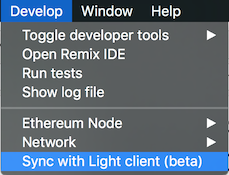
I'm closing this issue. Should you have any trouble, please refer to these channels:
- Canonical issue regarding sync: https://github.com/ethereum/mist/issues/3097
- Gitter channel, where the community is, and can certainly help as well: https://gitter.im/ethereum/mist
 evertonfraga
on 28 Sep 2017
evertonfraga
on 28 Sep 2017
This thread has been automatically locked because it has not had recent activity. Please open a new issue for related bugs and link to relevant comments in this thread.
![lock[bot] picture](https://avatars.githubusercontent.com/in/6672?v=4&s=40) lock[bot]
on 30 Mar 2018
lock[bot]
on 30 Mar 2018
Related issues
 PacketSmuggler
·
3Comments
PacketSmuggler
·
3Comments
 ivica7
·
6Comments
ivica7
·
6Comments
 toby1991
·
6Comments
toby1991
·
6Comments
 tymat
·
6Comments
tymat
·
6Comments
 Nogreedy
·
4Comments
Nogreedy
·
4Comments