Mist: Ethereum node needs to sync, taking too long
It's taking far too long for ethereum node to sync. I've been running my computer for at least half a day, internet speed is definitely not the issue. I'm at block 2,000,000 of 3,866,000 and the last 150,000 blocks have probably taken at least 6 hours. I've tried to find other users commenting on similar issues and the only thing I could find was reference to the system clock of the computer. I'm on a mac so I've manually edited it but it doesn't seem to do anything so it's automatically synced with time.apple.com.
System information
Version: `0.8.10`
OS & Version: osx
Node type: `eth/geth 1.6.5 (go)`
 statsdroneadmin
All 89 comments
yeah im agree, the developer needs to find a way to install this, this is really take too long
 OwlGreenApple
on 13 Jun 2017
OwlGreenApple
on 13 Jun 2017
It gets to the point where it downloads more blocks before it stalls and I have to usually force quit the app and restart it to get it going to download more blocks. My hard drive has more than enough space so don't think this is the issue. I've tried to run it all on it's own so don't think it is a computer resource issue.
statsdroneadmin
on 13 Jun 2017
i'm seeing the same issue. i left my computer on for about 18 hours and still under 2.5 million blocks. i'm just recently learning about how all this works, so please don't mind my question if there's an obvious answer, but is there a reason wallet nodes on the network need the entire chain, instead of say, the most recent million? and then miner nodes could include the full chain for integrity
 chrismanahan
on 13 Jun 2017
chrismanahan
on 13 Jun 2017
Seeing a similar issue, blockchain takes a long time, gets nearly to 100%, then starts the sync over again. I tried deleting the l%APPDATA\RoamingEthereum\geth\chaindata directory and restarting. That made the sync download run faster, I assume because it was doing a --fast sync, but it still fails to complete. I am using a Windows 10 PC, running 0.8.8 so I will update the build and try again just in case that's contributing.
 MrFix3
on 14 Jun 2017
MrFix3
on 14 Jun 2017
In 2 days I've moved 900,000 blocks. This wallet is useless, anybody else recommend any local wallets?
statsdroneadmin
on 15 Jun 2017
400,000 blocks to go.
statsdroneadmin
on 16 Jun 2017
I've been trying to sync for more than 3 days now, have downloaded close to 50GB of chaindata and I've another 1.5Million blocks left to sync.
I am also new to this whole lot and don't want to end up loosing cash!
In my hyped-up hurry to buy ETH I rushed into installing Ethereum Wallet app, copied the first legit looking address and used Changelly to change BTC to ETH and sent it to that address (my main account in the Ethereum wallet).
5 Days later still no sign of the ETH in my wallet. I'm hoping it is due to the ever-lasting sync ..?
I feel like my coins are being held at ransom. What if it NEVER finishes syncing. :(
 isitabubble
on 18 Jun 2017
isitabubble
on 18 Jun 2017
it seems that these tech-smart people have not made etherium participation user friendly AT ALL! Bitcoin is so uncomplicated! My Ether also 'lost' in thin air due to needing to 'sync'. Sync what for goodness sake?! I'm not a miner. 100gb sync data down already, in a perpetual sync. SO FRUSTRATING. I can see my ether on https://etherchain.org but i cant do a thing with it at all. Cant get it into ANY wallet whatsoever.
 SirHardo
on 19 Jun 2017
SirHardo
on 19 Jun 2017
I complete my sync (first instalation) with a week more 1 day. This is really annoying. :(
OwlGreenApple
on 19 Jun 2017
Yep. Same issue here. I've had my computer running non-stop, doing nothing but syncing the ethereum wallet and I'm still more than 1,5 million blocks away from done. And in the last two days or so progress has really come a near standstill. In the last 10 hours the wallet synced only about 15,000 blocks. At this pace it will literally never fully sync...
 vryfokkenou
on 20 Jun 2017
vryfokkenou
on 20 Jun 2017
Anybody have other eth wallets to suggest?
statsdroneadmin
on 21 Jun 2017
I've downloaded JAXX. It's a lightweight multi-coin wallet, but I'm using it to receive and store Ether. For now. Until I find a way of syncing the full node Ethereum Wallet.
vryfokkenou
on 21 Jun 2017
@alwayslookright I just started using Exodus. Before that, I was keeping it all in coinbase, which i don't advise because of the frequency of their outages lately. It's also more secure since you hold your private keys instead of a third party
chrismanahan
on 21 Jun 2017
Anybody have any suggestions to help this process to finish syncing? I've been going for well over a week and it seems as it gets closer to synching, it gets slower and slower with no end in sight.
statsdroneadmin
on 22 Jun 2017
After several weeks, I have this:
Downloading block 2,433,819 of 3,923,919
Downloaded so far 48.8 GB...
 ddon
on 24 Jun 2017
ddon
on 24 Jun 2017
You guys can use myetherwallet.com to access your ETH while your wallet syncs.
 garretlaxton
on 25 Jun 2017
garretlaxton
on 25 Jun 2017
After 24 hours:
Downloading block 2,438,870 of 3,923,919
Downloaded so far 50.6 GB
So, in 24 hours 5,051 blocks were downloaded, and since 1,485,049 left, it will take me 294 days :) nice... plus, by that time couple of millions extra blocks will be mined :)
ddon
on 25 Jun 2017
Are these recommendations good ones?
https://ethereum.stackexchange.com/questions/603/help-with-very-slow-mist-sync
They say to start from very beginning and start geth with --fast --cache=1024 params and process will go much faster. Anybody knows about this?
ddon
on 25 Jun 2017
How are you supposed to access your wallet that was created on the ethereum.org site to open it in myetherwallet.com?
statsdroneadmin
on 25 Jun 2017
@alwayslookright By using your backup file that you should have stored somewhere safe.
garretlaxton
on 26 Jun 2017
Okay so is there a technical solution to this? A missing dependency or networking issue?
 dogonbeach
on 3 Jul 2017
dogonbeach
on 3 Jul 2017
Just to update everyone here, --fast --cache=1024 params really helped the situation 👍
ddon
on 4 Jul 2017
Same problem here, this is basically unusable.
 stefkes
on 6 Aug 2017
stefkes
on 6 Aug 2017
@stefkes start from scratch and do it without a GUI... start geth with --fast and --cache=1024 params, and it will be finished in no time.
Or use MyEtherWallet :-)
ddon
on 6 Aug 2017
I started syncing my wallet on monday, still not synced on thursday. fucking rediculous..
 tomtom87
on 17 Aug 2017
tomtom87
on 17 Aug 2017
top man for sharing @ddon .....
@tomtom87 . Just use geth on command line as per above and it works fine.
1) rm -rf ~/Libary/Ethereum/geth/chaindata ( or whereever chaindata has been stored on your machine. ) to clear out the old sync data. Otherwise it stays in slow mode.
2) geth --fast --cache=1024
You'll see it sync pretty quick.
 r0nanhugh3s
on 18 Aug 2017
r0nanhugh3s
on 18 Aug 2017
Ive been running geth --fast will try the cache option, much appreciated for the support guys
Sent from my iPhone
On 19 Aug 2017, at 04:33, "blace.io" notifications@github.com wrote:
top man for sharing @ddon .....
@tomtom87 . Just use geth on command line as per above and it works fine.
rm -rf ~/Libary/Ethereum/geth/chaindata ( or whereever chaindata has been stored on your machine. ) to clear out the old sync data. Otherwise it stays in slow mode.
geth --fast --cache=1024
You'll see it sync pretty quick.
—
You are receiving this because you were mentioned.
Reply to this email directly, view it on GitHub, or mute the thread.
tomtom87
on 19 Aug 2017
You can use myethwallet.com to access your Etherium wallet that isn't syncing.
 briandgoldberg
on 20 Aug 2017
briandgoldberg
on 20 Aug 2017
I deleted my chaindata and am trying to get my wallet to fast sync. I am using a linux soft link to save my chaindata on a different hard drive. I am usingethereum wallet --fast --cache=1024 to run the wallet. Is that effective, or do I have to run geth first with the command?
I am having an issue where my node is perpetually 50-100 blocks or so behind. I am not seeing any peers listed in the wallet GUI. Any ideas how to fix this?
It also seems that if I leave the wallet in the loading screen (ie do not click 'launch application' to run the GUI) it syncs faster. Has anyone else noticed this?
 delton137
on 29 Aug 2017
delton137
on 29 Aug 2017
The lag of the network to i/o the disk is meaning you can never catch up with the chain. Its really moving that fast now.
So you need ssd, direct as same disk ur os is running. And patience. Took me 3 days non-stop. Just make sure your ssd, 100% computer on this one task, and turn it on n off again every time it glitches. Its really well made, can almost smell the vodka when u run geth.
On 30 Aug 2017, at 00:06, "Daniel C. Elton" notifications@github.com wrote:
I deleted my chaindata and am trying to get my wallet to fast sync. I am using a linux soft link to save my chaindata on a different hard drive. I am usingethereum wallet --fast --cache=1024 to run the wallet. Is that effective, or do I have to run geth first with the command?
I am having an issue where my node is perpetually 50-100 blocks or so behind. I am not seeing any peers listed in the wallet GUI. Any ideas how to fix this?
It also seems that if I leave the wallet in the loading screen (ie do not click 'launch application' to run the GUI) it syncs faster. Has anyone else noticed this?
—
You are receiving this because you were mentioned.
Reply to this email directly, view it on GitHub, or mute the thread.
tomtom87
on 30 Aug 2017
@tomtom87 thanks for your input. Unfortunately I cannot run on my SSD because it is only 256 Gbs. I am saving the chaindata to an old fashioned SATA platter drive. After 5 days of waiting, and restarting the wallet app many times, it finally synced up!! For a long time, I only had 1 or no peers, but now I have 12.
It seems the slower HDD was a factor, indeed, much to my surprise.
delton137
on 1 Sep 2017
Hi, so i'm on a macbook and i cannot seem to find the folder where the chaindata is stored.. I can see however that it takes a shitload of gbs of my ssd drive which i need back.. Can anyone help me with this? and can i acces my wallet online instead of using this desktop app?
 pjotrt
on 1 Sep 2017
pjotrt
on 1 Sep 2017
@alwayslookright I followed the instructions here:
https://ethereum.stackexchange.com/questions/3307/in-mist-browser-how-can-i-move-the-data-blockchain-to-another-drive-on-mac-osx
Creating a soft link worked for me, although I had trouble copying all the files so I decided to delete the chain data and start resyncing from scratch. Make sure to backup your wallet file before mucking around in the .ethereum folder.
The directions there should work in MacOS. Assuming you are using the mist wallet, the chaindata should be saved in ~/.ethereum/geth/chaindata.
To see how much space it takes up, load a terminal, type cd ./ethereum/geth/ to move to the directory and then type du -h --max-depth=1 to see how much space the chaindata directory uses.
delton137
on 1 Sep 2017
Big issue is mechanical hard drives, minimum requirement to ever catch up is an SSD.
 stobiewan
on 5 Sep 2017
stobiewan
on 5 Sep 2017
yes it must be SSD to sync, this should be made clear on installation
really.
On 05/09/2017 17:22, stobiema wrote:
>
Big issue is mechanical hard drives, minimum requirement to ever catch
up is an SSD.—
You are receiving this because you were mentioned.
Reply to this email directly, view it on GitHub
https://github.com/ethereum/mist/issues/2508#issuecomment-327135045,
or mute the thread
https://github.com/notifications/unsubscribe-auth/AB7p9x0GAQAW3KiGisABFnPZrv8VNSlyks5sfSDZgaJpZM4N4lv7.
tomtom87
on 5 Sep 2017
Yeah, without an SSD it keeps falling behind and the disk is constantly in use.
delton137
on 5 Sep 2017
Hi, I am downloading Mist. It has been downloaded but another windows show that there are 4.2 million blocks yet to be downloaded. It says 0 of 4.2 million blocks.
Does anyone know what is happening?
 babarriaz
on 11 Sep 2017
babarriaz
on 11 Sep 2017
Now HDD is the bottleneck to sync for me in aws node .
 detailyang
on 12 Sep 2017
detailyang
on 12 Sep 2017
Hey Everybody. You need to be running an SSD. Now that I've said that though, you can try to force it to work on a platter. First you have to download geth - https://geth.ethereum.org/downloads/
Then you have to run it command line BEFORE starting mist/ethwallet.
Most of you aren't starting from scratch, so --fast won't work. It only works if you start without a blockchain. command line : geth --cache=2048 --maxpeers=50 will get things moving
It still takes days to sync without an SSD, but it does work.
 squivo
on 13 Sep 2017
squivo
on 13 Sep 2017
squivo thanks man! Can you break this down for me. I have a mac and don't how to do that. Don't know what --fast is or how to make use of it or what geth --cache=2048 is?
How can I do what you suggest exactly. Sorry if this is a dumb question!
 Bennnow
on 27 Sep 2017
Bennnow
on 27 Sep 2017
Also is migrating from GETH to PARITY (as I have read elsewhere a good option?)
Bennnow
on 27 Sep 2017
Follow these instructions: https://github.com/ethereum/go-ethereum/wiki/Installation-Instructions-for-Mac. After installing brew, when you install geth with brew, it will a) put in an accessible location for you, and b) insert the binaries into your $PATH ( which means you can run geth from the Terminal from any folder location. Before starting Mist, open up the terminal, and run the geth --help command. You'll see all the options available. The default cache size is rather small so by setting --cache you're overriding the default ( same with --maxpeers ). Once you've got geth running in the terminal, THEN open up Mist, and wait forever. I would open up Activity Monitor as well, to see how close you are to maxing out your ram ( or, perhaps you can increase it ... --cache=4096 or more??? ). Let Mist sync. Don't Launch the App manually, wait until it catches up ( took me 2 weeks on my platter ). Once it's sync'd up, if you can leave your computer on most of the time, I would close Mist, stop geth, and restart it using a more reasonable cache size ( 1024 ) and restart Mist again. This way you free up ram so you can make crypto memes in photoshop.
squivo
on 27 Sep 2017
I haven't experimented with PARITY yet
squivo
on 27 Sep 2017
I had less than hundred blocks to go and it hung... it was at some some 4e6 blocks with some 8e6 in the chain structure... when restarted, the remaining blocks are a still less than a hundred, the chain structure repeated from zero!
Also strange is that the chain structure total is also increasing, giving no idea on how long this can still take...
 Balloota
on 28 Sep 2017
Balloota
on 28 Sep 2017
Hi, we have just launched Mist v0.9.1, with Light Client integration (beta).
What does that mean?
- Sync times reduced by an order of magnitude while staying safe.
- Much smaller storage required.
How to activate?
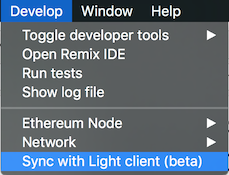
I'm closing this issue. Should you have any trouble, please refer to this canonical issue: https://github.com/ethereum/mist/issues/3097
 evertonfraga
on 28 Sep 2017
evertonfraga
on 28 Sep 2017
plz try this blockaction.io. We are running this on kovan testnet rightnow.
 bit-warrior
on 7 Oct 2017
bit-warrior
on 7 Oct 2017
Great... so how can testnet help someone who wants mainnet ethers back? About as much use as a glass hammer bro
On 7 Oct 2017, at 06:25, bit-warrior notifications@github.com wrote:
plz try this blockaction.io. We are running this on kovan testnet rightnow.
—
You are receiving this because you were mentioned.
Reply to this email directly, view it on GitHub, or mute the thread.
tomtom87
on 7 Oct 2017
create token you can just deploy contract with web3 api or use MEW. You need a ssd to sync and use --fast --cache=1024 options
it will take around 2-6 hours on a mac book pro. i am syncing several for my team.
You cannot sync on mechanical hard disk only ssd.
On 15 Nov 2017, at 03:46, nhatphai99 notifications@github.com wrote:
guys, so how can you create the ERC20 token and contract ??? wait so long to sync that sh**
—
You are receiving this because you were mentioned.
Reply to this email directly, view it on GitHub, or mute the thread.
tomtom87
on 15 Nov 2017
Same here, I have been syncing from last two week with no luck. Looks like ssd is must
bit-warrior
on 15 Nov 2017
you cannot sync without ssd it should be made clear at installation stage.
Also its best you run the docker image alongside mist i found this to be far more reliable.
If you cannot get sync keep turning it off n on again and praying to Vitalik a bit. Crossing fingers for luck can help, also sometimes wearing lucky underwear seems to have a positive effect on catching the elusive sync.
On 15 Nov 2017, at 07:52, bit-warrior notifications@github.com wrote:
Same here, I have been syncing from last two week with no luck. Looks like ssd is must
—
You are receiving this because you were mentioned.
Reply to this email directly, view it on GitHub, or mute the thread.
tomtom87
on 15 Nov 2017
Sync Ethereum Mist quickly using Geth seemed to work! https://www.youtube.com/watch?v=01GFwytVFC4
It seems to take a fraction the amount of time if you follow the instructions and type
--fast --cache=512
after dragging the geth.exe into the cmd prompt...but it's still only sync about 75% of the blockchain....Fingers crossed!
 turboyerbo
on 15 Nov 2017
turboyerbo
on 15 Nov 2017
yes you must do this way. But if not ssd hard disk sync will never reach 100% it will always be a few blocks behind.
On 16 Nov 2017, at 02:22, turboyerbo notifications@github.com wrote:
Sync Ethereum Mist quickly using Geth seemed to work! https://www.youtube.com/watch?v=01GFwytVFC4
It seems to take a fraction the amount of time if you follow the instructions and type
--fast --cache=512
after dragging the geth.exe into the cmd prompt...but it's still only sync about 75% of the blockchain....Fingers crossed!
—
You are receiving this because you were mentioned.
Reply to this email directly, view it on GitHub, or mute the thread.
tomtom87
on 16 Nov 2017
Downloading block 4,703,207 of 4,703,298
I hope I did not do it for nothing, I want the development software to integrate, J'ai appris à utiliser la console json et le pragma solidity cool la console je vois qu'elle est synchro avec le geth, je pense notre blockchain qui calcule les transactions
 Matthmatth88
on 9 Dec 2017
Matthmatth88
on 9 Dec 2017
@squivo - WOW after waiting two weeks now for sync, the --node-cache=2048 --node-maxpeers=50 as well as move the stuff to SSD did the trick after another 30 minutes.
I was about to desperately drop the shit.
 tyramisoux
on 11 Dec 2017
tyramisoux
on 11 Dec 2017
SSDs are what did the trick. So much i/o. Many write
squivo
on 11 Dec 2017
I hope the cache also does what it is supposed to (caching the write events) since I hope it won't ruin my SSD lifetime. In fact this is why I moved the stuff to HD before.
Might be a good idea to backup more frequently anyway :-)
tyramisoux
on 11 Dec 2017
eth.getTransaction(eth.getBlock(686927).transactions[0]) voila moi je veux
insérer une transaction dans mon ethereum Wallet grâce à cette commande
2017-12-11 20:10 GMT+01:00 tyramisoux notifications@github.com:
I hope the cache also does what it is supposed to since I hope it won't it
ruins my SSD lifetime. In fact this is why I move the stuff to HD—
You are receiving this because you commented.
Reply to this email directly, view it on GitHub
https://github.com/ethereum/mist/issues/2508#issuecomment-350825919, or mute
the thread
https://github.com/notifications/unsubscribe-auth/Agz0Zb2FgVGbyBnVghfIkJiWk-mol_-vks5s_X5AgaJpZM4N4lv7
.
Matthmatth88
on 11 Dec 2017
Il suffit de suivre ça transaction grâce au block qui sont synchronisés
mais après la télécharger je ne sais pas
2017-12-11 21:40 GMT+01:00 Matthieu Toussaint matth.toussaint88@gmail.com:
eth.getTransaction(eth.getBlock(686927).transactions[0]) voila moi je
veux insérer une transaction dans mon ethereum Wallet grâce à cette commande2017-12-11 20:10 GMT+01:00 tyramisoux notifications@github.com:
I hope the cache also does what it is supposed to since I hope it won't
it ruins my SSD lifetime. In fact this is why I move the stuff to HD—
You are receiving this because you commented.
Reply to this email directly, view it on GitHub
https://github.com/ethereum/mist/issues/2508#issuecomment-350825919,
or mute the thread
https://github.com/notifications/unsubscribe-auth/Agz0Zb2FgVGbyBnVghfIkJiWk-mol_-vks5s_X5AgaJpZM4N4lv7
.
Matthmatth88
on 11 Dec 2017
After 1 full week of syncing still not getting there... delete the complete caindate etc but nothing. Seems it plays with me here. Short before 'almost finishing' it get stuck or recalcs and start (nearly) all over again. What a shit-app. F.E. Bcoin app takes about 6-7 hrs to sync the 160Gb chaindate. Totally f#cked up here
 ethy23
on 15 Dec 2017
ethy23
on 15 Dec 2017
Defrag the hard drive. I noticed i/o slowed down hard drive over 200% after geth tried to sync. which never completed by the way. After defragging, it finished syncing in few hours. I am surprised as how shitty the mist wallet is given all the attention ethereum is getting. I guess its concept and inner working is revolutionary, however UI is horrible for normal people like me. It can't even display history by default. Fuck You ether for wasting my time. only using it for ico etc.
 hawaii18k
on 16 Dec 2017
hawaii18k
on 16 Dec 2017
Tnx Hawaii18K.. Have SSD with mgmt on it so that goes automatically. What did the trick was geht with light opt on. synced in 3 hrs (about 70Gb).. shitty prg who does load al the chain (like BCoin does w/160Gb)... but Bcoin loads in 3 mns and ethwall needs f#cking 2 hrs to sync. Think i shapeshift it to lcoin. have a nice wcnd!
ethy23
on 16 Dec 2017
All of this is assuming you have geth in place etc and usually -v 1.7.2 or above.
ok it is final guys! This is the solution:
- $ cd ~/Libary/Ethereum/geth/
- $ mv chaindata chaindata_backup
- $ mkdir chaindata
- $ geth --fast --cache=1024
- open ethereum wallet but DO NOT click on Launch Application.
- Wait and if it all works fine (after 100% sync) then, remove the chaindata_backup file by doing $ ~/Libary/Ethereum/geth/chaindata_backup
 emiliano1
on 19 Dec 2017
emiliano1
on 19 Dec 2017
Guys, use Ethereum CLI client from https://github.com/ethereum/go-ethereum.
I use geth --datadir "<Your dir with geth and keystore dir inside>" --syncmode "fast" --cache 2048 --maxpeers 50
It works for me!
Before using backup Your geth/chaindata dir and make new empty geth/chaindata dir.
 Duiesel
on 20 Dec 2017
Duiesel
on 20 Dec 2017
Clean up your hard disk space. That will solve the problem.
 mcna72
on 30 Dec 2017
mcna72
on 30 Dec 2017
I turned the app permissions on in windows firewall, cleaned up about 100 G on the hard disk and then it started downloading the blocks. It looks like the wallet is looking for space before it starts downloading.
mcna72
on 30 Dec 2017
the geth sync kept failing every 10 to 15 minutes so in windows i created a sync.cmd file with the following and that took care of it.
C:
cd "C:\Users\Dan\AppData\RoamingEthereum Walletbinaries\Geth\unpacked"
:loop
%@Try%
call "geth.exe" --fast --cache=512 --datadir="D:Ethereum-Wallet-win32-0-9-3"
timeout 2
%@EndTry%
:@Catch
goto loop
:@EndCatch
goto loop
 dfalzetti
on 14 Jan 2018
dfalzetti
on 14 Jan 2018
@dfalzetti could you please explain what your batch lines do, one by one please?
 gciriani
on 19 Jan 2018
gciriani
on 19 Jan 2018
Il permettent de contrôler les transactions avec l'Attach en ligne de
commande Javascript.JSON, admin.function() ex: miner.start(true)
2018-01-19 16:50 GMT+01:00 gciriani notifications@github.com:
@dfalzetti https://github.com/dfalzetti could you please explain what
your batch lines do, one by one please?—
You are receiving this because you commented.
Reply to this email directly, view it on GitHub
https://github.com/ethereum/mist/issues/2508#issuecomment-359004326, or mute
the thread
https://github.com/notifications/unsubscribe-auth/Agz0ZR-K8Zi_YcvXlNy78MBy6tgVaS-bks5tMLm3gaJpZM4N4lv7
.
Matthmatth88
on 19 Jan 2018
I have a Macbook Pro and my Ethereum wallet will not sync all the way. How do I fully synce the blocks and chain structures? Been downloading to 99% for the last two weeks. Please give me step by step instructions for a beginner. Thank you.
 yihaient
on 24 Jan 2018
yihaient
on 24 Jan 2018
@dfalzetti
Your batch file work perfect, thank you.
For other: you need to change some parts due to different configuration of each machine.
 UncleSnake
on 25 Jan 2018
UncleSnake
on 25 Jan 2018
I am afraid Facing above problem ... sad, not a smooth start ..
 raky35
on 3 Feb 2018
raky35
on 3 Feb 2018
J'ai quand même entendu parlé que pour faire du mining il faut du matériel
spécial alors changé votre matériel renseignez vous sur celui à acheter
Le 3 févr. 2018 09:31, "raky35" notifications@github.com a écrit :
I am afraid Facing above problem ... sad, not a smooth start ..
—
You are receiving this because you commented.
Reply to this email directly, view it on GitHub
https://github.com/ethereum/mist/issues/2508#issuecomment-362790556, or mute
the thread
https://github.com/notifications/unsubscribe-auth/Agz0ZQc12g3gFeFbBEFVfiW5wukauFg3ks5tRBlKgaJpZM4N4lv7
.
Matthmatth88
on 3 Feb 2018
Le 3 févr. 2018 10:29, "Matthieu Toussaint" matth.toussaint88@gmail.com a
écrit :
J'ai quand même entendu parlé que pour faire du mining il faut du matériel
spécial alors changé votre matériel renseignez vous sur celui à acheterLe 3 févr. 2018 09:31, "raky35" notifications@github.com a écrit :
I am afraid Facing above problem ... sad, not a smooth start ..
—
You are receiving this because you commented.
Reply to this email directly, view it on GitHub
https://github.com/ethereum/mist/issues/2508#issuecomment-362790556,
or mute the thread
https://github.com/notifications/unsubscribe-auth/Agz0ZQc12g3gFeFbBEFVfiW5wukauFg3ks5tRBlKgaJpZM4N4lv7
.
Matthmatth88
on 3 Feb 2018
any progress on this issue?
 tommy2049
on 3 Feb 2018
tommy2049
on 3 Feb 2018
No progress at all
I have been running my brand new Mac to sync and for days now and it always gets stuck at the end. Can you please provide me exact step by step process to get the app to sync fully please.
Sent from my IPhone
On Feb 3, 2018, at 1:39 PM, Tommy Luo notifications@github.com wrote:
any progress on this issue?
—
You are receiving this because you commented.
Reply to this email directly, view it on GitHub, or mute the thread.
yihaient
on 3 Feb 2018
Ok so here's how to make it sync:
- Check you have a ssd harddisk and some free space (like 10gb or so)
- Start the ethereum wallet, in the settings select sync fast sync / light client
- Leave it to do its thing, average at the moment is around 72 hours when im syncing up my nodes on dedicated servers or macbooks
- If you urgently need your wallet use myetherwallet - never send anyone your private key, and use a vpn and check the url is correct and u have not been sent to a phising site when you use myetherwallet
Sometimes you have to restart the wallet syncing, it will take atleast a day or more full syncin to get whole blockchain. Its very large now, so use light client if possible.
Hope you got it working... let me know if you get more problems
On 4 Feb 2018, at 05:04, yihaient notifications@github.com wrote:
No progress at all
I have been running my brand new Mac to sync and for days now and it always gets stuck at the end. Can you please provide me exact step by step process to get the app to sync fully please.Sent from my IPhone
On Feb 3, 2018, at 1:39 PM, Tommy Luo notifications@github.com wrote:
any progress on this issue?
—
You are receiving this because you commented.
Reply to this email directly, view it on GitHub, or mute the thread.—
You are receiving this because you were mentioned.
Reply to this email directly, view it on GitHub, or mute the thread.
tomtom87
on 4 Feb 2018
[image: Images intégrées 2]
2018-02-03 22:39 GMT+01:00 Tommy Luo notifications@github.com:
any progress on this issue?
—
You are receiving this because you commented.
Reply to this email directly, view it on GitHub
https://github.com/ethereum/mist/issues/2508#issuecomment-362856487, or mute
the thread
https://github.com/notifications/unsubscribe-auth/Agz0ZXzixNbeOkU-9daIPIS0F6jPd7wPks5tRNH2gaJpZM4N4lv7
.
Matthmatth88
on 8 Feb 2018
[image: Images intégrées 1]
2018-02-08 10:19 GMT+01:00 Matthieu Toussaint matth.toussaint88@gmail.com:
[image: Images intégrées 2]
2018-02-03 22:39 GMT+01:00 Tommy Luo notifications@github.com:
any progress on this issue?
—
You are receiving this because you commented.
Reply to this email directly, view it on GitHub
https://github.com/ethereum/mist/issues/2508#issuecomment-362856487,
or mute the thread
https://github.com/notifications/unsubscribe-auth/Agz0ZXzixNbeOkU-9daIPIS0F6jPd7wPks5tRNH2gaJpZM4N4lv7
.
Matthmatth88
on 8 Feb 2018
Have been at it for months (not 24/7, probably an average of 10-12 hours daily), I remember updating the client at least 3 times already during this period of time. I only need like 150k blocks now, they download at around 1 block per second, sometimes faster sometimes slower.
 danielocdh
on 12 Feb 2018
danielocdh
on 12 Feb 2018
Hello everyone, using pc with at least 8GB RAM + 8GB swap with ssd 250 GB drive solve this problem for me.
In the other side I tried to sync at win, linux and mac and had the same result: it syncing one block slower then the new one created.
Duiesel
on 12 Feb 2018
I have sent ETH to my Ethereum Mist wallet...however, my client won't finish the sync anymore it seems...65 blocks left and there is sort of stalls... I wanted to use that ETH to buy some altcoins, but of course I can't get to see a balance. Adding a sole proprietor contract isn't working either...
Can I use the keystore of the Ethereum Mist wallet to access this wallet via another platform? I am pretty new to all this cryptocoin stuff, but am fairly savvy with cryptography and security in general, so you can go technical on me :-)
 orbatec
on 28 Feb 2018
orbatec
on 28 Feb 2018
@orbatec just import your key on www.myetherwallet.com and you should be able to do everything from there.
emiliano1
on 28 Feb 2018
At least I prefer to keep my wallet and keys on my own system....
In fact I also have major trouble. About 10 other wallets run nice except Ethereum. Today I have not more than 2 peers. sucks...
And yes, I've read everything about "ISP limit swarm connections". But I do not have that troubles with others and able to connect to hundreds of peers using Bittorrent for example.
And yes - my system clock is fine (NTP from Firewall NTP server)
tyramisoux
on 28 Feb 2018
The whole geth --fast --cache=2048 didn't do diddly... So I ended up installing Parity and importing my geth keystore from Ethereum Wallet. Low and behold, my ETH is finally showing up! And it took Parity only about 2h to find my block.... On the downside I left my computer on all night and now I have some serious wear on the fans as it has been huffing and puffing non-stop with processor usage up to 171% ... I am fairly new to blockchain and cryptocoins, but this is a huge problem imho. I would expect that once you are in sync it should not continue to consume all of your resources, but it does...I actually find it quite useless this way...
Using myetherwallet -I assume- has the benefit that you are not doing the synchronization yourself: it is done by the platform...And yes, I too like to keep my wallet private, but the way it is now, it really isn't usable...
orbatec
on 1 Mar 2018
I had no luck at all syncing with the light-client. After switched off it works way better.
also forwarded 30303 from firewall to desktop. Seeing 2 incoming connections which seem not change a lot
tyramisoux
on 1 Mar 2018
it is working for me know .
raky35
on 25 Mar 2018
I have no other idea than there must be attacks to the network. Had not more than 1 up to 3 peers for WEEKS but gone up to about 20 peers a few day ago.
It is still very slow but continued importing!
With cache of 2048 it is no problem at all using HD OR SSD since I/O and disc-access is very low as well as network traffic.
When monitoring this I found "Microsoft photos" periodically takes a multiple of geth resources and bursting my drives hot. Removed that stuff to free shitloads of resources.
tyramisoux
on 25 Mar 2018
hi,
i am using ubuntu 16.04 xenial when i have been installing ethereum wallet it showing "ethereum node needs to sync please wait " which is taking more time and how to fix this help me
 karikalanCyberForza
on 10 May 2018
karikalanCyberForza
on 10 May 2018
my wallet downloading and synchronizing get lots of time. there is any option for reduce the time for downloading blockchain?
*this is my code *
`public class xyz {
private static WalletAppKit kit;
private static NetworkParameters params = TestNet3Params.get();
private File file;
public xyz(File file) throws BlockStoreException {
    this.file = file;
}

public static void refresh() throws ExecutionException, InterruptedException {
}

public void initialdownload(String btcpri, Context context) {
    ECKey key;
    BigInteger privKey = Base58.decodeToBigInteger(btcpri);
    key = ECKey.fromPrivate(privKey);
    setSDKThread();
    BriefLogFormatter.init();

    kit = new WalletAppKit(params, file, "bitcoin_wallet") {
        @Override
        protected void onSetupCompleted() {
            wallet().importKey(key);
            wallet().allowSpendingUnconfirmedTransactions();
            setupWalletListeners(wallet());
        }
    };
    kit.setDownloadListener(new DownloadProgressTracker() {
        @Override
        protected void progress(double pct, int blocksSoFar, Date date) {
            super.progress(pct, blocksSoFar, date);
        }

        @Override
        protected void doneDownload() {
            super.doneDownload();
        }
    });
    kit.setBlockingStartup(false);
    kit.startAsync();
}

private void setSDKThread() {
    new Handler(Looper.getMainLooper()).post(new Runnable() {
        @Override
        public void run() {
            final Handler handler = new Handler();
            Threading.USER_THREAD = handler::post;
        }
    });
}

private void setupWalletListeners(Wallet wallet) {
    wallet.addCoinsReceivedEventListener((wallet1, tx, prevBalance, newBalance) -> {
        if (tx.getPurpose() == Transaction.Purpose.UNKNOWN);
    });
    wallet.addCoinsSentEventListener((wallet12, tx, prevBalance, newBalance) -> {
    });
}
}`
 sidhesham009
on 3 Aug 2018
sidhesham009
on 3 Aug 2018
Related issues
 toby1991
·
6Comments
toby1991
·
6Comments
 ivica7
·
6Comments
ivica7
·
6Comments
 pingram3541
·
6Comments
pingram3541
·
6Comments
 brandoncurtis
·
4Comments
tomtom87
·
4Comments
brandoncurtis
·
4Comments
tomtom87
·
4Comments
Most helpful comment
400,000 blocks to go.