Misskey: "Error: unable to verify the first certificate"
💡 Summary
I just updated our Misskey instance from last v10 to v11.2.2
Everything that need to do a network request server-side (except to get something from other instances) result to a "Error: unable to verify the first certificate".
🙂 Expected Behavior
It should just work 🤔
☹️ Actual Behavior
"Error: unable to verify the first certificate"
For exemple :
"avril 23 17:53:54 mozuku misskey[93631]: ERR 4 [download-url] Failed to start download: https://misskey.anjara.eu/files/f5922fe9-7390-4319-859e-7158dcbae708: Error: unable to verify the first certificate"
📝 Steps to Reproduce
- Migrate last v10 tp v11.2.2
- Start misskey
- Try to produce a network request (for exemple just go to your profile and set a new banner or something).
- See error in server logs
📌 Environment
Misskey v11.2.2
Node 11.11.0
Nginx reverse proxy (so no https misskey side).
 skid9000
All 11 comments
Thank you for reporting.
Can you show me your misskey configuration?
 syuilo
on 23 Apr 2019
syuilo
on 23 Apr 2019
Sure
# Misskey configuration
# Final accessible URL seen by a user.
url: https://misskey.anjara.eu

# To use option 1, uncomment below line.
port: 3123    # A port that your Misskey server should listen.

db:
  host: /var/run/postgresql

  # Database name
  db: misskey_prod

  # Auth
  user: misskey

redis:
  host: localhost
  port: 6379

drive:
  storage: 'fs'

id: 'meid'
autoAdmin: true
disableHsts: true
Generally, it seems to be a SSL certificate validation error.
Will it work with other applications?
eg: wget -O/dev/null https://misskey.anjara.eu/files/f5922fe9-7390-4319-859e-7158dcbae708
 mei23
on 23 Apr 2019
mei23
on 23 Apr 2019
Yes
 root@mozuku # wget -O/dev/null https://misskey.anjara.eu/files/f5922fe9-7390-4319-859e-7158dcbae708
--2019-04-23 18:46:29--  https://misskey.anjara.eu/files/f5922fe9-7390-4319-859e-7158dcbae708
Résolution de misskey.anjara.eu (misskey.anjara.eu)… 2a01:4f8:171:661:2::2, 136.243.93.250
Connexion à misskey.anjara.eu (misskey.anjara.eu)|2a01:4f8:171:661:2::2|:443… connecté.
requête HTTP transmise, en attente de la réponse… 200 OK
Taille : non indiqué [image/png]
Sauvegarde en : « /dev/null »

/dev/null                                                       [ <=>                                                                                                                                       ]   1,01M  --.-KB/s    in 0,01s

2019-04-23 18:46:29 (94,1 MB/s) - « /dev/null » sauvegardé [1063598]
Can you execute this command inside misskey directory?
node -e 'require("node-fetch")("https://misskey.anjara.eu/files/f5922fe9-7390-4319-859e-7158dcbae708")'
If success, this command output is empty.

 rinsuki
on 23 Apr 2019
rinsuki
on 23 Apr 2019
(node:42275) UnhandledPromiseRejectionWarning: FetchError: request to https://misskey.anjara.eu/files/f5922fe9-7390-4319-859e-7158dcbae708 failed, reason: unable to verify the first certificate
    at ClientRequest.<anonymous> (/home/misskey/misskey/node_modules/node-fetch/lib/index.js:1444:11)
    at ClientRequest.emit (events.js:197:13)
    at TLSSocket.socketErrorListener (_http_client.js:397:9)
    at TLSSocket.emit (events.js:197:13)
    at emitErrorNT (internal/streams/destroy.js:82:8)
    at emitErrorAndCloseNT (internal/streams/destroy.js:50:3)
    at processTicksAndRejections (internal/process/next_tick.js:76:17)
(node:42275) UnhandledPromiseRejectionWarning: Unhandled promise rejection. This error originated either by throwing inside of an async function without a catch block, or by rejecting a promise which was not handled with .catch(). (rejection id: 1)
(node:42275) [DEP0018] DeprecationWarning: Unhandled promise rejections are deprecated. In the future, promise rejections that are not handled will terminate the Node.js process with a non-zero exit code
Just a guess: It's possible that the version of OpenSSL is old or CA certificates are missing.
 acid-chicken
on 23 Apr 2019
acid-chicken
on 23 Apr 2019
Thanks.
I think, your Node.js does not know the path of root certificates.
If curl is installed to your server, you can search from curl verbose log.
$ curl -v https://misskey.anjara.eu/files/f5922fe9-7390-4319-859e-7158dcbae708 > /dev/null
  % Total    % Received % Xferd  Average Speed   Time    Time     Time  Current
                                 Dload  Upload   Total   Spent    Left  Speed
  0     0    0     0    0     0      0      0 --:--:-- --:--:-- --:--:--     0*   Trying xxx.xxx.xxx.xxx...
* TCP_NODELAY set
*   Trying xxxx:xxxx:xxxx::xxxx...
* TCP_NODELAY set
  0     0    0     0    0     0      0      0 --:--:-- --:--:-- --:--:--     0* Connected to misskey.anjara.eu (xxx.xxx.xxx.xxx) port 443 (#0)
* ALPN, offering h2
* ALPN, offering http/1.1
* Cipher selection: ALL:!EXPORT:!EXPORT40:!EXPORT56:!aNULL:!LOW:!RC4:@STRENGTH
* successfully set certificate verify locations:
*   CAfile: /etc/ssl/cert.pem <--- this! this!
  CApath: none
* TLSv1.2 (OUT), TLS handshake, Client hello (1):
} [223 bytes data]
(... trimmed by @rinsuki ...)
If you find the path of root certificates, you can use NODE_EXTRA_CA_CERTS env to tell Node.js the path of root certificates.
https://nodejs.org/api/cli.html#cli_node_extra_ca_certs_file
e.g.
$ export NODE_EXTRA_CA_CERTS=/path/to/ca/certs.pem
$ node -e 'require("node-fetch")("https://misskey.anjara.eu/files/f5922fe9-7390-4319-859e-7158dcbae708")'
:/

And no my openssl is up to date (1.1.1b)
skid9000
on 23 Apr 2019
It's very weird but this command runs correctly on my personal computer with the same setup (node 11, node-fetch 2.3.0) :thinking:
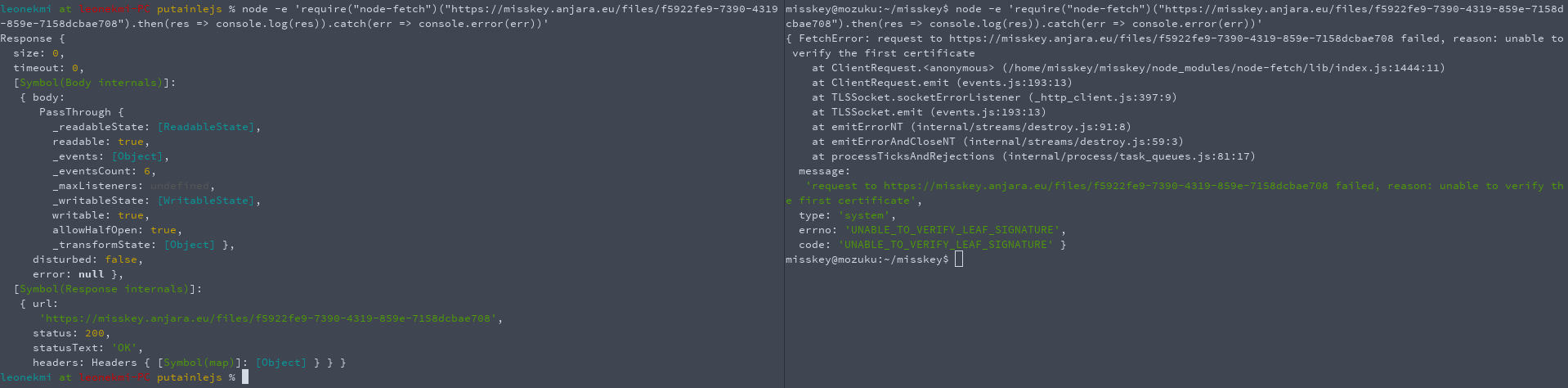
$ npm i [email protected]
npm notice created a lockfile as package-lock.json. You should commit this file.
npm WARN [email protected] No description
npm WARN [email protected] No repository field.

+ [email protected]
added 1 package from 1 contributor and audited 1 package in 0.953s
found 0 vulnerabilities

$ node -e 'require("node-fetch")("https://misskey.anjara.eu/files/f5922fe9-7390-4319-859e-7158dcbae708").then(res => console.log(res)).catch(err => console.error(err))'
{ FetchError: request to https://misskey.anjara.eu/files/f5922fe9-7390-4319-859e-7158dcbae708 failed, reason: unable to verify the first certificate
    at ClientRequest.<anonymous> (/home/testjssamerlaput/teub/node_modules/node-fetch/lib/index.js:1444:11)
    at ClientRequest.emit (events.js:193:13)
    at TLSSocket.socketErrorListener (_http_client.js:397:9)
    at TLSSocket.emit (events.js:193:13)
    at emitErrorNT (internal/streams/destroy.js:91:8)
    at emitErrorAndCloseNT (internal/streams/destroy.js:59:3)
    at processTicksAndRejections (internal/process/task_queues.js:81:17)
  message:
   'request to https://misskey.anjara.eu/files/f5922fe9-7390-4319-859e-7158dcbae708 failed, reason: unable to verify the first certificate',
  type: 'system',
  errno: 'UNABLE_TO_VERIFY_LEAF_SIGNATURE',
  code: 'UNABLE_TO_VERIFY_LEAF_SIGNATURE' }
(tested on a clean env on the same machine (this scenario has been reproduced on another Debian), i think this is Debian-related, my computer is Arch-based)
| Test env : Node.JS 11.14.0 [email protected] Same CA trusts | leonekmi-PC (Arch Linux) | hifumin (Debian 9) | mozuku (Debian 9) | Desktop (Windows 8.1) | Manjaro | Ubuntu Server 19.01 | Debian 9.8 fresh VM |
|--------------------------------------------------------------|---------------------------|---------------------------------------|----------------------------------------|---------------------------|---------------------------|---------------------------|---------------------------|
| leonekmi.fr | :heavy_check_mark: Works! | :heavy_check_mark: Works! | :heavy_check_mark: Works! | :heavy_check_mark: Works! | :heavy_check_mark: Works! | :heavy_check_mark: Works! | :heavy_check_mark: Works! |
| misskey.anjara.eu | :heavy_check_mark: Works! | :x: UNABLE_TO_VERIFY_LEAF_SIGNATURE | :x: UNABLE_TO_VERIFY_LEAF_SIGNATURE | :heavy_check_mark: Works! | :heavy_check_mark: Works! | :heavy_check_mark: Works! | :heavy_check_mark: Works! |
(Sidenote: i tried to add CA to an extra file and include it via https://nodejs.org/api/cli.html#cli_node_extra_ca_certs_file but no)
 leonekmi
on 23 Apr 2019
leonekmi
on 23 Apr 2019
Yes hello, i hate NAT, bye.
(Fixed by patching NAT configuration on our pfsense vm because the production vm dosen't have it's own public ip :man_facepalming: )
skid9000
on 30 Apr 2019
Related issues
 ibrokemypie
·
3Comments
ibrokemypie
·
3Comments
 marek-lach
·
3Comments
syuilo
·
3Comments
marek-lach
·
3Comments
syuilo
·
3Comments
 CookieRamen
·
3Comments
CookieRamen
·
3Comments
 YuzuRyo61
·
3Comments
YuzuRyo61
·
3Comments