Misskey: Infinite «Reconnecting» after login.
Hi.
I'm trying to build-up a new instance of Misskey, but have an issue.
At first, what have I done. Following the installation guide, I set up the database, cloned the repository and checked out the latest release. The final configuration looks like:
name: Ministry of Moonbutt Science
description: 'Who said «Fallout: Equestria»?!'

maintainer:
  name: commagray
  url: mailto://[email protected]
  repository_url: https://github.com/syuilo/misskey
  feedback_url: https://github.com/syuilo/misskey/issues

url: 'https://ministry.moonbutt.science'

port: 9584

mongodb:
  host: something
  port: 27017
  db: something
  user: something
  pass: something

redis:
  host: something
  port: 6379
  pass: something

preventCache: false

https:
  key: correct path and permissions to
  cert: correct path and permissions to
And, as usual, I set up the reverse proxy with Nginx:
server {
                listen 443 ssl;
                ssl_certificate correct path and permissions to;
                ssl_certificate_key correct path and permissions to;
                ssl_protocols TLSv1 TLSv1.1 TLSv1.2;
                server_name ministry.moonbutt.science;
                location / {
                        proxy_pass https://localhost:9584;
                }
        }
Аfter that I can go to https://ministry.moonbutt.faith, I can register an account, but after login everything is trying to reconnect to something. Screenshot:
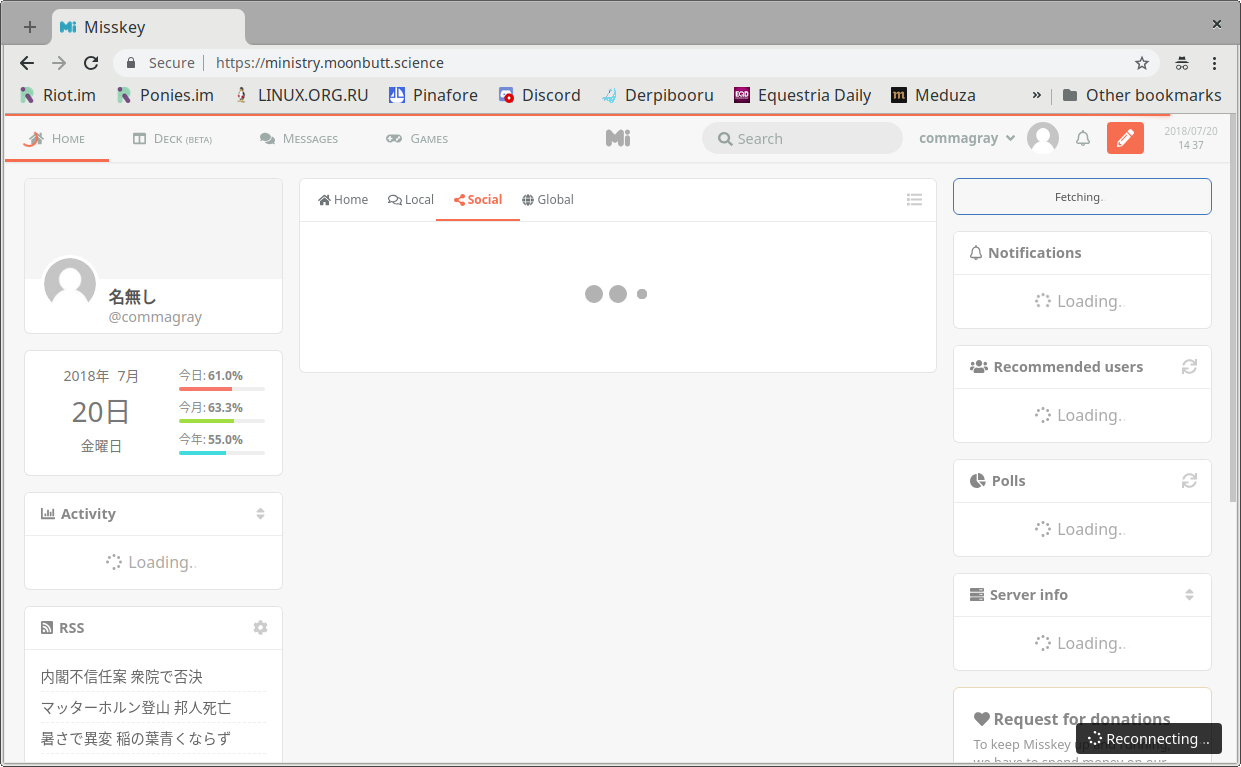
(Chromium, development build.)
So I can't do anything with front-end: to post, to follow, to see someone's timeline — everything is «reconnecting». But federation seems to be working: I can paste someone's ID and see their profile, but not the timeline.
Thanks.
Want to back this issue? Post a bounty on it! We accept bounties via Bountysource.
 commagray
All 9 comments
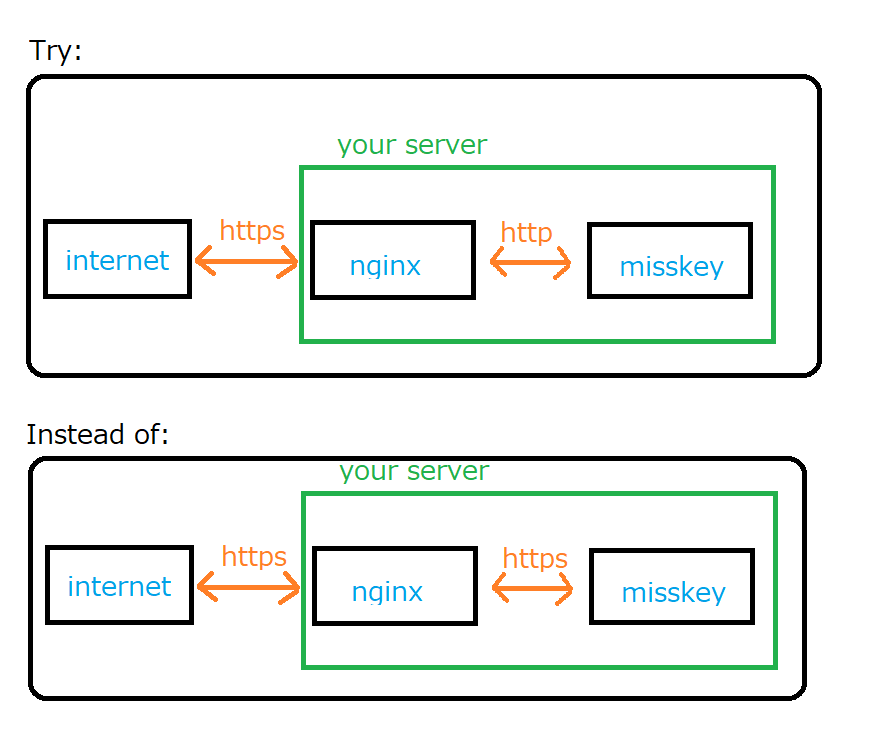
Have you tried proxy via http?
 2vg
on 20 Jul 2018
2vg
on 20 Jul 2018
or... check your Misskey's directory permission.
2vg
on 20 Jul 2018
 syuilo
on 20 Jul 2018
syuilo
on 20 Jul 2018
for example,
server {
listen 80;
server_name ministry.moonbutt.science;
return 301 https://$host$request_uri;
}
server{
listen 443 ssl;
server_name ministry.moonbutt.science;
proxy_set_header Host $host;
proxy_set_header X-Real-IP $remote_addr;
proxy_set_header X-Forwarded-Host $host;
proxy_set_header X-Forwarded-Server $host;
proxy_set_header X-Forwarded-For $proxy_add_x_forwarded_for;
ssl_certificate correct path and permissions to;
ssl_certificate_key correct path and permissions to;
ssl_protocols TLSv1 TLSv1.1 TLSv1.2;
location / {
proxy_pass https://localhost:9584/;
}
}
@2vg,
Have you tried proxy via http?
Yes, sure. Nothing at all.
for example,
I made s/https/http in Nginx's proxy_pass and MissKey's url and restarted both. The same.
or... check your Misskey's directory permission.
All content is owned by misskey user in their home directory.
commagray
on 20 Jul 2018
@commagray
Did you try this?
server {
listen 443 ssl;
ssl_certificate correct path and permissions to;
ssl_certificate_key correct path and permissions to;
ssl_protocols TLSv1 TLSv1.1 TLSv1.2;
server_name ministry.moonbutt.science;
location / {
//proxy_pass https://localhost:9584;
// instead
proxy_pass https://localhost:9584/;
}
}
The problem may be related to this article
https://stackoverflow.com/questions/12102110/nginx-to-reverse-proxy-websockets-and-enable-ssl-wss
syuilo
on 20 Jul 2018
@2vg, thank you for helping. @syuilo, this is exactly right thing, thank you. \
commagray
on 20 Jul 2018
@commagray
- nginx config
- Proxy to http (instead of https)
- Need Upgrade/Connection for WebSockets.
map $http_upgrade $connection_upgrade {
  default upgrade;
  ''      close;
}

server {
    listen 80;
    server_name misskey.example.net;
    location / { return 301 https://$server_name$request_uri; }
}

server {
    listen 443 ssl;
    server_name misskey.example.net;
    ssl on;

    ssl_certificate           correct path and permissions to;
    ssl_certificate_key       correct path and permissions to;

    # SSL protocol
    ssl_protocols TLSv1 TLSv1.2;
    ssl_ciphers ECDHE-RSA-AES128-GCM-SHA256:ECDHE-RSA-AES128-SHA256:ECDHE-RSA-AES128-SHA:ECDHE-RSA-AES256-GCM-SHA384:ECDHE-RSA-AES256-SHA384:ECDHE-RSA-AES256-SHA:AES128-SHA;
    ssl_prefer_server_ciphers on;

    # Proxy to Node
    location / {
        proxy_pass http://localhost:9584;
        proxy_set_header Host $host;
        proxy_set_header X-Real-IP $remote_addr;
        proxy_set_header X-Forwarded-For $proxy_add_x_forwarded_for;
        proxy_set_header X-Forwarded-Proto https;
        proxy_set_header Proxy "";
        proxy_buffering off;
        proxy_redirect off;
        proxy_http_version 1.1;
        proxy_set_header Upgrade $http_upgrade;
        proxy_set_header Connection $connection_upgrade;
    }
}
- default.yml
- Need comment out https section.
url: 'https://misskey.example.net'
port: 9584

# https:
#  key: correct path and permissions to
#  cert: correct path and permissions to
 mei23
on 20 Jul 2018
mei23
on 20 Jul 2018
Related issues
 ibrokemypie
·
3Comments
ibrokemypie
·
3Comments
 tamaina
·
3Comments
tamaina
·
3Comments
 tosuke
·
3Comments
tosuke
·
3Comments
 no-boot-device
·
3Comments
no-boot-device
·
3Comments
 AyaMorisawa
·
3Comments
AyaMorisawa
·
3Comments
Most helpful comment
@commagray